We remain fully operational. Our teams are working around the clock to ensure your deliveries continue safely.

DOWNLOAD THE APP


Customer Services
Copyright © 2025 Desertcart Holdings Limited
DOWNLOAD THE APP

🔗 Bridge the gap between old and new tech with style and ease!
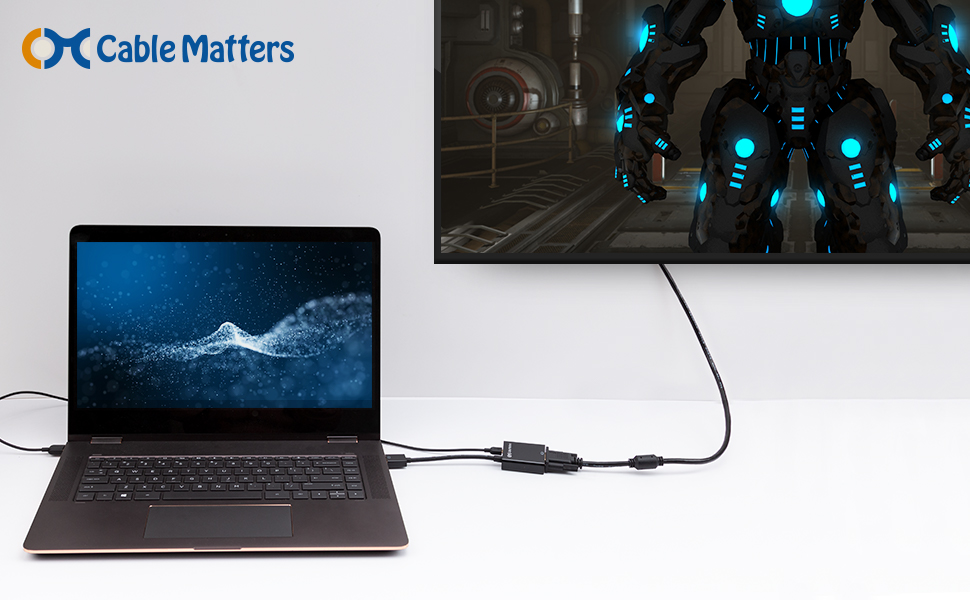
The Cable Matters HDMI to VGA Adapter is a compact, USB-powered converter designed to connect modern HDMI devices to legacy VGA displays. Supporting resolutions up to 1920x1080, it features a built-in IC chip for enhanced compatibility and signal stability, making it ideal for business presentations, classrooms, or extending desktop screens. While it does not transmit audio, its gold-plated connectors and durable design ensure reliable performance across a wide range of devices including Chromeboxes, Raspberry Pi, and gaming consoles.




| ASIN | B00879DM56 |
| Best Sellers Rank | #23 in HDMI-to-VGA Adapters #3,018 in Computer Cables & Interconnects |
| Customer Reviews | 4.3 4.3 out of 5 stars (3,734) |
| Date First Available | February 3, 2011 |
| Is Discontinued By Manufacturer | No |
| Item Weight | 1 ounces |
| Item model number | 113046-BLACK |
| Manufacturer | Cable Matters |
| Product Dimensions | 9.17 x 6.34 x 0.75 inches |
W**C
Didn't work for ROKU HD for me.
[Update 20 Mar 2015] - I am changing this rating to 5 stars. I hooked this up to my OTA digital tuner and it worked just fine. It must be some incompatibility with ROKU. As such, I don't feel it's fair to disparage this product because ROKU didn't work correctly. The company Cable Matters replied promptly to my original comment with a fair and helpful reply, so I am happy with th device. Just beware that the ROKU HD may not play well with this (in my experience). I am giving this two stars unless I figure this out. I bought this to hook up a ROKU box to my projector. I did not like the picture quality of Composite Video out. I have my HDMI cable running from the ROKU to the Cable Matters converter box, then from the box to my VGA projector. When I go to ROKU, all the menu screens work find, including up to the "Play now" on any episode of any Netflix, Plex, CBS, etc channel. It even displays "loading now". However, as soon as the episode is loaded, the screen blanks. I have a Viewtv At-163 ATSC Digital TV Converter Box and Media Player w/ Recording PVR Function / HDMI Out / Coaxial Out / Composite Out / USB Input that is connected to the projector via component video through VGA adapter and works flawlessly in 480P, 720p, and 1080p so I know my projector can handle the different resolutions. I have tried the converter with and without the micro-usb cable, so I do not know what else to try. Hopefully the manufacturer will have a suggestion, and I wont have wasted a SECOND purchase on trying to get HDMI out of my ROKU to projector.
J**N
Works great for connecting HP Chromebox to old VGA monitor
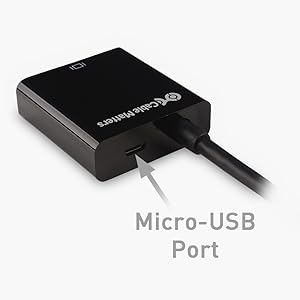
Bought this HDMI-to-VGA adapter (which is shipped with an included USB power cable) for pairing a new HP Chromebox (CB1-014) for use with a very old LCD. Works great - simple plug-and-play. Allows use of an old 15pin D-sub VGA cable to the LCD monitor. (Note: While HDMI cables provide sound, VGA does not. Thus a person would need a separate 3.5mm audio cable to provide sound to the speakers being used. Since i already had said 3.5mm stereo cable for providing sound, there was nothing else for me to purchase.) Note: The Chromebox clearly labels that the front two ports as USB Power ports (noting that they provide both power and data connections.) Be certain to power this HDMI-to-VGA adapter with the PROVIDED power cable (USB-A male to micro-USB-B male power cable.) Using that power cable connected with a simple USB data port might not provide enough power - idk really - since first i do not know the required min power to drive this this HDMI-to-VGA adapter. I am assuming that any negative posts about this item are related to ppl not using the PROVIDED power cable or possibly connecting that cable to a data-only USB port - but really i am guessing here. (Note: The USB power cable plugs into a USB-A power port and also a USB micro-B port on the block-shaped part of this HDMI-to-VGA adapter.)
V**N
Works well, does what it says. No hassle setting up - just works.
Got this to play Google Play movies from a Chromebook to an older VGA Projector. Worked like a charm with no fussing around. Once the Chromebook HDMI out was plugged into this adaptor, and the adaptor plugged into the VGA In on the projector - it just worked. The Chromebook instantly saw the second display, set the resolution to the highest supported by the projector and we were off. Picture quality was very good, as good as VGA allows. The only issue is Audio. HDMI sends audio with the video signal, but VGA does not. This created a minor issue, as the Chromebook thought audio was playing over HDMI - obviously it wasn't. This adaptor does not have an audio out, but that was not an issue. We just set the Chromebook audio out to be a set of Bluetooth speakers and we were in business - big projected picture and great sound. Awesome way to watch a movie. BTW: While I mention Chromebook above, I did the same setup from a Windows Laptop and it had the same issue with audio, and the same solution. So the behavior is the same on notebooks other than the Chromebook I talk about above. The only difference, the Chromebook had enough power via HDMI to power the adaptor - the Windows laptop did not. On Windows, I plugged the included micro-USB cable in to give it more power. The adaptor came with the USB cable for this issue, nice touch. Quality: good. Movie quality looked very good. When displaying static content, like excel spreadsheets or PowerPoint presentations the low resolution of the VGA projector was more visible but the quality was still fine - crisp, sharp and vivid colors. All good.
S**A
Worked Perfectly!
I just bought a new lap top but when I work in my office I hooking it up to a large monitor. The new connector for the lap top doesn't work with the cable from the monitor so I had to buy a adapter. I bought it at Best Buy (yep, sucker....) because I wanted it to work the day I bought the computer. It took the guy forever to scour the back peg walls and find it, so I thank him for that, but the one he found first is the one he brought up to me and it was $50. Yikes. So I went to Amazon, found this one, ordered it, received it very fast (I only bought the computer last Friday night and I already had the adapter by Thursday!) and then, last night, the 1 week anniversary of buying the computer I returned the $50 adapter to back to them. Caution: when I connected this adapter to the computer and monitor the first time, the screen did NOT display on the monitor. I thought I'd have to return it and was sad but then, against all natural inclination, I read the 2 page flyer that came with it and it tells how to adjust your settings and Voila! works great and saved me over $25 even including postage. Highly recommend! No need to pay more (now I wonder if I could have got the cheaper one even....a segment on 20/20 last night compared a $6 tv connector cable with a $300 cable and there was no difference....) but I liked the reviews for this one and one of the cheaper ones did seem to cause people trouble. FYI.
C**T
Worked right away with the HDMI port of a DELL laptop (Windows 7 Enterprise 64bit) to a VGA projector. However, there was no sound. The manufacturer warns that there is no sound over VGA, due to VGA limitations. However, I had no sound through my 3.5mm jack. I unplugged the adapter from my laptop, plugged it back immediately and the sound came back through my 3.5mm jack. I wish it did not cut out the sound through the analog jack, since the user might think it will always cut out the sound.
P**D
Its expensive for sure, but good for guys who want third screen attached to the MacBook with 13inch screen
C**N
Ottimo prodotto, fa quello che deve fare perfettamente! E devo dire anche con una qualità ottima! Tante grazie a presto!
U**Y
Fast dispatch and works really well
M**C
Funciona a la perfección, mi nuevo portátil no tiene salida VGA, sólo HDMI y con este adaptador puedo conector mi antiguo monitor VGA
Trustpilot
3 weeks ago
2 weeks ago