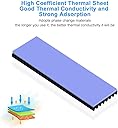
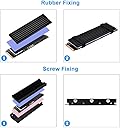
PROS/CONS at the bottom When I got my new 512gb Silicon Power NVME and formatted it, the first thing i did was run a read/write speed test with Crystal Mark. This is my first M.2 SSD and I was pretty shocked when i saw the temperatures jump to 67C in just a matter of seconds. I know they like to run somewhat hot, but I could only imagine the temps it would reach when doing something that was a bit more work than just a quick speed test. So I figured a heatsink might be a good idea and stumbled on these (yes there are 2). I only really needed the one, but I also have a stick of Optane installed and figured I could use the other just to cover up the blue PCB. Anyways, I ran the same test at the same ambient temperature and the NVME only reached 33C! They definitely work as intended, and they come with everything needed to install. There were 4 decent quality thermal pads (2 standard thicker ones for each heatsink, a thinner one for the under side of the one with a backplate, and one that has precut squares in case you'd just like to put pads on certain chips like the controller.), as well as cleaning cloths, a mini screwdriver, and screws. Install was a breeze (though there are NO instructions or pictures included), use the cleaning cloths to make sure there's no grease or residue on the surface of the heatsinsk, peel off the adhesive on the thermal pads and stick them on the sinks (they aren't overly sticky so you can get them back off fairly easily), then the bigger ones halves just slot together and gets tightened with screws and the smaller one uses good quality silicon bands to hold pressure onto the M.2, then just install onto the mobo as normal. PROS: -They feel like good quality aluminum and the finish on them is nice -They don't take up much space at all if you're concerned about tight spaces -Thermal pads feel good quality and weren't dried out -They include all necessary bits to install them -Easy enough installation -They do cool surprisingly good! -Fitment is good -Great value for 2 heatsinks! CONS: -No instructions. It's still easy to set them up thankfully, just remember the thinnest pad goes on the bottom inside of the 2 piece heatsink -Finish on the visible area is good, but on the side that contacts the pads there were some scratches and small nicks. No big deal as it's not going to be seen and it doesn't affect anything, but just wanted to put that out there - The heatsink that uses the silicon bands doesn't quite go the full length of the SSD, it still covers all the necessary parts but i wish they had it go to the end of the drive with a little notch cut out for the screw like the bigger sink. Still have a bit of blue PCB showing. I'd recommend these to anyone looking for an inexpensive and effective solution for cooling their M.2 drives!