Buy anything from 5,000+ international stores. One checkout price. No surprise fees. Join 2M+ shoppers on Desertcart.
Desertcart purchases this item on your behalf and handles shipping, customs, and support to Netherlands.
๐ก Upgrade your home network โ because buffering is so last decade!
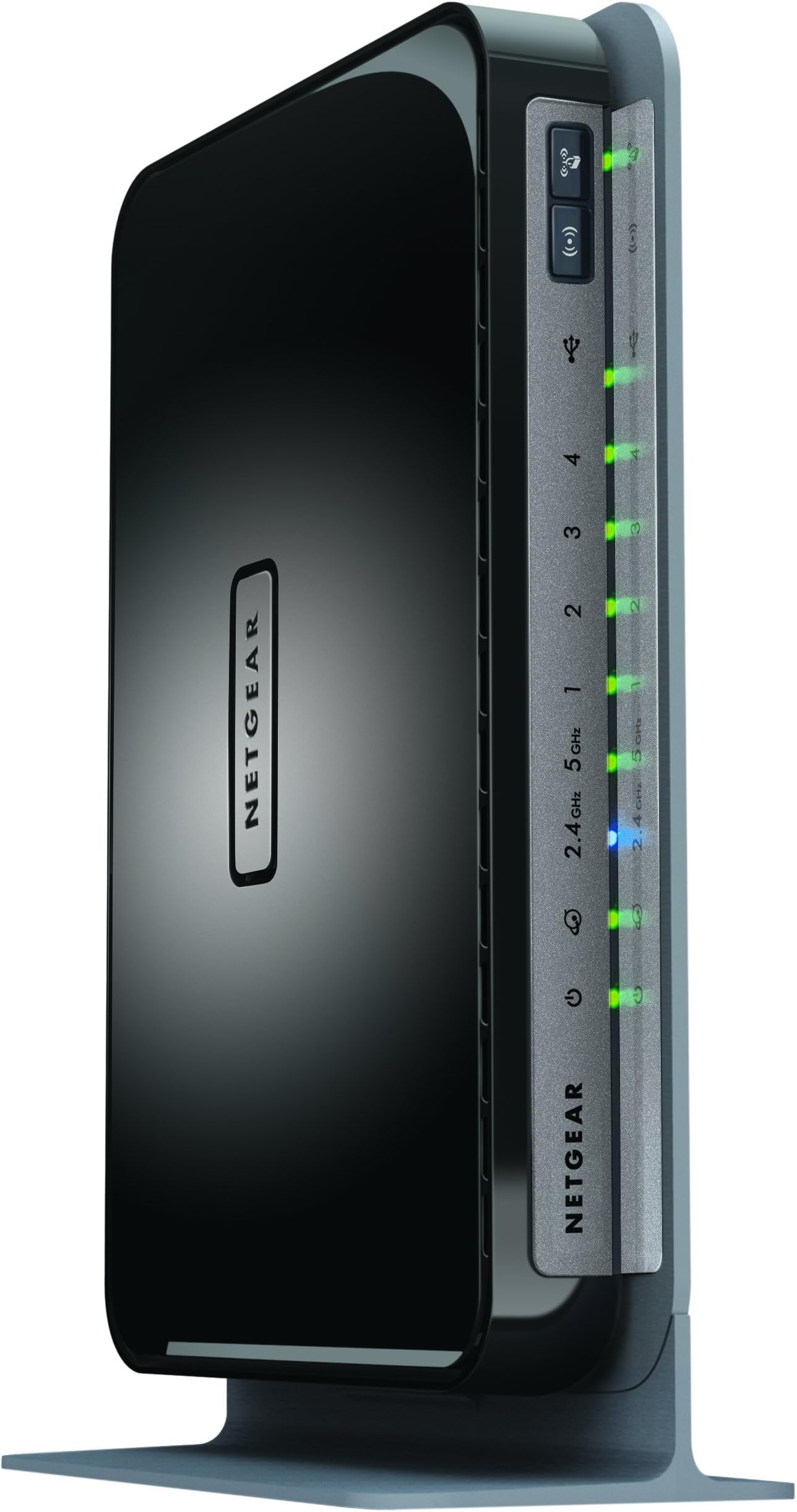
The NETGEAR WNDR4300 N750 Dual Band Gigabit Router delivers combined wireless speeds up to 750 Mbps across 2.4GHz and 5GHz bands, ideal for medium to large homes. Featuring 4 Gigabit Ethernet ports, USB sharing capabilities, and IPv6 compatibility, it ensures fast, reliable connections for streaming, gaming, and multi-device households. The NETGEAR Genie app simplifies network management, making setup and monitoring effortless for busy professionals.


| ASIN | B008HO9DK4 |
| Antenna Location | Gaming |
| Antenna Type | Internal |
| Best Sellers Rank | #50,306 in Computers & Accessories ( See Top 100 in Computers & Accessories ) #1,291 in Computer Routers |
| Brand | NETGEAR |
| Built-In Media | Ethernet Cable, N750 Wifi Dual Band Gigabit Router, Power Adapter, Premium Feature Booklet, Quick Start Guide |
| Color | Black |
| Compatible Devices | Printer |
| Connectivity Protocol | ethernet, wi-fi |
| Connectivity Technology | wireless |
| Control Method | App |
| Controller Type | vera |
| Coverage | Large Homes |
| Customer Reviews | 4.2 4.2 out of 5 stars (3,581) |
| Data Transfer Rate | 750 Megabytes Per Second |
| Frequency | 5 GHz |
| Frequency Band Class | Dual-Band |
| Global Trade Identification Number | 00606449084528, 30606449084529 |
| Is Modem Compatible | No |
| Item Part Number | WNDR4300-100PES, WNDR4300100PES |
| Item Weight | 448 Grams |
| LAN Port Bandwidth | 10/100/1000 (Gigabit) |
| Manufacturer | Netgear Inc |
| Maximum Upstream Data Transfer Rate | 750 Megabits Per Second |
| Mfr Part Number | WNDR4300-100NAS |
| Model Name | WNDR4300 |
| Model Number | WNDR4300-100NAS |
| Number of Ports | 5 |
| Operating System | Windows 7, Mac OS |
| Other Special Features of the Product | WPS |
| Security Protocol | WPA/WPA2โPSK,WEP |
| UPC | 606449084528 |
| Unit Count | 1.0 Count |
| Warranty Description | 1 Year Limited warranty |
| Wi-Fi Generation | Wi-Fi 4 |
| Wireless Compability | 5.8 GHz Radio Frequency, 802.11a/b/g/n |
J**O
Awesome
This is a great router. It replaced an older Netgear router that was in the process of dying, and the change was amazing. If you're on the fence, go ahead and get it. This router is EASY to set up. I ran through the guide quickly enough, changed the SSIS and access paskeys, and was off and running. the signal is strong and reliable, and covers the house quite well, and the signal extends outside onto the deck and yard nicely enough. The router comes with a family protection feature that allows you to set up an account that will check and filter every request going through the router, both on WiFi and through the ethernet. Nothing is fool proof, but it provides a great layer of protection for our family. We have a "Micro-Cell" signal booster from AT&T. We connected it to a port on the router's ethernet, and it receives a strong, reliable connection to the internet. I've connected an external hard drive to a USB port, which makes the drive available on our network, which is handy when we're at home. Its great having a shared drive for pictures, songs, documents and other files we like to share. I haven't used the "cloud" feature, but I'm planning on getting a bigger drive and hooking that up as well. I doubt it will be too difficult, but I can't speak to that yet. In addition to the MicroCell, I typically have 2 computers wired on the Ethernet, 1-3 laptops (including work laptops connecting through VPN - without difficuty), 2 kindle fire's, a windows tablet, a windows phone and an android tablet and phone. Everything can be connected at once, and it works just fine. We've had study groups over, and they connect their phones, tablets, and computers to the Wi-Fi as well. I'm not sure how many concurrent connections it handles, but we haven't capped out yet, so it seems it is more than 10 or 12. I have a 'normal' sized 3-bedroom split-entry house, and this router adequately covers the house, although I did get a signal booster to increase the speed in the back bedroom. The bedroom, however, is on a different floor, and the signal travels through not only the floor, but the stairs and a couple of walls. It makes it, but with the signal booster at the top of the steps, there's improved bandwidth in that back corner. I'm sure if I centered the router better in the house, I wouldn't need it, but the way its laid out, putting it in the middle would be awkward, so its off to one side. I'm VERY glad I picked up this router, and I heartily recommend it.
P**P
Great range and speed for my house.
I have a 2,000 sqft house and a UVERSE 3700 modem with built in G WiFi that had a very weak signal when not in the same room as the modem. I decided to upgrade my WiFi with this N, Dual Band router and so far it has been consistent and powerful. I get plenty of coverage in the far reaches of my home (went from fluctuating from 1-3 bars constantly to a STEADY FULL BARS in the far rooms with an occasional 3. It never drops to less than 3 which is exactly what I wanted in a new, powerful router!). SETUP: Setup was a breeze. Plugged it in, changed the WiFi name and network in the router settings via my laptop, and picked a channel that had the fewest interference in my area (this was optional, but I've been told it can help with your WiFi signal and it was easy to do in the settings menu). Worked perfectly. TECH SUPPORT REVIEW: I did try to be more advanced with the router than I should have.... and it caused me a headache and some troubles. I read online that adding a WiFi router to my existing modem wasn't easy and needed some more intensive, advanced setting changes. After bricking my router (blinking lights, no WiFi, and the factory reset option I Googled didn't seem to work) trying to change these settings, I was forced to call Netgear tech support. After about 5 minutes at home at 11:30 at night, I was connected to a tech that, while he had a strong accent, we were able to clearly communicate and he was very knowledgeable. He walked me through how to do a proper factory reset (I don't know why this wasn't in the online manual or in any of the included printouts) and presto, we were up and running perfectly after about a 20 minute call. Not bad. SUMMARY: Ease of setup, my experience with tech support was positive. Strong range and speed to the extremes of my house (your hours and results may vary, of course). Hopefully, like all products, it serves me well for a few years and i won't have to reboot or reset often..
L**Y
Perfect! But the Genie interferes with advanced setup
The speed is NOT the 750Mbps stated, as when you max out both the 5GHz and 2.4GHz they are crossing channels, thus reducing it by 150Mbps. The router clearly states this when configured, and pops up the information so you are aware. you can effectively get 600Mbps. Easy set up for a generic user, but a little skill is still needed to understand what you are looking at if you plan to change the default settings. Works right out of the package for most home users, and the Genie will walk you through the rest. Even included a shielded color coded cable for the main data line. For those of us who have an advanced setup: Does not report to Sophos UTM, but the traffic is easily visible when manually configured in sophos. The netgear refused to accept the correct static IP's for my network and kept resetting DHCP range to 172.x.x.x/20 (not sure why it picked a class B network but it did) and the WAN to a 10.0.0.1 despite being set without DHCP or a NAT. This was resolved by looking in the advanced setup after being VERY annoyed and getting a headache, and finding the "Configure as an AP" setting, which released the genie from the settings and allowed manual configuration. Using this shuts off all router processes and it acts as a pure AP with a switch built in, perfect for my uses but may be a problem in your environment. I recommend you look at advanced functions FIRST instead of just configuring it how you want, or the genie will reset your work to the router defaults. On a side note, it does not always inform you that it reset your settings, but you find out when nothing works. I have had this for about 4 months, and have yet to see any major problems with the WiFi other than the occasional glitch that requires a reboot (only a few times, and most often during network configuration). I am observing the device carefully and will IMMEDIATELY contact netgear for a replacement if the WiFi stops bradcasting at either 2.4 or 5GHz.
I**Y
Es muy sencillo de configurar, las bandas duales funcionan muy bien, el rango de mi wifi mejoro notablemente. Lo malo es que no lei bien y pensรฉ que manejaba el Qos independiente para cada dispositivo limitando el ancho de banda. En general muy buen equipo.
S**O
Lo llevo utilizando algo mรกs de un aรฑo y nunca ha dado ningรบn problema, es rรกpido, estable, ligero, y de bajo consumo. Lo tengo conectado en el salรณn de casa a un extensor de conexiรณn por cable a travรฉs de la corriente (TP LINK ASIN: B00ADW9R22) desde el router principal Telecable que estรก en otra habitaciรณn. Con la peana vertical, detrรกs de la TV no ocupa casi espacio. Proporciona dos nuevos puntos Wi-Fi (2,4 Ghz y 5 Ghz) para conectar smartphones, tablets, portรกtil... y 4 puertos Gigabit 10/100/1000 donde tengo conectados el deco de Telecable, la Xbox One y una Samsung Smart TV. Todo lo que necesitaba en mi pequeรฑa red domรฉstica. Fantรกstico.
V**E
My previous router Netgear JNR1010 had served me well for 3 years. It is a very basic and cheap router. It worked very well. As the wireless connections increased to more than 3 devices, internet disconnection became the norm! For months, I would reset the router every 15 - 20 minutes to restore the internet without knowing what the real issue was. I thought it was an ISP problem. Finally I figured out that this basic router couldn't handle those multiple connections. So I've decided to buy one that could handle all those connections. I zeroed in to this router after reading some tech reviews that gave positive feedback on this router. Setting up the router is very simple. Once you connect any device (wireless), the device will open the Netgear page or you can manually type routerlogin.net in the browser to access that page. Then you have to simply choose the setup options it displays. The default password will be at the router's bottom. You can change that password within the options. Once everything is done, the WIFI is set. This entire process takes only a few minutes. This router is really good! I live in a first floor flat that is about 1250 Square Feet. This router's range is more than enough to cover the entire flat. I was also able to access the router 30 - 35 meters away from the flat. For a home user, it's range is quite powerful. Multiple connectivity is awesome. This is a dual band router that enables the usage of 5 GHz band for watching videos, which will ensure trouble free streaming. The other 2.4 GHz band can be used for general browsing. This router also has an USB port through which an external HDD or a Pen Drive can be connected and then accessed via WIFI. It's a nice feature and gives you the option to access additional storage. This router is wall mountable! It can also be set up horizontally or vertically on the surface. This router doesn't support BEAM FORMING technology. Unless you work at home or you do some seriously important stuff, you will not need this new technology. This technology costs a few thousands more than the old technology. All that extra money can be saved with this router. Besides BEAM FORMING technology can cause much more exposure to high RF as it concentrates the signals onto the connected device. As I said before, go for this technology only if you really need it. In a sentence, this is the best router in the market sans BEAM FORMING technology! NOTE: There will be some differences if the unit is an import.
M**I
Nice reliable router, good range, like the user interface and options
O**R
This product could not have been any better.
Trustpilot
3 days ago
2 months ago