📚 Scan Smarter, Not Harder!
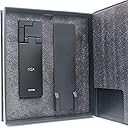
The xcanex Bookscanner with FlatPage Pro Technology offers a revolutionary scanning experience, ensuring high-quality images without the hassle of manual adjustments. With features like automatic page detection and finger image removal, this scanner is designed for professionals who value efficiency and precision, making it the perfect tool for digitizing books on the go.
L**Y
Awesome product. Stunning results! (But you need to know the tricks)
Ok, I'm impressed -- larger companies probably wouldn't release a product like this that is essentially a Beta version, but even this version is awesome. I've used the piQx for about a month now. It takes a bit of trial and error but once you get it figured out, wow does it ever work! The results are so good they almost make one giddy. The functionality of the software -- auto-scan, auto image cleanup (including removal of the image of your finger holding the page down), ability to create lots of different document types, drag and drop pieces of images onto a canvas -- is outstanding. It also does color scans of 8½ x 11 pages that are so good they look like originals. But a caveat: you have to be reasonably patient and willing to experiment in order to get the hang of it. I'm giving it 5 stars anyway; it's one of the most innovative products I've ever purchased. Well worth both the price and the learning curve.I bought the piQx to scan a bunch of older books that aren't offered in e-Book format. I want to be able to read them on Kindle/iPad, and if possible highlight them electronically, etc. At first, using this little scanner was an exercise in frustration. My books fit on the scanner pad that comes with the unit, with space to spare on all sides. Still, using the manual, the video tutorial, and piQx support team hints, I just wasn't succeeding. A lot of pages came out as gibberish. In auto-scan mode, I would sometimes have to mess around for almost a minute before the little blue page-corner recognition dots would figure out the page size. I would raise the scanner camera as far as the stand would let me, until the software said "too high", but it still wouldn't take in the whole page. Arrrrgh.SO... here are the tricks I discovered. (BTW piQx team -- thanks so much for your helpful suggestions, both via email and here.)Trick #1: Out of desperation, I unhooked the top part of the stand, manually raised it about two inches, and taped the two parts together since there's no extender. I was sure I'd get the "too high" message, but I did not! With that single change, the dual-page scanning in auto mode works perfectly! About 10 seconds for every two pages, and the results are amazing. It looks like a typeset book rather than a scanned page. Just beautiful quality! (For some reason customer images can't be added here, but you can see my screenshot on Imgur: After the dot com, type /Yv1yRpQ. The left side is a scan using the piQx in auto dual-page scan mode, saving it as a plain PDF file, and then using Adobe Acrobat to recognize the text. The right side is the same thing, but using the built-in OCR software and saving it as an OCR'd pdf file.)Trick #2: The "define page" function (finger-pushing-button icon) works not only for pages that don't page-define automatically and stay in "raw image" format, but also works even after the page definition software has produced a "finished" typeset-like page. If the "finished" version is distorted for some reason, you can override it and re-do the page definition manually. Fantastic function if you are picky and want an absolutely perfect result.Trick #3: To get a perfect page definition if you're doing #2 above, define the borders of the page to be parallel to the four sides of the text, not necessarily parallel to the page edges.It probably goes without saying, but if you're doing book scanning, it's important to have PDF software such as Acrobat so that you can insert (rescanned) pages into a PDF file, or add newly-scanned pages to the end of a file.
K**3
Buggy software
I purchased this scanner to scan different sizes books both on normal and glossy paper, occasional glossy brochures and newspapers. Company and its tech support is located in Singapore.Packaging was good. Package material advises not to hookup camera with usb 3 port. You have to watch helpful installation videos on included DVD which are also present on their web site and youtube. Trick is to adjust the height of camera in such a way to scan a good size book. This was thoroughly explained in their installation video. Camera has a led light so you can scan in dark too.Now comes the software which is source of major frustration. Software version on dvd is 2.1.1.0, newest update is 2.1.1.1 which can be downloaded from their web site after you enter your scanner serial number. First I installed it on my windows 8.1 laptop which only has usb3.0 port in a hope it might work but as expected did not work. . I moved onto windows 7 desktop with usb2 ports, it worked for a little while than it crashed in middle of a book scan, I restarted after crash but software did not have mode selector icon anymore so I uninstalled it on that machine and moved onto windows 7 laptop with same results, most crashes happened on book scan module, other modes worked flawlessly such as sheet and business card modes etc. After a crash software may not restart or becomes unstable so you may have to reinstall it all over again. After many crashes I shoot an email to tech support which I guess located in Singapore, answer came next day which is by my standards is late as any email takes a second to reach its destination, I guess there may be a phone number to call which I assume dials to Singapore.Scan quality is awesome and software has different book modes such as single page, dual page for both left to right and right to left languages. Finger shadows removed successfully. Pages deskewed and spine curves were flattened with no effect on text. I was able to scan few photographs and business cards their quality was very good, after scan business cards will open in included card application prepopulated with info from the scan which I thought was cool.I finally returned it back to amazon after a week of use. I spent lot of time to troubleshoot software on three machines and did not have patience to keep going. I liked hardware and scan quality but software is the main issue here. If software crashes taken care of and scanner works with usb3 ports it will be an awesome solution to the book scanning.
J**.
The product design is nice, the product itself - not so much
I chose to give this product a low rating because I am a MAC user and software is not available on this product despite promises to launch prior to the close of 2013. The amazon description is inaccurate. An email from the manufacturer confirms the inability and unavailability of Mac software.Despite not being able to turn the the item on and scan my head off, I went ahead and installed it on a PC laptop anyway so that I could still write a thoughtful review. It's a nice, well built design, images are nice (glossy images have glare - period) BUT the scanner SLOWs to turtle speed with heavy scanning 20+ pages, digital finger removal is time consuming and over all the program that runs the device crashes often.Frustrated and sending it back! Thankfully Amazon has great customer service and is accepting my return. They do need to correct the product description - Beta only NOT FOR MAC. Buggy at best for high work load scanning (i.e. 20 pages of a book does not a book make). 5 stars for product concept, 1 star for execution. I'm a MAC user - I'm just not used to things "crashing"! Definitely not seamless and not intuitive despite the sleek design.
Trustpilot
1 week ago
1 day ago