


🎶 Elevate your space with sound that speaks volumes — without the bulk.
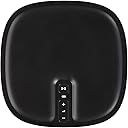
The Sonos Play:1 (2013) is a compact, dynamic driver speaker delivering rich, room-filling sound with effortless WiFi streaming. Designed for indoor use, it supports multiroom setups and stereo pairing via the Sonos app, enabling seamless control across devices. Weighing just over 4 pounds and measuring 4.69" square by 6.36" tall, it offers a premium audio experience with simple plug-and-play setup, making it a top choice for stylish, connected living.
| ASIN | B00EWCUK1Q |
| Additional Features | Multiroom digital music systems, speaker systems |
| Age Range Description | Adult |
| Antenna Location | For Indoor Use |
| Audio Driver Type | Dynamic Driver |
| Audio Output Mode | Stereo |
| Best Sellers Rank | #1,883 in Portable Bluetooth Speakers |
| Brand | Sonos |
| Built-In Media | Power Cord |
| Color | Black |
| Compatible Devices | Laptop, Personal Computer, Smartphone, Tablet |
| Connectivity Protocol | Wi-Fi |
| Connectivity Technology | Wireless |
| Control Method | Voice |
| Controller Type | Amazon Alexa, vera |
| Customer Reviews | 3.7 out of 5 stars 4,869 Reviews |
| Enclosure Material | Plastic |
| Global Trade Identification Number | 00737989665912, 00878269000327 |
| Impedance | 4 Ohms |
| Is Waterproof | FALSE |
| Item Dimensions D x W x H | 4.69"D x 4.69"W x 6.36"H |
| Item Height | 6.36 inches |
| Item Weight | 4.08 Pounds |
| MP3 player | No |
| Manufacturer | Sonos |
| Material | Plastic |
| Model Name | Play:1 |
| Model Number | PLAY1US1BLK |
| Mounting Type | Play,Tabletop |
| Number of Audio Channels | 1.0 |
| Number of Items | 1 |
| Number of Power Levels | 1 |
| Power Source | AC |
| Processor Count | 4 |
| Series Number | 1 |
| Speaker Maximum Output Power | 10 Watts |
| Speaker Size | 6.36 Inches |
| Speaker Type | Surround |
| Subwoofer Connectivity Technology | Wireless |
| UPC | 878269000327 737989665912 |
| Unit Count | 1.0 Count |
| Warranty Description | 2 yr warranty on parts & labor |
| Warranty Type | 12 |
| Water Resistance Level | Not Water Resistant |
| Wireless Technology | Wi-Fi |
B**3
The best solution for home audio. Simple set up and expansion, great audio quality, and ROCK SOLID.
Let me join the chorus of positive reviews here. I had previously suffered with various Bluetooth and AirPlay speaker systems. They were all unreliable, and frequently dropped the signal. Pairing the devices was also a hit or miss affair, and the sound quality was dubious. Enter Sonos. Lots of people at work have been raving about Sonos, so I finally took (a modest) plunge into their ecosystem. I bought the Bridge (even though I technically didn't need to for my initial system) but I wanted it for future expansion capability. I also bought the lowest-priced Play 1. The Play 1 is HEAVY, and very nicely designed. It has a relatively small footprint and seems very at home in our modernist living room. The hardware setup was very easy. Comprehensive QuickStart instructions were well illustrated and clear. It was mostly about the sequence of plugging in cables. One VERY nice touch is the additional pass-through Ethernet port on the Bridge. I had run out of ports on my two routers, and needed on for my new NAS (that I was setting up as a media streamer.) Plugged it straight into the Bridge and it works flawlessly on my network. I then downloaded the Sonos app from the App Store, launched it, and followed very simple on-screen instructions. The instructions included clear illustrations showing which buttons to press on which devices to complete the pairing, and what the illuminated light sequences on those devices meant. Within a few minutes, everything was connected and working. I added my Spotify and Pandora accounts quickly, and within a few minutes I was streaming music to the Play 1. My expectations for sound quality were a little tempered by the fact that I had the smallest Sonos speaker, and it was in mono. But I was not at all disappointed when I started playing music from my Spotify playlists. I have Spotify set up to stream higher quality bit rates. This probably helps. The sound can be turned up VERY loud. We have it in a living room which is easily filled with rich, separated highs and lows. I do notice on some tracks, however, the bass end can get a little muddy, but only on certain songs (Beyone's Halo, for example, is one of those.) This might be a factor of the mono sound, as sometimes tracks are not mixed and engineered that well for mono; they rely on a greater stereo spectrum for better listening. The beauty of being able to expand this system to other speakers and rooms, and the fact this is operating on a rock-solid wi-fi network, only adds to appeal of the Sonos system. I was so impressed by it all, that I immediately ordered a second Play 1 to add to the first so that I could set up stereo sound (it hasn't arrived yet.) Again, this seems easy to do (based on reading a thorough explanation on the Sonos Web site.) It's just a matter of a few clicks in the App, and pressing one button on the speakers to indicate which is left and which is right. By the way, the Sonos support Web site is superb - clear and helpful instructions and troubleshooting. One additional thing I love is having every Mac / iOS device in the house loaded with the Sonos App, each of which can control the system. That includes four iPads, four MacBooks, two iPhones, and an iPod touch. All the apps control the system flawlessly. You can pickup the currently playing track if you move from one device to another. Spotify integration is OK, but not great. Your playlists are visible, and you can search for any track in Spotify via the Sonos app (and make it a favorite in Sonos, or add it to a Spotify playlist), but it does not show all the artists and albums that you have stored to "My Music" within Spotify. My answer has been to create separate playlists for each member of our family. I am in the process of setting up a NAS server with around 60GB of music. Giving Sonos access to it was as easy as entering the (fixed) IP address of the server and the music share volume. It found it immediately. My server is a Synology 1-bay drive. I have just finished copying all the music to it, the Sonos system can see, but I am waiting for the Synology system to finish indexing all the files before I call them up on the Sonos system. I don't expect any problems, but if there are any, I will update my review. Altogether I am extremely pleased with the system, and am looking forward to expanding it throughout our home in the future. I recommend abandoning sketchy Bluetooth and Airplay speaker systems, and go for the best; especially as the entry level Sonos system is now highly competitive price wise.
B**S
Expensive but worth every penny and more.
If you're reading this review, you're probably where I was a few months ago. I had two burning questions in my mind: (1) how good is the SONOS system (is it worth it?), (2) which speakers should I get (what does my initial/total investment need to be)? SHORT ANSWER: IT IS WORTH IT. As to the first question: it is fantastic. Yes, it is expensive. But there's absolutely no doubt that SONOS delivers exactly what it promises. You can play music wirelessly anywhere that your wireless reaches. It just works. It took about two minutes to set up and it was incredibly easy. (See below) A PAIR OF PLAY-1s SOUND FAN-F-ING-TASTIC Two Play 1s, in stereo sound great. (Turn loudness off, set treble up to 70-80%.) I stressed this so hard. Initially I thought, man, can I even get two Play 3s or do I have to get two Play 5s? Play 1 did not enter my initial considerations at all. I read too much from serious audiophile folks. So here's what I did: I bought two Play 1s and 1 Play 5. After listening for about ten minutes, I returned the Play 5. The Play 5 sounds fantastic, don't get me wrong. But unless you have a big space to fill, two Play 5s would just be overkill. Meanwhile, the two Play 1s in stereo arguably outclass the Play 5 for the same price. (You'll see debate on this point on the SONOS forums.) If you want to get started, a single Play 1 still sounds better than almost any bluetooth speaker you care to mention. So your initial investment can be simply a single Play 1 and a bridge. You will be hooked, I'm afraid. I now have four play 1s and a PlayBar. (A separate review may follow for the Playbar or be amended to this--suffice it say for now that my only complaint is that it would be nice to be able to set separate volume levels for tv and music playback, otherwise it works amazingly well. I do not use a sub and don't think it is necessary, though I may add it at some point when the pocket book allows.) APPLE HARDWARE, MICROSOFT SOFTWARE SONOS is all Apple on the hardware end and all Microsoft on the software side. If you're the literary sort, you could say that the hardware is the fox and the software is the hedgehog--the fox knows many things but the hardware knows one big thing. The speakers are elegant looking and everything just works. On the flipside, tech geeks will point out that you pay a style and performance premium. Yes, there are other solutions that are cheaper and I'm sure deliver better sound. And much harder to set up, much buggier, and more frustrating. On the software side, things are not quite as elegant. Are the software guys the big dummies or Achilles' heel of the SONOS operation? No. The software actually has amazing challenges and does some amazing stuff. It's just ugly. The SONOS software integrates every conceivable music source. SONOS supports Amazon Music (formerly Amazon Cloud Player), Spotify, Pandora, Rdio, Rhapsody, pretty much anything you can think of, including, now, Google Play. Better: it allows you to create playlists from multiple sources.So, I can pull tracks from Amazon Music, Google Play, my iphone, any networked drive, and have it all play together. Great stuff. SONOS also has sleep and alarm/wake functionality and a few other little bells and whistles. The problem is that by stuffing so much stuff under the hood and trying to be jack of all trades, the SONOS controller is almost unavoidably clunky. SONOS recently updated the software controller, preserving all the functionality, but attempting to streamline and make the controller less ugly. It didn't really work. It's a little annoying, but still works fine. I hope further updates will be coming because intuitiveness has taken a step backwards, unfortunately. INTERFACE AND OPTIONS Would be nice if you could set volume levels and other specs for each music source. For instance, Sirius plays at a level lower than Amazon Cloud Player. SETUP Initial problems trying to use one component but once I connected bridge the setup took 30 seconds. It was not obvious to me from instructions that you need to press BOTH volume + and play/pause together, either. CONCLUSION You will not regret this purchase. My wife thought I was nuts to spend all this money, but she now agrees that the SONOS system is the most life changing and awesome piece of tech we own. Highly recommended. (I usually don't make this plea, but: please vote helpful if you found this helpful. And if you're an audiophile who is thinks Sonos is not up to snuff, keep in mind this review is aimed at ordinary folks and don't downvote me on that basis, please. THANKS!)
M**E
SONOS PLAY 1 vs. DENON HEOS 3
Full disclosure, I am a Sonos user and have fully adopted into their wireless speaker ecosystem. I currently have two Play 5s (Dining Room & Great Room), two Play 3s (Living Room, Guest Bedroom), and a Sonos Home Theater setup in my Media Room (one Sonos Playbar, one Sonos Sub, and two Play 1s). After hearing all of the pre-release hype about the Denon HEOS Wireless speaker system, I want to compare it to my Sonos system. So I picked two HEOS 3s up this weekend and tried them out. In my opinion, the Sonos Play system provides a slightly better overall experience and value for the money you spend. However, the Denon HEOS system has a distinct edge over Sonos - not requiring the $99 Denon HEOS Extend Wireless Range Extender just to use the system. News reports have leaked that Sonos is working on a solution to remove the requirement of their $40 SONOS BRIDGE Instant Set-up Solution for SONOS Wireless Network, but until that software/firmware release comes, I can definitely see why the HEOS system will be a serious contender and solid alternative for some households. MUSIC SOURCES: Both Sonos and Denon work with the following music service providers: - Pandora - Spotify - Rhapsody - Tune-In However, Sonos is able to work with the following additional music services: - Amazon Cloud Player, - Google Play Music - Beats Music - SiriusXM Internet Radio - Slacker - Stitcher SmartRadio - Songza - Rdio - Last.fm - iHeartRadio - SoundCloud - Audible - and many more lesser known digital music sources As of the date of this review, Denon has only been able to gain partnerships with Pandora, Spotify, Rhapsody, and Tune-In. That's nothing to sneeze at, however if you are a subscriber to any other music service, you may want to wait before giving the HEOS system a try. In my opinion, just having access to Google Play Music is a deal maker for me with Sonos. And the ability to control what plays through my Sonos speakers with the native Google Play Music app (versus having to be in the Sonos app) is a serious step in the right direction to satisfy my needs as a customer. ** Point Goes to Sonos ** THE LOOKS: Cosmetically, the look of the Sonos Play 1 is considerably more traditional versus the HEOS 3. The HEOS 3, measuring 10.7" x 5.1" x 6.5" is taller, sleeker, and stylish than the 6.36" x 4.69" x 4.69" cylindrical Sonos Play 1. However, in my opinion, the Sonos Play 1 has a more solid feel with its metal mesh front plate and and smooth lines with no major edges. It also has a denser feel than the HEOS 3, packing in just over 4lbs of audio hardware in such a small casing. Depending on your personal style and if you want your speakers to blend in to your room, the winner of the looks category is totally up to you. While I like the minimalist look of the Sonos, the clean edges and sleek design of the Denon is very eye catching. And if you like to have cool lines in design to draw attention to an exceptional piece of audio equipment, the Denon is a clear winner. So for being different by blending elegance with a touch a touch of flash, the winner for this category is Denon. ** Point Goes to Denon ** UNDER THE HOOD: Both speakers house two class D digital amplifiers pushing a tweeter and mid-woofer that generates a crisp, clean sound for both higher frequency vocals and mid level bass tones. There is no doubt that both Sonos and Denon installed great amplifiers and speakers into their systems as they both generate a solid range for all genres of music - equally. The HEOS 3 does have a ported designed enclosure, which the Sonos Play 1 does not. I found that the ported enclosure was a nice touch to add a little more depth to the bass, but for certain music tracks played through the device, it seemed the sound was muddier than the Play 1. Nothing horrible, but very noticeable depending on where you have the Play 3 placed in the room. ** Point Goes to Sonos ** THE APP: Sonos recently changes their app's user interface for iOS, Android, Mac, and PC. This was another big development for Sonos as the old user interface for their controller looked like it was stuck in the early 2000s. And while it still leaves mush to be desired, the Denon HEOS controller app is not much better. It adds features like grouping rooms by dragging widgets together within the app and other functions that seem to be geared towards easier control. However, depending on the phone you are using, pinching and dragging are more cumbersome than tapping to select. Again, this is not a big issue, but something I found slightly clunky and annoying with my smaller iPhone screen. Again, this is a personal preference. I like the new Sonos controller app, but can definitely understand why Denon went a different direction. Denon seems more built for a tablet experience, in my opinion as some of the key actions call for pinching, dragging, and precision dropping. ** Sonos & Denon Tie ** THE SETUP: Both Denon and Sonos are extremely easy to setup and both customer service teams are OUTSTANDING. However, given the fact that Sonos currently requires more steps in their setup process (connect a Sonos Bridge), the point goes to Denon for sure. During the initial setup of your first Sonos speaker, you must either connect it directly to your network router or purchase a Sonos Bridge, connect the bridge to the router, then wirelessly connect the speaker to the SONOSNet network created by the Sonos Bridge. Did that sound confusing? Well, it may be for the first time user of novice electronics buyer. The really nice people at Sonos customer service had to hold my mother's hand in setting up her first Play 1 and it took almost an hour as she was not familiar or comfortable with making changes to the router the cable company had installed in her home - true story. On the other hand, once you have a bridge set up, adding additional Sonos components is extremely easy. Denon, on the other hand, has an extremely easy setup from the beginning. Plug the speaker in the wall, download the app, use the supplied cable to connect the speaker's AUX jack into your phone's headphone jack, follow the in-app directions to connect to your network, unplug the speaker from the phone, place the speaker in any room, blast music from the app. Simple! ** Point Goes to Denon ** EXPANDABILITY: Both the Sonos and Denon systems allow for multiple speakers to be added. Additional speaker may be played independently, paired as a group, or paired as a stereo pair. In my test, I only purchased two HEOS 3s. So, I cannot speak for pairing different size HEOS speakers together. The biggest advantage regarding expandability goes to Sonos. With a playbar and subwoofer in their arsenal of components, Sonos has a huge advantage for users who also want to bring the wireless music technology to home entertainment. The Sonos Playbar and Sonos Sub can run as a 2.1 home theater or 5.1 home theater system when paired with two Play 1s. And believe me the sound is amazing. So, with Denon only building an ecosystem for music based consumption, I think it leaves room for growth to catch up with Sonos' expandability into home entertainment. Again, this is not a deal breaker for getting into the HEOS ecosystem, but should definitely be considered before going too far down the Denon rabbit hole. ** Point Goes to Sonos ** THE RESULTS: The Sonos Play 1 is a great, compact speaker that will definitely bring attention to your home's sound system. It has a bigger sound than you would expect from such a small speaker and having two play 1s paired together can fill most rooms with a crisp, clean sound. The Sonos Play system does require a Sonos Bridge (for now) and that is the biggest negative that I would give it in my book. But that is not a deal breaker as the Play ecosystem as a whole is much more powerful than the Denon HEOS ecosystem is currently. At a $199 price makes me give the Sonos Play 1, 5 out of 5 stars. I definitely don't think you will be disappointed with the performance or functionality of the HEOS system. I just believe that you can get more for your money with Sonos.
G**R
The sound of one hand clapping
Pros: beautiful sound, nice looking Cons: expensive, interface is limited and updates are not a priority. Terrible choice for podcasts and audiobooks When I first got these I loved them. The sound was pure. The hardware is amazing. The big drawback with this system is that everything must be done through the Sonos app. You can't set them up in the operating system as a general output. It sounds like a little thing but it means you can't use apps like Audible or podcast managers directly. I had to use my computer to manage the podcasts and the app lumped the audio books into chapterless lumps that were impossible to navigate in. The results were so bad I eventually bought an iPad which I use more and more. The app was so counterintuitive I had to call the help line to coordinate moving from room to room. I waited about 30 minutes to speak to some one. I mentioned integrating the speaker into the op system and they replied that was "too complicated". I wondered about that response since designing an app to be all things to all people would be difficult indeed. Now I know that they have no intention of building anything but a plain vanilla app that streams music but does little else well. That call was in January. I recently began using Amazon Prime Music. I went to their site to see what statement they made regarding support. Instead they were still playing the game "Post on the forums and we will look at your ideas." (Expletive deleted). They charge this much for a product and can't give a simple statement on whether they are going to support a major streaming source? Beyond lame. Update 09/03/2014: This company is about selling, selling, and more selling. The latest big upgrade? It now does not require a bridge. Great news if you are a brand new customer, there is one less piece of equipment to buy. If you are an existing customer who paid for a bridge, well, you were a paying beta-tester. And who can afford to staff the help desk adequately when there is that Superbowl commercial that's still being paid for? You remember, the one where the model drifts through a impeccably decorated modern house with the speakers and the lights telepathically obeying every whim? But that's not the main issue. Every company want to sell more every quarter. The issue is that Sonos continues to misrepresent what this product can do and what kind of support existing customers will get. I was passing through Target and the electronics department just got a Sonos display, and side by side, a Bose display. As I stood there I realized something. Neither system was forthcoming about how it is configured but I suspect the Bose was the usual output from the device setup. But Sonos was all silence, not a word that this was a streaming service that locked you to their app for eternity. Or that if you wanted to do something other than stream Pandora from a non-Chromebook device you were in for a world of hurt. I listen to my Sonos system for less than an hour a month. They were a terrible fit for me. I studied the website and even called customer support before I bought these. They lied and said "oh yes we support Audible" and after I bought them they said "well you need to download the books to your iTunes library and use your computer as a server." So not the same thing. And as far as you can get from telepathic ease. Advice for people considering this system: Read the one and two star reviews. Then go to the Sonos forums and do searches on the streaming services and hardware you want to use, ESPECIALLY, if you have a Chromebook. If everything checks out, great you will have a good experience. But if anything is off DON'T depend on these people for an update. This is a one trick pony from a lame company. Update 12/8/2015 Crazy town is following me. I made up my mind to "let it go" and move on with my life. Even with all the flaws the two Plays weren't a catastrophic experience just a profoundly annoying one. But now things are being to get weird. Remember I complained how audiobooks had to downloaded to my computer and played from there? They took that away. Said: were so sorry, we meant to update this, but we didn't and now it is in the way of something new so, tough luck, though if your speaker has a line in jack you can use that (I AM NOT MAKING THIS UP!). I thought I could avoid this by refusing the app update. But a week later the app could not see the Audible files on the iMac. I was dumbfounded. The files on the Mac hadn't changed, the app hadn't changed so...how? Then I remembered a forum I ran across comparing Bose to Sonos. Apparently Bose loves proprietary hardware and Sonos loves obtrusive software. And somebody claimed every single thing the app did had to run through the Sonos servers. I didn't think this concerned me since my source was generally my own computer. I think I was wrong. The translation was happening on the company server not the app. That's one way the system could "forget" how to recognize these files. This crazy thing was running things to the company that should have stayed entirely on my LAN. It might be listening to everything on my network. The is also another little thing where Amazon says Sonos plays Prime Music and Sonos says "no, you have be a recognized beta tester to play Prime Music." I'll pass. I don't want to play "Mother May I" with these people. There is also this gem on the Sonos website: The Sonos Beta program is where music lovers like you get to try out new software and music services before they're officially available on Sonos. You are at the forefront of the global streaming revolution, making Sonos' vision to stream all the music on earth in every room a reality. Yup, were all servants to Sonos' dream here. If any of you other servants have packet sniffer skills I would love to know if the bridge is passing information to the mothership while the system is supposed to off. Before you call me cray-cray please reflect on the software code embedded into Volkswagen diesels to turn off emissions equipment except when conditions suggested a test was in process. Thanks.
A**R
Possibly life changing!
The Good: The Sonos Play:1 works with virtually every streaming service available. At 6.36" H x 4.69" W x 4.69" D the Sonos Play:1 is is small enough to hide in almost any room, but given its simple beauty, you may choose to display it. The Play:1 can be set up in stereo pairs, or multiple Sonos devices can play synced or independent music throughout the house. The Play:1 is humidity resistant (although not waterproof or water resistant) so it can be safely kept in high humidity areas like a bathroom or indoor pool. Despite its small size, the Play:1 is a clear and powerful speaker. Apps are available for phones, tablets and computers. Simple setup, easily pairs with other Sonos devices. One app for all streaming services. The Bad: Sonos recently lost the ability to stream Audible (presumably due to competition with Echo). The Play:1 requires power and cannot run on battery. The power cable may limit placement options. Sonos speakers rarely go on sale, except usually right before the holiday's, so the price is generally the price. Overall: The Sonos Play:1 is a phenomenal entry point into the wireless streaming market. At $199 it is priced competitively, even though the competition is still trying to catch up. Despite being top dog in the field, Sonos is still pushing ahead by adding features regularly. Sonos is universally praised for their features and sound quality and it is well deserved. For months my wife had been complaining that she needed a way to stream music in our master bathroom while she was getting ready in the morning. She had already bought, and subsequently returned, a myriad of cheap bluetooth speakers that sounded awful and had a hard time filling the 10x12x14 bathroom with sound. So I decided to put the issue to bed with a Sonos Play:1. As soon as we powered the speaker up and started playing music, we realized it wasn't just going to suit the purpose, it was massive overkill! We now have it split time between our kitchen counter and our pool bar, which is a testament to its small size, big sound and portability. I had wanted to buy a Sonos Play:3 for many years, but had a hard time justifying buying a single speaker that cost as much as my Denon AVR-1913. When Sonos released the Play:1 I was instantly drawn to it. The idea that I could have multiple speakers throughout my home, and at my pool bar, all playing the same thing...all controlled through one app, without having to pay an electrician to run wires all over my house was captivating. Despite having the aforementioned Denon AVR-1913 set up as our entertainment center, and as a dual room, seven speaker, two subwoofer monstrosity for parties, the Sonos Play:1 quickly became our go-to option for playing music around the house. Play:1 Features Sonos Physical Features: Two Class-D digital amplifiers (apparently this is where the magic happens, I have no idea what this means) One tweeter One mid-woofer 6.36" H x 4.69" W x 4.69" D 4.8 lbs Built in wifi Top panel buttons for play/pause, volume up/down and skip (double tap play/pause) Screw in mount for speaker stands/brackets Functionality: Stereo Pairing: Through the app, two Play:1's can be paired to form left and right channel speakers. 5.1 Home Theater: Adding two Play:1's to a Playbar and Sub forms a true surround sound experience. Adjustable bass and trebel controls Trueplay tuning: Using the app, you can use Trueplay to measure the acoustics of any room to fine tune your Play:1 so it sounds great no matter where it's placed Insteon integration: Since January 2015, Sonos can be controlled by Insteon devices or through the Insteon app. It can also be added to scenes and preset to play certain music with a scene. Streaming: Sonos can stream over 100,000 free radio stations, shows and podcasts. It can playback music stored on up to 16 PC's, Macs or NAS devices on your home network. It can also wirelessly play music from your iPhone, iPad, iPod touch or Android device. Oh and it works with a couple of streaming services, including but not limited to: Apple Music Spotify Pandora Deezer Radio by TuneIn SiriusXM Google Play Music SoundCloud Amazon Music iHeartRadio Rhapsody Rdio Qobuz TIDAL And downloads from any service offering DRM-free tracks Other Features: Although it isn't waterproof or water resistant, the Play:1 is humidity resistant. You can use the ethernet port on the back of your Play:1 to bring internet connectivity to other devices, such as a set-top box, DVR, PC, game console or network hard drive. Seriously, this is right off of Sonos' site and something I didn't know until I was writing this. Previously this port had been virtually useless when Sonos pushed an update eliminating the need for a bridge. What does it all mean? The Play:1 is beautiful in its simplicity. Its small form factor and well thought out look allow it to almost disappear into any room in which it's placed. While you may not notice the Play:1 when it is silent, it is tough to ignore when it is playing. The Play:1 delivers surprisingly clear and powerful sound at any volume and in any size room. I often bring this one speaker outside to fill my large backyard with music. The app delivers something I long for in other areas of home automation, a single app to control multiple services. No matter which platform you want to use to stream your music, all you need is the Sonos app to control it. And while we're talking about streaming, it's time to dispel a myth about Sonos really quickly: SONOS DOES NOT USE YOUR PHONE'S DATA TO STREAM! While you do control your Sonos with your phone, tablet or PC, all of the streaming is done over your wireless network directly to the Sonos. You can kick off a station or playlist from your phone and then go out for the day and Sonos will continue to play. Despite the fact that it is just a speaker, the Sonos Play:1 has been the most used device in my house since I bought it over a year ago. It has given our lives a soundtrack and given us the ability to quickly change the mood from anywhere in the house. During parties, guests can join the network, add the Sonos app and play whatever they want to hear whenever they want to hear it. The greatest thing about the Play:1 is that it is just the tip of the iceberg. Sonos also offers the Play:3, Play:5, Sub, Playbar and Connect. These can be controlled independently to play from different sources in different rooms, controlled together to play the same source in multiple rooms or paired into systems, delivering stereo or 5.1 surround sound. With the Sonos Connect, you can bring existing stereo equipment into the fold, allowing you to sync your existing entertainment center with Sonos devices around your home. Because of its amazing sound, endless streaming options, massive scalability, ease of use, price point and evolving integrations, the Sonos Play:1 is a must have for your smart home.
N**D
Worth The Effort
This review is based on two sets of Play 1's; one purchased at Christmas last December, and the other recently purchased. The initial pair were purchased to provide casual listening in our living room without drilling holes in the floor and stringing speaker wire. The second pair were purchased to function as the primary system at a different location, with similar requirements. Unlike many reviews which specifically note that the reviewer is not an audiophile, I AM an audiophile (primary system includes an Audio Research SP14 preamp, Krell KSA 80 power amp, and Apogee Diva speakers). The primary attraction to the Play 1's aside from the WiFi aspect was the easy access to my entire digital music library, nearly 80GB and growing, controlled by my phone without having to run downstairs to my computer. My experience with the first pair of Play 1's was bumpy at best, and the primary reason for a non-5-star review. I came close to returning them at one point. The problem was difficulty in getting the Sonos app on my PC to find the Play 1's and communicate consistently. This resulted in wildly inconsistent performance, with a few occasions of the system working fine for an hour or two, making me believe the problem was solved, and other times, nothing. Most frustrating. At least part, if not all of the problem stemmed from the presence of a second router in our home to provide adequate WiFi coverage throughout the house. One long support call to Sonos improved things, but did not solve the issue entirely, and they recommended a call to Netgear, the maker of the second router, to get it properly bridged. "This should be a 15 minute phone call," I was told. Famous last words, right up there with "Hey, watch this," and Here, hold my beer." Two and a half hours and $140 later (Thank You So Much, Netgear! Not!) things were briefly better, but it didn't last. Finally another extensive support call to Sonos seems to have solved the problem entirely, such that I can now confidently pull my phone out to control the Play 1's, knowing that I won't be spending the next half hour troubleshooting the speakers. Having achieved this audio-PC nirvana, I felt confident in buying the second pair for our cottage. The second installation experience was the complete opposite of the first. It took about 15 minutes to get the two speakers installed and working. Every step in the process proceeded without a hiccup. And the on-screen prompts made it pretty painless. I did have to re-index my music library even though the computer I am using is the one I originally used with the pair at home. Not sure why, but it didn't take too long, and it is all good now. So I have two widely divergent experiences with installing a pair of Sonos Play 1's. I think the cautionary tale is to have ONE router, and one SSID, and things get pretty easy. If you have a second router, it needs to be properly bridged. The other thing to come out of this experience is the knowledge that Sonos tech support is very good. They speak English as their first language (unlike Netgear tech support), and are friendly and helpful. So kudos to Sonos for their support. You were perhaps wondering when I would get to the SOUND of the Play 1's. Overall, they are excellent speakers, and represent an excellent value. They provide a large sound stage, and cover the full range with the exception of the lower bass. Given their diminutive size, they cannot reproduce convincing tight, deep bass notes, but they still do a reasonable job. Their mid-range presence is a little reticent, but I find this an appealing trait, given my taste in music, as the music emerges with a convincing degree of "air" or depth. They are certainly capable of nice detail, and crisp sound, while avoiding harshness and glare on the high end. While I wouldn't choose them as my primary speakers for a high end system, I wonder if I could find another system that would provide a similarly satisfying musical experience at this price point. Combine their favorable sound traits with small size (making room placement easy), and WiFi connection (avoiding the need for wires), and control of all your music with a smartphone, and it adds up to a compelling package. If you told me these were the speakers I had to live with for the rest of my life, I wouldn't be jumping off a bridge somewhere. But I am not giving up my Apogee Divas, either! If I were to add anything to their capabilities, a simple AUX in jack would be nice for a phone or iPod, while adding little to their cost. Blu-tooth would be the other option, but might add more cost and complexity. I vote for the AUX in jack. In sum, the Play 1's are a small, potent package that can deliver a very satisfying musical experience. Installation can be very straightforward, or not. If you have a more complex WiFi topology in your home, be prepared for some time on the phone with tech support, but they are very helpful.
C**R
I wanted something with great sound quality and with the right room placement
Let me start by saying that Sonos speakers are expensive. I was skeptical about trying them when I was told about them because they are small and I am not a fan of Bose, so I wanted to steer clear of similar designs. However, I wanted a speaker system throughout my house, and I was thinking of a DIY solution with a bunch of recessed speakers and a couple of powerful receivers, but I was dreading running all the speaker wire into the nether regions of my house. I was also frustrated by the lack of control that a receiver would have since I'd have to operate it from the middle of my house somewhere and the only in-room remote control I could do cheaply would be volume attenuation. With Sonos, I thought I'd give it a try with one speaker and see how effective it would be. In short, I was astounded by the sound quality of these little speakers. As a former sound engineer and musician, I wanted something with great sound quality and with the right room placement, these things deliver. I then made it a mission to buy another speaker every payday until I had one for every room in my house. I'm not quite there yet, but the issues I described above with the DIY "solution" are just a memory now because of the amazing level of control Sonos provides. The flexibility of being able to add speakers whenever you want makes the system more affordable since you aren't locked into buying everything at once to get a great sounding system. Using my smart phone, I control every speaker individually or collectively, or in any combination I chose to group together. I can listen to different music in every room, listen to the same music in the whole house, or in groups. I can stream any music I own, most Internet radio services or cloud-based services, and even most terrestrial radio stations I've looked for from many cities around the world. I can use the Sonos playbar to listen to the TV in any room(s) of the house. I've also added a subwoofer to round out the very bottom end of the spectrum that the Play:1 speakers miss. With the Play:5 you can stream a stereo RCA or 1/8" auxiliary input. With the Connect, you can stream RCA and digital audio inputs. Basically anything you can envision listening to is possible, all while using your smartphone as a remote control. Now what don't I like about it? Hmm... I don't like the price of the Sub, I think it needs to be about half what they are selling it for. If you plan to use Sonos:1 speakers to shake your foundation, you're expecting too much. You will need the Sub eventually, and that's a lot of coin. In my case, I think I need 2 of them since my house is fairly large, but I've already spent a fortune so I am waiting. I'd also like a way to hear the phone and the doorbell when I'm jamming out, and I think it would be fairly easy for Sonos to develop a turnkey system that could do it. But these are just minor details because overall, this is an amazing system that kept me from crawling around in my attic and putting in a system I would have hated.
D**N
Easy setup and great sound
I've been considering a whole house audio distribution system for a long time, but retrofitting into an older home is expensive so it never got done. I heard a review about the Play:1 on a pre-Christmas radio segment. It sounded good and I came into a large vale gift card so purchased a single speaker to give it a try. I took advantage of the free bridge promo because I wanted my speaker in the living room and the router is in my office. Out of the box the set up was very simple. I loaded the software on my iPhone plugged the bridge into my router and pushed the sync button. In a few seconds the bridge was recognized. I then plugged in the speaker, went to add a component and then I had a little trouble. The installation instructions show to push the sync button (on a bridge) for other components (e.g., speakers) the drawing shows arrows pointing to the pause/play and the volume up buttons. I'm a little dense so I took it as 'or' instead of 'and.' After I finally pushed BOTH buttons simultaneously, the speaker quickly sync'd up. To test, it was easy to locate a radio station to stream (picked a local one we listen to frequently), and in no time the system was working. Speakers: The speaker sounds good to my (non-audiophile) ear. It is easy to control from the app and I am satisfied with the sound in my average size living room (typical 50's rambler). We like light classical and lounge style music so not hitting particularly heavy bass. Others might prefer more oomph but for the price and features, I have no issues. Nicely designed with a clean, contemporary look. I was so impressed I bought 2 more Play:1 speakers--one for kitchen and another for the master bedroom. The speakers need a power source so that might be a small issue if you want to wall mount them as it's not likely the wall outlet will be near enough to avoid the need for an extension cord. This might also be an issue if you want to set up a stereo pair. Apps/software: I have the apps for iPhone, iPad and PC. Locating music and controlling the playback is easy and intuitive. In addition to playing music from my computer, I've setup favorite streaming radio stations, Pandora and Spotify. I'm new to Spotify and set up a trial premium account so still figuring it out. Pandora works very well. You can add tracks, stations and/or playlists to Sonos favorites for quick access. You can also create playlists within Sonos. Another great feature is the ability to group the speakers together so they are playing the same music. This can be done for any combination of speakers which is really handy for a party. The system also allows 2 speakers to be configured as a left/right stereo pair--something I haven't tried, but am thinking about for enhanced sound in the living room. A couple of minor gripes with the software: 1) I find it hard to navigate to the settings menu in the iPhone app. I get there eventually and usually just use the iPad or Laptop when I need to reconfigure something. 2) [Update-it is possible to override the stock room names. See comment] I would prefer the ability to name the rooms free-form instead of just using the stock names provided (e.g., in my home we each have an office so I'd prefer 'Dan's Office' and 'Terry's Office' to 'Office' and 'Office2' for the identifiers). Very happy (enough to buy 3 so far). Reasons to like: 1) Easy setup 2) Good sound; 3) Access to music library and tons of internet streaming options; 4) Whole house system without the expense; 5) Wireless so portable and easy to move around; and 6) Intuitive software interface on multiple platforms. No real significant limitations from my point of view, but I'm not that concerned about the lack of support (yet) for things like iTunes radio and I'm not an audiophile so limited ability to judge quality of the sound.
Trustpilot
5 days ago
2 months ago