🔥 Stay cool, perform cooler — the thermal paste pros trust!
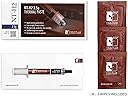
Noctua NT-H2 3.5g is a premium-grade thermal compound engineered for optimal heat transfer between CPUs/GPUs and heatsinks. Featuring a no-spread, easy-apply formula and long-lasting stability of up to 5 years, it supports a wide range of devices from high-end desktop processors to gaming consoles. The package includes 3 high-quality cleaning wipes, ensuring hassle-free maintenance and multiple applications from a single tube.


| ASIN | B07MZ45X9G |
| Are Batteries Included | No |
| Best Sellers Rank | 2,720 in Computers & Accessories ( See Top 100 in Computers & Accessories ) 2,331 in Accessories (Computers & Accessories) |
| Brand | Noctua |
| Colour | Grey |
| Customer Reviews | 4.8 4.8 out of 5 stars (10,482) |
| Date First Available | 29 Jan. 2019 |
| Guaranteed software updates until | unknown |
| Item Weight | 4 g |
| Item model number | NT-H2 3.5g |
| Manufacturer | Noctua |
| Product Dimensions | 10 x 10 x 2 cm; 4 g |
F**.
Great, reliable thermal paste that does a great job helping your heatsink soak up the heat!
This is the only thermal paste I purchase. Every 3 years or so I clean out my systems and at the same time, replace the thermal paste. The included cleaning pad helps getting your CPU and heat-sink clean very quickly. There is enough thermal paste for about 2-3 cpu's if you use the correct amount. I applied it to one system with a Threadripper, and another with a ryzen 7 series CPU. The paste works really well and helps the CPU transfer the heat to the heatsink very well. Very easy to use. Fire and forget installation - no need to worry for another 3-5 years! Well with the money, as you know what you are getting!
L**H
Very good performance
As with everything on my PC I buy, I check many reviews and tests for it before purchasing. I had my heart set on liquid metal TIM (thermal interface material) but after reading about the etching, staining and worry about long term impact on the CPU heatspreader and or heatsink I was not interested any longer. I wanted a thermal compound that lasted a long time without having the hassle and risk involved with taking your PC apart to reapply compound. I had run Noctua NT-H1 thermal compound for 10 years with my I5 2500K CPU which was overclocked quite high to 4.8GHz. Temperatures were always very low and I never once had to reapply the paste, this lasted longer than even specified by Noctua, but they do not lie or fudge numbers like some companies do. Noctua are brutally honest and that I love. Their customer service is also very good. With the modern CPUs of today with their tightly packed, high core counts, it's vital to remove that heat as quickly as possible. With a poor performing compound your CPU isn't going to be boosting as well and it's going to be running warmer, making for a shorter lifespan. Noctua NT-H2 appeared to offer the best performance whilst being safe for all components and having a long lifespan. I've read too many reports of the MX compounds having high peak temperatures even after trying many different application methods and that put me off it, even though it was very cheap. Talking about pricing, I do feel this is quite high price but you do get the wipes included too - although I'd rather they offered a version without the pads too... Perhaps a smaller pack would be good as well as the amount of compound in this would last many applications. The included wipes are very large and come with tons of alcohol soaked in them, plan to clean a lot at the same time as it's very overkill for one CPU and cooler! They are very good quality however. The temps in my system are lower than what most are getting online so I think this compound does help, let's hope it lasts as long as the NT-H1 and I'll be very happy! I ignored Noctua and used the X application method as looking online this gives the best spread on common CPU sizes. Highly recommended.
T**.
Top tier performance and great value!
I've used several thermal pastes over the years, but Noctua NT-H2 stands out. Application is smooth, cleanup is easy, and most importantly, temps dropped noticeably compared to stock paste. Perfect for both first-time builders and seasoned PC enthusiasts. Highly recommended!
K**E
Great value to performance!
Best thermal paste I’ve used. I went from 65c under load to 40-45c and 30-35c idle very impressive. It is a little thicker than other brands so spreading it with an applicator is a no go but the pea method for ryzen cpus works a charm.
M**N
Perfect for GPU re pastes, not so much CPU’s.
Thermal pastes are not all the same. The Noctua NT-H2 paste IMHO is best suited for GPU core re pastes than CPU and does a very good job in dropping GPU core & hotspot temperatures. For CPU cooling, there are better choices out there if want the best performance. Not saying that you cannot use it for CPU cooling, as obviously you can, but temperatures will not be the best. I would use this if I did not have any of my preferred paste for CPU cooling. It does offer good value for money & spreads very easily without having to warm it up between the palms of your hands or placed in warm water for a few minutes like some, but I find the harder it is to spread evenly, the better it is for CPU cooling without too much pump out. For GPU’s I find the opposite & less viscous pastes are superior for some reason. Overall a jack of all trades but much better at one.
K**G
Noctua NT-H2 Thermal Paste Review
The Noctua thermal paste is of high quality and keeps my CPU's temperature low, it is all a good value for money. Highly recommend.
P**E
Works!
Worked completely fine with my PC! Bought this a couple months ago and my temps and everything are still good!
L**A
Good stuff.
Really easy to apply the paste, 3 really good wipes. Plenty of paste leftover.
M**I
Great product. Keeps my thermals cool. :)
K**1
Good
C**R
Bunun üzerine macun yok. 14700k 4-5 derece rahat fark ettiriyor
A**G
1. Noticeable Temperature Drop After applying the Noctua NT-H2, I managed to drop my CPU temps by about 10% under load. That might not sound like much on paper, but in practice it meant less thermal throttling and more stable performance during heavy gaming sessions. I could clearly see the difference compared to the stock paste I was using before. 2. Easy Application Process What impressed me most is how simple it was to apply. The paste spreads evenly without needing extra effort, and the included cleaning wipes made the prep work fast and clean. I’ve worked with pastes that are messy and hard to handle, but NT-H2 felt very forgiving. 3. Long-Term Reliability One of the reasons I chose Noctua is their reputation for stability, and this paste didn’t disappoint. It’s non-conductive, so there’s no risk of damaging components, and it’s rated to last for years without drying out. That gives me confidence I won’t need to re-apply anytime soon. 4. Perfect for CPUs and GPUs I tested it on my CPU first, but this paste is also safe for GPUs. Knowing I can use the same tube on my desktop CPU, GPU, and even a laptop repaste makes the value much better. At 3.5g, there’s enough for multiple applications. 5. Premium Brand That Delivers Noctua has always been my go-to for quality cooling, and NT-H2 reinforces that reputation. Between the lower temps, easy handling, and long-term peace of mind, I see it as an investment in system stability. It costs a bit more than generic pastes, but the performance gain justifies it.
G**)
La pasta termoconduttiva NT-H2 di Noctua è un prodotto di alta qualità progettato per migliorare la trasmissione di calore tra componenti di computer, come CPU, GPU e MOSFET. L'ho testata sia su una CPU Intel Core i9-12900K che su una GPU Zotac GeForce RTX 3080 Trinity OC e in entrambi i casi ho notato una significativa diminuzione della temperatura dei componenti. La confezione include una siringa di pasta termoconduttiva da 3.5 grammi e tre salviette monouso imbevute di alcol isopropilico per pulire le superfici e rimuovere eventuali residui di pasta termoconduttiva precedente. L'applicazione è molto semplice: basta pulire accuratamente le superfici che verranno a contatto e applicare la pasta termoconduttiva seguendo le istruzioni del produttore. In genere, si consiglia di utilizzare un pattern di punti, ad esempio un punto centrale da 4 mm e quattro punti da 2 mm agli angoli per una CPU di dimensioni medie. La pasta non richiede tempo di indurimento e dovrebbe funzionare fin da subito. Se la siringa viene richiusa correttamente, le rimanenze di pasta possono essere utilizzate entro circa 3 anni. Non è necessario utilizzare grandi quantità di pasta termoconduttiva: basta una quantità moderata per ottenere ottimi risultati. In generale, il tubetto da 3.5 grammi dovrebbe essere sufficiente per almeno una decina di applicazioni su una CPU. La pasta ha una consistenza media, quindi può non essere facilissima da stendere in strato sottile, tuttavia seguendo la tecnica dei punti consigliata si dovrebbero ottenere ottimi risultati. Le prestazioni della NT-H2 sono molto buone: come ho già detto, ho notato una significativa diminuzione della temperatura della CPU e della GPU dopo averla applicata. Inoltre, la pasta non ha prodotto alcun tipo di contaminazione elettrica, il che è importante per evitare problemi con componenti sensibili. In conclusione, la NT-H2 di Noctua è una pasta termoconduttiva di alta qualità che offre ottime prestazioni e facile applicazione. La confezione include tutto il necessario per una corretta installazione e la durata è molto buona. Consiglio vivamente questo prodotto a chiunque abbia bisogno di migliorare il raffreddamento dei propri componenti di computer, sia che si tratti di CPU che di GPU.
Trustpilot
2 months ago
1 month ago