
DOWNLOAD DE APP


Klantenservice
Copyright © 2025 Desertcart Holdings Limited
DOWNLOAD DE APP


💿 Burn Brilliance, Archive Forever — The Ultimate Blu-ray Powerhouse
The LG WH14NS40 is a sleek black internal SATA Blu-ray rewriter delivering blazing 14X BD-R write speeds and versatile multi-format compatibility including BDXL and M-DISC support. Designed for Windows 10 and earlier, it comes bundled with Cyberlink software for enhanced 3D playback and media creation. Ideal for professionals and enthusiasts seeking reliable high-capacity archival and premium audio/video burning capabilities.

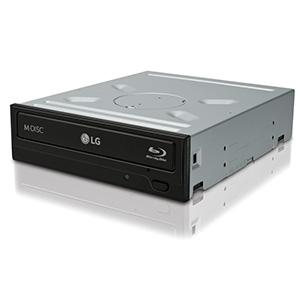


| ASIN | B007VPGL5U |
| Additional Features | Blu-Ray Disc |
| Best Sellers Rank | #6 in Internal Blu-ray Drives |
| Brand | LG |
| Built-In Media | Drive |
| Cache Memory Installed Size | 1 |
| Color | Black |
| Compatible Devices | compatible support for Windows 10 |
| Connectivity Technology | Serial ATA |
| Customer Package Type | Standard Packaging |
| Customer Reviews | 4.5 out of 5 stars 4,160 Reviews |
| Digital Storage Capacity | 128 GB |
| Form Factor | Internal Drive |
| Hard Disk Form Factor | 5.25 Inches |
| Hard Disk Interface | ATA-4 |
| Hard Disk Rotational Speed | 1 |
| Hardware Interface | SATA 1.5 Gb/s |
| Hardware Platform | PC |
| Item Dimensions L x W x H | 6.5"L x 5.7"W x 1.6"H |
| Item Weight | 1.65 Pounds |
| Manufacturer | LG Electronics |
| Media Speed | 48X |
| Model Name | WH14NS40 |
| Model Number | WH14NS40 |
| Operating System | Windows 7, Windows Vista, Windows XP |
| Optical Storage Read Speed | 24x |
| Optical Storage Write Speed | 24x |
| Read Speed | 22.16 Megabytes Per Second |
| Special Feature | Blu-Ray Disc |
| Specific Uses For Product | Personal |
| UPC | 719192625150 |
| Warranty Description | 1 year manufacturer |
G**N
Excellent Drive, Reasonable Software
Updated with corrections 12/17/2012 I have two of these drives. So far I have seen no problems reading or burning Blurays. I've written single density BD-R and BD-RE drives without a hitch. The resulting disks play flawlessly in my aging Samsung Bluray player. Most Bluray disks read at about 22 MB/s, but there are some that drop to 10 MB/s and some that exceed 30 MB/s. The drives also work well reading and writing CDs and DVDs at speeds a little slower than my older Samsung DVD drives. Consider keeping a DVD drive in your machine if you want the best performance possible. The only quirk I found is that "Exact Audio Copy"---a program written specifically to read audio CDs accurately---could not rip audio from any CD. No matter what the setting, that program rips nothing but silence. With other programs (including Windows Media Player, J River, Winamp) the LG drive rips audio just fine. The included software is an LG branded OEM version of Cyberlink Bluray Disk Suite version 10. The suite includes a reasonable 3D BluRay player, which plays Blurays and DVDs direct from the drive, but not from disk. It also plays videos from disk. The Cyberlink player plays Avatar 3D very well. On one of my machines, with an Nvidia 560 video card, I can play accelerated 3D w/o issues. On another machine, with an Nvidia 650, 3D video will not play correctly. Both machines have no issues with the Nvidia 3D test program at either 720p or 1080p. Fortunately, the player has a mode called "Micro Polarizer 3D (row interleaved)" which works with TVs (including LG and Visio) that use non-powered 3D glasses. (Local theater 3D glasses are compatible) These TVs polarize the even pixel rows on the screen in one mode, and the odd rows in another mode, so the player is able to render 3D by rendering two different images---in even/odd mode---w/o help from either the TV or the video card. Both my computers were able to display 3D movies in this mode. The downside is that the motion compensation is poor, and fast moving action appears a bit more jerky than it does in 2D mode. The Cyberlink player also has a mode that converts anything it can play in 2D to 3D. While this mode is far from the best 3D available, it works remarkably well. If you try it, you *will* be amazed. You must install your LG drive before you can install the Cyberlink software. Shortly after installation, the Cyberlink software prompts you to download an update. The first time you try to install the update, it fails. On the second try, it installs w/o difficulty. Also included with the software is an automatic firmware updater for your LG drive. The updater pops up a window every time the machine boots. If you get tired of the interruptions, you can uninstall the updater. The Cyberlink suite contains a number of other program I haven't tried. These include a Bluray burner, a label printer, and some movie creation tools. At the time of this review, on Amazon, the Cyberlink software adds $5 to the cost of the drive. In my opinion, the Cyberlink software is well worth the added cost.
J**L
Excellent Performing BD Drive
Excellent performing BD Drive. This drive easily installed, replacing a DVD-RW, giving the computer much greater capability in now that it will burn Blu-Ray discs as well as DVDs and CDs of all varieties. I might comment on the selection of blank BD discs, there are a couple brands that perform much better than the others (Verbatim or Panasonic). This drive handles both these blanks with ease and produces superb results. I have burned both video+music, but mostly I love the BD blanks for transfer of high resolution remastered 192/24 FLAC music files from the computer. These music discs can then be played on most Blu-ray players, and if the sound connections on the Blu-ray player are connected and can play through a high quality music system, the results can be stunning, music with greater fullness, detail, expanse, soundstage, clarity and just plain beautiful to hear, whether listening through speakers or headphones. With the correct Blu-Ray music burning software, fantastic listening can be achieved with burns from this good LG burner. And up to, and sometimes more than 5 hours of continuous music can be burned to a single Blu-ray blank. There is just no better way to listen to your favorite music, arranged in the order you like, than perhaps to stream the high resolution to your system. This LG drive can also play the music that you have burned, or the video that you have created, through your computer, and if the computer is capable of streaming to a higher quality system, that can be done too. So the uses and capabilities of this wonderful LG Blu-Ray internal burner are many, not to forget one of the best things about this drive, Amazon offers it at a great price. Certainly worth the money spent, and I can recommend it to anyone, regardless of their intended use. This drive is certainly one that gives much enjoyment and worth the money spent.
R**R
Looks and functions better then the Sony BDR-207
So far, the LG WH14NS40 arrived in a simple plastic bag with all the needed or required parts, including the useless software. (Sorry, I make more use of open source programs as they're more reliable then closed source.) Regardless of the lack of cardboard, the bulk unit looks to be in pristine shape, and I prefer bulk items as they're cheaper. (Can't do much with the card board once the item is unwrapped and seems to be a waste of money.) Pros: 1) Eject seems to work much smoother & quicker then the Pioneer BDR-207. 2) Cool blue LED drive activity light. It's far from being too bright, which is good. Although I didn't mind the older LED green lights. Guess this shows LG is on-the-ball with always trying something a little new, without being too excessive and risking breaking perfectly fine features. 3) Eject button is also of different style, which is a move away from the old style buttons. Dunno if there's any benefit, but it's a change from the past without any apparent risk to the function of the button. 4) Since I primarily record data and not music, this drive support 48x CD-R versus the Pioneer BDR-207 (and the newer BDR-208?) only supporting 40x CD-R speed rates. My guess, Pioneer is in the business of audio quality versus data archiving. # dmesg scsi 2:0:0:0: CD-ROM HL-DT-ST BD-RE WH14NS40 1.00 PQ: 0 ANSI: 5 sr0: scsi3-mmc drive: 1x/1x writer dvd-ram cd/rw xa/form2 cdda tray cdrom: Uniform CD-ROM driver Revision: 3.20 sr 2:0:0:0: Attached scsi CD-ROM sr0 sr 2:0:0:0: Attached scsi generic sg2 type 5 # cdrecord -prcap Cdrecord-ProDVD-ProBD-Clone 3.00 (x86_64-unknown-linux-gnu) Copyright (C) 1995-2010 Jörg Schilling Linux sg driver version: 3.5.34 Using libscg version 'schily-0.9'. No target specified, trying to find one... Using dev=2,0,0. Device type : Removable CD-ROM Version : 5 Response Format: 2 Capabilities : Vendor_info : 'HL-DT-ST' Identifikation : 'BD-RE WH14NS40 ' Revision : '1.00' Device seems to be: Generic mmc2 DVD-R/DVD-RW/DVD-RAM. Drive capabilities, per MMC-3 page 2A: Does read CD-R media Does write CD-R media Does read CD-RW media Does write CD-RW media Does read DVD-ROM media Does read DVD-R media Does write DVD-R media Does read DVD-RAM media Does write DVD-RAM media Does support test writing Does read Mode 2 Form 1 blocks Does read Mode 2 Form 2 blocks Does read digital audio blocks Does restart non-streamed digital audio reads accurately Does support Buffer-Underrun-Free recording Does read multi-session CDs Does read fixed-packet CD media using Method 2 Does not read CD bar code Does read R-W subcode information Does not return R-W subcode de-interleaved and error-corrected Does read raw P-W subcode data from lead in Does return CD media catalog number Does return CD ISRC information Does support C2 error pointers Does not deliver composite A/V data Does play audio CDs Number of volume control levels: 256 Does support individual volume control setting for each channel Does support independent mute setting for each channel Does not support digital output on port 1 Does not support digital output on port 2 Loading mechanism type: tray Does support ejection of CD via START/STOP command Does not lock media on power up via prevent jumper Does allow media to be locked in the drive via PREVENT/ALLOW command Is not currently in a media-locked state Does not support changing side of disk Does not have load-empty-slot-in-changer feature Does not support Individual Disk Present feature Maximum read speed: 177 kB/s (CD 1x, DVD 0x, BD 0x) Current read speed: 177 kB/s (CD 1x, DVD 0x, BD 0x) Maximum write speed: 8468 kB/s (CD 48x, DVD 6x, BD 1x) Current write speed: 8468 kB/s (CD 48x, DVD 6x, BD 1x) Rotational control selected: CLV/PCAV Buffer size in KB: 4064 Copy management revision supported: 1 Number of supported write speeds: 0 Current performance according to MMC get performance: Maximum performance according to MMC get performance: End LBA: 2298496 Read Speed: 53952 == 53952x NONE Write Speed: 6400 == 6400x NONE Supported CD-RW media types according to MMC-4 feature 0x37: Does write multi speed CD-RW media Does write high speed CD-RW media Does write ultra high speed CD-RW media Does write ultra high speed+ CD-RW media Supported profiles according to MMC-4 feature list: Current: none Profile: BD-RE Profile: BD-R random recording Profile: BD-R sequential recording Profile: BD-ROM Profile: DVD+R/DL Profile: DVD+R Profile: DVD+RW Profile: DVD-R/DL layer jump recording Profile: DVD-R/DL sequential recording Profile: DVD-RW sequential recording Profile: DVD-RW restricted overwrite Profile: DVD-RAM Profile: DVD-R sequential recording Profile: DVD-ROM Profile: CD-RW Profile: CD-R Profile: CD-ROM Profile: Removable Disk Supported features according to MMC-4 feature list: Feature: 'Profile List' (current) (persistent) Feature: 'Core' (current) (persistent) Feature: 'Morphing' (current) (persistent) Feature: 'Removable Medium' (current) (persistent) Feature: 'Write Protect' Feature: 'Random Readable' Feature: 'Multi Read' Feature: 'CD Read' Feature: 'DVD Read' Feature: 'Random Writable' Feature: 'Incremental Streaming Writable' Feature: 'Formattable' Feature: 'Defect Management' Feature: 'Restricted Overwrite' Feature: 'CD-RW CAV Write' Feature: 'DVD+RW' Feature: 'DVD+R' Feature: 'Rigid Restricted Overwrite' Feature: 'CD Track at Once' Feature: 'CD Mastering' Feature: 'DVD-R/-RW Write' Feature: 'Layer Jump Recording' Feature: 'CD-RW Write' Feature: 'BD-R Pseudo-Overwrite (POW)' Feature: 'DVD+R/DL Read' Feature: 'BD Read' Feature: 'BD Write' Feature: 'Hybrid Disk Read' Feature: 'Power Management' (current) (persistent) Feature: 'S.M.A.R.T.' Feature: 'CD Audio analog play' Feature: 'Microcode Upgrade' Feature: 'Time-out' (current) (persistent) Feature: 'DVD-CSS' Feature: 'Real Time Streaming' Feature: 'Logical Unit Serial Number' (current) (persistent) Serial: 'K8LC4M05052 ' Feature: 'Media Serial Number' Feature: 'Disk Control Blocks' Feature: 'Microcode Information' (current) (persistent) Feature: 'AACS' I'll update this review and it's rating as I record to media, but so far, most have bought this drive versus the Pioneer BDR-207, for which I initially purchased but ran into problems.
L**I
Drive failed after just 5 years ...
This is the third drive I have purchase within the past few months. After upgrading one of my PCs, I decided to upgrade the other two with a BD / DVD writer. So far all of the drives have performed great. Very fast read speeds. I was able to burn Verbatim BD-Rs rated at 6x at a much faster 12x. No "coasters" yet. Does a great job on DVD's/CD's as well. I will be trying the highly rated M-Disc in the near future to archive a lot of old documents I have one my PC. This drive is supposed to handle all digital disc media available today, including BDXL. At this great price, it is truly a bargain. Highly recommended. It will even read 4K and 3D Blu-ray discs but, as I understand, only on those drives that have a "Service Code NS50" on the top label. All three of my drives did. WH14NS40 does not come with any software (the BH14NS40 does but costs more). Windows does not have native Blu-ray player, though there are many available on the internet, either free or for a cost, so if you plan on using this drive with a Windows PC and do not have Blu-ray software player, you will need to purchase or acquire one (I already had Power DVD 12, which also supports Blu-ray). But windows will still recognize the drive without drivers and will read/play CD's and DVD's natively either through Windows Media Player (or other native apps available in Windows 10). Oh, and I forgot to mention, even at the fastest ripping speed, the drive is extremely quiet! UPDATE 4/22/2022 The first of the three drives I purchased several years back, failed, just a bit over 5 years of use. The other two so far, are performing well. The drive would read/write DVDs, and read BD-R, but not write. Went through several troubleshooting steps and came up with the conclusion that it was a hardware issue with the drive. Even trued re-flashing firmware with the same result. The replacement drive is identical, except newer firmware (to prevent UHD ripping, but not reading). In the past I have had good luck with LG, so I hope this was just a fluke. LG is one of the very few BD-R burners out there (most of them are just re-badged LG drives). So I downgraded my previous 5 stars to 4. I wanted to go lower but the other 2 drives still work fine. For now. It appears that the Blu-ray laser on the failed drive was not putting out enough power to actually burn the disc (reading takes less power). As I said, I hope this was just a fluke. (FYI, it was not a media issue ... tested that thoroughly and that was not the problem ... same three discs that failed to burn on the failed drive, burned fine on the replacement drive).
F**O
LG Electronics 14x SATA Bluray Internal Rewriter! Without Software?
This is my first Bluray reader, so i dont have to much to compare to, but until now its amazing! looks great, its lightweight (REALLY LIGHTWEIGHT), the instalation its easy as any dvd or cd rewriter just uses a SATA cable (Use de 6GB/s ones on this for better performance), and the power strips from your PSU. The package: Normal and simple, good protection. The weird thing is that it came with a software! dont know why but inside the box came an ASUS DVD SUITE, which comes with Nero 10 Essentials, E-Green, E-Hammer, Asus Firmware Update and Quick install guide! lots of weird stuff i maybe never use, but might come in handy for someone. (i havent used the disc, so i dont know if this software comes with serials and activations) This package does not come with the SATA Cable to conect the unit nor the power strip of course. Installation: Just turn off your computer, get the tray out or remove your old rewriter, put the bluray rewriter in place and secure the screws if your case, then connect the SATA cable and your power strip. Close your case and turn your computer on. It will display that annoying message that new hardware has been detected, it will look for the drivers and you are good to go. Let it roll!: I test it with the movie Super 8 Bluray on my pc and guess what? nothing happend when i close the tray! yes u need additional software to play your blurays! (NO VLC CANT! dont waste your time) The best one i found was Power DVD 11, so i downloaded it and applied an updated in order to play the bluray, and it worked great, looks awesome, no slowmotion during the movie, no glitches, no lag everything worked. The sound coming from the unit is minimum, less than my old DVD rewriter. Yes power dvd its kind of laggy, and really really bad optimized, but thats a software problem. I dont know if it plays 3D Blurays, for the price i dont think so, but i have a PS3 for that so i dont care. I havent burned a bluray yet so i cant tell, but ill update this when i do Overall im happy with it, great price and great unit. Im an LG Lover so its great for me :D
R**P
Worth every penny
Works great and well priced.
C**R
Really Easy To Use.....
Have wanted a Blu-Ray burner for awhile mainly for the amount of space it gives you. Finally decided to go with this burner as I have a number of LG DVD burners now and all have preformed very well and for long periods of time. Got in in today and as expected it was an OEM item. I've installed OEM stuff before so that wasn't a problem. I did run into one thing that did take a bit of time to figure out. I have an Inspiron 3847 computer and the front has the standard drop down doors that cover the DVD's front and open by dropping down whenever the eject button is pressed. I didn't think this would present any problem as the front panel item worked great on my old DVD burner. After popping off the case's front panel, taking out the old burner and installing the this burner, I discovered after I snapped the front panel back on that when I pressed the front panel's eject button that it didn't seem to be pressing the new drives eject button. I took the front panel off again and after much checking and puzzling over what could be the problem, I found out what was happening. It seems that the Inspiron's eject item expected a button instead of the full up and down "part of the front case" eject item the LG used. (It has a full across the front panel that runs the full length of the burner and is raised on the right side where the hidden eject button is. When the front panel of the computer was snapped back into place, it pushed up against this raised front part of the drive thus having the effect of pushing the area with the button all the time and therefore you wouldn't be able to use the eject right.) I solved this by trimming just a bit of the case's front panel's edge off where it hit the drives hidden eject panels front. (Just enough to leave a gap between the drive and the computer case's front panel. This proved to solve this problem with no problem. Now when you pushed the eject button you could feel the drives button being pushed. After getting that solved, and after I mounted an extra HD in the empty 5.4 drive bay, I took it into the computer room to check out. I booted up went to the BIOS and checked the drives and all showed up but I had to switch a cable as the last HD showed up in the wrong slot and I wanted the Blu-Ray on the last slot. After that I booted all the way up and Windows 10 "saw" all drives correctly. Most of my use of DVD type drives on my systems are for back up and since that's what I intended to use this for, I checked it out. I made a CD back up of some files without a problem. I then tried a DVD+RW disk back up and this went OK too. I then placed a blank Blu-Ray disk in the drive and made a back up of a folder off my HD for a test. Window's file manger was what I used with the "send to" item on the right click menu. It copied the files and I burned them onto the disk with no problems. I then took the disk out and put it back in the see about reading the disk and had no trouble at all looking thru the folders and the files and opening them, etc. I noted this drive runs faster then my old drive did and it seems to "feel" more solid than my old one. I noted that Windows 10 popped up the correct drivers for the drive without a problem and I really like how fast it reads my disks. I haven't put it to extensive use yet, but it has the feel of a nice drive. Other than the case issue, which either Dell or LG might consider addressing, this is a really good drive and just what I wanted.
P**N
Easy Buy; Great Drive
I bought this drive to replace my IDE DVD burner as I like to backup a lot of my data, but my current motherboard only supports two IDE devices at a time. With SATA, the problems are practically gone. On installing the drive, it was easy enough, came with screws to put it in, its own SATA cable in case you forgot to buy one, and a nice addition, it came with a Molex to SATA power converter. I'll admit that it did not work first time that I did boot, but I think it was because I bumped the other cables and it made a horrible connection with the machine. After swapping the cables and fixing it up, everything worked beautifully. I had already bought a 10-pack of Blu-ray discs to use for backing up some files that were really just taking too much space, but I didn't want to lose them. I was going to install the software in case it had a driver attached to it, but Windows Update immediately found a driver for it. After installing the driver, I put the disc in and decided to use the default burning methods on Windows and not the software, as I'm pretty content with what I have. It took a while to burn the amount of data I wanted on there, but it was very well worth it in the end. I burned another disc and it burned just as well. For anyone looking for a Blu-ray drive that is affordable and comes with burning features, along with being able to put a Blu-ray movie in and finding ways to watch it on your machine, I highly recommend this product. I would buy this product again if I was to build another computer in the near future.
Trustpilot
5 dagen geleden
2 weken geleden