Some deliveries may take a little longer than usual due to regional shipping conditions.

DOWNLOAD DE APP


Klantenservice
Copyright © 2025 Desertcart Holdings Limited
DOWNLOAD DE APP
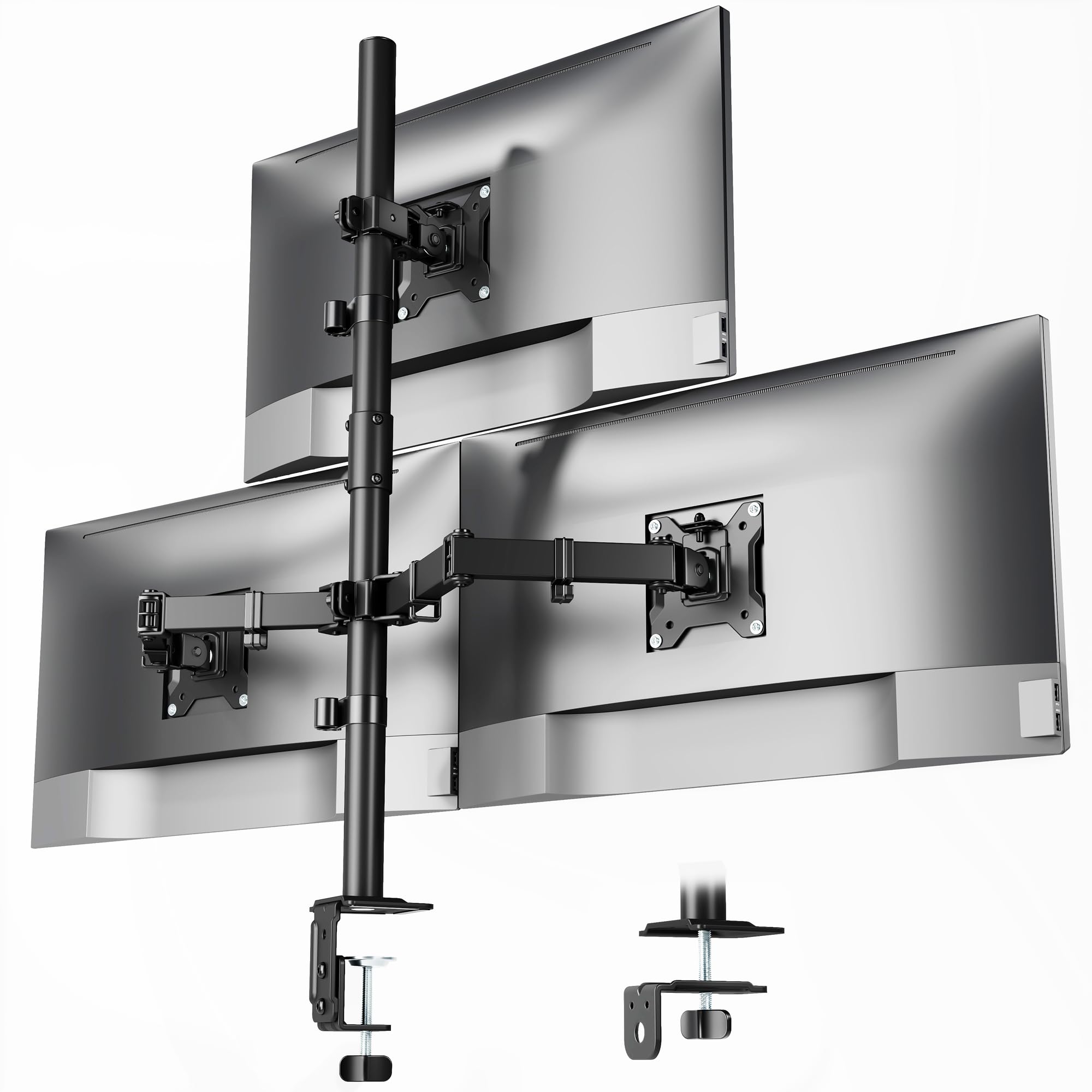
🖥️ Elevate your workspace, dominate your day.
The monTEK Triple Monitor Stand Mount is a robust, fully adjustable desk mount designed for three monitors ranging from 17 to 32 inches and up to 22 lbs each. Featuring VESA 75x75mm/100x100mm compatibility, it offers versatile mounting via C-clamp or grommet base, integrated cable management, and extensive ergonomic adjustments including tilt, swivel, and rotation. Engineered for stability and quick installation, it transforms cluttered desks into sleek, efficient command centers favored by professionals seeking enhanced productivity and style.



| ASIN | B0FL7MQ9KM |
| Best Sellers Rank | #505 in Computer Monitor Arms |
| Brand Name | monTEK |
| Color Name | Black |
| Customer Reviews | 4.0 4.0 out of 5 stars (15) |
| Date First Available | October 19, 2025 |
| Item Weight | 10.01 pounds |
| Item model number | US-DS-MA1006PBK-T |
| Package Dimensions | 17.28 x 7.01 x 5.24 inches |
T**K
Perfect for 3 monitor setup
Works perfect for a 3 monitor setup. Just make sure your monitors have "VESA" screw patterns on the back or it won't work. I'm glad I checked that before ordering.
P**E
Very sturdy stand that will have you up and running with 3 monitors quickly
Executive Summary This stand comes with heavy duty parts that create a solid base for holding three different monitors. The instructions are not too bad to follow and the assembly is pretty straight-forward. The components of the stand are heavy, there are accommodations for keeping your wiring out of the way, and the attachment method of the monitors to the frame is simple. Please note that the monitors are arranged in a pyramid, not "three across." Also, BE CERTAIN YOUR MONITORS SUPPORT THE PROPER MOUNT POINTS. THIS STAND IS *ONLY* COMPATIBLE WITH VESA MOUNTS. Review When the package arrives you find a lot of well-packed parts in the container. The assembly instructions were fairly easy to follow, and I particularly appreciated the several "don't assemble like this" pictures as double checks once you had components together. I never DID make a mistake in the assembly, but I credit part of that to these additional pictures/diagrams that had me paying attention to details of the parts in a way I probably would not have without the extra pictures. I have not had a 3-monotor stand before so I was concerned about the strength and stability of the frame. However, once I got the frame assembled (about 40 minutes because I was being overly cautious) and clamped it to my desk (without monitors attached), all of my concerns were gone. Pressing and pulling the stand in different directions (carefully!) demonstrated that this stand is VERY stable. I have ZERO concerns about it falling over for any reason other than a mistake in mounting on my part. Speaking of clamps, there are two methods of mounting the frame to your desk. The first involves a standard "clamp" mechanism which is how I chose to set the stand up. I found it to be sturdy and well balanced and I have no concerns about it falling over under normal use. The second method involves attaching with grommets and you either have to have an existing grommet on your desk or else you need to drill a hole for one. Since the clamp works just fine, you do not have to drill any holes in your desk...just use the clamp method. Please note that the listing on Amazon clearly calls out that any monitor you wish to mount MUST have VESA mounting holes of either 75x75mm or 100x100mm. This is a pretty standard mounting setup, which is why I was disappointed to find that several of my monitors do NOT support this mounting method. The VESA mount is a square pattern and once you mount the provided plate and assemble the stand structure it is a matter of sliding the monitor mount (with the monitor attached) onto the receiving arm. My non-compliant monitors are older and I will probably replace them anyway. I'll just have to make certain that the new monitors have the VESA mount points. This stand/mount is also highly adjustable. You can raise and lower the cross-arm, swing the two lower arms inward our outward, and tilt all of the monitor attachment points to your liking. I've provide pictures of the packaging, the parts, the assembled stand and the VESA mounting plate. I took the photographs of the assembled stand NOT attached to the desk because it is easier to see all of the components that way. In the photo of the entire stand I have ONE of the VESA plates slid in place (the one on the right) but the other two attachment points "bare" so you can see how the plate just "slides on" when it is attached to the monitor. It might be a good idea to have a second person help you with the monitors to avoid any mishaps. In my application, I have three different devices for which I want to have displays on my desk at the same time. That is, I am NOT using all three monitors for a single computer. Because of this, the pyramid arrangement of the monitors works well for me. I am hooking up a desktop computer, a laptop, and a Raspberry Pi each to its own monitor. This stand allows me to get all three monitors "off" of my desk, freeing up work space while still providing a good presentation of all three monitors. Also note that the package provides several "clamps" for your cabling to the monitors. You can easily route power cords and data cables along the stand such that they won't be "draped" in your way. I give this stand my highest recommendation, especially because of its utility, it's sturdiness, and in general value for the dollar. I expected the stand to cost much more than the listed price given how solid and sturdy the components are.
K**Y
Solid Mount, Frees Up So Much Desk Space!
I've been wanting to clean up my desk setup for a while, and this triple monitor mount was the perfect solution. It's currently holding my three 27-inch monitors, and it feels very stable and secure. There's no wobble when I'm typing, and the arms are strong enough to hold the weight without any drooping. The adjustability is great. I can easily tilt, swivel, and rotate each monitor to get them perfectly aligned, which is a huge plus. It has reclaimed an enormous amount of desk space, and my setup looks so much cleaner now. I used the C-clamp base, and it's rock-solid on my desk. My only complaint, and the reason I'm giving it 4 stars, is that the assembly was a bit of a pain. The instructions were just okay, and getting all three arms perfectly aligned and adjusting the tension for each one took a lot of fiddling. It's not a quick 10-minute job. But now that it's all set up, it's fantastic. It's stable, looks great, and does exactly what it's supposed to. If you're patient with the setup, the final result is well worth it.
F**K
3 x 32” Curved Monitors were No Problem for the monTEK
monTEK should be a household name by now. These are some of the best monitor mounts I’ve had. I used these for my work setup (no photos allowed sad face). I have 3 x 32” LG Curved Monitors and I was skeptical that they would all fit when installing the stand. However, I was pleasantly surprised to find out that you can fit all 32” and don’t need to use 2 smaller ones or change the configuration. The install & set up took about 35 minutes because I timed it. This included mounting the hardware to the monitors, clamping it to my desk, and routing the cables. That brings up a good subject, cable management. monTEK really did a great job adding in cable routers that allowed me to achieve a clean look. Nothin worse than a bunch of cables hanging or having to zip tie them. The cables route to the back with the integrated cable guides. This made it super easy to have a nice look after I was done. I would say that for the price this has to be one of the best monitor mounts available. Its price point is very aggressive in comparison to single monitor systems and this allowed me to save space by going vertical. I’m super happy with the outcome and really appreciate this monitor mounting system. It’s very easy to set up, and once it’s done you’ll be feeling like the FBI with all those monitors in one place. Not to mention this made my productivity even better now that I don’t have to bounce from screen to screen and go left to right all day long.
K**G
Transformed My Workspace—Triple Monitor Bliss!
I couldn’t be happier with this triple monitor mount. From the moment I unboxed it, everything felt thoughtfully engineered. The installation was a breeze—took me about 15 minutes with the clear instructions and all the parts neatly organized. I appreciated the option between C-clamp and grommet mounting, which made it easy to adapt to my desk setup. Once installed, the arms held my 27" monitors rock solid. No sagging, no wobble—just pure stability. The range of motion is phenomenal. I can tilt, swivel, and rotate each screen to exactly where I need it, which has drastically reduced my neck strain during long coding sessions and gaming marathons. The integrated cable management is a game-changer. My desk looks clean and professional now, with all wires tucked away. It’s amazing how much space I’ve reclaimed. If you're serious about productivity, ergonomics, or just want a sleek setup that feels premium and performs flawlessly, this mount delivers. Highly recommended!
Trustpilot
2 weken geleden
2 maanden geleden