


💼 Elevate your digital workspace with storage that works as hard as you do.
The Seagate Desktop Drive STGY8000400 is a robust 8TB external hard drive featuring USB 3.0 connectivity for fast data transfer up to 120MB/s. Designed for desktop use with a durable aluminum and glass enclosure, it supports Windows and Mac systems with plug-and-play ease. Ideal for professionals needing massive, reliable storage for multimedia, backups, and large file libraries, it also includes a data recovery service for added security.


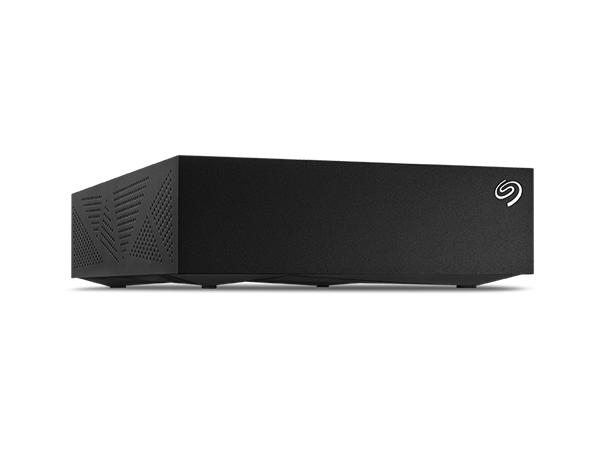


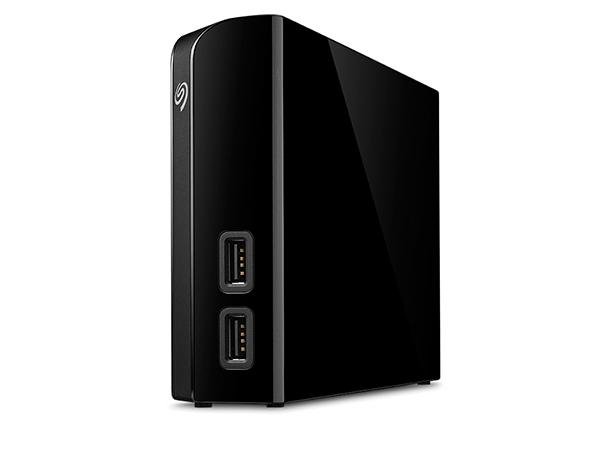
| ASIN | B07CQJBSQL |
| Additional Features | Data Recovery Service |
| Best Sellers Rank | #47 in External Hard Drives |
| Brand | Seagate |
| Built-In Media | Seagate Expansion Desktop External Drive 8TB USB3.0 |
| Cache Memory Installed Size | 8 |
| Color | Black |
| Compatible Devices | Desktop, Laptop |
| Connectivity Technology | USB |
| Customer Package Type | Frustration-Free Packaging |
| Customer Reviews | 4.4 out of 5 stars 16,293 Reviews |
| Data Transfer Rate | 160 Megabits Per Second |
| Digital Storage Capacity | 8 TB |
| Enclosure Material | Aluminum/Glass |
| Form Factor | 2.5-inch |
| Global Trade Identification Number | 00763649127322 |
| Hard Disk Description | Mechanical Hard Disk |
| Hard Disk Form Factor | 3.5 Inches |
| Hard Disk Interface | USB 2.0/3.0 |
| Hard Disk Rotational Speed | 7200 |
| Hard-Drive Size | 8 TB |
| Hardware Connectivity | USB 3.0 |
| Installation Type | External Hard Drive |
| Item Dimensions L x W x Thickness | 4.65"L x 1.63"W x 7.06"Th |
| Item Height | 7.06 inches |
| Item Type Name | Seagate (STGY8000400) Desktop 8TB External Hard Drive HDD – USB 3.0 for PC Laptop & Mac |
| Item Weight | 2.4 Pounds |
| Manufacturer | Seagate |
| Media Speed | 120.0 |
| Model Name | Expansion |
| Model Number | STGY8000400 |
| Number of Items | 1 |
| Read Speed | 120 Megabytes Per Second |
| Special Feature | Data Recovery Service |
| Specific Uses For Product | business, personal |
| UPC | 763649127322 763649161210 |
| Warranty Description | 1 Year Limited |
D**N
3 years later i still love it
i been using this thing for about 4 years now and it’s great. the sleds are a bit slow so it’ll struggle to run games 2025 and up but outside of that it’s great for storing a mass game library and running them from it!
B**B
Good for 5 years running 24/7 initially.
Purchased in December 2020. Has run 24/7 for five years with little heat issue. Yes, I know why 24/7, I have my reasons. Stopped working intermittently then completely would not start when powered off then back on. So I decided to disassemble it as the warranty was long out of date. Here is what I found: A SG Barracuda HDD ST8000DM004, you are still able to purchase this SMR HDD as bare drive. Good if not reading and writing large files constantly. I still prefer CMR overall. The HDD is still good and loads up in a docking station. Good News files were recovered. Better News I now have a large drive I can use in my server for continued storage. Time to pull out the meter... As it turns out the control board in the enclosure has bit the dust. Figures the control board would fail first! The power supply is still good. Overall if you are buying for a backup drive it is worth it depending on price fluctuations. If you are not computer savvy you may have issues down the road when the control board fails. Look fo rthe videos pulling the internal drive out is easy. Suggestions here for the less informed: Back up your backup. If its electronic save it in several places IF it is an important file!
M**N
How I got it to work on my mac (finally)...
I bought this drive (10TB version) to use as a media storage device for my Plex server. I run my Plex server on an older (2013) apple iMac that is running MacOS Catalina. When I first unboxed the drive, it looked nice, but when I plugged it into the power and then the USB on the back of my computer, it wouldn't show up. I couldn't get it to show up in my Finder window, on my desktop, or even in Disk Utility. I did all the tricks to show all drives and all volumes, but it just didn't even recognize that it was plugged in at all. I read some of the other reviews, lots of people complaining about how it wouldn't work on their mac etc..., I thought that maybe I was going to have to return the drive and figure out something else (it comes preformatted in exFAT, but as I said, MacOS Catalina wouldn't even acknowledge it was plugged in at all, so there was no way for me to reformat into the the system I wanted). Luckily I had a Mac Laptop with BigSur installed. On my laptop, it didn't show up in Finder or the desktop at first, but it did recognize it in Disk Utility (again, you have to set it to show all drives and volumes in the view). There I was able to select it, then reformat it as MacOS Journaled (or whatever file system you wanted, but that is what I use on my older Mac). Once I did that, I was able to plug it into my older Mac, and it showed up in Finder, Desktop, and Disk Utility. I actually reformatted again on the old mac (just to be safe, but probably not really needed as it was reading, I just wanted to make sure it would work on the old mac the way I wanted it to). As I'm typing this, it's just finishing backing up the 4TB of media from my old drive, it's been whirring away for about 24 hours now, no problems so far. So as long as you are willing (and have the newer macOS available), then this is a great external hard drive for Macs, just don't expect it to work natively right out of the box (but external hard drives rarely do). That being said, I am happy with the price and performance so far, hoping 10TB will last me quite a while (my old drive was 6TB and I thought I would never even come close to filling that up, but I don't like to run my drives too full, so using 4TB out of 6TB was more than I liked, so this 10TB should fit the bill nicely for a while anyway).
K**A
INITIAL review after setting up. Info on drive not showing up and reformatting for Time Machine...
I'm writing this because of all the reviews I see complaining about the drive not showing up on their computer initially, saying "it doesn't work right out of the box!" I often wonder if some of these people never even read the documentation before giving up. The included documentation for the drives is horrible, with only a Quick Start page that shows how to plug it in, but there is great info on Seagate's site that helps if you go look at it. There's also something else I found out that might be helpful, and I'll address that here. Once I've had it in use for a while I'll update this review for a more in-depth account of how well it works. I'll list my comments by issue: 1) Drive not getting recognized. After seeing so many "it doesn't show up" comments, I was concerned when mine didn't show up on my iMac either. I followed the instructions on plugging it in (in sequence, which may or may not make a difference, but you gotta do it correctly just in case), and the first thing you have to do is decide which US Standard plug to slide onto the universal plug adapter; there are two that are almost identical, two-prong plugs; one has holes in the prongs and the other doesn't. Docs say nothing about which to use, so I went with the one with holes. The unit powered up and sounded like it was initializing, but it wouldn't get recognized by my Late 2017 iMac. Unplugging and restarting did nothing. I went to the online documentation and did the recommended check to see if Show Hard Drives was checked in Finder/Preferences/Show-Hard Drives. It was (which I already knew because my others show there, but just in case I needed to recycle the command...). That did no good. After a bit of thought, I decided I'd try the other plug, and that did the trick. USE THE PLUG WITH NO HOLES IN IT if using in the US! Once that was solved, it showed up and all looked good. 2) Using with Time Machine on Mac. The info in the product description says the drive is ready to use with Time Machine, preformatted. The problem is, if you have Catalina or later, there is a new formatting called APFS that replaces xFat, and you will have to reformat to use with Time Machine. This is a simple process using Disc Utility, and it reformats quickly. Once I had that issue solved, I got Carbon Copy Cloner (trial version) and set up the tasks of copying my main hard drive (348.3 GB) and my 8 TB external drive to the new Seagate drive and let it go. The main drive was backed up in just over 47 minutes. Yeah, it's a tad noisy, but nothing that can't go on while working on the computer by any means unless you're maybe recording a YouTube video at the computer or something. The external drive, which had 6.58 TB of stuff on it took a little longer... 12 1/2 hours to be exact. Slow? I don't know, it's the first time I've copied a hard drive with that much stuff on it, but I set the task and left it alone and it was done in the morning. The image included here shows Carbon Copy's review page for the performed tasks. CAVIAT: you may need to use a program that allows the computer to work without shutting down after a period of inactivity. I use an app called "Amphetemine", which forces the computer to stay on in various circumstances that you can set. I set mine to remain on "as long as specified app is working" and chose Carbon Copy Cloner. Not sure you have to do this, but Amphetamine is a great app and I didn't want to take the chance of having to start over, so I used it, and it worked great. The noise some complain about could be other drives (I have the 12 TB version for desktop) or it may be a personal preference, but a drive in a plastic case like this with lots of air holes in it will make some noise, however I didn't find this "noisy" at all IMHO. So far, I'm impressed with Carbon Copy as well, but like the drive, I'm in my infancy with using it, so time will tell. I also have a 1 TB external I use for Time Machine, so instead of using this one for that, I will most likely also set up the drive to copy that drive so I have a backup of my Time Machine just in case. You can set Carbon Copy to copy whenever it detects a change in a drive, so once the initial copying is done, the lengthy copies are done, and it's only copying when things change. If you have issues with one of these drives not being recognized by your computer straight out of the box, FIRST make sure you have the correct US plug installed. THEN, make sure to reformat to APFS if you're running Catalina or later if you plan to use it for your Time Machine backups. At that point, so far in my experience, it's a great drive. I'm giving four stars only because of having to hunt down good documentation for the actually necessity for reformatting for the OSs, and for having NO information about the right plug to use. NO idea why the one with holes won't work, but it would be nice if they gave a heads-up on that. Once it's been working a while, I'll readdress this review.
P**U
High-capacity storage for backups or read-mostly data
Solid external 8 TB drive. Perfect for storing large read-mostly datasets, such as video. This drive should also function well for incremental backup. Note that this drive uses SMR technology. This means that very large writes can slow down, and the average write bandwidth will be much lower than the peak write bandwidth. Do not use this for a long-duration, random-access, write-heavy workload, such as blockchain archival. I obtained mine in January 2021 and it has just begun to show signs of failure after two years of extensive use in a home-built ML server, well exceeding the annual data transfer (read/write) rating, and including over 10000 spinning hours. This should be interpreted as a positive; it is a sign of good robustness. The nature of the failure is gradual, not catastrophic: several uncorrectable sectors have appeared. As such, we are transitioning this drive to scratch storage use. Unfortunately all hard drives fail eventually. For critical data, use a multiple backup solution such as 3-2-1, ideally with redundancy in each layer such as RAID, to minimize the probability of data loss.
T**T
Works great on a Mac, buttttt
I have had no trouble with my 8TB drive working on my iMac. Yes, I had to reformat it and that took a little research online to figure it out. But it works great. So great that I'm purchasing the 16TB drive today because I've almost filled the 8TB up. I haven't tried to use it with Time Machine - I have a different drive for that - but I have no doubt it would work. Instead, I use it as extra space, loading all my media and documents on it. I love it. I know there are a ton of 'Doesn't work with a Mac' reviews, but I can only assume the steps it takes to reformat the drive scared them off. (Because yes, there is that slight moment of panic when you follow the directions and your computer warns you it's going to erase the entire drive.) But once the drive is reformatted, I haven't had one issue with it. I had MacOS Catalina when I bought it. I now have MacOS Big Sur. Still no issues. (Except for it getting filled up LOL - but that's my fault, not its ;) ) Update 3/8/21: For those who have BigSur on their Mac - the power distribution via BigSur is perfectly f'd up. So whereas before my update to BigSur, I could leave my external hard drives plugged in and when it started up the next morning, everything was fine, now with BigSur, I have to unplug my externals when not in use. ANNOYING - especially since my iMac retains its connection and won't let me eject them easily unless I turn it off! And this isn't Seagate's issue - this is VERY MUCH an Apple mistake they aren't fixing. What happens if I don't? The computer won't start. The loading screen will get to 25% and stall. Once it even slid off the edge of the screen. I have to then force the computer to stop. And then restart. Then it starts up (Usually). I love Seagate, but am not happy with Apple. I'm getting to the point where there aren't any computers I can trust. I won't do Windows and this will be my last Apple machine. We seriously need an OS that works, is stable, and won't steal our data.
J**J
Funny noises and slowly died from day one
I bought this drive to hopefully rid me of one of my two, 8 tb hard drives. At the very least free up some space. The moment I got it it was making some distinctly but alternatingly different sounds that did not sound like a hard drive should? Anyone familiar with the old Maxtor grinding noises will know what I mean. At first I thought that is just how this drive must sound. As someone that has been building computers since the 90's I'm aware technology changes and sometimes in unexpected ways. But as I transferred files the drive not only got slower but it got louder. It took me five to six times longer to get all my files off the drive and back onto my other drives before it died completely. I only had the drive for a week and not only did the noises (I can only equate to taking a record needle and tapping on a record that wasn't spinning) get stranger and louder but the drive took longer to transfer files and got more and more erratic coming out of sleep mode. I love both Western Digital and Seagate but in this case I am willing to say I just got a bad one as this is more than possible. I personally have not checked on the actual technology that is in this drive but until I do I had to go with a reliable drive I know the technology in better. I would advise if you get one that takes a long time to come out of sleep mode and makes strange taping scratching noises speraticly, send it back for a new one. I won't blame Seagate for this completely I just know I got a bad one out of the box.
G**K
Great Storage for Series X/S Games
First, we should all know by now that with a few exceptions, there is no way to play Series games from any external drive, not even from an SSD for those wondering, but we CAN play games from all previous Xbox consoles from an external drive. I read so many reviews on so many drives prior to purchasing this one. Did I purchase this one because it has the best performance? No. I could’ve purchased an SSD with a much higher write/read speed but I would’ve gotten a fraction of the storage at a much higher price. I decided on this HDD because at $164, the dollar per TB is almost impossible to beat and with how I intend to use this HDD, the performance is more than adequate. So, I write this review in hopes that it’ll help someone else decide whether this drive is for them. I read so much about read/write speeds when researching HHDs and I got to thinking, the read speed for a lot of us will be more important than the write speed. Why? Because our internet’s download speeds will max out way before the HDDs write speed capability is maxed out. So here is where the read speed comes into play. If you use this drive to store all your games, including Series games, and copy rather than move the games to the internal drive, then you’re only “moving” your games in one direction, and it just so happens that copying from this HDD to the internal drive is very fast. I copied Jedi: Fallen Order, Halo Infinite and Forza Horizon 5 from the HDD to the internal and they copied at a pretty much sustained 1.5Gbps (187 MBps). At 103GB FH5 took no longer than 15 or so minutes to copy. To me, a 15 minute wait is totally worth the savings/storage you get vs an SSD or dare I say the $400 2TB expansion card!!! At this price point I think it’s hard to make an argument against this HDD. I don’t know if the read speeds will be impacted as the HDD fills up so I will update the review once I’ve had more time with it. On a side note, the drive came in a generic cardboard box which I was not expecting. Don’t know if that means anything but nonetheless that’s the way it was shipped.
Trustpilot
2 maanden geleden
2 weken geleden



