We remain fully operational. Our teams are working around the clock to ensure your deliveries continue safely.

DOWNLOAD DE APP


Klantenservice
Copyright © 2025 Desertcart Holdings Limited
DOWNLOAD DE APP






🚀 Unlock the future of WiFi with Archer BE700 — where speed meets smart security!
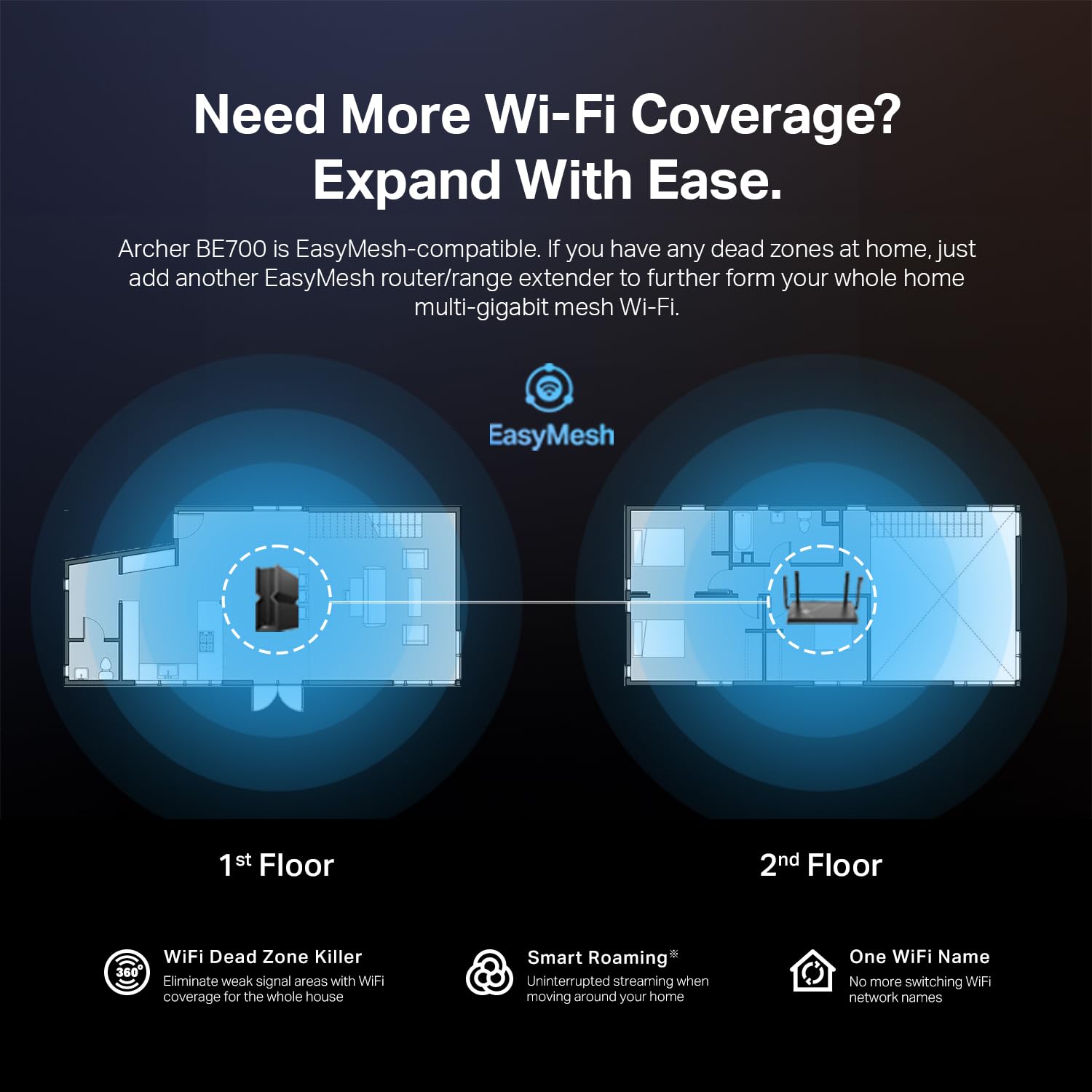
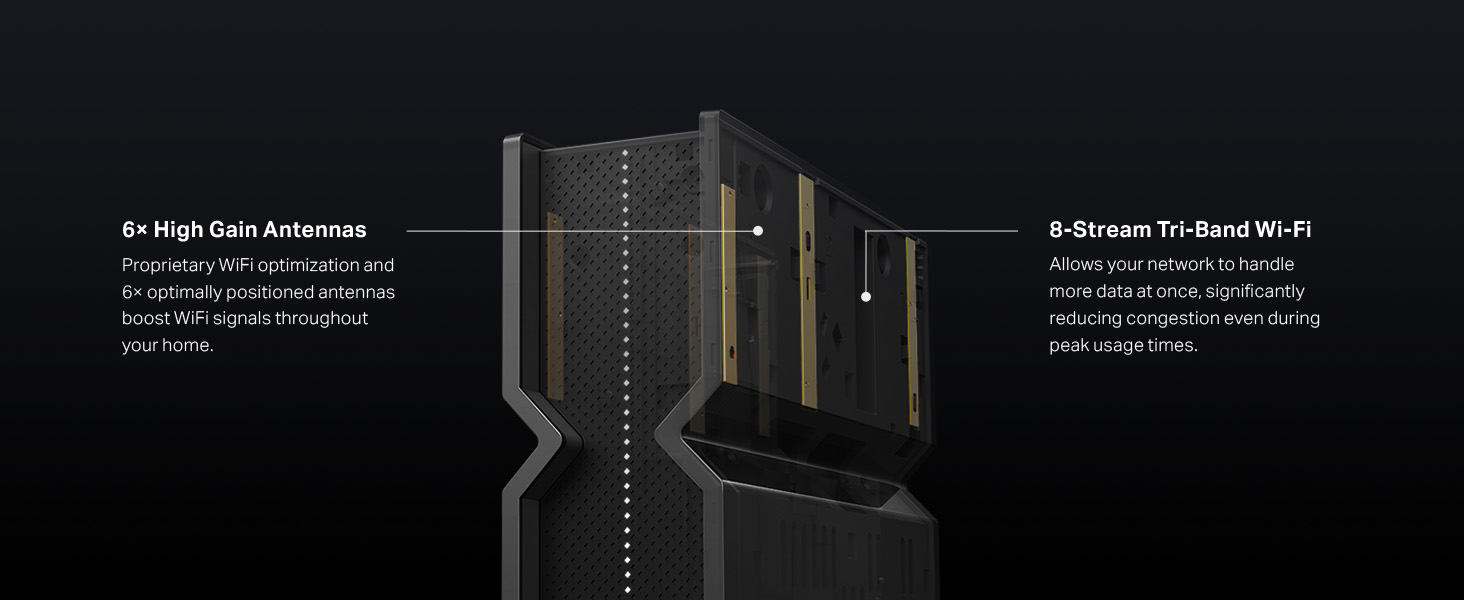
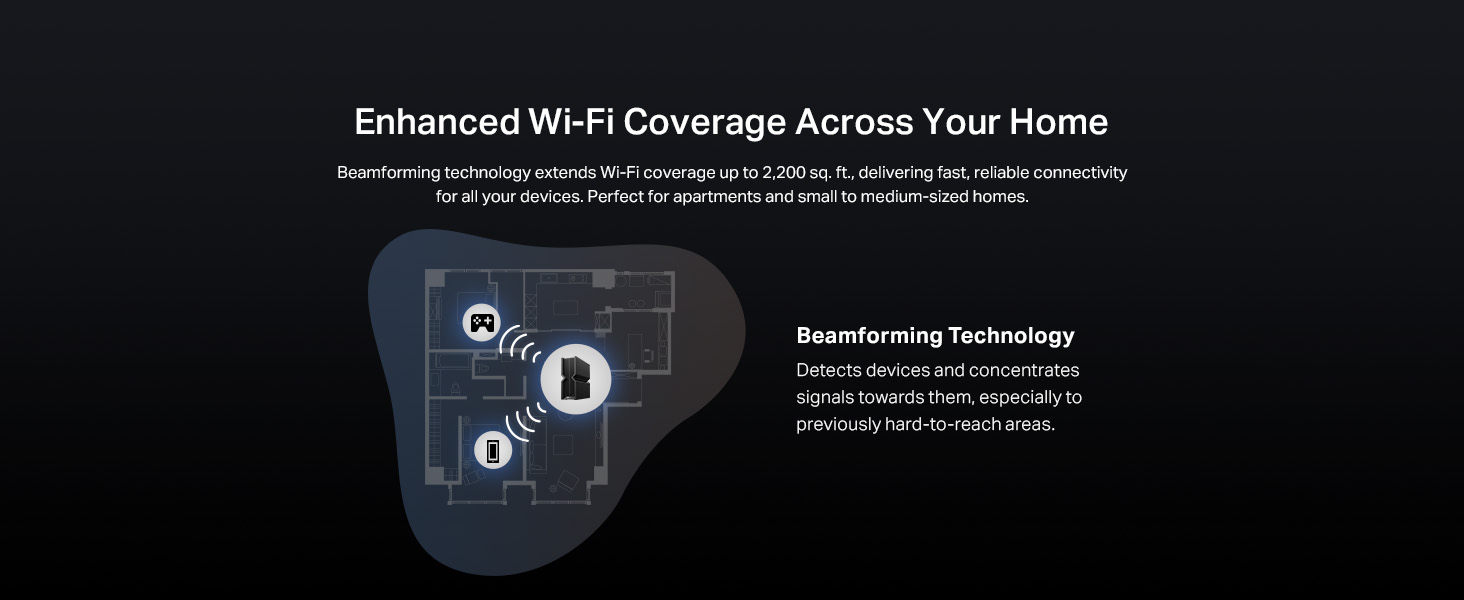
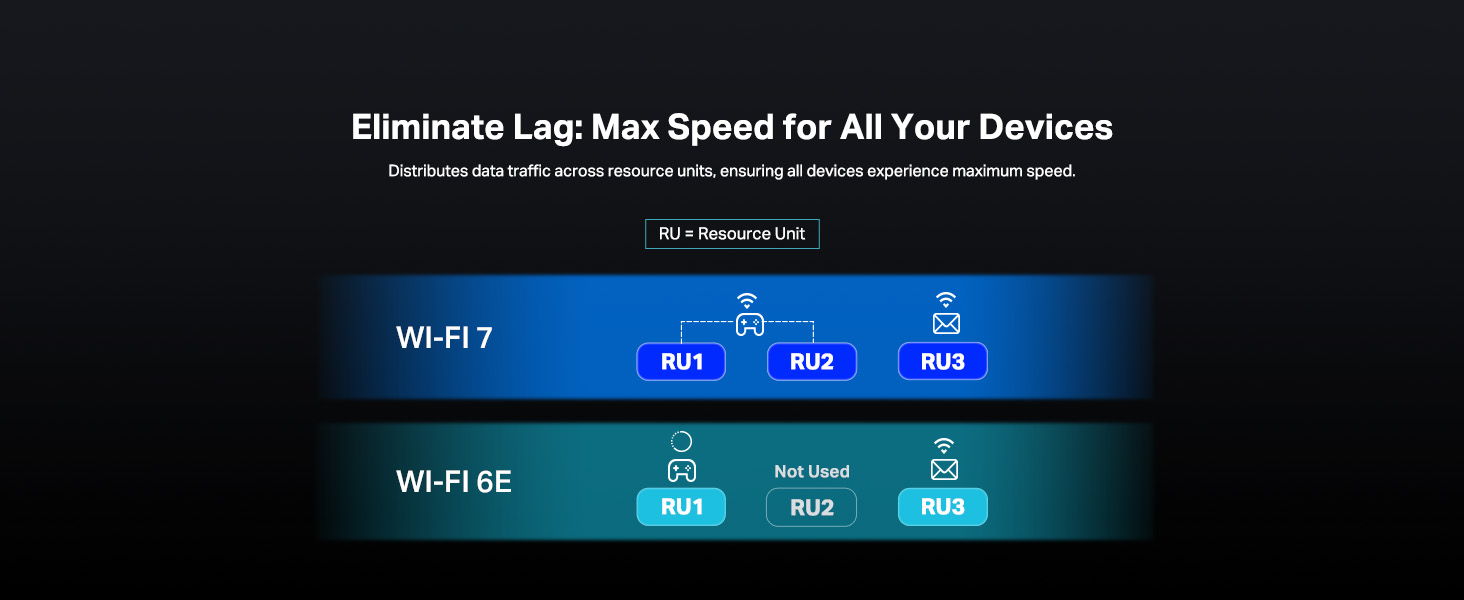
The TP-Link Archer BE700 is a cutting-edge tri-band WiFi 7 router delivering up to 15Gbps combined wireless speeds, powered by 6 internal antennas and advanced beamforming technology. It features multi-gigabit wired ports including a 10G WAN port, supports EasyMesh for seamless whole-home coverage, and integrates robust security with VPN and IoT protection. Designed for tech-savvy professionals and early adopters, it ensures ultra-low latency, high bandwidth, and future-proof connectivity for demanding streaming, gaming, and smart home environments.






| ASIN | B0DGQVB7GH |
| Best Sellers Rank | #158 in Computers & Accessories ( See Top 100 in Computers & Accessories ) #14 in Computer Routers |
| Brand | TP-Link |
| Color | Black |
| Customer Reviews | 4.2 4.2 out of 5 stars (153) |
| Date First Available | November 20, 2024 |
| Item Weight | 2.47 pounds |
| Item model number | Archer BE700 |
| Manufacturer | TP-Link |
| Operating System | Linux-based |
| Package Dimensions | 11.02 x 9.61 x 5.79 inches |
| Series | BE15000 Tri-Band Wi-Fi 7 Router |
| Wireless Type | 802.11.be, 802.11ac, 802.11ax, 802.11g, 802.11n |
A**O
Amazing and Powerful Router for 6 Ghz
Bought the BE700 router recently on Amazon Prime Day of 2025. This router is AMAZING. The only let down and I didn't know this after the fact is that 2.4 and 5 Ghz are using 2x2 or 2T and 2R antennae each. 6 Ghz band is using 4x4 or 4T4R antennae. If your devices or heavy data using network is primarily using 5Ghz, pick another router. I got lucky all of my heavy data use devices for SMB, streaming purposes can and are using Wifi 7, while only one streaming device (our Nvidia Shield Pro) uses Wifi 5. Can't complain because it's actually possible now for me to seamlessly stream 4k anime and movies through wifi from my SMB server. Setup was super easy with the router itself. The client devices, definitely not and I had to test, reconfigure, install new drivers, update Windows 11 to 24H2 preview. S24 Ultra setup for Wifi 7 was just as easy and it took the 320 Mhz, and MLO networks like a champ, but I'd say the 6Ghz on 320 Mhz bandwidth was definitely faster. I've also turned on OFDMA and MU-MIMO and I can definitely tell from my gaming that my latency is so much improved with those on. After all of the client devices setup, my gaming PC is connected at rock steady 4k up/ 4k down Mbps. That's 4x as fast as a usual Cat 6 cable network! My server is connected at 3.8k~3.2k down / 3k~2.4k up. Despite setting up MLO, I've setup the router to use 320Mhz bandwidth (double the bandwidth of Wifi 6). Both features have to be setup manually which are the smoking gun features of Wifi 7. It's like my PC and server are connected directly with USB 3.0 and this is the first time I could max out my backup and SMB hard drives over air at about 200MBps! Not to mention, whenever I take some videos off my S24 Ultra and offload it to my PC, It's also almost like connecting my phone and PC over USB 3.0 speed (slightly slower). Best of all: with all of the features on, none of my devices nor my family's devices have instability nor disconnection issues. I'm actively using OpenVPN setup with the router and it's incredible that I could finally secure being able to connect to my home network after years of using a Wifi 6 Verizon router and leaving my VPN Wifi 5 router at my parents'. Not to mention, the free parental controls are the same as any normal router out there (blocking sites or by category, limiting speed, or sleep time). The paid subscription can be a plus, but those features are some weekly website reports or algorithmic driven blocking that are definitely extras and aren't really present in usual routers. All of my IoT devices are connected to the IoT network and are isolated from any of my other devices. TLDR, this router is very powerful if you primarily have 6 Ghz devices, ESPECIALLY if you have Wifi 7 devices. All the other features are amazing and are a must to use. If you want to fully utilize this router, you have to be an advanced user, or essentially, you're using Wifi 6E speeds.
M**G
Fantastic
Fantastic router. Setup in literally 5 minutes after I named each SSID that I needed and done. Best paired with a wireless adapter capable of 802.11be/tri band WiFi 7 wireless adapter. Don't forget to go into your advanced settings for your wireless adapter and make sure it's setup on the 5GHz band for 802.11ac/ax/be.... 1) Device manager 2) Click arrow next to Network Adapters 3) Find your adapter and right click, choose Properties 4) Click on Advanced 5) In the menu, choose 5GHz and on the drop down on the right, make sure it is setup for 802.11ac/ax/be
V**.
Blazing-fast Wi-Fi 7 speeds and future-ready features packed into a surprisingly compact design.
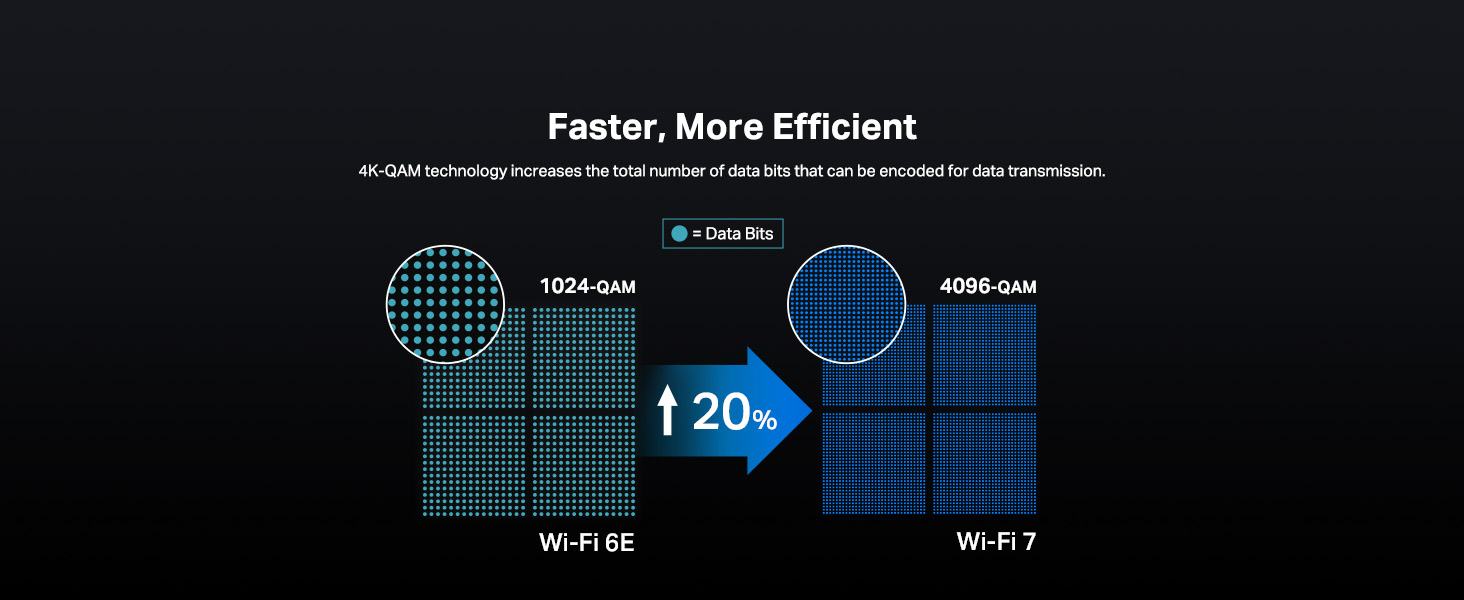
When I first unboxed the TP-Link Archer BE700, it looked like something out of a modern architecture magazine - sleek, minimalist, and clean with all six antennas tucked inside its shell. No spider-legs here. It's surprisingly compact for a tri-band 15Gbps router, and setting it up took less than 10 minutes thanks to TP-Link’s Tether app. The QR code on the back brings you right into the configuration flow, and soon enough, I had three networks (2.4GHz, 5GHz, 6GHz) broadcasting across my house. Let’s talk performance. This router is fast. Standing in the next room with a Wi-Fi 7-enabled device (like the S24 Ultra), I was pulling 850 Mbps from my gigabit fiber. From the opposite end of the house, speeds were still north of 450 Mbps - all without a mesh extender. The coverage, thanks to beamforming and internal antenna tuning, is outstanding. And with a 10G WAN port, 2.5G LAN, and three 1G LAN ports, it can handle even heavy-duty wired setups. What really sets the BE700 apart from other routers on the market and what actually sold me on this one is its future-ready architecture. Multi-Link Operation (MLO), 4K-QAM, and 320 MHz support on the 6GHz band mean it’s prepped for high-density streaming, gaming, and AR/VR traffic - assuming your devices can keep up. It also supports TP-Link’s EasyMesh for expanding coverage later without swapping out your whole setup. That said, not everything is perfect. For one, Wi-Fi 7 device compatibility is hit-or-miss right now. My Pixel 9 Pro and Galaxy S25 Ultra struggled to connect to the 6GHz BE network at first. This seems to be a broader firmware maturity issue - I read other users' reviews online and they have noted similar problems with other TP-Link Wi-Fi 7 routers. If you're buying this for instant Wi-Fi 7 support, it might be worth waiting for a couple firmware updates. There’s also a lack of nuanced access controls. You can’t set per-device rules that allow LAN-only access without internet, which is a letdown for anyone who wants to isolate devices like smart TVs or IoT gear. You get basic MAC filtering, a separate IoT network, and some solid free parental controls via HomeShield, but more advanced networking users will miss granular rule-making. And finally, no WAN failover support - which is surprising at this price. You can’t plug in a backup internet source and have the router automatically switch if your main line drops. That feature is common in other routers in this price range, especially those targeted at remote workers or small business use. Overall, I’d say that TP-Link Archer BE700 is an impressively fast and future-proof Wi-Fi 7 router with strong coverage, excellent port options, and a sleek design. It’s easy to set up and offers great performance for modern homes, especially those preparing for Wi-Fi 7. However, some may encounter compatibility issues with newer devices, and power users may find the access controls and lack of failover options limiting. It’s definitely worth considering if you're future-focused - just know you might be an early adopter dealing with a few wrinkles. Bottom line: The TP-Link Archer BE700 is a sleek, tri-band Wi-Fi 7 router that's fast, compact, and easy to set up with stellar coverage and robust wired port options. It supports future-ready tech like MLO, 4K-QAM, and 320MHz channels, making it ideal for high-bandwidth tasks. However, early Wi-Fi 7 compatibility issues, limited access control features, and no WAN failover may frustrate advanced users. Great for future-proofing but be prepared for some early-adopter quirks. I’d say it earns 4 stars in my book right now. If the future firmware update fixes a few quirks and issues, it will become a 5-star product easily. Recommended! Pros: 1. Sleek, compact design with internal antennas. 2. Fast setup using TP-Link’s Tether app and QR code. 3. Excellent Wi-Fi performance and range without mesh. 4. Supports Wi-Fi 7 features like MLO, 4K-QAM, and 320MHz. 5. Includes 10G WAN, 2.5G LAN, and three 1G LAN ports. 6. EasyMesh compatible for future expansion. 7. Offers free parental controls via HomeShield. Cons: 1. Some devices struggle to connect to the 6GHz band. 2. Limited access control options for advanced users. 3. No support for WAN failover. 4. Firmware still maturing, leading to early-adopter issues.
M**O
Bom acabamento, funcionamento e alcance de sinal muito bom.
D**N
Great range, reliable and easy to set up and run. It has worked perfectly ever since I did the initial setup and has operated glitch and trouble free ever since. This isn't my first TP-Link Router, but is by far the best Router I've ever owned.
D**U
Bought it a few days ago, easy to setup, the wifi signal is very strong. Put it in the dining room corner, the whole 3000 sq ft house can stream 30 GB movie from a Nas drive connected to it. So far I'm very satisfied.
A**.
good
S**S
Internet tombe souvent en panne, filaire et wifi. Je dois le redémarrer plusieurs fois semaine.
Trustpilot
1 week geleden
1 week geleden