
DOWNLOAD DE APP


Klantenservice
Copyright © 2025 Desertcart Holdings Limited
DOWNLOAD DE APP

🚀 Power, Speed & Connectivity — The Ultimate Intel Core Ultra Motherboard Experience
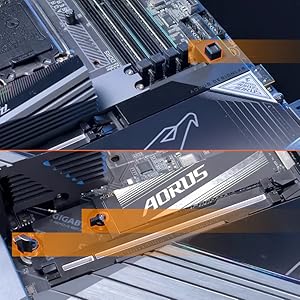
The GIGABYTE Z890 AORUS Master is a premium ATX motherboard designed for Intel Core Ultra Series 2 processors, featuring an 18+1+2 power phase design with 110A Smart Power Stages, support for DDR5 memory up to 5600 MHz across 4 DIMMs, and five M.2 slots including dual PCIe 5.0 Gen 5 NVMe for ultra-fast storage. It offers cutting-edge connectivity with WIFI7, 10GbE LAN, dual Thunderbolt 4 ports, and extensive USB options. Enhanced thermal solutions and DIY-friendly EZ-Latch mechanisms ensure optimal performance and easy upgrades, backed by a 5-year warranty.





| ASIN | B0DJP9LCYC |
| Best Sellers Rank | #111 in Computer Motherboards |
| Brand | GIGABYTE |
| CPU Model | Intel Core Ultra 5 |
| CPU Socket | LGA1851 |
| Chipset Type | Intel Z890 |
| Compatible Devices | Personal Computer |
| Compatible Processors | Intel Core Ultra 200 Processors |
| Customer Reviews | 4.3 out of 5 stars 152 Reviews |
| Graphics Card Interface | PCI Express |
| Item Weight | 5.6 Pounds |
| Main Power Connector Type | 24-Pin |
| Manufacturer | GIGABYTE |
| Memory Clock Speed | 5600 MHz |
| Memory Slots Available | 4 |
| Model Name | Z890 AORUS MASTER |
| Model Number | Z890 AORUS MASTER |
| Number of Ethernet Ports | 1 |
| Number of Ports | 16 |
| Platform | Windows, Windows 10, Windows 11 |
| Processor Socket | LGA1851 |
| RAM Memory Technology | DDR5 |
| Ram Memory Maximum Size | 256 GB |
| Total PCIe Ports | 1 |
| Total SATA Ports | 1 |
| Total Usb Ports | 14 |
| UPC | 889523045107 |
| Warranty Description | 5 Year Manufacturer |
C**C
Super performance, Super quality and looks great
This board is just Super all around. I am a gigabyte fan and it is the only brand Mobo I will buy and have bought for the past 20 years. I have never had any trouble with them once setup. At any given point, I have between 2-3 computers running - My primary and my backup/media server. I normally go with the Gaming Series because they typically offer better performance/price ratio, but needed some additional features and the Aorus Master was on sale at about the same price. And WOW, taking it out I immediately knew this was a well built motherboard, the heat sinks and re-enforced or UD slots for the GPU and nvmes is amazing. It is probably the most beautiful looking board I have ever seen. I typically dont care about that since I am into performance over anything, but It is a looker for sure and just super quality. Things that are standouts on this Master model are 5 Nvme slots with 2 being Gen 5. Two built in Thunderbolt 4 ports which can also be used as a network connection offering 20Gb network connection. 2 USB gen whatever headers on board (the blue ones), typically there is only one, more ARGB and fan connectors, included extra temp sensors and even a Ram cooling fan. Assembly is normal, its just always a pain swapping boards out of an existing case. It came with version 9 of the BIOS and I had to update twice, once with the control center and once manually. I also had to manually download the network driver because I was having weird dropouts initially. I think because of my OS and using the RT network drivers before and this is a new driver for aquiscent or (whatever itis) that can go up to 10Gb if you have the correct hub and network in place. Performance is great. Now about the shared PCI lanes. I have a 5070ti installed and a couple Gen 5 Nvme in the primary slot. You can see the 40k GPU benchmark under those conditions. The primary gen5 slot does not share lanes with the GPU, The PCI lanes are shared with the second Gen5 slot. Then the GPU runs at Gen5x8 instead of x 16, The 39k bench is with the second gen 5 nvme installed. You can see the slight performance decrease across the benchmarks. So its up to you if you use the second Gen5 slot, but if you dont you have full speed and pci lanes on the primary NVME and GPU. This board is a premium board, with great performance and so many features and possible upgrade/usage paths. Highly recommended for Gaming or actual graphics/3D/AI work. BTW, I also have mine running in Level 2 Ultra mode in BIOS which is super quick to get into and easy to tweak with full access to all timing/voltage settings. I use XMP, enabled low latency and forced Gear 2 for my Ram settings
A**R
An extraordinary motherboard!
This is a superb motherboard. There are lots of Pros, so I'll focus on the only Cons I came across. I tested this motherboard in Windows 11 Pro. The network Ethernet driver adapter Marvell AQtion is good but a bit dummy. If you change Wake on Lan settings it hangs as it's unable to negotiate with the motherboard the new changes and loses connection to the internet. The only way to bring it back to life is by turning the power off from the PSU and unplugging the cable from the wall as well, wait for 10 seconds and turn on and plug everything again. A software reset in Windows won't work, you have to do a hardware reset so the chip discharges energy. Unplugging the Ethernet wire from the modem/router and rear IO of the motherboard is recommended too if it doesn't work the former. Edit: One other thing I forgot to mention. Another chance of improvement relies on the Gigabyte Control Center (GCC) software. It is really buggy, at the point where you choose to install a bunch of drivers and only some of them are installed, or if you choose to install one, the next screen is completely empty, but anyway I managed to do it by clicking the button even though nothing is shown on screen. Moreover, this process you'll need to repeat it for each and single item in the list, otherwise, you'll think you've installed everything you needed but then you start to realize that things don't work as expected, and that's because the specific drivers were not installed at all as you may have thought. Keep this in mind as it was not a good experience during the setup in Windows, but anyway, nothing that cannot be solved via software update in the future. I won't downgrade my rating on this motherboard because of that, as this issue will be present on all Gigabyte's motherboards and it can be perfectly fixed as I mentioned. All in all, the hardware is solid as rock!
A**Y
Outstanding Performance and Build Quality
This motherboard worked great out of the box and had no hardware issues. A BIOS update was required for full compatibility with my CPU, but the built-in Q-Flash Plus feature made the process quick and easy. Assembly was straightforward. The layout made it easy to install the CPU, GPU, and NVMe drives, and the tool-less M.2 slots were a nice touch. Everything about the board feels premium and well thought out. VRMs and cooling are more than capable under load. If you're building a next-gen system, this board checks all the boxes. Gigabyte delivered a strong, feature-rich platform. Highly Recommended.
B**T
Terrible Support System
Caution: Their customer support is terrible. Their "chat" is always "unavailable at this time". I put in a support ticket because one of the memory slots went bad. You can't talk to anyone, only put in a ticket which may take up to a week for them to answer it, if they ever answer it. Not a good situation to be in when your pc is out and you have to wait for who knows how long to get a response. When the mother board was installed, it ran great for about 6 months, then started having problems with the memory slots, which isn't terrible for a pc, but trying to work with their supports is terrible. Last "Gigabyte" product I'll every buy. Caution!
P**L
An amazing quality board with great features!
If you're using a 14900k and want a refreshed LGA 1700 board, this is the one to get. I went through issues with the ASUS Dark Hero and the ASRock Phantom Gaming Nova. I had one Dark Hero arrive with a crack in one of the DIMM slots and the other with a failing audio chip. The ASRock Nova was dead on arrival, so I decided to give GIGABYTE a chance, and I'm beyond happy I did. The motherboard is gorgeous and built like a tank. It has excellent functionality, especially for my needs. The bios has been drastically improved and is extremely easy to navigate, which is a vast improvement from what I remember. I have no issues other people have reported on, like coil whine or the motherboard not recognizing all the available RAM. The QC on mine is flawless. There's not one complaint on my end. It's running my 8000mhz 48 GB RAM kit at 7600mhz using an XMP profile with minor voltage changes with no errors on MemTest, and I'm using the Instant 6HZ feature to automatically OC my CPU. I'm using a thermal grizzly contact frame and a kryosheet. I couldn't be happier with the performance of this motherboard. I will now consider GIGABYTE boards in the future, given that they have won me over with the Master X.
J**R
A good motherboard for creative work
I chose this motherboard as it has a good feature set for the price, though I wished the PCIe lanes were more plentiful and not so much either or when it comes to the graphics card in the primary slot and the primary NVMe drive slot. However, to be fair this is a fairly common thing for consumer grade motherboard in general. This board does contain 5 NVMe slots, one is gen 5, the rest gen 4, 2 of them are connected directly to the CPU as your boot drive can be in the top gen 4 slot just below the primary GPU expansion slot, and the only x16 slot, the other 2 are either x8, or x4 but all have a physical x16 layout. Like many board out there, if you run 2 GPU's, both will run at x8, but the combines lanes means roughly more performance from both GPU's, crucial for high def video editors when time is of the essence. This means faster renders overall can be expected. Even SATA takes away from using some of the NVMe slots. At the moment, I have 2 NVMe drives, one for boot/programs, one for video caching for editing, one SATA SSD for work ion video projects and a spinning drive of 4TB's for archive storage of all video related material and final video rendering to have easy access to should I need to recut or reuse a clip for another project etc. This board is the later version of the Aero G. It originally came out as the Z790 chlipset, socket 1700, but the 15th gen Core Ultra chips now use the 1951 socket and updated Z890 chipset. The older version only had one 2.5GB LAN, now it has 2, and 2 USB C ports on the back. The current one has only 1 USB C port, and can do USB C alt mode for display port etc and can be used for charging and is capable of USB 4 or Thunderbolt as well. The 2 LAN ports are for either redundancy or to double up and up the throughput I think. So far it's been good and the I/O shield come preinstalled and sits in a Fractal Focus G case and so far it seems to be running well. I have updated the BIOS twice, once for the CPU's microcode update and a later BIOS update just a few days ago. The BIOS flash feature is a dedicated USB port on the back that can be run from the BIOS page, accessed during the boot process (del) and click on the Q Flash button in the EUFI BIOS software and go forth, but you must unzip the file and it'll know which one to load and will flash the ROM for you. It's easy, just make sure to have time and it'll shut off during part of the process and will repower on and will let you know it's done. Otherwise, needless panicking may result in you shutting it off, dumping the power and bricking the motherboard. Once that happens, it's game over, a new board will need to be procured. Once everything was installed and ready to boot up for the first time, it came up and allowed me to install the OS, Windows 11 Pro that I had already downloaded and unzipped to a thumb drive. Once that was done, I could install the drivers for the graphics card and for the large part, it all went smoothly. Just had to ensure the motherboard got the proper boot drive sequence so it can boot into Windows and it loads Overall a good choice for creators that does not cost and arm and a leg, and I believe it's even less than the Asus ProArt boards for creators. BTW, there is an Aero D, but it's the extended ATX size, so it's a bit longer in one direction and does contain more features, including I think 5GB and a 10GB LAN ports, I think more NVME slots 2 PCIe slots etc. Overall, a good board that does not break the bank with a decent set of features.
A**R
Great AI MB for Tesla & 5090 Liquid GPUs
Installed Ultra 7 285K in Gigabyte Z890 Aero G with Artic iii CPU AIO 360, 5090 MSI Liquid, two sticks 96Gb Corsair 6000 and Tesla GPU in Midsize NZXT H7 HiFlow. Set BIOS at 125W TPD, 250W power limit, underclocked 4.6, running 20 cores 100% under 70C on simulations w both GPUs full CUDA for months without a glitch. Using FanControl thru CPU_OPT for Tesla cooling perfectly. Much Cooler and Stabler than 7800x3D and I9-10900 prior builds.
I**N
Amazing Mobo!
Amazing board. Supports latest gen Ultra 9 CPU, and Pcie 5.0 M2. Plethora of features for overcloclers but runs crazy fast without using any of them! Highly recommended!!
Trustpilot
5 dagen geleden
3 weken geleden