We remain fully operational. Our teams are working around the clock to ensure your deliveries continue safely.

DOWNLOAD DE APP


Klantenservice
Copyright © 2025 Desertcart Holdings Limited
DOWNLOAD DE APP


🚀 Elevate your home network to pro-level speed and control—because buffering is so last decade.
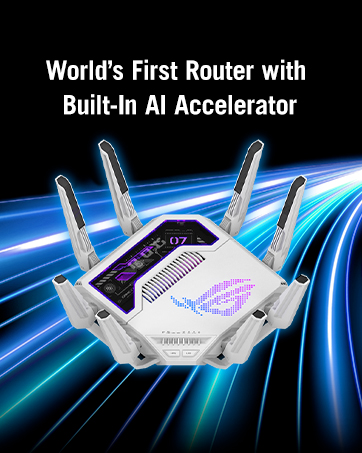
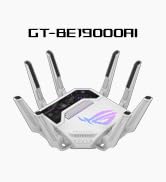
The ASUS ROG Rapture GT-BE19000 is a cutting-edge tri-band WiFi 7 router delivering ultra-high speeds up to 19 Gbps via 320MHz channels and 4K-QAM. Equipped with dual 10G LAN ports, AI-driven WAN optimization, and triple-level game acceleration, it’s designed for power users and gamers seeking seamless, low-latency connectivity. Additional perks include AiMesh compatibility, free network security, and integrated WireGuard VPN, making it a versatile powerhouse for modern home and office networks.





| ASIN | B07MNZNPLZ |
| Are Batteries Included | No |
| Best Sellers Rank | 23,874 in Computers & Accessories ( See Top 100 in Computers & Accessories ) 189 in Routers |
| Brand | ASUS |
| Colour | Style7 |
| Customer Reviews | 4.6 4.6 out of 5 stars (37) |
| Date First Available | 1 Jan. 2019 |
| Guaranteed software updates until | unknown |
| Item Weight | 2 kg |
| Item model number | 90IG0850-MO9A0V |
| Lithium Battery Energy Content | 2.6 Watt Hours |
| Lithium Battery Packaging | Batteries contained in equipment |
| Lithium Battery Weight | 5 Grams |
| Manufacturer | ASUS |
| Operating System | Linux |
| Product Dimensions | 35.04 x 35.04 x 22.06 cm; 2 kg |
| Series | TUF Gaming AX4200 |
| Voltage | 12 Volts |
| Wireless Type | 802.11.be |
N**N
Feature-packed router, could do with a bit of polish but better than equivalent alternatives
I bought this to replace a similar model by a competitor. I have to say, while it may not be perfect, this router is much better. Firstly, it has a lot of functionality built in. I am glad to even have basic things like local DNS on my network that other routers don't have. Wireguard VPN is another feature I'm pleased to have. Hardware-wise, having two 10 GbE LAN ports is handy for having fast speeds between my desktop and my NAS, and it allowed me to ditch the separate 10 GbE switch I was using before. I can reach 9.5 Gbps throughput between those two devices (some other reviews seem to suggest speeds are limited, but not in my case). Wi-Fi-wise, I have no complaints. The router has MLO, but as a technology it doesn't seem worthwhile yet. Firstly, on the router, you use it as via the Guest Network Pro feature which I wasn't expecting, but it isn't a big deal I guess. But secondly, my Pixel 8 did not get on with it so well (after a while, the 5/6 GHz Wi-Fi stopped working on the phone until the phone was rebooted). This wasn't the router's fault though. The web interface could do with a bit of polish, but it works well enough. The app is also not bad. The two downsides I have come across are: - the Aura lighting makes a high-pitched noise for most colours. I turned it off - I have DHCP problems via Ethernet with the latest firmware version. I downgraded to an older version to fix it. Hopefully this will be resolved in time. Be aware that some features like AI Protection and parental controls require opting in to some Trend Micro thing. I'm not particularly interested in those features anyway so have left them off. I'd give the router 4.5/5 overall.
N**L
Amazing speed for power users
Excellent speeds and range but only really for power users with high speeds over 2 gig
R**S
Unstable…
This router has a lot of exiciting features, but unfortunately this is by far the most unstable router I ever used. WiFi constantly dropping. For a product that costs over 400 quid, I would expect it does its basic job.
B**M
Ich habe den ASUS ROG Rapture GT-BE19000 primär für die VLAN-Unterteilung gekauft – ein Hauptkaufargument war zudem das moderne Wi-Fi 7 mit 6-GHz-Kanal. In technischer Hinsicht liefert der Router genau das, was ich mir versprochen habe: leistungsstarkes WLAN, große Kanalbreiten und eine stabile VLAN-Segmentierung. Was mir allerdings nicht so gut gefallen hat: das Gerät ist ausgesprochen groß und wirkt dadurch wie ein regelrechtes „kleines Monster“ im Wohnraum. Die Dimensionen und die markante Gaming-Optik sind für mich etwas überzogen, vor allem wenn man den Router in einem normalen Wohn- oder Arbeitsbereich nutzt. Positiv hervorzuheben ist die moderne Hardware-Ausstattung und die umfangreiche Feature-Palette Negativ fällt hingegen die optische Präsenz und Größe des Geräts ins Gewicht.
S**N
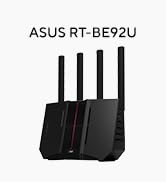
If there is a router that has it all, it's this one. WiFi 7 with support for 6GHz band to get the maxium speed wirelessly. two 10 Gb/s ports, one for WAN/LAN and one for LAN, along with four 2.5 Gb/s ports (one WAN/LAN and three LAN). Setup is a breeze. I connected my other ASUS RT-BE92U WiFi7 in AiMesh mode and now I get very large coverage across all areas of my house using a single SSID. Also connected my VPN to hookup my IP phone and it works flawlessly with 0 disconnections and very low latency.
A**H
ممتازه حسن كثير الاتصال واللعب
R**À
Premessa: arrivo da una esperienza deludente e frustrante con un TP-Link Archer BE800 (quindi un modello con specifiche "simili", sulla carta), che mi ha snervato all'infinito e mi ha convinto a scollegarlo e "archiviarlo". Il ROG Rapture GT-BE19000 non è un semplice router, ma una centrale di controllo per chi pretende il massimo dalla propria rete domestica, specialmente quando si hanno decine di dispositivi IoT e la necessità di gestire flussi dati senza rallentamenti o incertezze software. PRO: • Hardware e connettività ★★★★★ (5 stelle): Un mostro di potenza con due porte 10G reali (1 WAN e 1 LAN), quattro porte 2.5G, una porta 1G e due porte USB (USB 3.2 e USB 2.0) che permettono di collegare contemporaneamente un NVMe per i backup (ad esempio) e un altro dispositivo, surclassando la concorrenza che spesso si ferma a una singola USB. Lo sto sfruttando con una FTTH TIM a 2.5Gbps e mi permette di toccare i 2100 Mbps (circa) reali in download senza la minima incertezza; upload stabile tra i 950 e i 990 Mbps. • Software e funzionalità ★★★★★ (5 stelle): La gestione è su un altro pianeta rispetto al mio precedente TP-Link Archer BE800; qui si possono creare reti wireless multiple con personalizzazioni chirurgiche (MLO, IoT dedicata, guest isolata, ecc.), gestire VPN complesse con VPN Fusion (consente di specificare quale dispositivo, ad esempio, deve collegarsi sempre dietro VPN) e sfruttare applicazioni USB avanzate per trasformare il router in un mini-NAS o sostituire una VM creata su altro hardware. Il paragone, lato software, è impietoso rispetto al precedente. • Stabilità e copertura ★★★★★ (5 stelle): Le otto antenne esterne non sono solo estetica ma garantiscono un guadagno di segnale reale, risolvendo i lag delle videocamere esterne (parlo per esperienza personale) e i cali di banda che il precedente Archer BE800 non riusciva a gestire, nonostante l'hardware — sulla carta — sia simile. • Personalizzazione LED ★★★★★ (5 stelle): Fortunatamente il software permette di spegnere completamente i LED RGB, salvando il salotto da un effetto "discoteca anni '90". Decisamente troppo tamarro per i miei gusti. • Esperienza d'uso ★★★★★ (5 stelle): La decisione di cambiare è maturata dopo i troppi problemi del BE800 (RAM satura senza motivo, assistenza TP-Link inesistente e bug irrisolti, oltre ad una app mobile "castrata") e questo ASUS si è rivelato un investimento azzeccato grazie a un prezzo competitivo e prestazioni nettamente superiori/migliori. • Packaging ★★★★★ (5 stelle): L'esperienza inizia già dalla scatola, splendida e curata in ogni dettaglio, che fa capire subito di avere tra le mani un prodotto di fascia premium. • APP Mobile ★★★★★ (5 stelle): Funziona bene e ha tutte le impostazioni che possono tornare utili (e oltre), a differenza dell'app del TP-Link. Il problema è, come leggerete tra poco, solo il "menu"... CONTRO: • Interfaccia utente ★★★ (3 stelle): I menu sono sviluppati in modo irrazionale e illogico, obbligando a cercare impostazioni fondamentali in sottomenu "strani" (ad es.: la VLAN ID per la PPPoE nel menu LAN anziché in quello WAN); sembra quasi una caccia al tesoro progettata da un sadico. Un altro esempio palese è quello di chiamare la stessa opzione in modo diverso, tra interfaccia WEB e APP mobile oppure rendere disponibili opzioni via APP e non via WEB (il banalissimo speed test, ad esempio). • Integrazione DNS ★★★ (3 stelle): L'adozione di AdGuard DNS come servizio partner (si spiegano le cose, con questa parola) è limitante, dato che NextDNS - ad esempio - resta superiore per flessibilità e log, anche se è comunque possibile configurare quest'ultimo manualmente tramite DoT, come ho fatto io. Ovviamente NON è obbligatorio adottare/abilitare AdGuard DNS, però è un peccato che non ci sia scelta. ➟ Conclusioni: Dopo aver perso la pazienza con i blocchi improvvisi e il supporto nullo di TP-Link, per il precedente router, questo ragno rosso e nero ha riportato la pace nella mia rete locale gestendo circa 50 dispositivi (costantemente collegati) senza battere ciglio. Se cercate un controllo totale sulla vostra infrastruttura domestica e non avete paura di navigare in menu un po' caotici, il passaggio a questo ASUS è un obbligo morale, specialmente se lo trovate a un prezzo vantaggioso. N.B.: La valutazione sarebbe dovuta essere da 4 stelle, ma alzo a 5 per via del prezzo "offerta" a cui ho acquistato (480€)
V**S
Very intuitive and straighforward setup. Yet it is quite large.
Trustpilot
1 maand geleden
2 weken geleden