
DOWNLOAD DE APP


Klantenservice
Copyright © 2025 Desertcart Holdings Limited
DOWNLOAD DE APP
![Yale SD-L1000-PB Conexis L1 Smart Keyless Door Handle for Home Security, Remote Lock/Unlock, App Control, Key Card and Phone Tag Included, Polished Brass Finish [BSI Approved]](https://m.media-amazon.com/images/I/51A4oZTq5rL.jpg)


🔐 Unlock the future of home security—because your door deserves to be as smart as you are.
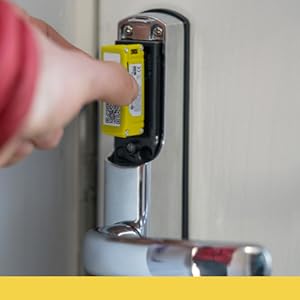
The Yale SD-L1000-PB Conexis L1 is a polished brass, BSI-approved smart door handle designed for keyless home security. It supports remote locking/unlocking via Bluetooth and app control, includes key cards and phone tags, and fits most PVC and composite doors between 44-70mm thick. Powered by 4 AA batteries with low battery alerts, it offers tamper alarms and bank-level encryption. Compatible with Z-Wave and SmartThings modules, it enables seamless integration into smart home ecosystems, providing flexible access management and real-time notifications.



| ASIN | B078SJ883F |
| Best Sellers Rank | 19,283 in DIY & Tools ( See Top 100 in DIY & Tools ) 9 in Dead Bolts |
| Brand | Yale |
| Colour | Polished Brass |
| Connectivity Protocol | Bluetooth |
| Control Method | Remote |
| Controller Type | iOS |
| Customer Reviews | 3.5 out of 5 stars 1,943 Reviews |
| Finish | Chrome |
| Global Trade Identification Number | 05011802277670 |
| Included Components | 1 x Smart Door Lock |
| Item Dimensions | 20 x 35 x 270 millimetres |
| Item Type Name | Smart Door Lock, In-App Control, Key/Phone tags, Remote Lock/Unlock, |
| Item Weight | 1.85 Kilograms |
| Item dimensions L x W x H | 20 x 35 x 270 millimetres |
| Lock Type | Electronic Lock |
| Lock type | Electronic Lock |
| Manufacturer | Yale |
| Manufacturer Warranty Description | 2 year manufacturer. |
| Material | Polyvinyl Chloride |
| Model Number | SD-L1000-PB |
| Recommended Uses For Product | Home Security |
| Recommended uses for product | Home Security |
| Shape | Rectangular |
| Special Features | 2 Year Guarantee, Works With An App, Kitemarked Product, Weather Resistant |
| Style | Yale Conexis L1 |
| Unit Count | 1.0 count |
I**S
Great product - Ignore the negative reviews
You first need to check that the distance from the centre of your handle to the centre of your lock. If it is 92mm it will fit, otherwise you are out of luck. It is easy to fit. However, I had an issue removing the original euro cylinder. The manufacturer of my door decided to use Loctite and low quality screws. This was on the main screw on the edge of the door which holds the euro cylinder. The result was the screw became threaded. I got it out using a screw remover tool and my Dewalt 18v drill. Once the old handle and lock were removed, the install of the new lock was straightforward. Take time at this point to make sure everything is correctly aligned. There is a bit of ‘play’ before you torque the screws, so at this point make sure the lock is turning and not getting snagged. This happened to me but I realised if I loosened the screws and then tried it while loose, it would turn, from there I just tightened the screws and it worked fine. When programming your fobs and cards, make sure you complete this all in one go. I have heard it is not possible to add more later without removing them all and adding them all back with the new devices. I programmed mine all in one go and have never had a problem. The lock has performed admirably for more than a year now. Recently after the install, we would occasionally get the lock spinning sound when it was trying to engage the lock. This was our fault for not quite engaging the locking mechanism on our door. This is easily rectified by pushing the door handle up with a little bit more force. The Yale app is not that good. However, it did get a large update around the middle of 2018 and was a large improvement. It removed the ridiculous ‘turn the phone’ to unlock the door feature. Now you just press the unlock button (Genius!). I bought the lock to integrate with Samsung Smartthings. Why would I want to do this? When integrated with ST you have total control of the lock. I had to buy the Smartthing Module 2 https://www.amazon.co.uk/Yale-Smart-Door-Z-Wave-Module/dp/B07965NDRN/ref=sr_1_fkmrnull_2?keywords=yale+smartthings+module&qid=1554798195&s=gateway&sr=8-2-fkmrnull It is about £42 but well worth the investment for the benefit which become available. I have set the lock up so that it will automatically unlock the door when one of the ST presence sensor is detected. https://www.amazon.co.uk/Samsung-SmartThings-F-ARR-UK-2-Presence-Sensor/dp/B01LZK6ANK/ref=sr_1_fkmrnull_1?keywords=smartthings+presence+sensor&qid=1554798319&s=gateway&sr=8-1-fkmrnull This works very well. When arriving home, the door is unlocked automatically and I do not have to mess around with keys. This is particularly useful when carrying objects like shopping bags and not having to put them on the wet floor to find my keys in my pocket. I have also integrated the lock with Phillips Hue lights. I have set some of them to a red colour when the door is unlocked. This has warned us a few times that the door is unlocked. I can unlock the door remotely to let in family and friends if we are not home. There are so many negative reviews about this product – I have my own thoughts as to why. Firstly, I believe that if the mechanism is not aligned correctly, it is going to cause problems later down the road. From batteries not lasting long and to the unit prematurely failing; this more than likely down to increased friction. Secondly, several users of the Z Wave module have also been highly critical. One aspect about Z Wave devices which needs to be appreciated is Z Wave does not use the existing Wi-Fi signal, it uses its own network and a different frequency. Therefore, in order for the device to work optimally, the lock has to have access to a strong Z Wave signal. Most Z Wave devices which are mains powered repeat the signal and improve the strength and range of the network. If the signal is weak, it will have a negative impact on the battery life. I use rechargeable batteries for the lock. The instructions tell you not to, however, I have found not ill effect for not following their instructions. Overall, the lock has work out great for us over for over a year. It is more convenient, feels high quality and looks good too. I ignored the numerous bad reviews and thought it was down to a bad installs, which created the bad experiences. I am glad I ignored the negative reviews.
S**L
*** Atomic Lemon - AVOID!!! ***
I purchased this lock, despite all the negative reviews, in the hope that I could get it working on my door. Some of the negative experiences seemed to be related to either not reading the instructions, or a lack of mechanical aptitude when installing the lock. (The lock clearly won’t fit some doors, but that didn’t seem to be a problem for me.) From an installation perspective, everything was quite straightforward. I was able to install the lock, and it did lock my door as expected. Despite the complaints from a couple of users that you have to lift the handle in order to lock the door, this is actually an inherent design feature of multipoint locks. You simply can’t expect any electronic lock motor to have the power to actuate the handle to lock all of the various points on the door, especially when running on AA batteries. Personally, my biggest problem is lifting the handle and forgetting to turn the key in the lock to secure (and then forgetting to double-check), thus leaving my door unlocked. The Conexis L1 ostensibly solves this problem by locking the door for you whenever you lift the handle. Unfortunately, this is where my positive experience ended. First and foremost, as mentioned by other users, every interaction with the lock produces annoying beeps or chimes, which, while hardly audible from the outside, would wake anyone sleeping in my home, even through closed doors. This “feature” apparently can’t be disabled. Goodbye, peace and quiet. But it gets worse… Having followed the instructions to-the-letter, and paired my lock with the initial credential (the credit-card token), I now had to pair with the iOS app in order to provision more tokens. I had the foresight to buy 4 extra key-fobs, because I’d read of a lot of issues with the app, and didn’t fancy waiting for Bluetooth to connect, or twisting my phone like an idiot to unlock my door. (I don’t mind carrying a key fob, and I need one for the common door in my block anyway, so it wasn’t an issue for me.) However, according to the instructions, beyond the master token that you initially pair (as above), the rest must be added via the app. Upon downloading the app and registering my account (including verifying my email address), I was presented with a message that I had to log out and back in, because my account was restricted for some reason. Not a good user experience, but I did as asked, and it seemed to proceed to the next step. I clicked “Add New Lock”. The app presented me with instructions on what to do next: Press the “R” button on the lock, notice the purple light on the front, then press that to turn it blue (activating Bluetooth). The app and lock seemed to connect, and I saw “Processing key” for several minutes… then, a completely cryptic “Error code: 3 (please try again later)”!!! I tried the process again, only to have the same long wait, followed by “Error code: 9”. This was the response I received through several more retry cycles. I decided that it was an app issue, and went online to troubleshoot. Absolutely no mention of these error codes exists online. No mention in the Yale FAQ - just a very brief blurb of what to do if the app won’t connect to the lock. (Make sure you turn on Bluetooth on your phone - DUH?!?) I decided to uninstall and reinstall the app, and was then presented with a message asking whether to: 1) Delete the old keychain (currently not a supported feature, as it turns out); 2) Restore keychain (the only real option); or 3) Skip (resulting in restricted app functionality). Why give someone a choice when there is only one right answer?!? Of course, this didn’t solve my problem. I received the exact same response from the app: “Error code: 3”, followed by a string of “Error code: 9”. By now, I had decided to avoid the app entirely. Despite the instructions that ship with the lock not mentioning it at all, I was able to find an older instruction manual online, that indicates that you *can* pair multiple tokens directly with the lock (without using the app). However, you have to pair all the tokens at once during the same pair cycle, and if you want to add a token later, you have to re-pair all of the *existing* tokens (whether card, fob, or sticker-tag), plus the new ones. Setting aside the idiocy of this for a moment, I decided to re-pair the only token I had thus-far paired (the card), and also the *single* fob shipped with the lock, plus the extra 4 I had purchased. Wouldn’t you know, I could not get the lock to pair with any of them? I followed the instructions to the letter, but only got a series of annoying beeps. By now, a half-hour intallation had turned into 90 minutes, and I had tickets to a show, and didn’t want to leave my home with only a single key, that might get lost, and lock me completely out. So, by now completely frustrated, I decided to perform a factory reset, and re-pair from scratch. Yale makes this super-complicated. You have to: 1) Remove the batteries; 2) Half-disassemble the lock, so that you can access and unplug the connection cable; 3) Hold down the “R” button while you re-insert the batteries; 4) Listen for a single beep. When I tried, this, the lock began beeping at me continuously, loud enough to alert the neighbours, yet I persevered. You are then meant to: 5) Remove the batteries again; 6) Reattach the cable; 7) Replace the batteries. Now I received the same set of continuous, annoying beeps. I tried the factory-reset process two more times, with the same results. I was now in possession of a bricked Yale Conexis L1, which I had to dismantle and replace with my old lock. I emailed Yale, but it took them over 36 hours to respond, and all they could tell me was that they’d fixed the issues with the app, and to give it another try. No mention of the problems with the factory reset, or what I could do to fix the actual lock. So I’m adding my negative review to the pile. I’ve since read every 1-star review, including several people’s who were locked out of their houses, or at least couldn’t gain access through the door with the Conexis L1 installed. My home is on the 6th floor, with only a single external door, and I don’t fancy rappeling to the balcony to gain access in the event that this completely-unreliable lock were to fail on me. Here is the tl;dr version: 1) Physical installation is straightforward. 2) The poorly-developed iOS app is buggy and unreliable - amateur at best. 3) Multiple reports of the lock failing after some time, which WILL lock you out. 4) Customer service is extremely poor. 5) The lock beeps loudly every time you use it, and yes, this will wake your family when you come in late! *** NOTE: I am a 25-year veteran Software Engineer, with an MSc Information Security. My professional opinion is that this lock has multiple flaws, both in the electronics (or at the very least, in the firmware) and the iOS app. There doesn’t appear to be any way to update the lock firmware, either, so no way to fix any bugs. Given the importance of a door lock as the first line of defence for your home, I would not risk placing this device on my door. It is simply not well-tested, and issues like I had should NEVER happen with a released product. Some minor bugs might be expected, but no one should run the risk of being locked our of their home without adequate support. Yale support is by web-form only, and they have stopped posting their phone/email in the copy/paste responses they attach to each of these reviews. THIS PRODUCT IS A RADIOACTIVE LEMON. AVOID!!! *** PS: Yale will probably copy/paste another “Thoughts and Prayers” message below, but without any actual help except referring you to their web form, which serves to prevent any meaningful or timely contact with customer service. You have been warned.
C**S
Excellent, Quality Built Lock
Absolutely love this lock! I replaced a cheap Chinese one I got on Amazon that failed after a few months and the difference in quality is unreal. I ran into a few problem when installing the lock, I recommend using the instruction manual and not the video guide for install. The minute I realised what the issue was, the lock worked a treat. It's quick to unlock and lock and the app works great on Android. The beeps are slightly annoying when you don't unlock the internal mechanism completely, but apart from that no major complaints. Battery life is also fantastic!
T**D
Great Lock - App is Rubbish - Buy the Smart Hub!
I have had this Digital Yale Smart Lock installed on my front door since 2017 - so a long time now! The lock itself is fairly substantial, much bigger and heavier than my previous door handle/lock. It feels very well made and give a good impression when removing from the box that this is a great security lock. The handle and unit are chrome with a plastic RFID reader. On the rear of the lock is a plastic screw cover which takes 4 x AA batteries and a plastic cover for the reset button and additional yale modules (more about them later). So why would you want a smart lock? It's technology... and i personally love anything tech related. It's also great not to have to carry keys around with you. The app boasts unlocking and locking via the conexis app, as well as little plastic RFID fobs and credit card type RFID passes. You get a selection of these in the box. Fitting - this was fairly straight forward and i had zero issues with this. The lock alignment needs to be perfect though. If you are unsure then ask a local locksmith to fit. However this product is certainly ok for DIY installation. I did it myself in about 20 mins and had no issues. As mentioned before it is a very big and chunky lock so take this into consideration when purchasing. Locking/Unlocking - to lock the door you must pull up the handle. Although the lock is fully motorised it will not lock the multi-point locking section of the door. It only electronically locks the deadbolt. To unlock you can either use the app, an RFID fob or if inside you must depress the knob and turn. This lock would be no good for an elderly person who has dexterity issues, due to the knobs push in and turn design. My grandmother can not open this lock despite trying her very best. Once the knob is pressed and turned you then can open the lock by pushing down on the handle. RFID FOBS : These work well - although you have to assign them first within the app. Programming is fairly simple although everytime i update the fobs it does take quite a while for them to actually register correctly in the app, i normally have to do this several times before the conxeis app recognises the fobs. You can assign names to the fobs but this is beyond rubbish as the app does not ever notify you correctly (if at all) on who's fob has been used. To use the fobs you just tap them on the black plastic at the front of the lock and if accepted you will hear the lock spring to life and open the dead bolt. I find most of my fobs dissapear from the app after adding, but they all seem to still work okay and unlock the door without issue. Phone unlocking - just does not work via the conexis app! I have reported this to yale several times and have now given up. I have a very early unit so they may have updated the firmware within the latest locks, but my original lock is still rubbish when it comes to the conexis app. (If you have a Yale Smart Hub then use the Yale Alarm app as unlocking works flawlessly within this addional app) I have locked myself out several times during the initial months after i first installed the lock. This was beyond frustrating. I ended up resorting to ensuring all my family had back door keys in case we couldnt open the front door. Contacting the Yale customer helpline is so frustrating - trying to find/speak to someone who knows anything about the lock became a joke. However i have to say that once i managed to track down a single yale employee who was knowledgeable - he was absoloutely fantastic and kept in regular touch with me to iron out most of the issues in the very early days of me installing the lock. I can't thank this chap from Yale enough! Eventually though, after many communications via phone and email he also gave up and arranged for me to be sent a Yale smart hub to connect the lock too. I have a Yale alarm system so the smart hub just linked into this. I had to purchase the Yale access module though to get the lock to talk to the Yale Alarm app. This was another £50 at the time. Once i had linked the lock to the Yale Alarm system it just worked brilliantly. I have never had a problem with the lock since - this does however use a different app to the conexis one. Batteries in the lock last a good few months, however again don't reply on the conexis app to alert you when the batteries are dying. It just never works at all! You will get to notice the sound the lock makes when it is struggling to draw power. I just replace the batteries when the motor sounds different. If you do link it to the Yale Alarm smart hub then this does notify you correctly when the batteries in the lock are starting to fade, but again this is via the Yale Alarm app not the dedicated conexis app. Conexis App - RUBBISH beyond belief. Now i have had this lock for 5 years and it still does not work with the dedicated app! I have now just given up using it. The problems i had with it are that it continually logged you out - having to log back into the app every time you want to open your front door was beyond frustrating. Even then on tons of occasions the app said my details were incorrect even though they were not. The twist to unlock feature via your smartphone again hardly ever worked. Touching your smartphone to the lock again just failed miserably most of the time. Notifications never ever work! History of the lock being used never works. It really is the worst app i have ever installed on my phone. I genuinely can't understand how a company such a Yale would release such a poor app, more importantly why they have failed to sort it out and correct the issues over the last 5 years! Another really frustrating thing about the conexis app is that it uses digital keys. You only get a small amount of these digital keys (5 if i remember correctly) and these get wasted very quickly when the app messes up - which is frequently and at no fault of the user. You have to then purchase additional keys as an in app purchase at £2.99 per key!! This is daylight robbery! If you change your phone you again need a new key. Adding a time limited key again just expires one of your keys never to be used again. The amount of keys i wasted due to the poor app design was ridiculous. My contact at Yale again was super nice and provided me with 10 extra keys at no cost. I now never ever use the conexis app. So should you buy this lock - You may be surprised to hear me say YES... i do recommend this lock. My only caveat to that recommendation is that you also buy a Yale Smart hub and the access module. I did try the zwave module with smarthings but this again didn't work great so i went for the access module. I have spent over £300 in addtional tech trying to get the lock to work correctly in the early days. The lock does however integrate great with the Yale Alarm app fantasticly. With the smart hub you can also remotely lock/unlock the door which is an excellent feature. You could not do remote locking/unlocking with the standalone lock and the conxeis app without the modules. This lock combined with the smart yale alarm system is excellent. If you don't have the yale ecosystem then i would say avoid this lock like the plague especially if you only want to use the digital keys within the conexis app. The lock also has a battery back up feature that we have used twice - if the batteries in the lock fail placing a 9v battery on the contact at the bottom of the lock on the outside will just give it enough power for you to unlock it. This is a very handy backup feature that yale have included. Hopefully yale may have released updated firmware for the newer conexis locks - if they have then maybe some of the problems i am still experiencing 5 years later may have been fixed. I really do wish they would update my lock as i would love it to work how it is suppost to work, but that is not likely to happen. Overall i like this lock a lot, it's just frustrating the lock doesn't work without the additional items which cost a lot of money - next time i am not so sure i would be one of the early adopters of such new technology. I have certainly had my fingers burnt! Hopefully Yale will have addressed a lot of these issues in thier latest locks. I hope that you found my review helpful
A**J
Excellent lock and a must have for automation users
I am heavily into home automation but locks were something I did not consider as most required drilling or redesigning of the locks altogether. Then came the Yale L1. I had been watching this lock for a while on the various sites but the mixed reviews always pointed me to buying from somewhere I can get warranty/support/returns and Amazon is great for this. Once arrived, I was shocked how big it is. But how many times do you see a door handle in your hand and off the door -it turned out it's actually only slightly bigger than the existing one I had - about the same as removing the battery module on this handle. Fitting SHOULD have been easy but took almost 6 hours. This will not be the same for everyone buying as in my case, my existing lock screw was rounded off and so we spent ages trying to hack it off, going off to buy screw removers and so on as by then, we could not put the old handle back on. Once this was removed, everything went on fine but the door just would not lock. The lock engaged however not fully. After numerous attempts at refitting, we pulled the locking mechanism put by one notch despite measuring up to what the manual stated it should be based on our door size and voila, everything started to work perfectly. So the advice would be - Go slow with the existing lock screw to start with. The problem is these screws bond with uPVC doors and is a known issue so after years of not budging, it aint gonna budge! And on fitting the L1, check check and double check sizing and alignment. There is also an issue with certain Z-wave modules for this lock where the battery drains very quickly - Yale support has been excellent regarding this and where I was getting 9 days battery life, I'm on day 12 now so I think it is resolved. I'm still not entirely happy with the way the App works for this lock but maybe thats just my understanding - as I use the home automation app more, the Yale app itself rarely gets used and is not of any importance at this stage. Also with pairing up to HA, remember the lock has to be included in secure mode and be practically touching the HA hub/controller otherwise it will not pair properly. Looking at the lower end reviews: For those where you have to lift to the top - remember this lock unlocks the "key" part you would have. But you still have to raise the handle to engage the manual locks built into the door. This is by design and has no other way around it. To be honest, this is good in terms of safety too or should you get locked out. If your lock does not engage fully, check the handle is fully up. Again, this is no different to the manual way of locking ...you would not be able to turn the thumb screw fully to lock the door until the handle was engaged up fully.
D**D
So the Yale ‘Smart’ Lock that’s actually rather DUMB!
I’d wanted one of these for a while and finally got one, I put the reviews saying that adding and removing keys was problematic were from probable technophobes but how I was wrong! Installation is fairly straight forward as long as you have the right size (between handle spindle and lock barrel) lock mechanism. The lock its self is well constructed and feels nice and solid. The hardware it’s self I can’t fault. After installing it, I paired the master key and paired the app. So far so good…… NOW comes all the problems in the form of the app! The app comes with 5 virtual keys you can create and send out to friends / family as either a temporary key or a permanent key. I created one of these and sent it out fairly easily and doing reduced my virtual keys available to 4. Now comes the problem… this Yale lock says you can add up to 50 key fobs to it and I had a few additional fobs and phone sticker tags. So expecting this to all just work as the lock has been around for a few years I would have expected any kinks to have been ironed out a long time ago. BUT NO. I added my additional fobs and stickers testing each one by one and all seemed to go well. EXCEPT, and thank god I’d not gone outside and locked the door!, I found out that as I added each fob, the app was removing all credentials added before it… So if you add fob 1 and test it. It works… and your master key will work. If you add fob 2 and test it fob 2 will work and your master key will still work, however fob 1 will no longer work! If you add sticker 1 and test it sticker 1 will work and the master key will work, but fob 1 and fob 2 will no longer work! DUMB, not smart…. DUMB!. I tried to contact the number on the packaging for Yale and that just said the number was no longer in service… What the heck! So I went via the website and found a number. That said they were closed (they’re only open mon-fri and sat morning URGH) but if its regarding a smart lock press 1, I pressed 1 but nothing happens and it just tells you tough luck, phone a locks smith and contact us when we’re open. NICE one Yale! So when I called back the person was helpful and said I should try a reset of the lock and re-installing the app. This involves actually taking the handle off and disconnecting a fragile cable connection in order to do this (DUMB!). So I did it, the keys I’d shared through the app were lost as a result and resetting the lock consumes a virtual key count! I did complain about this and they reset my key limits in the app thankfully. However this made absolutely no difference and I had the same experience. I was then told there was a work around and the app team are aware of the issue and working on it. I was told to reset the lock again and when adding the master key, instead of just adding the one fob as a master key as directed in the instructions present all the fobs and stickers one after the other. This worked and all credentials were accepted by the lock and I could issue a virtual key out again. HOWEVER! The app got in a pickle and despite being able to issue a virtual key for someone else would not unlock for me and then refused to connect to my phone at all for any settings sharing or updates etc. Again thank GOD I’d not gone out without a fob assuming the app would work for me. This is also dumb as using the work around means if my daughter lost a fob for example I couldn’t revoke it, without gathering all they remaining key fobs, resetting the lock, loosing another virtual key count, having to re-issue all the virtual keys again and scan in all the remaining fobs again! THIS IS NOT SMART IT IS DUMB!!! So I contacted support again and was told a new version of the app had been released last night and I was to reset the lock again (taking of apart again….. dumb….. as that little connector isn’t designed to be repeatedly removed and will fail if that was a regular occurence) and after adding all they keys at the master key stage I should be able to then go into the app and attempt to add a fob I’ve already added and the lock will then sync all the other fobs etc to the app. So I did this and after trying to add the fob to the app, it only added the one fob to the list of credentials, not all the others… URGH…. I added all the others one by one and they seemed to work…. except after adding one of the fobs, the other stopped working….. DUMB!!!!!!!!! So I removed both fobs and added them again and only the last fob worked and one of the stickers stopped working. I wondered if since the app is so shoddily written if they were messing up the table view and when I’m picking one fob in the app its actually editing another because it wasn’t updating views properly or something. So I left the app and removed a credential, left the app, removed the next one etc etc etc until they were all removed, then I added one, left the app, added another and low and behold only the last one to be added worked again, I tried the remaining credentials and this continued, as you add a credential, it disables all others before it. So they’ve not fixed it at all. DUMB! So yup, you guessed it to get my fobs back I had to …….. RESET and take it apart yet again to re-assemble and manually add all the credentials back in as master keys yet again. So again if my daughter loses a key for example I can’t just disable it if someone find it and works up to my house…I’d have to as I said, remove the lock , reset it, present all remaining keys again, re-issue any virtual keys and either buy more if I’ve run out or plead with support to re-fund the keys counts. This app is so shoddily written it doesn’t even support light and dark mode and assumes your phone is running in light mode. If it’s in dark mode, parts of the text are hidden as the phone colours are wrong. Dark mode was introduced to iOS back in 2019 for goodness sake Yale! 3 YEARS AGO! And you can’t make you app work with it yet? If you can’t even make that simple UI fix I hold zero hope in your ability to fix you app properly and it seems like most people have been moaning about it since then as well! So all in all, I have it working, for now as long as anyone doesn’t loose a key and I don’t want to add any more! This smart lock could be so good but it is well and truly let down but the application turning it from a smart lock to a dumb lock…….. Come on Yale… it’s not hard, SACK your app development team and hire one that knows how to write an application. Hell I’ll do it for you for free, its really not that hard! If the app worked things would be great but as it stands, its absolute garbage. I’ve wasted so many hours on this lock that was supposed to make life simpler but instead its had the opposite effect so I wouldn’t recommend it at all. Save your money, time and sanity.
G**L
Easy to fit and set up,
After reading many reviews on the yale smart lock I decided to take the leap, many of the reviews claiming how hard it was to fit etc. Well it was super easy even when I got to the last part about to add the batteries realising I had a spare bit that should have been fitted at the beginning, so had to disassemble it all and put back together still done and dusted in 45mins. The motor has no issues locking or unlocking it does it with ease. I added 2 cards 2 tags and one phone tag which all appeared to add easily when i went to test 1 of tags didn't work and I couldn't remove it, I will come back to that at a later date as i don't actually need it. I wanted a smart lock to integrate in to my smart home so the zwave module was a must, it paired first time with Hubitat using S2 security. So now I don't need to use any tags as it now auto unlocks. Over all I'm happy it's a little noisy but it was never going to be silent, the beeps to confirm locking and unlocking I disabled straight away as they are a proper wind up but that was simple todo. The yale app is basic at best but i never plan to use so not really an issue for me, but it seems to work OK just not as polished as you would want in 2022.
E**O
HW quality nice, SW is flaky, electronics feeble
Update after 2 years of use - following a day’s torrential rain (possibly a coincidence), the Conexis L1 has bricked itself. App suddenly showed me critically low batteries - but we never got the jolly warning tune in the preceding days. Changed the batteries for a fresh set, and now it’s electrically DEAD. Back to mechanical lock tomorrow… 3 months review: The hardware quality of the Yale is not in question – seems solid enough; although it’s a bit narrow TBH. Not a wide enough footprint on the back of the door to prevent it waggling slightly sideways under the leverage of the door handle. Operation with keytags always works perfectly. The app is a bit flaky. Not rubbish, but could be better. The dodginess that I’ve experienced is: • On first install, it got its knickers in a twist and it wouldn’t accept any keytags at all. Had to do a factory reset and follow the instructions again, slowly and TO THE LETTER. Worked fine the 2nd time. • On several occasions (maybe after each iOS 12 update?) the app seemed to lose the ability to do the Bluetooth connection to the lock, which meant I got locked out of the house and had to revert to using somebody else's keytag. (I tend to use my phone to get into the house; not the keytags). • I was messing about with iOS 13 beta a few months back, and that completely killed the Yale app. Had to downgrade to iOS 12 again until they fixed it. Works OK again now with latest iOS 13 release. • As people have mentioned – the lock only records time/date stamps when it’s unlocked with a phone – kinda useless. • You can’t just walk up to the door and have the phone unlock it – there’s a multi-step procedure: Find the app, open it and wait until it makes a network connection and checks credentials. Then touch the big yellow button in the app. Then touch the capacitive touch button on the lock. Then wait for the LED to light up blue and then – about 3-5s later, the lock unlocks. Dodgy network connection? Nothing happens. Dodgy Bluetooth between the phone and the lock? Nothing happens. • There’s a bit of tomfoolery when managing keytags in the app. If the Bluetooth handshake doesn’t happen properly between the app and the lock while you’re adding or deleting keytags – the app ends up with a different inventory of keytags than the lock has. You have to re-do the last operation again, making VERY. DELIBERATE. SLOW. ACTIONS. – and then it seems to work properly. In summation, I like it – to me, it’s a lot less faff than the existing operation of a standard Euro Cylinder lock: Amazon guy rings doorbell… El Geraldo runs to door… he stops off at key cupboard to retrieve front door key… he faffs about getting key in lock… Amazon guy has got bored and is writing out his “we missed you” ticket… El Geraldo finally opens door to disgruntled delivery man. In contrast, with the electronic lock, to unlock it from the inside - you just push the knob and turn it anti-clockwise (accompanied by various musical beeps!) To lock, you just lift the handle and wait for motor whirring noise and more musical beeping. The other faff with Euro locks is when you want to leave the house – you have to first unlock the thing from the inside with a key and then re-lock it from the outside with the same key. Then you get in the car, start the engine and one of the kids has left something in the house. Turn off the car, give the child the car keys… wait for them to come back… If everybody has a key in their phone, they can now unlock the door themselves. (What teenager doesn’t have their phone on them at all times?) One recurrent (user) problem I’ve noticed, that you cannot get with a fully mechanical lock – the Euro lock mechanism cannot be locked unless the handle is pulled all the way to the top. If you were using a physical key, you’d notice a problem with that and sort it on the spot, in order to lock the door. With the electronic lock, my kids are so lazy that they do a half-@r$ed job at lifting the handle and then walk away. The little motor tries to lock the lock mechanism and stalls – because the handle isn’t fully raised. It does beep at you to say it failed to lock the door, but by that time, the child has legged it up the stairs and has already booted up his Xbox. Another user error is anybody who doesn't live at our house, trying to let themselves out the front door - they just can't do it. I have to yell instructions at them from the other end of the hallway, or do an awkward shuffle past them and let them out. It's perfectly simple guys - the knob just takes the place of the key slot. Push it in, turn it anti-clockwise until it stops!
Trustpilot
3 weken geleden
5 dagen geleden