We remain fully operational. Our teams are working around the clock to ensure your deliveries continue safely.

DOWNLOAD DE APP


Klantenservice
Copyright © 2025 Desertcart Holdings Limited
DOWNLOAD DE APP
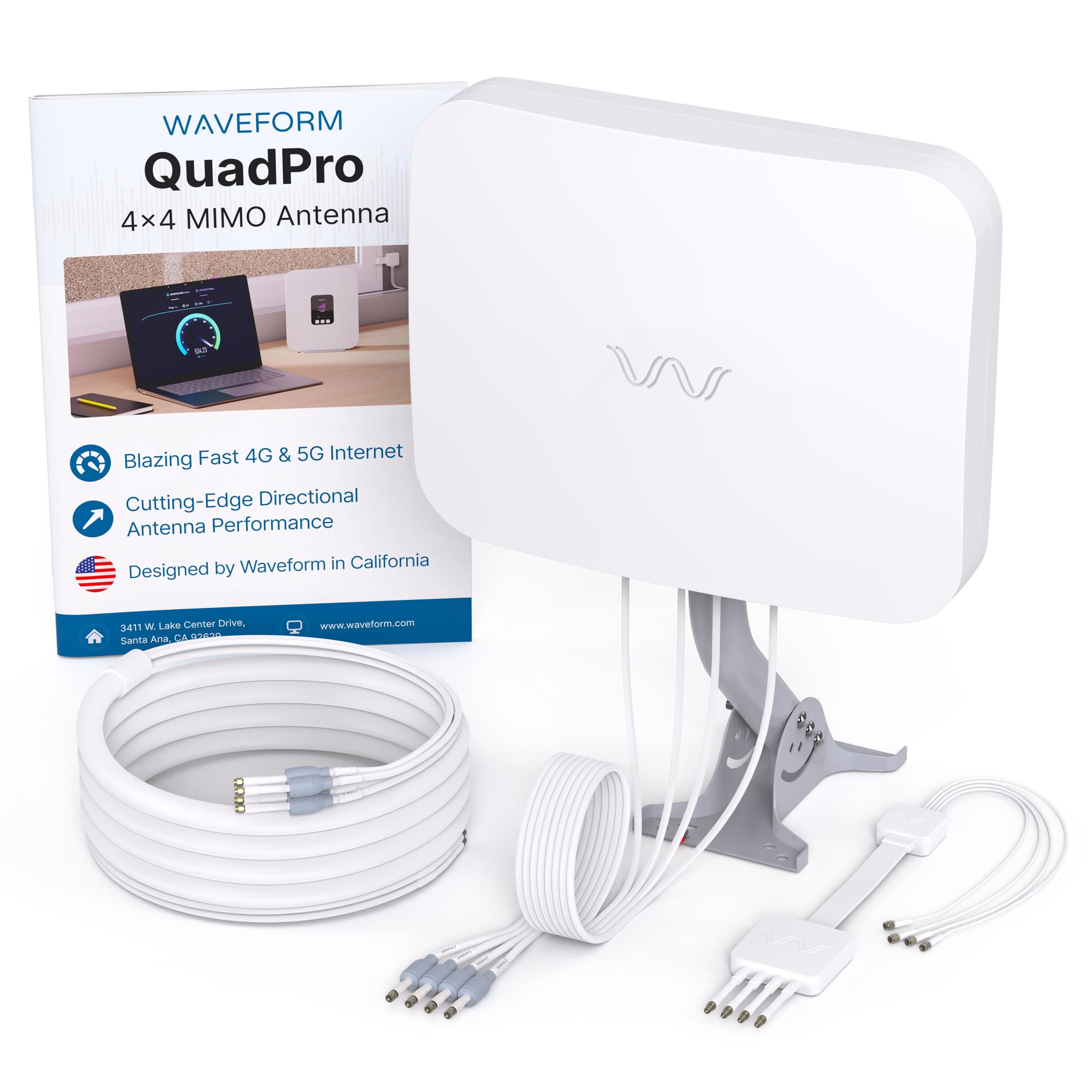
🚀 Elevate your home internet game — don’t just connect, dominate!
The Waveform QuadPro 4x4 MIMO Signal Boosting Panel Antenna Kit is a premium external antenna designed to dramatically enhance 4G and 5G cellular internet performance. Supporting all major US carriers with up to 9.1 dBi gain and full 4x4 MIMO, it delivers faster speeds, lower latency, and improved reliability. The all-in-one kit includes weatherproof cables, a unique window entry system, and mounting hardware for easy, drill-free installation. Ideal for T-Mobile Home Internet, Verizon, and AT&T gateways, it’s the go-to upgrade for professionals seeking consistent, high-quality wireless connectivity at home.


| ASIN | B0CTRW5SLP |
| Antenna | Radio |
| AntennaDescription | Radio |
| Best Sellers Rank | #44 in Computer Networking Antennas |
| Brand | Waveform |
| Color | White |
| Customer Reviews | 4.6 out of 5 stars 853 Reviews |
| Global Trade Identification Number | 00198168042939 |
| Impedance | 50 Ohms |
| Item Weight | 2.28 Kilograms |
| Manufacturer | Waveform |
| Maximum Range | 3 Feet |
| Number of Channels | 4 |
| Warranty Description | 3 Year Manufacturer Warranty |
B**G
Outstanding Performance Upgrade – Real, Measurable Results
I purchased the Waveform QuadPro 4×4 MIMO antenna to improve our AT&T Internet Air connection, and the results have been nothing short of excellent. Before installing the QuadPro, our speeds were inconsistent—especially on upload—and signal quality fluctuated depending on time of day and network conditions. After installing the QuadPro (mounted outdoors and properly aimed), we saw immediate and measurable improvements: - Download speeds doubled, now consistently around 250 Mbps - Upload speeds increased dramatically, very consistently tripling compared to before - We now see 17–22 Mbps upload on a regular basis - Signal quality (SINR) and overall stability improved noticeably - Far fewer drops, less band switching, and much more reliable performance under load This wasn’t just a speed test win—the connection feels better in everyday use. Video calls are stable, uploads no longer stall, and performance is consistent throughout the day. The build quality is excellent, the documentation is clear, and the antenna does exactly what it’s designed to do: improve both signal strength and signal quality, which is especially critical for 5G and fixed wireless setups. If you’re on cellular internet and serious about performance—especially upload stability—the QuadPro is absolutely worth it. This was one of the most impactful upgrades we’ve made to our home network. Highly recommended.
A**R
A quality antenna which will help improve connection stability and speed
This is a high quality antenna. I live in the country and have limited options for internet. T-Mobile home internet recently became available in my area, but living several miles from the city, the coverage with the Sagemcom modem with no antennas resulted in very mixed performance results. Living a few miles outside of town, I do not get the n71 (2.5GHz) 5G bands, but I do reliably get connected to the n41 (600 MHz) bands. This antenna has not significantly increased the number of bars that I receive, but the quality of my internet connection is much better. The Sagemcom modem regularly shows 3 bars, but occasionally dips to 2 bars. This is during the summer with full foliage on the trees. I expect that my signal might improve in the winter when the trees drop all of their leaves. Download speeds went from 50-150 mbps, to a fairly stable 150-200mbps. Upload speeds went from 1-4mbps, all the way up to 20-30mbps. Latency and jitter were also improved, but this is still a wireless connection, so there is going to be more latency than a wire/fiber to the home connection. These are not fantastic numbers by any stretch of the imagination, but considering that I am moving up from $150/mo DSL which was 30mbps down, and 2mps up, these improved speeds are fantastic! Wireless internet is not my ideal home internet connection, but for $50/mo, T-Mobile internet will save me a bunch of money in the long run. Installation of the antenna was straight forward and was as easy to install as other antennas I have installed for TV and ham radio, just with more coax connections. Aiming took a little playing around with as the T-Mobile app only gives you a general direction on where to place the router, not specific coordinates where the tower is located for aiming an antenna like this. My only complaint about the antenna is that it is expensive. You get what you pay for, so the expense is a negative, but its performance speaks for itself. Instead of purchasing the $400 kit, I pieced together my own UFL connectors and coax runs, and I already had a mount on my roof that I could attach the antenna to. Only advice for the coax is that you should order the shortest run that will complete the connection as longer coax will degrade the signal. (1) UFL 4-pack of Connectors: https://www.amazon.com/gp/product/B074RJ1RXP (4) Coax runs: https://www.amazon.com/gp/product/B09XMF4M18
J**N
Well-Engineered and It Works
tl;dr - very well engineered and thoroughly thought-out product. It can help you a lot if you really need it, and even help some otherwise. I opted for the "complete kit" which included 40 feet worth of cabling and a window adapter. The product itself comes very well packaged and protected. Cable ends and any exposed bolts on the mount are covered with soft rubber "nibs" (?). Boxes and packages are well labeled. Documentation is very good, meaningful pictures and diagrams included. The hardware that comes for mounting is excellent, they ship multiple sizes of wall anchors and there is an extra or two for most bolts. They even provide wrenches, real ones - the 10 mm wrench has an open end and flexible socket end (which I could have used last week when replacing a car battery in our Honda). There are multiple sizes of wall anchors for mounting. The cable itself is well-insulated and the weatherproofing boots are solid (much better than the ones I got with some home cameras I bought). I'm guessing Waveform really, really does not want me to return the product. And the way they accomplished that was to make sure I had just about everything I needed to pull off a successful install. Ok, so... does it work? Yes! I live in North Texas and my house has a bunch of trees around it, which is awesome for shade, not so much for raking and cellular reception. I am on TMobile 5G home service using C660 gateway. The south side of my house, which faces toward the cell towers, does not have a useful window for me to put the gateway. The least bad place I found was a high spot in my living room, and the download speeds were okay, but the upload speeds were atrocious. Here are three speed scenarios. The first is the default of the gateway in the living room. The second was to put the modem outside near where I mounted the antenna. The third is the antenna. Scenario 1 - Gateway in living room, not near a window 322 Mbps download, 4 Mbps upload LTE received signal strength: poor Signal Received Quality: 5G good, LTE excellent, Signal Received Power: 5G poor, LTE poor Interference to Noise: 5G poor, LTE poor Scenario 2 - Gateway outside 500 Mbps download, 41 Mbps upload LTE received signal strength: good Signal Received Quality: 5G excellent, LTE excellent, Signal Received Power: 5G poor, LTE poor Interference to Noise: 5G excellent, LTE good Scenario 3 - Antenna 581 Mbps download, 69 Mbps upload LTE received signal strength: good Signal Received Quality: 5G excellent, LTE excellent, Signal Received Power: 5G good, LTE good Interference to Noise: 5G excellent, LTE good So, gateway in a bad place is bad. Gateway in a good place is much better, but even in my best case scenario, the Waveform had 10+% faster download and 50+% faster upload speeds. Some tips for folks who are installing this: - I attached the mount to a roof soffit. The provided anchors didn't work well because there wasn't enough wood for them to really "bite" into. Toggle bolts worked much better for me - When joining cable ends together, make sure to use the 8 mm wrench to tighten the connection before sliding the waterproof boots over. The boots take enough force that they can undo hand-tightened connections. If you see your benchmarks drop all of a sudden, this may be the cause (it happened to me) - Buy the window entry cable, even if you are not going to run the cable through a window. I spent a day or so piloting the antenna in different places around my house, and the window adapter can also be used to run the cable under a door (so you don't have to leave the door open while testing) - All of the cables have 1-4 labels, which is good, but they are not color coded or anything like that, so you really have to look carefully when connecting things - The well insulated cables do not flex a lot, even the ends that go into your gateway/modem. With TMobile's C660, the wires mount pointing up, so you will need to find your stand if you are not using already, and you will have to apply some gentle but firm force to get the cables positioned
M**3
A T-Mobile Home Internet lifesaver! Just be sure to place it properly
I live in Gerogia about an hour away from Atlanta. Where I am currently situated, I basically live in a ditch with poor phone service, especially in the basement. To make matters worse, the only local option for internet is Kinetic by Windstream, which from past experiences from friends and family is terrible with poor customer service. I was excited, if a bit skeptical, to try T-Mobile Home Internet and see how well it would work for me and my family. The experience without the antenna was mediocre at best. Once we figured out what the "optimal" position was for the gateway, we got around 50 Mbps download and 10 Mbps upload on the best day. The experience was hampered by constant drops that had me second-guessing whether this was the best option for internet. Enter the Waveform MIMO 4x4 Panel. I came across this antenna looking for solutions to the problems we were having and I was immediately in love with the in-depth instructions that Waveform provided to connect the antenna to the gateway. Considering I need a decent and constant internet connection for my current job, this seemed like a no-brainer purchase, especially with other users saying it drastically improved their speeds and stability. It's a bit on the expensive side, but my mentality was that if this would work with the gateway and provide me with the internet connection I need, then so be it. I'm happy to say that this antenna was worth every penny. Like I mentioned, the Waveform online setup guide for the T-Mobile Home Internet gateway (in this case, the black Arcadyan KVD21 model) is incredibly detailed and easy to follow. Opening the gateway itself was painful and connecting the tiny pins for the antenna was anxiety-inducing (I'm pretty sure I damaged one of the connectors on the board and I most definitely voided the warranty), but once everything was put in place and the cords were coming out of the gateway, the antenna was ready to go. I was worried the panel was a dud at first because I originally put it in the backyard since that was where the only 5G towers in my area were located, according to CellMapper. While the panel was in the backyard, the speed increased slightly on downloads to 75 Mbps at most, but the upload speed went down to around 5-10 Mbps. Even worse, the drops and ping were consistently horrible. It was arguably worse than the gateway performance BEFORE I installed the panel. It was a couple of days before the start of my new job, so I was left panicking that I didn't have the internet necessary to do my job and that we would be short nearly $400 even if I returned the panel (the damage fees from T-Mobile are ridiculous!). All hope seemed lost until I discovered a tool with the T-Mobile Internet app that allows you to determine where the position of the closest 5G tower is. According to the app, the best position for the gateway was actually near the FRONT of the house, which I didn't even consider since CellMapper didn't show any 5G towers in that direction! In a last-ditch move, I decided to move the panel to the front of the house just above the garage, running the panel cable through the attic and down into the garage to connect to the gateway. Now the internet works like a dream. Connecting my phone to the gateway wi-fi, I am now getting very consistent 300 Mbps download speeds (sometimes even higher!) and around 20 Mbps upload speeds, with the connection constantly showing "Good" at the bare minimum and the SINR on the LTE and 5G bands looking fantastic. It's amazing how one change in positioning can improve the panel's ability to provide fast internet speeds. And let me tell you, this panel performs above and beyond expectations. Credit to the folks at Waveform for making this thing and providing the instructions to make it work with my current situation. Provided you have the money, tech smarts and strong constitutions needed to put this panel together, I highly recommend it for those having trouble with their T-Mobile Home Internet! TL;DR, get this thing if you want to improve your T-Mobile Home Internet connectivity! Just a few things to keep in mind: - Be sure to read all the manuals, including the one provided with the panel and the guide on the Waveform website for the gateway you are using; everything you need to know is provided in incredible detail - Prepare to sweat if using this panel with the gateway; the gateway itself is hard to open and the panel connectors are tiny meaning they can be damaged if not handled correctly (not to mention the hefty damage fees!); this process is not for the faint-of-heart or for those who are less tech-savvy - Be prepared to pay a lot of money for this; in my case, it was worth it, but hopefully this will get discounted in the future so everybody can afford it - Use the positioning tool on the T-Mobile Internet app to determine where to put the panel; once I put the panel on the outside wall facing that location, everything worked perfectly (CellMapper was not helpful in my case) - To access the T-Mobile Internet positioning tool, follow these steps: 1. On the Home screen, click "More about connection quality" 2. Choose the "Launch placement assistant" option 3. Choose "Skip Video" after pressing "OK! Let's do this" 4. For best results, use the "Share location" option; this will allow you to use the camera to get a better idea of where the 5G signal is coming from 5. Choose the Camera option on the "Signal direction results" menu; the phone will then show you a fancy pink wave indicator indicating the position of the 5G signal; this is roughly where you will want the panel to be
S**N
Well built 5G antenna really helps speeds and stability on T-Mobile 5G Home Internet
This is a beefy antenna and I like it a lot! It's much larger than I expected, but it looks to be very well built. I ended up mounting it near the peak of my roof as the network metrics seemed to be best there (more below). On top of producing a quality product, these guys are really proactive with their support! As soon as you register and give them your address, they automatically do a site survey and text you an annotated picture of your roof with the nearest tower location noted. They also select the tower they think will give you the best signal so you'll have a good place to start. We have line of sight to a TMO tower, and it's pretty close, so I don't think our speeds are common (and that was the peak speed, we usually see 250-350mbps). But you can see all of the network metrics from the internal antenna sitting in the bedroom window jump when switching to the QuadPro! It's not cheap, but I'm saving $100/mo but switching from Cox to TMO, so it still makes financial sense IMO. Add a size note, if you have T-Mobile home Internet I'd highly recommend download "Hint Control". It allows you to login to your router and view the network metrics real time when trying to position the antenna. It was really helpful!
A**E
Can Make Huge Difference for Receiving T-Mobile Home Internet, with Patience and Trial and Error
I was eager to try out T-Mobile Home Internet when it recently became available in my location. The prospect of getting unlimited wireless internet using a single device that receives 5G cellular signals was very appealing. When I got the device and tried it out, though, the reception was very weak, no matter where in my house I placed the gateway. My house is surrounded by quite a few trees, which undoubtedly was a factor in reducing the signal quality. I tried various options to improve the signal, which was often as low as 1 Mbps download, or even worse. I called T-Mobile technical support to try to locate the best tower to aim at, and I tried two different cell signal boosters, neither of which helped at all. From watching YouTube, particularly the Nater Tater channel, I learned about this Waveform 4x4 MIMO panel antenna. I was reluctant to try this option, because it requires disassembling the T-Mobile gateway and installing several fairly delicate wires that have to be connected to the four leads of the antenna. After running out of other options, I plunged ahead with this approach, with great assistance from my wife, who is good at handling delicate electronic devices. She disassembled the gateway (we have the Arcadyan version of the T-Mobile gateway) and attached "pigtail" wires to the connectors inside the gateway, which are hard to reach and hard to attach wires to. Eventually, she achieved firm connections, and I started testing the antenna in various places around the house. To make a long story short, I finally settled on the location shown in my photo, which is a sort of balcony reached from the third floor of the house. After a couple of weeks of testing, I didn't notice enough improvement to make the service really usable, but then I happened to watch one of the Nater Tater YouTube videos, in which Nate mentioned an alternative order for attaching the four pigtails to the four antenna leads. That order is D-M-M1-M2. At first, that order didn't produce a real improvement, but then I turned the antenna in various directions to see what would happen, and I finally saw a dramatic improvement in download speeds. Now I get a maximum download speed of about 140 Mbps in the early morning, and it averages around 40-80 Mbps at different times of day and night. There still are some worse slowdowns in the afternoon, especially between 3:00 and 4:00 p.m., presumably because of deprioritization of internet signals when more people are using their T-Mobile cell phones. Overall, though, the T-Mobile wireless internet service is very useful whenever I need it, and I can now keep the service without feeling that the speeds are too slow. I can't say enough about the Waveform technical support staff, who were tremendously supportive during my weeks of testing, frustration, and trial and error. They offered several helpful suggestions, and even sent me an alternative type of antenna to test to see if that would bring an improvement. The only caveats I would mention are that, at least for me, it was not an easy task to disassemble the gateway and attach the antenna leads properly. You have to be patient and willing to do delicate and potentially frustrating work. Also, doing this may cause problems down the road when you ultimately return the gateway to T-Mobile, who clearly would not approve of taking the gateway apart in this manner. Also, it can be quite tricky to find the best location for the antenna and the best direction to point it in. In my case, I ended up purchasing an extension pole that can be inserted into the J-pole assembly that came with the antenna. When the antenna was attached to that pole, it was quite easy to turn the pole to change the direction of the antenna, to test how the signal approved in various directions. Overall, if, like me, you live in an area with marginal cell reception and a lot of trees, it can be very worthwhile to try this antenna, provided you are prepared to dedicate some effort over a period of time until you achieve success.
J**E
Transforming My Internet Experience
I recently upgraded to blazing fast 5G internet using the Waveform 4x4 MIMO Panel Antenna Kit, and I have to say it's been a game-changer for my internet connectivity. I'd give this kit a solid 4.5-star rating. Here's why: First and foremost, this kit is an all-in-one solution optimized for a simple DIY install. The package includes everything you need, from the antenna mount to various adapters like SMA, TS9, and U.Fl. The detailed installation guide made the setup process a breeze, and I was up and running in no time. It's a great option for those who prefer to take matters into their own hands. One standout feature of this kit is its support for T-Mobile 5G home internet. The detailed guides provided make it easy to connect to various TMHI gateways, including the Nokia 5G21, Arcadyan KVD21, and Sercomm Fast 56WW Gateways. This level of compatibility is a huge plus, ensuring that you can get the most out of your T-Mobile 5G internet service. What's truly impressive is the kit's compatibility with a wide range of modem and router manufacturers, including NETGEAR, PEPLINK, CRADLEPOINT, MOFI, and more. As long as there's a way to connect external antenna ports, the MIMO antennas in this kit can help you achieve dramatically faster internet connectivity. It's a versatile solution that can accommodate various setups. The ultra-high performance 4x4 MIMO technology ensures optimal 5G speeds. I installed this kit with my T-Mobile home internet, and the difference in upload and download speeds was remarkable. It provided a significant boost in performance, making streaming, online gaming, and video conferencing a seamless experience. It supports every 4G and 5G band from every major carrier, so you can trust it to deliver reliable and fast internet connectivity. The only minor issue I encountered was the length of the cable. It could have been longer to provide more flexibility in finding the ideal spot for the antenna without compromising the location of the indoor router receiver. However, even with this small setback, I managed to find a good spot that improved my speeds by around 60 percent, which is still a substantial upgrade. In summary, the Waveform 4x4 MIMO Panel Antenna Kit is an excellent investment for anyone looking to enhance their 5G internet experience. It's easy to install, compatible with various equipment, and delivers remarkable speed improvements. While the cable length could be improved, the overall performance and versatility of this kit make it a worthwhile purchase, and I highly recommend it to anyone seeking faster, more reliable 5G internet.
B**R
Great product, amazing customer support!
I live in a very rural area where cable internet options are non-existent and line of site to a local cell tower is almost impossible. The only cell service we get with any kind of reliability is T-Mobile and we could get two bars on a good day. We have been fortunate enough to get good satellite internet service, but it isn't cheap. I work from home as a Global IT Director and needed a connection that was solid at all hours of the day and night, and where local home internet use (multiple TVs, multiple devices) didn't impact the bandwidth I needed. I purchased the Waveform QuadPro 4x4 MIMO Signal Boosting Panel Antenna Kit with the hope of being able to boost my T-Mobile business internet connection to meet this need. After receiving my kit, customer support reached out to me to make sure I had received everything as expected, and to offer their support in getting everything set up. I was facing challenges in finding the direction to the right cell tower that would give me the best service. They performed a survey of my area and provided a map showing where the towers were and what kind of speed/service the towers were likely to provide. With their help, I was able to find a tower that would connect to the n71 5G band and the n41 600MHz band and it was generally stable. It took a fair amount of adjusting to find the right height, directional angle, and overall positioning, but with the support provided from Waveform, I was very happy with the results. Over the course of several months, they reached out to me asking how things were going and if I needed any support in finding a better signal or anything else related to the kit i purchased. I did have to reach out to them a couple of times, even after their normal support hours, and I would generally get a response within a few hours. I have never had any kind of company or vendor do this beyond the initial 30 days. I could keep going on and on about how happy I am with the product and service I received. The product was fantastic. It performed and did exactly as advertised, and the support team is second to none... and I tend to be pretty hard on technical support teams. They have gained a life long customer!!
Trustpilot
1 maand geleden
3 weken geleden