
DOWNLOAD DE APP


Klantenservice
Copyright © 2025 Desertcart Holdings Limited
DOWNLOAD DE APP

⚡ Elevate your network game with pro-grade WiFi 6 power and cloud control!
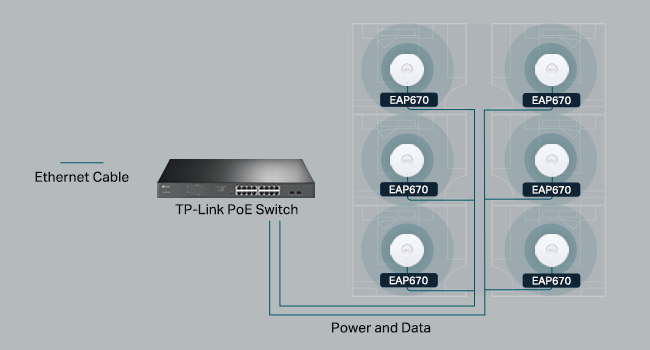
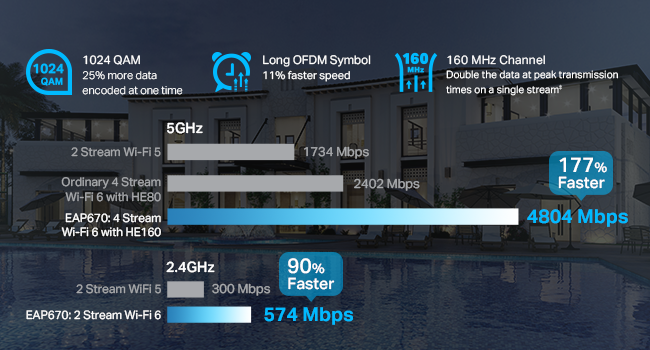
The TP-Link EAP670 V2 is a premium WiFi 6 AX5400 ceiling-mount access point designed for extensive coverage and high-density environments. Featuring blazing dual-band speeds up to 5400 Mbps, a 2.5G PoE+ port for easy deployment, and integrated Omada SDN cloud management, it delivers professional-grade wireless performance with sleek aesthetics. Ideal for modern offices, hotels, and smart homes, it supports advanced mesh networking, seamless roaming, and robust security protocols—all backed by a 5-year warranty.



| ASIN | B0CRLYWHBL |
| Antenna Location | Business, Home |
| Antenna Type | Internal |
| Best Sellers Rank | #1 in Computer Networking Wireless Access Points |
| Brand | TP-Link |
| Built-In Media | Ceiling/Wall Mounting Kits, EAP670, Installation Guide, Power Adapter |
| Color | White |
| Compatible Devices | Personal Computer |
| Connectivity Technology | Bluetooth, Ethernet |
| Control Method | App |
| Controller Type | Switch |
| Coverage | Extensive coverage, up to 250+ clients, with high-speed Wi-Fi on both 2.4 GHz and 5 GHz bands. |
| Customer Reviews | 4.6 out of 5 stars 2,407 Reviews |
| Data Transfer Rate | 5400 Megabits Per Second |
| EU Spare Part Availability Duration | 5 Years |
| Frequency | 5 Hz |
| Frequency Band Class | Dual-Band |
| Has Internet Connectivity | Yes |
| Has Security Updates | Yes |
| Is Modem Compatible | No |
| Item Dimensions L x W x H | 8.66"L x 8.66"W x 1.28"H |
| Item Weight | 1.52 Pounds |
| LAN Port Bandwidth | 10/100/1000 megabits per second |
| Manufacturer | TP-Link |
| Maximum Upstream Data Transfer Rate | 4804 Megabits Per Second |
| Model Name | EAP670 V2 |
| Model Number | EAP670 V2 |
| Number of Antennas | 2 |
| Number of Ports | 2 |
| Operating System | Omada |
| Other Special Features of the Product | WPS |
| RAM Memory Installed | 256 MB |
| Router Firewall Security Level | Basic |
| Router Network Type | wired |
| Security Protocol | WPA-Personal, WPA2-Personal, WPA3-Personal |
| Special Feature | WPS |
| UPC | 840030711671 |
| Unit Count | 1.0 Count |
| Voltage | 12 Volts |
| Warranty Description | 5-Year Warranty Manufacturer |
| Wireless Communication Standard | 802.11ac, 802.11ax, 802.11b, 802.11g, 802.11n |
| Wireless Compability | 802.11ac, 802.11ax, 802.11b, 802.11g, 802.11n |
S**E
The perfect solution!
I've messed around with trying to place my router in my house, moving it around, changing antenna, putting in boosters... everything to try to get a better signal. I had heard about these on a podcast and decided to give them a try and they work really well. I went with the Omada ones because I picked up the OC300 as well. It has been SOOOO easy to add new access points where needed. I have one on each floor and one outside and paired with the OC300 makes setting up a breeze. Pros: * Easy to set up - if you don't get an OC200 or OC300 (or use a Raspberry Pi or computer to run their software for free), you simply log in, set up your WiFi networks and you're on your way. With the OC200/300, you just "adopt" the device and it sets everything up. I now change my WiFi every time I have people over so I can personalize it to them and it keeps them off my primary network. * POE - Don't want to run power to where you want this? No problem! Just run an ethernet cable and power it over that. * Comes with everything you need for mounting * Great signal strength and covers a lot of area. * I've bought all of mine on sale but I would pay full price if needed one in a hurry. Extremely good value for what you get. * There are hidden solutions you can get but people have commented how it looks like I have "professional wireless" in my house. These look just like what you'll find in an office, if that is important to you. Cons: * None - I've been very happy. I've switch everyone in my family to these along with an OC200 to run them. Since they have asked me to help them with their networking stuff in the past, it has made my life really easy to be able to run these. I highly recommend them.
R**W
Reliable AP. Reasonably Priced. Good Performance.
For my home, I prefer a traditional access point connected to a Ubiquity EdgeRouter over Ethernet rather than an integrated consumer wireless router. I had been using a TP-Link EAP225 WiFi-5 AP for over 5 years, and it had been completely reliable. It was time to upgrade to WiFi-6. The EAP650 supports that newer standard, providing an improvement in overall performance. It has been in use for a month and has been perfectly reliable. The signal is also somewhat stronger than the old AP. Supports VLANs, and multiple SSIDs on each frequency band. Easy to configure. A real improvement over the EAP225 is the ability to upgrade the firmware in the UI without having to manually download the firmware file to a PC first. Very nice.
M**R
Excellent Outdoor Access Point
Excellent outdoor access point. Setup through the Omada app was straightforward, and the unit delivers strong, stable coverage over a long distance. Once mounted and powered, it just works. Signal stays solid even through walls and across open areas, and it handles multiple devices without dropping. If you need reliable outdoor WiFi with real range, this is a great choice. It is easy to setup, it is small and well made.
F**X
Blazing fast, reliable, and customizable!
I've recently re-worked my home network to use all Omada APs and switches. One access point looks to be enough to cover my whole home, but I may add more in the future. The AP can broadcast multiple SSIDs, VLANS, and bands to allow support for older devices. Pro tip: As long as one AP is plugged into your network with Ethernet, you can connect others using "Omada Mesh" This is great for the "prosumer" who wants to standardize their home network, but is also easy enough for anyone to configure.
J**E
Great Coverage, but Band Steering Needs Work
The Omada Access Point delivers excellent coverage and integrates smoothly with the Omada Software Controller, making setup and management simple. Speeds are fast and reliable once connected, and roaming between APs works well in my setup. My only complaint is the “seamless” band steering between 2.4GHz and 5GHz — it’s not truly seamless. I’ll sometimes have full Wi-Fi bars but can’t load anything for a few seconds while it switches bands, which can be frustrating during calls or streaming. Overall, it’s still a great AP for the price, but I hope TP-Link improves the band steering in future firmware updates.
N**L
EAP670 V2 absolutely fantastic access point, works at distance, everything has stable WiFI!
I've had routers from many of the usual manufactures; Asus, Netgear, Tplink, Linksys, etc. They are ok, but have issues, I already have good router and I just need them to work as bridges or for their wifi, but they are pretty poor at doing just this function. In fact, I would say most work ok at routers but I don't need them for that, but are poor at WiFI with unstable, unreliable WiFi connections if they connect to devices at all!! I come across Omada range which is really commercial grade WiFi gear but I focused on their access points specifically the EAP670 V2. They are fairly easy to setup, but there is a learning curve which mobile and web app make reasonably easy to setup if you are familiar with wifi routers in general, if not, the learning videos are quite helpful. I have around 100 wifi devices in the home, and I mean everything connected flawlessly and was stable with EAP670 V2, especially in mesh and roaming mode, they would move to another EAP670 V2 as needed. I would caution not turning on all roaming features, just the core ones only, since some older devices just don't work well but EAP670 basic defaults worked well in most cases. I was so impressed I bought the OC200 to help manage all the EAP670 I had purchased, and place strategically around the home to cover all the blind spots but at the sametime minimize overlaps, ensuring to place each of access points at least 12 meters apart to keep interference low between devices. The software looks like its based on opensource SDN technology (a good thing). I would say that Omada brand has made excellent use of its features/capabilities but the most important thing has maintained a level of quality and reliability that truly shocked me after spending 18+ years working with other wifi routers and expecting another so so slight improvement, but the improvement here in terms of quality, reliability and stability overall is a great leap forwards. I have device on wifi network that parodically just failed to connect or stopped working, these now just stay connected and work flawlessly, that amazing! It should have been this way a long time ago, but I guess you have to wait for large leap forwards in quality, reliability and stability. I've had access points and controller for over a month now, working flawlessly. I highly recommend the EAP670 V2 and OC200 controller. I haven't tried Omada brand switches and routers but if their access points are this good it may worth considering in the future. I use Mikrotik brand of switches, routers and I really like them for their deep level of configurability (not for faint of heart or everyone), quality, stability and reliability, interestingly also based on open source technology.
J**C
Excellent Once Configured
I run a homelab and decided to add a TP-Link EAP610 access point, and overall I’m very happy with it. Once it’s up and running, performance has been excellent and rock solid. The setup process was a bit more involved than I initially expected. I’m not entirely sure if every step I took was strictly necessary, but this approach worked well for me. To manage the access point properly, I spun up a Docker container running the TP-Link Omada Controller. The adoption process through Omada went smoothly once everything was online, but it definitely adds some upfront complexity compared to a consumer-grade router or AP. That said, I actually see this as a positive in the long run. I plan on adding more Omada access points in the future, and having the controller already running will make managing additional devices, configurations, and updates much easier. This setup feels well-suited for anyone running a homelab or small network who wants centralized control and scalability. Overall, if you’re comfortable with Docker and a bit of networking setup, the EAP610 is a great access point with strong performance and plenty of room to grow. Just be prepared for a more involved initial setup compared to plug-and-play options.
N**S
Constant, and I mean CONSTANT disconnects. Good luck connecting.
If you’re debating on getting the EAP720 please keep reading because it’s horrible. Just get a different model, do not get the EAP720. The EAP610 worked almost flawlessly out of the box and other than having to restart my modem it was basically plug n play. So far I’m 1000000% satisfied with the EAP610. I didn’t even look at the instructions, it did everything I was expecting other than the restart but that’s a very minor complaint. Please read below for the review for the EAP720. Frustrating and annoying. Basically, that's it, although I'll go into a little more detail, but this piece of junk just doesn't work right. The instructions are garbage, it's just pictures with no actual instructions. Fine, I've done this a couple times and although it's been a while it wasn't difficult to plug in power, plug in ethernet, and go to the setup page on my PC. Except that didn't work. Until it did. Then it stopped working. Then it worked. I finally got to change SSID/Passwords and connected my phone. Well, I tried to. It just...didn't connect. Then it did. Then it dropped. Then it connected for a while so I did a speed test and I got excited because the connection was great and the speed was fantastic. Until it dropped connection for no reason. I think you can tell where the frustration comes from by now. So after a day or two, it seemed to have a steady connection and I wasn't dropping the connection constantly, so I foolishly thought maybe something got fixed. Then I got home and it was disconnected again. Turned it off and on, it connected. Then it dropped. Then it connected, then it dropped. Then I unplugged the piece of crap and I'm returning it. Maybe I got a dud. I ordered a different model number of the "same" WAP, and it should be here tomorrow. My old one bit the dust, and that's the only reason I even need one, but so far TP-Link/Omada isn't coming through for me. If the next one works I'll post a glowing review but the EAP720/DE2000 whatever the stupid model number is, just plain sucks.
Trustpilot
3 weken geleden
2 maanden geleden