We remain fully operational. Our teams are working around the clock to ensure your deliveries continue safely.

DOWNLOAD DE APP


Klantenservice
Copyright © 2025 Desertcart Holdings Limited
DOWNLOAD DE APP
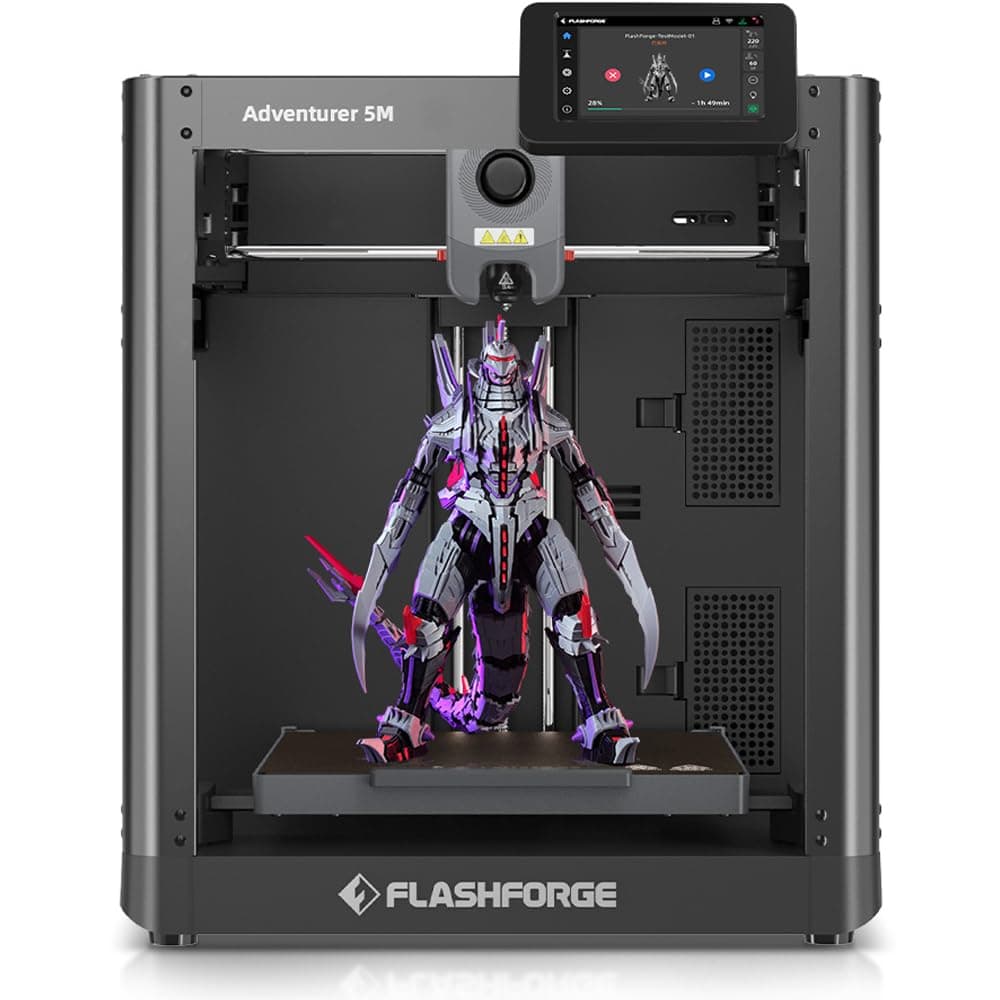
⚡ Unlock your creative edge with the Adventurer 5M — where speed, precision, and smart tech collide!
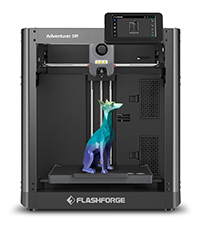
The FLASHFORGE Adventurer 5M is a professional-grade CoreXY 3D printer designed for both rookies and experts. Featuring a fully automatic leveling system, rapid 600mm/s print speeds, and a patented quick-detach nozzle capable of reaching 280℃, it ensures superior print quality with minimal setup. Its smart connectivity options and power-resume function make it a reliable, efficient choice for high-quality, consistent 3D printing at a competitive price point.






| ASIN | B0CD78PTVX |
| Best Sellers Rank | #10,542 in Industrial & Scientific ( See Top 100 in Industrial & Scientific ) #24 in 3D Printers |
| Customer Reviews | 4.0 4.0 out of 5 stars (930) |
| Date First Available | July 31, 2023 |
| Item Weight | 29 pounds |
| Manufacturer | Zhejiang Flashforge 3D Technology Co., Ltd |
| Product Dimensions | 14.29 x 15.83 x 19.21 inches |
M**7
Probably one of the best 3D printers I have ever used!
(Intro, skip below for review) My first printer was an ender 3 years ago at this point. Then I bought a Sunlu S8 which is a CR10 clone with what at the time was a huge build plate. Running these printers could be an absolute chore. Constantly leveling the bed, constantly fixing broken parts. It was no where near a seamless process. Recently I decided to upgrade my printers after thousands of hours of printing on them and the AD5X was one of those upgrades along with an Elegoo Neptune 4 Max. The Neptune 4 max is a standard bed slinger design and also has a lengthy setup process although more streamlined, still it's a more traditional process. What about the AD5X though? (Review) All I can say is that I'm amazed. Until the ADX5 I didn't have a single printer that took me less then an hour to set up. Even the Neptune 4 Max took right around an hour and my older two printers probably took about two hours each. The ADX5 though? That took me right around 20 minutes taking my time. The thing came so nicely packed. It is definitely one of the best packaged and layed out printers out of the box I have ever seen. Within a half an hour I had this thing plugged into the wall and starting the setup. The setup took right around ten minutes to perform. You are prompted to download an app that also connects to your AD5X. It allows you to see some basic stuff but also see your camera feed if you purchased it separately. After the set-up of the AD5X comes the set-up of your slicer on your PC. For me this is where a bit of an issue comes into play. Unfortunately for me I am a Linux user and flash forge wants you to use their software out of the box, which is flash forge-orca. It's basically just a fork of orca slicer with some specific AD5X stuff built in. Unfortunately it doesn't support Linux, Windows and Apple only. I ended up just partitioning my hard drive and installing windows. This gave me the ability to finally use the software. If you have used orca before this is just about 90% the same. I'm not actually sure it was worth all of the hastle to get it. A lot of information I was finding online had me convinced I needed flashforge-orca but I'm really not understanding why. Maybe it interfaces better with the machine for wireless connection? I don't know but it does work, it works well. It's basically just orca slicer. (Printing) After everything was finally having everything set up it was time to print. I downloaded a little model. Then I colored it in flashforge orca. Changed a few settings to my liking and then sent it over to the printer. This little model generally takes about 10 hours in one color on my other printer at a 0.08 layer height but with four colors on the AD5X this little model took an entire 50 hours! Color printing is a very, very slow process. Now, I'm fine with a long or even very long print process. The bigger issue is the filament purging. This thing purges way to much filament. Don't get me wrong, this is my first ever colored print. I'm sure I could have done this in a more intelligent way to reduce waste. That being said though. Just this little print purged three to four times more the amount of fillament then the actual model itself used. (See photo). I think if I were to do it again I would do a print with less color changes. Normally this wouldn't be that big of a deal, you could just lower the purge settings in flashforge orca. The problem is though is that for whatever reason flashforge locked the purge settings in the firmware of the actual machine itself. Meaning that regardless of the changes you make in your slicer to the purge settings the machine will ignore those settings and default back to the machines settings which are far, far, far to aggressive. Again, some of this comes down to my own inexperience with multi color printing but you can see from the photo just how much filament was waisted. You can install the ZMOD to unlock the ability to adjust your own purge settings. I'm a little confused as to why these settings are locked anyways? The ZMOD will also fully unlock your ability to connect to your printer via fluid to be able to better control the printer. Beyond the major issue of purge settings and it IS a major issue in my opinion the printer swaps fillament wonderfully. It's actually very impressive to watch this thing at work. I was taken back by just how far this technology has come in the last few years! Speaking of how far this technology has improved through the years let's talk about the ease of use of this bad boy. Let me preface this with there are truly no "easy" 3D printers. If it's your first printer you'll probably spend the day watching videos trying to figure out the in's and out's of the machine and how to use the slicer but if I'm being honest if there is a good place to start it is with this machine. From powering this thing on, to having the bed fully leveled it takes less then ten minutes. You can literally be starting one of the included test prints in less then five minutes of powering on this machine this is crazy to me. It's not like back in the day either where you will spend hours adjusting belts, level in beds tightening or loosening wheels. This came pretty much ready to go. Heck the Elegoo Neptune 4 Max I recently bought to replace my CR-10 style printer took me a full week to get setup correctly before it would put out great prints. The ADX5 being a coreXY printer by it's very nature is just kind of ready to go out of the box. Being a coreXY printer means that this thing just doesn't suffer from a lot of the print issues that a lot of bed slinger style 3D printers suffer from. It puts out clean consistent prints pretty much every time without fail. I was also surprised by just how fast this is as well. My bed slinger can go fast but often times I end up slowing it down because quality really suffers. But on the AD5X being that it's CoreXY you can go much, much faster without suffering print quality issues. It is such a relief to just slice a file and just print it every time and not have to worry if it's going to stick to the bed. Once you send a file over to the machine it will auto level before it starts printing and then it will just go! 90% of the time this thing just prints without issues. Even though this thing is about 25% of the size of my large bed slinger I just end up turning to it more often do to it's reliability. Another thing I love about this printer is the amount of upgrades available for it. The ability to buy the enclosure kit and also the camera separately allows the price to be lower which is especially nice for those just looking to print PLA. For those looking to print in ABS and such it's really nice to have the enclosure as an option. I personally did take the extra step of getting the enclosure and the camera and so far they have been excellent upgrades. (Neutral points) The build plate size. Yes it is small! It reminds me of my old Ender 3 build plate. That being said, I think people make way to much out of build plate size. Most prints these days are going to be cut to fit on any size bed anyways. With the speed that this prints at as well I rarely find myself wishing it was larger. However I do have another monster size 3D printer that I can basically print anything on so your milage may very. I personally don't mind the size at all. Another neutral point is the noise level of this machine. When doing color changes it is indeed pretty loud but this is to be expected in my opinion especially at this price point. The enclosure also helped with this. That being said even when I have both 3D printers running at the same time I'm still able to work in my office. I actually find the noise to be nice. If you're bothered by noise though you might hate this aspect of the machine. (Now the bad) Is anything perfect? I think not. Especially in the world of 3D printers. There is always probably going to be some trade off with these machines and the AD5X is no different. As mentioned Flashforge Orcha doesn't work on Linux which is very annoying. They are not really alone in that though. That being said once you have Flashforge Orca set up you would think its an out of the box solution but it really isn't. I would have hoped that flashforge would know their machine better then anyone which would lead to some nice profiles for various materials like ABS,PLA, PETG ect. With the machine just being so easy to set up and get printing I would have liked to see that ease of use on the slicer side. I did find though that I had to rely on my past knowledge of the slicer to kind of hone things in to get the best print quality. This is to be expected when you are using any other printer that just uses off the shelf Orca but not as expected when you are using a proprietary version of Orca. Regardless, it did end up working great once I got all my profiles set up. I did find it a little annoying though that some settings are kind of moved around in flashforge Orca. Also, I have had constant connectivity issues with Flashforge Orcha. It just does not want to connect to the printer. It worked for a little while but then just stopped and never worked again. Fortunately there is a USB port on the AD5X so I have just been putting files on a flashdrive and transferring my prints to the machine like that. I don't really understand this issue though since the app on my phone connects perfectly to the AD5X even allowing me to see the camera feed with no issues. Another issue I have and it's a small one is how long the bed will take to heat up on this little thing, especially with anything other then PLA. For PETG for instance which I print with the bed at about 75 degrees. It takes a good 25 minutes to a half an hour. It's honestly not that big of a deal but it is worth mentioning. Then there is colored printing. It's an amazing concept and one that I will certainly use but only on occasion. Infact, I would personally lean towards perhaps getting the version of this without colored printing option. It is just a giant waste of filament. I mean seriously using double the amount of fillament or perhaps more for a single print is insane. It does work well for adding two of the same color filament and not needing to swap out filaments during long prints but with the bed size being so small that's not going to be somthing that is necessary for a lot of people. One of the larger issues I have had with this machine is actually with how the screen is attached to the unit. As mentioned earlier I decided to purchase and build the encloser. One necessary step with this is to remove the screen. Well while detaching the screen from the unit the ribbon cable popped out of the back of the screen. While trying to reattache it the little door that clamps the cable down broke off making it impossible to reattache the screen. Fortunately I reached out to support who made it right immediately sending me both a new screen and ribbon cable. Then the bracket for the enclosure that flashforge made to have 3D printed is also poorly modeled in my opinion. It actually forces the ribbon cable further from its natural seated position while simultaneously pushing against a solid portion of the bracket. This puts unnecessary pressure on the screen ribbon cable. It actually ended up ruining my ribbon cable, again though flashforge made it right. I also modified the bracket via tinkercad so that it wouldn't push against the ribbon cable in the future. (Conclusion) Despite some small complaints I think that for the price your getting more then what you're paying for with this. Reliable coreXY printing, quality build, color switching and the ability to upgrade as much as you want. Is it a perfect 3D printer, no, no it isn't. I still think full color 3D printing and color printing in general still has a ways to go. The AMS in this just waste far to much fillament and Flashforge removing the ability to adjust purge settings is a huge problem in my opinion. And there is of course a few other complaints mentioned above. That being said though when I look at this through the lens of where I started with 3D printing my ender 3 to what we have now. This 3D printer is in a whole other dimension. Do I recommend this thing? All day every day!
D**.
1,000+ Hours Later, This Printer Still Surprises Me
My experience with the FLASHFORGE Adventurer 5M The Adventurer 5M has been an absolute workhorse. It puts out consistent, reliable prints day after day with almost no downtime. I waited until I had real hours on this machine before reviewing it, because I didn’t want my opinion influenced by the “new printer glow.” I now have well over 1,000 print hours on it, and my impression hasn’t changed: right out of the box, it performs extremely well. I started 3D printing on an Ender 3, which taught me patience and troubleshooting, but not much about enjoyable printing. The 5M is what kept me in the hobby. I print a lot of functional parts and accessories across different hobbies, and I want durability, accuracy, and repeatable results. This printer delivers exactly that. I primarily run Sunlu filament on it, which is very budget-friendly, and the print quality I get from this combination is shockingly good. I recently purchased a Bambu Lab P1S expecting noticeable gains in speed and print refinement, and to my surprise, the difference is almost unnoticeable in everyday use. The 5M hangs right with it while costing roughly half as much. - Pros - Highest print quality I’ve seen at this price - UI is intuitive and simple - Works seamlessly with Orca Slicer - Genuinely fast, nearly matching my Bambu P1S - Replacement parts are easy to get on Amazon - Minimal tuning required, just run Orca’s built-in calibrations and go - Cons - Louder than the P1S - No enclosure This printer has earned a permanent spot on my bench. If Flashforge keeps building machines like this, I’d be more than happy to test whatever they’re working on next. TL:DR Over 1,000 hours of use, rock-solid reliability, top-tier print quality, and speed that hangs with printers twice its price. The Adventurer 5M is one of the best-value machines in consumer 3D printing.
D**A
Deze machine komt al bijna kant en kaar binnen in een goede doos en goed verpakt, binnen een half uur werkte hij al, gelijk even verbonden met internet en toen kwamen de updates ook al binnen. Alles met alles heel erg blij mee en deze printer is ook snel maar geeft best wel geluid. Maar ik geef toch mijn 5 sterrren want alles met alles een zeer mooie machine. M.v.g.
C**A
La uso desde finales del año pasado y puedo decir que es una impresora práctica, tiene un costo excelente, para lograrlo encontrarón el punto exacto de una impresora con lo realmente necesario para mantener el balance de una calidad excelente y un precio justo, aun así puede crecer un poco más con algunas mejoras disponibles. La uso principalmente con PLA y me ha funcionado muy bien. Pero por lo que la recomendaría principalmente es por el servicio, tuve que contactarlos por un problema del HotEnd, me atendieron bien y muy rápido y me ayudaron a solucionarlo de forma que supero mis espectativas. Definitivamente en cuanto me sea posible compro más impresoras de esta marca.
O**6
Excelente máquina de gran calidad y excelente precio
C**S
Très bonne machine , le ic vraiment long quand ont veut plusieurs couleurs , niveau temps avec en comparaison d une simple impression (1 bobine ) donc 1 couleur le temps peut être divisé part 2,3 . Sinon fonctionne très bien , calite impression top rien à re dire . Assez simple à utiliser même pour une première fois
M**S
I haven't tried a lot of 3d printers because each time I tried to get into fdm printing, I wasted hours and hours just trying to get the thing to print reasonably well. Squaring up the frame, messing about with layer heights, bed levelling, first layer adhesion... I've tried open frame printers, and fully enclosed, large format printers and smaller ones and each time, gave up and left it alone for a few years before curiosity drew me back in. The leaps forward in printing technology with this printer are massive. It's so easy to use. Auto-levelled once, after I took it out of the box and haven't had to again. I use liquid 3d printer bed glue prior to each print and have never had an issue with first layer adhesion. The print quality is amazing and wow, is it fast! Maybe a downside is the cost of the replacement heads. But they are super-easy to swap out, reloading is a breeze, and I'm happy to pay a bit more for the sheer ease of use. After 20+ years of dismissing fdm printers, I've found one that I love.
Trustpilot
3 weken geleden
3 dagen geleden