We remain fully operational. Our teams are working around the clock to ensure your deliveries continue safely.

DOWNLOAD DE APP


Klantenservice
Copyright © 2025 Desertcart Holdings Limited
DOWNLOAD DE APP

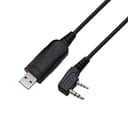
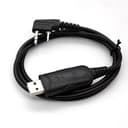

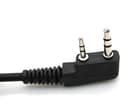
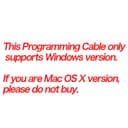
Baofeng USB Programming Cable for Baofeng UV-5R, BF-888S,BF-F8+ With Driver CD Support WIN10, 64 Bit PC Features: Newest Version Support Windows 10, 64 Bit PC Space of two-pin: 11mm;Length: 100cm;Two-pin standard diameter : Ear 3.5mm stereo (top pin); Mic 2.5mm stereo (bottom pin) Compatible with Two-way handheld radio: UV-5R/5RA/5R Plus/5RE, UV3R Plus, BF-888S, BF-F8+ Package includes: 1 x USB Programming Cable 1 x Driver CDIf you can't install the driver and the frequency writing software, please contact us, we will have a professional tell you how to operate. When you program a walkie-talkie of a certain type, it will not operate. Please contact us. We will send you the corresponding operating software instructions for the model. If you can't make sure this Antenna can work on your two way Radio, please contact "RTDSHOP" and tell us Brand and model of your two way Radio. * RTDSHOP --- Professional Two Way Radio and Accessories sales. RTD is a Registered brand.
J**N
” or "Search for the best driver for your device" (Win98) 5) Press “Next”
Installation and ConfigurationHow to Install the Driver1) Plug the Cable into a USB port.2) The “Welcome to the Found New Hardware Wizard” or "Add New Hardware Wizard" (Win98) should appear. If it doesn’t appear, go to step 9.3) Ensure the product driver CD (included with package) has been inserted in your CD-ROM drive.4) Select the option: “Install the software automatically (Recommended).” or "Search for the best driver for your device" (Win98)5) Press “Next”. Win 98 users should check CD-ROM drive.6) Windows should find the “Prolific USB-to-Serial Comm Port” driver. Otherwise you should find the directory under your version of Windows under the "USB to RS232 1.1" directory on the CD-ROM. Windows 98 lists the device as "GM USB to Serial Bridge"7) You will probably see a message indicating that the driver has not passed Windows Logo testing. Press “Continue Anyway.” This warning can be safely ignored.8) Press “Finish” when prompted by Windows to complete the installation.*** If the “Found New Hardware Wizard” did not appear in step 2 ***9) Open Device Manager by doing the following: a) Click on “Start” and then “Control Panel.” b) Switch to Classic View (if in Category View). c) Double click on “System.” d) Select the Hardware tab. e) Press the “Device Manager” button.10) Under “Ports (COM & LPT),” look for a USB Device entry with a yellow exclamation point '!' by it.11) Right click on the USB Device and select “Update Driver.”12) This should bring up the “Welcome to the Hardware Update Wizard.”13) Ensure the product driver CD (included with package) is inserted in your CD-ROM drive.14) Select the option: “Install the software automatically (Recommended).”15) Press “Next.” Continue from step 5 above.
S**N
Made programming radio easy
Worked for me on Windows 10, used free software available online because a virus scan of the included CD came up positive. I deposited the CD in the trash and recommend you do the same.
G**E
Zero Issues - Use Chirp
The cable arrived. I took it out of the box/bag. I plugged it in. I started my chirp program. I imported my preprogrammed file. I loaded the frequencies in to the radio. It took less than three minutes for all of this. The cable worked for me. I have a laptop with Win7. I used it to load a Baofeng UV-5R. The disc it came along with a piece of paper towel to sop up the condensation makes a good drink coaster. Do Not Load This Disc...just download Chirp!
S**Y
Does what it is supposed to do and at a good price.
Programmed my Baofeng UV-5R V2+ with no issues. Cheaper than the others that were listed.
J**N
Useless, i can't install drivers which means I can't ...
All files and folders on included disk are in Maderin Chinese. Useless, i can't install drivers which means I can't program my radio
K**E
A must have for programing Baofeng Radios
A must have for programing Baofeng Radios. Programing Baofeng radios without using a computer and appropriate software is virtually if not impossible. The cable was not included with either of the 2 radios i purchased. I figure I saved about forty bucks by purchasing separately compared to the "Kit" price. Please Note: I am relatively new to the world of HAM radio and just getting my feet wet so to speak.
J**N
Completely useless.
This might as well be a bit of string with a USB plug on one end. Didn't work on three different operating systems with a host of different drivers tried. No youtube video or online guide solved the problem. And the CD included is loaded with malware.If I could give this zero stars, or a negative number, I would. I rarely have been this frustrated and disgusted with a product, and I work in I.T.! Don't bother buying this.
P**L
Works fine with CHIRP on the UV-82
I got this for a Baofeng UV-82 and it worked great on the first try. The CD that comes with it has the correct drivers, but no software. Use CHIRP to program.
W**N
Didn’t work properly
My radio was not detected by my computer when plugged in.
S**A
Works great!
Works great!
A**R
Great job
Item just as advertised; well packaged and in the nick of time. Great job!
D**E
Good Product
It just works, no messing with com port settings.
P**T
Worthless product--drivers all Chinese, don't work.
Enclosed driver CD in Chinese, ZIP files contain corrupt drivers, Windows auto-installed drivers don't work with CHIRP (always says not enough data has been read). POS, returning.
J**Y
better off using CHIRP software download online and then works
does not work with the software or disk that comes with it, better off using CHIRP software download online and then works ok
D**O
Disk useless
Program disk came in Chinese. Useless with no instructions
V**S
Don't Waste Your Money
These counterfeit cables don't work. In addition there is no customer support. Total waste of money. I should have bought the name brand programing cable first.
E**D
so im pretty sure I couldnt even return it
Stopped working after using 4 times! Either it didnt come with cd or I lost it , so im pretty sure I couldnt even return it.
Trustpilot
3 dagen geleden
2 maanden geleden