We remain fully operational. Our teams are working around the clock to ensure your deliveries continue safely.

DOWNLOAD DE APP


Klantenservice
Copyright © 2025 Desertcart Holdings Limited
DOWNLOAD DE APP
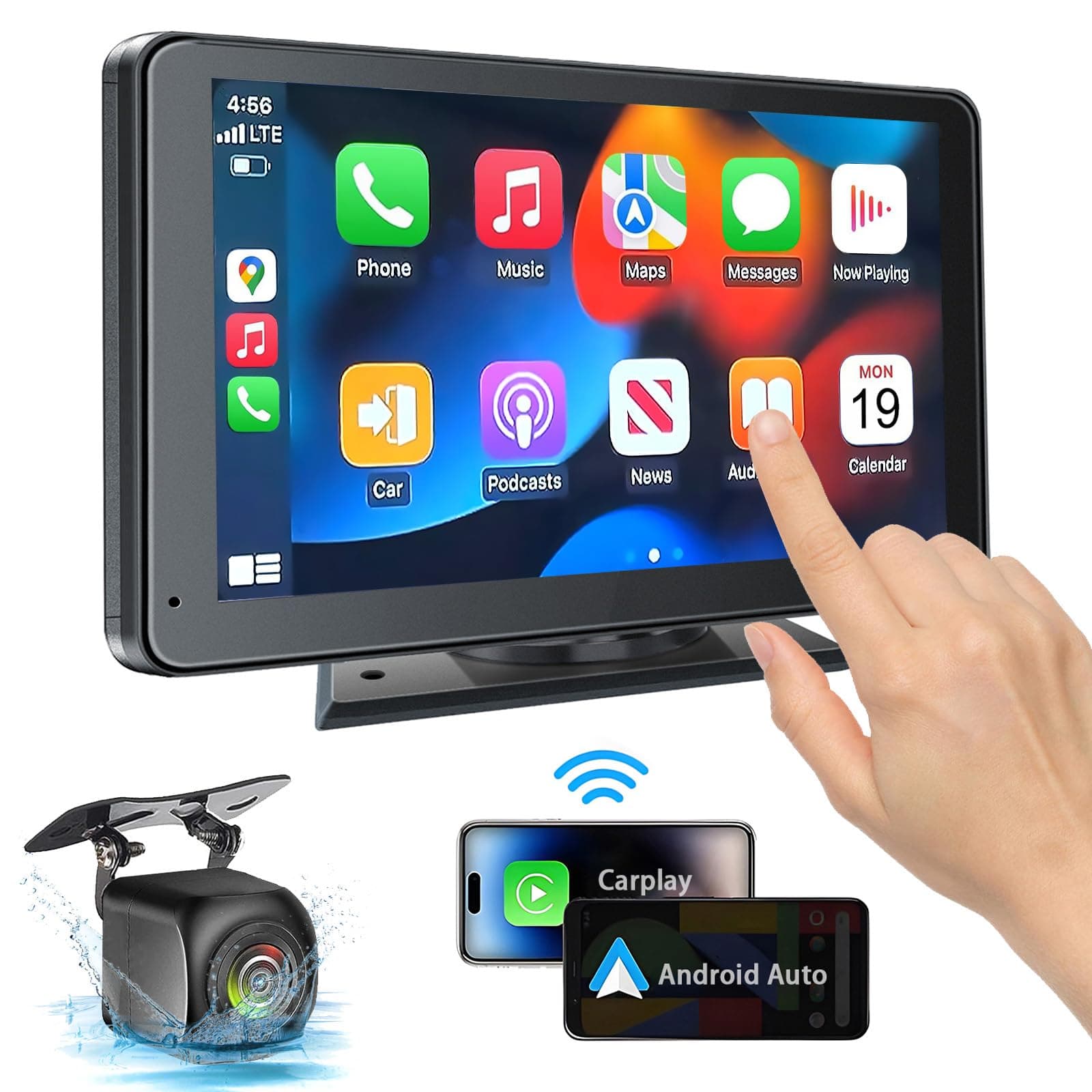
🚘 Upgrade your drive with smart tech that fits every ride!
The PASLDA 7" Portable Wireless CarPlay & Android Auto touchscreen stereo transforms any vehicle with wireless connectivity, universal compatibility (12-24V), and a crystal-clear HD display. Featuring Bluetooth 5.2, Mirror Link, and a night-vision backup camera, it offers a safer, smarter, and more connected driving experience—all with easy installation and lifetime support.


| ASIN | B0CDKMJDLD |
| Audio Output Mode | Stereo |
| Audio Output Type | Speakers |
| Best Sellers Rank | #939 in Electronics ( See Top 100 in Electronics ) #1 in Car Stereo Digital Media Receivers |
| Brand | PASLDA |
| Built-In Media | DVD |
| Color | Black |
| Compatible Devices | Mobile Phone |
| Connectivity Technology | Bluetooth |
| Connector Type | USB, 3.5mm Jack |
| Control Method | Touch |
| Controller Type | iOS, Android |
| Customer Reviews | 4.0 4.0 out of 5 stars (3,323) |
| Format | WAV |
| Item Dimensions D x W x H | 7.36"D x 4.21"W x 0.9"H |
| Item Type Name | Carplay |
| Item Weight | 1.9 Pounds |
| Manufacturer | Shenzhen Yuzhongqi Technology Co., Ltd. |
| Model Number | FX-WCS-803 |
| Number of Channels | 4 |
| Other Special Features of the Product | Wireless Carplay & Android Auto,Mirror Link,Touchscreen, Siri/ Google Voice Control,Rear View Camera Input |
| Supported Internet Services | Maps, Youtube |
| UPC | 791137577830 |
| Unit Count | 1.0 Count |
| Video Encoding | AVI/MKV/MOV/VOB/MPEG |
| Warranty Description | 2 Year Warranty and Lifetime Technical Support |
| Wireless Technology | Bluetooth |
C**Y
A Small Upgrade That Made a Big Difference
I honestly didn’t expect such a huge improvement from this portable 7” HD touchscreen — but wow. Installation was incredibly easy. No complicated wiring, no stress. Within minutes, it was up and running in my car. The screen is noticeably bigger than my original built-in display, and that alone completely upgraded the look and feel of my dashboard. It feels more modern and way more comfortable to use while driving. The wireless connection works smoothly, and pairing was quick and stable. Apple CarPlay runs perfectly — responsive, clear, and super intuitive. The navigation feature has been a game changer for me. I no longer stress about directions or squint at a tiny screen. Everything is clear, fast, and reliable. Overall, this portable screen dramatically improved my driving experience without the cost of replacing the entire system. If you’re thinking about upgrading your car tech without breaking the bank, this is absolutely worth it.
C**.
Inexpensive Touchscreen CarPlay Upgrade!
Installed this portable CarPlay screen in my Honda Odyssey and it works great. Setup was very easy—no complicated wiring, just mount it, connect, and go. Wireless Apple CarPlay connects quickly every time, and the touchscreen is responsive and clear. I love having Maps, Music, and Messages right on the screen without replacing the factory stereo. The backup camera is a nice bonus and works well. This is a perfect upgrade for older vehicles like mine. Highly recommend!
E**Y
Not Great. Not Even Good
Cheap…. But you get what you pay for I guess. First of all - wireless where? Seriously. I get that the wire would need to be connected to the reverse light but I have 3 different wires coming out the side of the actual screen…. I’m curious in what singular way it’s wireless? Extremely misleading. Second, don’t even bother with the mounting options. Unstuck within 1 day. If you have a CD player in your car, I recommend you buy a mount that goes inside your cd slot it holds way better. Third, i dislike that I cannot view my texts. All it does is read out a text I select. Safe and fine while driving but Annoying if you’re parked and don’t want to pull your phone out to read your messages. Fourth, I’m not sure if it’s just me - but the camera’s night vision does not work for me. Like at all. I reached out to customer support and still waiting on a response. I paid someone to install this thing so if they tell me it is defective I am going to lose it. *btw this was not an easy install. I have a Volkswagen. A foreign car with annoying parts does not like to have upgrades added. Fifth, what the actual flying fudge is the user manual? Terrible grammar, terrible instructions, product support link just sends you to some weird website that doesn’t actually offer any help. You can tell this item is a drop sellers dream. For the amount of effort I put into this thing, I’d rather have just paid MUCH more for one that actually works the first time. If you personally know someone who can set this up for you, it might not be as much of a loss when it starts to not work.
A**A
Surprisingly good
I kinda bought this on a lark to see if it could improve -- and make safer -- driving our 2009 Camry, especially for my kids who are learning how to drive. I also bought a license plate mount for the backup camera, and I bought a different kind of mount for the head unit so that I could hook it into my AC vent (getting it to stick to my dashboard was not going to work longer term with a car that sits outside in the Texas summers). Long story short, it connected to my phone almost immediately, and it works very well with Android Auto. And the backup camera is also very good (my wife was impressed with the image and said it is better then the built in backup camera in her Honda CRV). So, overall, very happy to rate it 5 stars. Assuming it holds up, worth the money spent and time it took to setup and install. Here are some specific pros and cons and considerations: Pros: * It does what it says it will do and it does it at a very reasonable price. * Very bright, crisp images on the screen. Cons (these are all minor): * Touch screen seems an iota slow. Not terrible, just about 1/5th of a second slower than my phone, for comparison. * Built in speakers are OK, but not great and certainly not built for high vol. * Cord for the backup camera was about a foot short for how I wanted to route it, but it was long enough to route it under my front seat (which was my second choice). * Instruction manual gets a B-. Far better than most instructions manuals coming out of China, but could be better. Considerations: * Backup camera installation is not hard if you know what you are doing and are comfortable pulling wires through cars, etc. There are some good videos on YouTube. Watch them carefully and think through how you are going to do it before you start. If you have the correct tools and are comfortable doing this kind or work, should take you about an hour at most. * You likely will need to drill a small hole for the backup camera wire. Be thoughtful about how to do that (there may be two walls you have to punch through), and use grommets or tape to make sure the sharp edges where you drill the hole don't eventually slice through the wire's insulation from the vibration of driving. * Also have about 10 small 'zip ties' for securing the wires so they don't get pinched some day. * As noted above, I do recommend a different way to mount the head unit than what comes with the system, and a different camera mount. * Lastly, you are going to have some cables running to the unit, so have a plan to manage them so they are not in your way while you drive and become a hazard or look unseemly.
Trustpilot
1 maand geleden
1 maand geleden