
DOWNLOAD DE APP


Klantenservice
Copyright © 2025 Desertcart Holdings Limited
DOWNLOAD DE APP
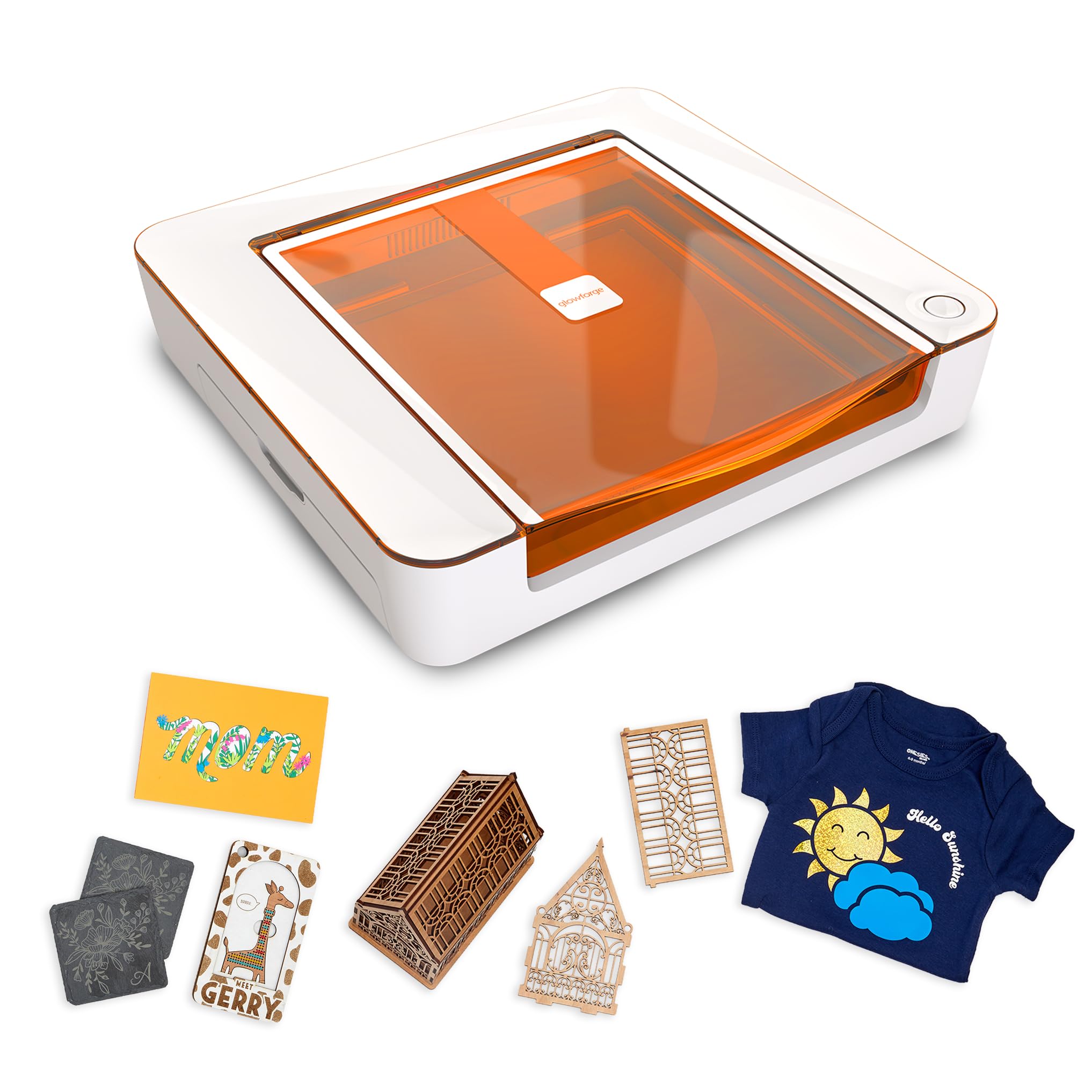
✨ Glowforge Aura: Ignite your creativity with precision and speed! ⚡
The Glowforge Aura is a compact, 6W diode laser engraver and cutter designed for home use, offering compatibility with hundreds of materials including wood, leather, metal, and stone. Featuring onboard camera, autofocus, and WiFi connectivity, it delivers fast, precise engraving with built-in safety as a Class 1 laser device. Ideal for DIY projects, crafts, and small business applications, Aura combines ease of use with professional-grade results.


| ASIN | B0CBQRCVJX |
| Active Surface Area | 451 square inches |
| Batteries Included? | No |
| Batteries Required? | No |
| Best Sellers Rank | #275,603 in Arts, Crafts & Sewing ( See Top 100 in Arts, Crafts & Sewing ) #805 in Jewelry Making Engraving Machines & Tools |
| Brand | Glowforge |
| Color | white |
| Customer Reviews | 3.4 3.4 out of 5 stars (189) |
| Date First Available | August 1, 2023 |
| Included Components | Power cord, Quick Start Guide |
| Item Package Quantity | 1 |
| Item Weight | 23.6 pounds |
| Item model number | GF-ASM-00470 |
| Manufacturer | Glowforge |
| Material | Aluminum |
| Number Of Pieces | 1 |
| Operation Mode | Automatic |
| Part Number | GF-ASM-00470 |
| Print media | Unknown |
| Product Dimensions | 22 x 5 x 20.5 inches |
| Special Features | Onboard Camera, Autofocus |
| UPC | 811961034412 |
N**Y
Works great out of box for this experienced laser user!
I bought this product a couple of months ago and wanted to put it through it's paces before writing a review. I have several years experience with laser cutters/engravers, and was upgrading from an older machine to something a bit newer/quicker, and perhaps a little more user friendly. I was immediately impressed by how well this laser worked right out of the box. Had everything set up and printed my first test project within a half hour. It's pretty slick, I think for a first-time laser purchase this thing is pretty much ideal. There are plenty of pre-made projects you can hop into straight away, and even more if you purchase the membership or are in the trial period. The membership wasn't for me in the long run, but it was great way to start off, and for people who don't want to get into the weeds with creating designs and cuts in other pieces of software and importing them into the Glowforge interface, I think it would be well worth the money. Like many users I tend to use GIMP & Inkscape to create my projects, but pretty much any graphics program such as photoshop should work, so long as you can export image files and SVG graphics. So don't let the membership aspect sway you away from this laser; if you feel like you have to pay a monthly fee to use it, you absolutely do not. I read some reviews talking about the speed of this laser, with some people expressing disappointment with it's speed. That all depends on your perspective. It's important to note that this is a diode laser, not a CO2. If you are wanting to go into large scale production you'll need to invest a lot more money on an expensive CO2 setup, but for the hobbyist or even a small Etsy store I think this laser will do the trick. Compared to my old diode laser, the Glowforge prints at least 6 times faster. Jobs that would take 3 hours to engrave can be done in less than 20 minutes, and the quality is just as good, maybe even a bit better. Cutting speeds are similarly faster. So for me, this thing has been a godsend. The software took a bit of getting used to, but again I was moving from an entirely different platform. I can safely say that compared to my earlier experiences with lasers the overall learning curve was much, much quicker. I was really impressed with the pre-sets. On my old unit I would waste an hour or more running test prints and grids to get satisfactory results, so I was a really amazed by how often my first print would turn out great without having to tweak any of the settings. The auto calibration and camera really work well on this unit. Initially I was a bit dismayed by the fact it had presets because I was so used to fine-tuning laser power and speed manually, but found that all of these functions are there if you really want to get that exact effect you're looking for. I'm pretty old-school, I like to back up my photographs to hard drives at my house and not store them on the cloud, so at first I wasn't wild about the platform being cloud based. But that's the way the world is moving, and I certainly haven't had any issues with this aspect, and in fact have fully embraced it. You can either buy Glowforge certified materials which will be automatically detected, but I have had excellent results by purchasing other non-certified materials as well. Just make sure to buy them from a decent supplier. For more advanced users, you can cut/engrave other materials as well (as long as they are diode laser compatible), but obviously you'll need to experiment a bit to get the settings rights. The Glowforge forum is a great place to go for advice or to see who has already done something similar so you'll have a good starting point. For me this is where a lot of the fun really comes in. In summary I'd say this is a great diode laser for both the novice and the experienced. The footprint is small, and it's a tidy device that looks great sitting in your craft room (or living room table).
T**N
Not worth it
I was excited to order this machine for fun crafts. The excitement went away all within 30 minutes of opening the box. There is no owner's manual, only a quick installation guide. There are hardly any cutting tips online, so I had to do trial and error while cutting. I did one sample cut and it worked fine. After that, the machine kept cutting off mid-cut, which caused me to lose so many acrylic products that aren't cheap. Also, even with the filter that you have to buy separately it. does not catch all of the fumes, so that separate cost is also pointless. The machine overheats, so expect your projects to go fr.om 50 minutes to 2 hours for one small cut. Their software is easy to use if you have a premium account, which is about $240 a year. I am not happy at all with this product.
A**C
Crafting elevated!
Full disclosure: I was a beta tester, so I’ve been able to use this machine before others. There’s some really important information that’s missing from the listing, so read carefully and make sure you’re buying the right product for what you need. First - don’t be mistaken, this isn’t the laser that made Glowforge famous. Aura is less powerful, cheaper, smaller, lighter, and a lot more orange but the Aura has completely transformed my crafting! Setting up the Glowforge Aura was an absolute breeze (you just need wifi). The step-by-step instructions were incredibly easy to follow. Within minutes, I had it up and running. There’s just one button. When it lights up, you push it. One of the most important features: It’s safe. Glowforge is the only laser I know that has a 3rd party testing certificate. With a 6 month old baby, this was extremely important to me. One of the standout features of the Glowforge Aura is the Glowforge Proofgrade materials. These materials are specifically designed to work seamlessly with the laser cutter, ensuring consistent and high-quality results. The variety of materials available is impressive, from wood and acrylic to leather. I tried to save a bit of money and use other materials and although they work great, it takes so much more time and effort. I ended up buying the Proofgrade materials and now I won’t go back! They are so much easier and high quality. The Glowforge Aura can cut through a wide range of materials with precision. Whether you're making intricate pieces, personalized gifts, or more, this laser cutter can handle it. I was amazed at how easily it cut through wood, leaving clean edges and intricate designs with minimal effort on my part. The Glowforge software is a joy to use. It's intuitive and user-friendly, making the design process a breeze. You can also import your own designs or choose from a library of pre-made designs, making it easy for both beginners and experienced designers. I used the Aura air filter with it and the automatic on/off is so great. No extra buttons to push or think about - just attach and go. I have also used it without the filter, which in that case needs to be vented out a window. How it actually works: I created a wood an acrylic sign for my niece’s birthday party that turned out PERFECT. It looked like something you would spend hundreds on. It did take some trial and error to get there though. I first tried to use off-brand white acrylic, adjusting the settings on the machine manually but then learned that this laser does not cut white and clear acrylic because of the type of laser it is. I ended up buying the Proofgrade wood and painting it - saved me so much time and wasted much less material. It did cut easily through green acrylic to make accents for the sign. I also quickly engraved a piece of pink acrylic for a last minute additional sign. The Glowforge Aura has truly taken my crafting hobby to the next level. If you love crafting, this laser cutter is a game-changer that will have you creating stunning projects and inspiring others to do the same. I think Glowforge Aura is the best bang for the buck in its category. If you’re trying to produce a product to make money, upgrade to something bigger. If you’re crafting or making stuff at home - Aura is the best pick for safety, ease of use, and just being a lot of fun to operate.
Trustpilot
1 maand geleden
3 dagen geleden