
DOWNLOAD DE APP


Klantenservice
Copyright © 2025 Desertcart Holdings Limited
DOWNLOAD DE APP

⌨️ Elevate your workspace with wireless ergonomic mastery — type smarter, feel better!
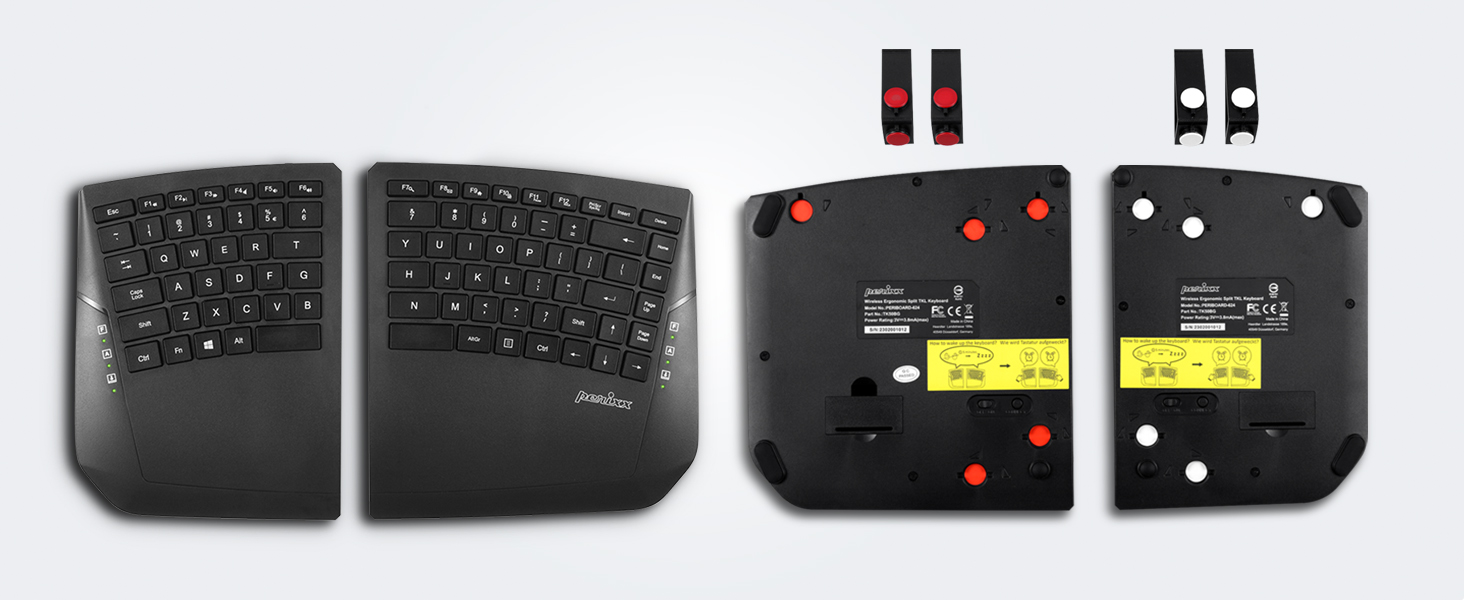
The Perixx PERIBOARD-624B is a wireless ergonomic split keyboard designed for professionals seeking comfort and flexibility. Featuring true wireless connectivity with up to 2 ft separation between halves, adjustable tilt angles, and a curved split-key design, it reduces strain on wrists and shoulders. Its low-profile membrane keys offer tactile responsiveness, while built-in multimedia shortcuts enhance workflow. Compatible with Windows 7 and later, this sleek black keyboard balances advanced ergonomics with modern wireless convenience.




| ASIN | B0C789ZFMK |
| Best Sellers Rank | #266 in Computer Keyboards |
| Customer Reviews | 3.8 3.8 out of 5 stars (289) |
| Date First Available | June 6, 2023 |
| Item Weight | 2.03 pounds |
| Item model number | 12164 |
| Manufacturer | Perixx |
| Product Dimensions | 14.21 x 8.46 x 1.1 inches |
J**C
I really like this keyboard
I'm not sure why there seem to be a good amount of mediocre to negative reviews for this keyboard. I quite like it. I've been using a Goldtouch keyboard for awhile that is fully tented and I don't have any complaints with it. I decided to give this one a try because it's the only one of its style and type I've seen that is completely wireless. No wires to the computer or from one half of the keyboard to the other. The keys are very low profile and have a quick little throw to make them activate (perhaps that's some of the reason for the other reviews?) That does take a little getting used to but it seems to be the same as the newer logitech ergonomic keyboards and others I've seen. It is quite different than the Goldtouch and other standard membrane keyboards, and it's nothing like a mechanical keyboard or a hybrid mechanical keyboard like the old Logitech G10 gaming keyboard, so if that's your expectation, you won't like this. What I really like about this keyboard is how there are reasonably-sized palm rests built into the design. With the Goldtouch, I had to build a custom curved wrist rest to set far away from the keyboard to rest my forearms on in order to have straight wrists at the keys when fully tented. It worked fine, but I much prefer that this keyboard has a place to rest built right in that keeps your wrists in the correct orientation. The Goldtouch just doesn't, and that doesn't really matter if you use it flat or mostly flat, but if you want to tent it, you need some place to rest your wrists/arms to avoid unnecessary fatigue after long use. I also really like how you can use only one side of the keyboard if you want to, saving battery on the other half. For example, if you want to sit in a recliner and play a game, you can just take the left half of the keyboard to the chair on one arm and a mouse on the other other arm. Simple as can be. So, in closing, I would say if you have reasonable expectations, this is a really good keyboard. I have only had it for a few months so who knows how durable it will be long-term but it feels solidly built and is very easy to type on for extended times. If you use standard qwerty keyboard typing form, there is no issue with any of the key placements. If you have invented your own style, you may not like some of the key placements. I would recommend it to anyone who likes tented keyboards, as this one, so far, seems to have the best ergonomics for wrists I've found.
P**F
Difficult to transition from a Microsoft Natural
Got this keyboard to replace a very tattered, ailing Microsoft Natural 4000. For those simply looking for a highly configurable arrangement of keyboard and not switching from a very specific keyboard, this Periboard is really quite nice. If you are or were switching from a Natural, here are some things to think about: Key placement and size: not an exact match, and even where the keys are a match for the Natural, the size or angle of the keys are a little off-feeling. Certain keys (for me, Z for instance) take more pressure to actuate, I believe because I'm used to some of the slight radiusing of the Natural). Some are a further reach but a similar grouping (like arrows), and some are near where the Natural has them (Delete, Backspace) but become frustrating because they're not in the identical arrangement. Some keys are smaller, and another reviewer mentions this and indeed it is not only an accurate description, but also the reviewer sounded concerned about getting used to the smaller size of certain keys, such as Enter. This specific point has indeed been a learning curve for me, and I can no longer say I'm an adept touch-typist. I have to look at the thing with greater frequency than I would like, and if the room is dark, this is a strain since the keyboard is not backlit. Adjustability: I reason that the Periboard is highly adjustable, but unexpectedly that becomes a problem at times, if the keyboard halves drift apart or need to be moved and re-positioned. But the ability adjust the keyboard's stance along three axes plus make the halves further apart is quite unique and useful. Stability: Another reviewer noted that the keyboard halves rock and wobble a bit if the desk surface is not perfectly flat. My experience is identical to this and I've ended up folding a piece of note paper under one foot to keep it stable. I also believe I saw in a review that the keyboard feet can collapse if one presses to firmly on the keyboard, and indeed the magnets can separate and become pulled out, resulting in a temporary (and easily fixed) collapse. In my experience this is infrequent and minor, but worth noting. Key function: In most respects, this is an easy keyboard to get used to. Initially, seeing the low keys I had concerns that the key action would have little tactile response like typing on a capacitive screen. Fortunately that is not the case at all, and the key action is similar to the Natural in many respects. Unfortunately as one reviewer noted, some keys seem to have an improper 'click' to their action, and it's unclear if that will affect the long-term functionality of that key; I re-mapped some application keys to avoid using those clicky keys as often. Cabling: As one would expect from a cabled (non-wireless, non-bluetooth) keyboard, there's a main cable, a junction, and a secondary interconnect to the other half. The junction is poorly designed in terms of its size, which seems unnecessarily large -- a disc almost 6x2cm. It does stow under a fully raised half of the keyboard, but I still wonder why do that at all when it could be smaller or nonexistent (meaning, any circuitry in it should be contained in the keyboard shell). Tenting and angling: the included triangular legs permit two stable height configurations, two unstable height configurations, and one additional stable height if you include 'flat' (no use of the legs). The unstable configurations result from having the legs turned inward, which accomplishes little with respect to height adjustment and also permits the weight of one's hands to collapse the legs. So, though the legs are keyed for use in this orientation, I will always avoid it. The height and angle achieved by the legs in full-height orentation is fine for my long-term use and I do not have wrist fatigue, especially if I angle the halves further apart at the spacebar side. No numeric keypad. Including a numeric keypad would throw off the symmetry and change the keyboard angle, and I suspect that weighed heavily on the design choice. Some people won't care, and may welcome being rid of the width. I do care, and ended up buying a bluetooth numeric keypad that I use for number-crunching. It's not the same or as convenient as an attached keypad, but it adequately compensates for the Periboard's design. This also means there is one Enter key. There is no 'big enter key' like one gets with a numeric keypad. This is probably of little concern to most people, but it's worth mentioning in the context of failure -- if that key stops working, several of things we all do on a computer become difficult if not impossible, and having a second or backup Enter can become important. Miscellaneous: F-lock does not seem to stay enabled through a sleep or reboot cycle. That might be my OS, or could be the keyboard. Capslock feels too easy to press. The Windows / Super key feels too far right (toward the middle), in an effort to find somewhere for the Fn key. The keys are all flat (not scalloped), and interestingly this makes by-touch identification of certain important ones (like Enter) more difficult. I sometimes end up hitting nearby keys like backslash and apostrophe instead of Enter. Key point of my experience: key position and size are making the transition from a Natural a bit long and somewhat frustrating.
T**N
For the price, outstanding!
This was the least expensive split keyboard I could find. Overall, I’m very pleased. I’ve had to “retrain” my hands a little because the right shift key is a little off compared to my old semi-split keyboard by the same manufacturer, but otherwise it works well. For the price, it was a very good deal; in my classroom, there is so much potential for spills, etc. that I just can’t justify a $100+ keyboard that I’ll likely have to replace every year. There are some features I *wish* were different, so these are things I wish I’d known or would consider if I were repurchasing this item: - there is no number pad. This would have been a dealbreaker if I’d noticed before I bought it, but I got a cheap add on and it’s only a minor issue now. - the support feet have an interesting setup, triangular braces that can be turned on different sides to get different heights. Much sturdier than the usual foldout/hinged pieces. However, they are held in little circular notches with small circular magnets, which can slip out easily if the keyboard gets jostled or bumped. Overall, I like the ease of adjustment and the concept is good, but if you type hard you might want to glue them in your preferred position. FWIW, they also seemed very tall even in a low position, but now that I’m used to it I prefer it. -the keyboard is very “soft”. Retyping a page-long reading today, I realized that there is not much key feel during typing, it’s kind of mushy. I like to feel the key because I learned to type on a typewriter, so this may be too soft for some.
C**N
✅ Ich bin mit dieser Tastatur wirklich sehr zufrieden. Die Tastenanschläge sind angenehm, leise und gut spürbar – perfekt für längeres Schreiben oder Arbeiten. Die Verarbeitung wirkt hochwertig, und auch das Design gefällt mir sehr gut. 📦 Lieferung war schnell und alles war gut verpackt. Insgesamt ein sehr gutes Preis-Leistungs-Verhältnis – klare Kaufempfehlung von mir!
M**K
I dont write many reviews, but not many items have impressed me as much as this one! Im wheelchair bound and spend about 22 hrs a day in bed thanks to chronic pain. I researched like crazy to get a split keyboard that suited my needs. The fancy gamer or pro ones cant do what this can, and its half their price. Wirelessly, i can be in bed and have each half at my sides. At first it had sync problems, but when I moved the dongle up to a top port rather than at the back it hasnt given me an issue since. Battery wise i havent changed them yet and ive had it working every day for six weeks. Also, i cant tell you how many times they have dropped from the bed to the floor so they are rugged despite being all plastic. The magnetic bits are handy and well thought out too. Overall its a well designed, sturdy, useful bit of kit that I totally enjoy using as I learn touch typing. Thankyou Perixx
N**A
The magnetic mounts are nice but they are not the most stable. I find the magnetic legs getting twisted and crooked all the time and then I have to manually re-adjust them.
P**Z
Otherwise, good value for the price. But takes getting used to the small keys
B**A
I'd give it 10 stars if I could. Its the best keyboard I've ever had. I've been using it for a year now and all the pain in my fingers and wrists are gone!
Trustpilot
5 dagen geleden
2 weken geleden