
DOWNLOAD DE APP


Klantenservice
Copyright © 2025 Desertcart Holdings Limited
DOWNLOAD DE APP

🎨 Elevate your creative flow with the ultimate shortcut sidekick!
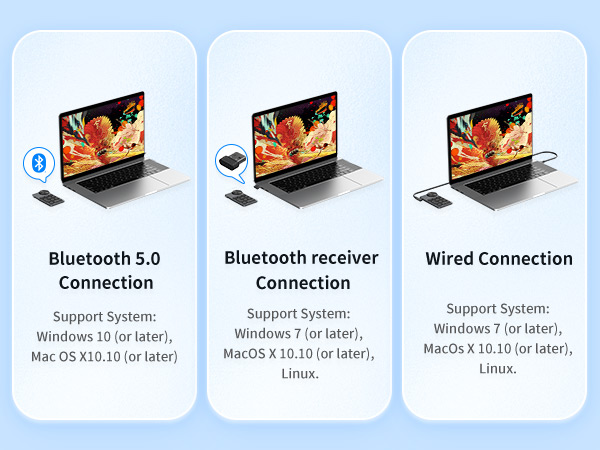
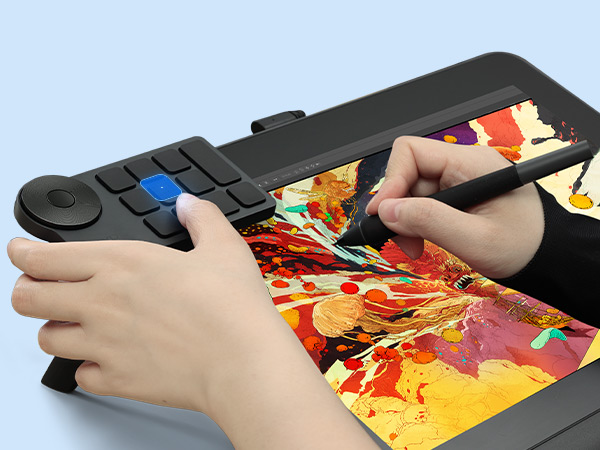
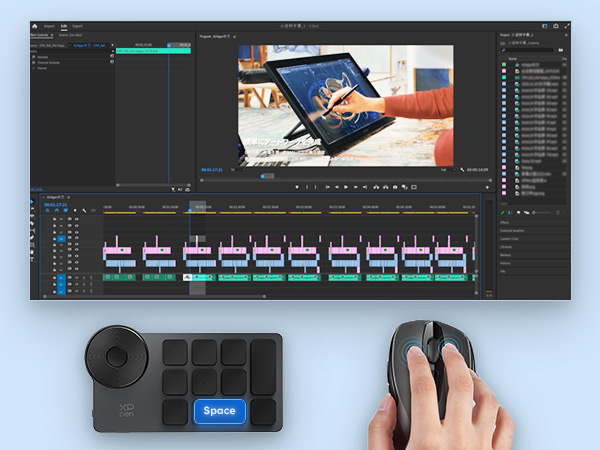
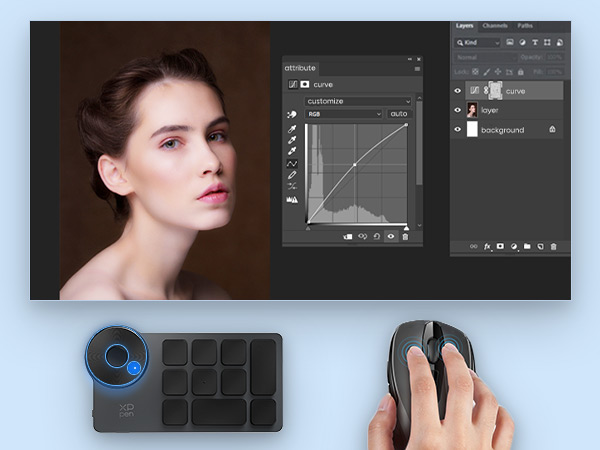
The XPPen Mini Keydial ACK05 is a compact, wireless shortcut keyboard featuring Bluetooth 5.0, a tactile precision dial, and 10 programmable keys supporting up to 40 shortcuts. Designed for creatives and professionals, it offers up to 300 hours of battery life, anti-ghosting technology, and broad compatibility across Windows, Mac, and Linux platforms, making it an indispensable tool for video editing, graphic design, and multitasking.



| ASIN | B0BVW3S1QR |
| Additional Features | Lightweight |
| Antenna Location | Video Editing |
| Best Sellers Rank | #23 in Computer Graphics Tablets |
| Brand | XP-Pen |
| Built-In Media | Bluetooth Dongle, USB Cable |
| Button Quantity | 10 |
| Color | blue |
| Compatible Devices | Laptop, PC, Smartphone, Tablet |
| Connectivity Technology | Bluetooth |
| Customer Reviews | 4.3 out of 5 stars 527 Reviews |
| Enclosure Material | Acrylonitrile Butadiene Styrene |
| Generation | 1st Generation |
| Hand Orientation | Ambidextrous |
| Item Dimensions L x W x H | 3.94"L x 3.15"W x 0.79"H |
| Item Weight | 75 Grams |
| Keyboard Backlighting Color Support | Single Color |
| Keyboard Description | Wireless |
| Keyboard Layout | QWERTY |
| Manufacturer | XP-PEN |
| Mechanical Keyboard Switch Model | Scissor Switch |
| Model Name | Keydial ACK05 |
| Model Number | ACK05 |
| Number of Batteries Required | 1 |
| Number of Keys | 10 |
| Power Source | Battery Powered |
| Recommended Uses For Product | Video Editing |
| Series Number | 5 |
| Special Feature | Lightweight |
| Style Name | Modern |
| Switch Type | Scissor Switch |
| Theme | Art Creation |
| Warranty Description | 1 Year Warranty |
M**.
Works like a charm on Windows and Android!
I mainly got this as a companion macropad for my Magic Drawing Pad, but after trying it on my PC, I've decided to make this my daily driver for when it comes to macropads; I originally had two, but I ended up ditching them both solely for this one. It's THAT good! The software was easy to work with (both Windows and Android) and setup my macropad on both devices, though I noted that it crashes on Windows if I hit the plus sign on what seems to be additional configurations. Regardless, I had zero issues running it wirelessly or wired (both 2.4ghz and Bluetooth). Very little to no latency issues; input responses were spot on. I haven't tried it out on Linux yet, but I'd reckon I would have a similar result with Windows and the Magic Drawing Pad. The ACK05 is thin, has a little bit of "premium-esque" weight to it, and can fit in the Magic Drawing Pad's blue stand case; that's how easy it is to take with you. That, and the dial also makes for a pretty satisfying fidget if I get bored. Oh, so clicky!
A**R
Functions Great on either PC or Mac
I needed a little shortcut keyboard capable of working across both PC or Mac platforms. This fits the bill delightfully. Being a compact size, the ACK05 has a minimal footprint on your desk. If your PC is running Win 7 or later or your Mac is using OS 10.10 or later, this is a great little device to have. I oftentimes have to jump back and forth between either a PC or Mac environment in my work, so having a little keypad where one simple button press eliminates the need for me to remember which keyboard shortcuts are required for tasks across either OS is wonderful. I use this little guy all the time. Functionally, it's a pretty decent bag. Buttons all feel nice with a proper click to them that the scissor switches provide. The wheel is great for assigning with programs to access things like rotation or zoom options, though I really wish it didn't have indexer-clicks when turning it. I prefer wheels with a silent no-cllck control feel to them...but at this price I'm not going to hum about it. It works, so I'm happy. Battery life is excellent. Work with this peripheral for hours and hours and hours and it runs and runs. I basically just have to remember to plug the USB-C type cord into it at the end of the work week and It's good to go for Monday. Yes, there are flashier and more expensive shortcut keyboard devices out there but I really appreciate this one for its simplicity. I've used the $100 Xencelabs Quick Keys remote keypad before, I found it an extravagant exercise that was more flash than function. Small, slippery low-profile buttons positioned along the outer edges of the unit to make way for an OLED screen with really hard to read tiny text, and some RGB gimmickery thrown in. Battery life on that device wasn't great as I recall. The ACK05 on the other hand has easy-to-press raised buttons across its entire diminutive surface, and if you can use a sharpie and have some Avery labels on hand (I use the removable style tiny ones) you can customize your keypad to some degree. I suppose you could even use cut-to-size sticky colored post-it note paper to add color to the buttons. The ACK05 requires one of the buttons on the 10-button layout be assigned as the "key group switching" button... it allows you to set up and customize 4 possible groups of (9) keys for a possible combination of 36 potentially different shortcuts / actions. That is way more shortcuts than I need, but it's nice to know they're there if you need them. Additionally you can assign a button as "set preview" in one (or all) of the groups. This will display the currently selected groups of keys and their programmed functions on the monitor when you press it. I have that option on both groups of the two key groups I use, so I have 8 keys remaining on each group I can assign functions to. I kind of wish the center-button in the rotating wheel could be assigned something else besides "choose a wheel option: zoom, scroll, brush size or rotate"...AND that they might have included some indicator of which you were in (that would have been an appropriate use of small LEDs I'd argue) if you have the screen-dialogue subtitles shut off because they get real annoying real quick... but it's not a deal-breaker. The XP-Pen software that shipped with the ACK05 I went ahead and updated and it does a good job of making all the options for customization accessible. It was pretty easy to understand and I appreciate that you can orient the layout / buttons manager as displayed on the monitor same as how the ACK05 will physically rest on your desktop. I do not possess the technical expertise to comment on how the ACK05 might be better or worse than other keypads when it comes to the robustness or flexibility of the software and coding, but I will say its been working really well for me between my PC and Apple systems and I have thus far had no problems with it. If I had any quirks to address, it might be that I wish the buttons were a slightly lighter color than the black body of the ACK05 so they'd be easier to see...but as mentioned, that is easily and quickly remedied with application of stickers. XP-Pen does include some in the packaging, but I found it more fun to make my own. In conclusion I think the XP-Pen ACK05 is a very good deal for a handy little keypad that does work well and doesn't cost a lot of money. I've been happy with mine, it's proven to be a little workhorse that lets me get things done more easily.
R**Z
Perfect Macro Keypad, Just Not Wireless
The keypad and dial work great. The program used to set keys/shortcuts is easy and works great. It can also sit in the dock as to set shortcuts as needed. I used the keypad for screenshots and video capturing while playing video games. It worked like a charm and I did not miss a single screenshot. I also used the keypad for Photoshop. I used the dial for zoom and assigned a few of the shortcuts I needed. I can honestly write that it sped up my productivity. The major flaw with this keypad is that I could not get a reliable wireless connection. I used the dongle, but could not keep a stable connection. Bluetooth was more of the same. The keypad would connect and function for a while. But, after a while, the keypad would just not respond. I ended up just leaving it wired, and it works great. I am very disappointed that I could not use it wireless, but the functions of the keypad are so good that I can settle for it being wired. Love the keypad. I just wish the wireless function worked.
J**C
Best macro pads you'll find on Amazon. Well worth the money.
This thing is pretty good for the price. It's built well and feels like a quality product. It's not heavy but feels solid. The cable stayed plugged in without issue. The keys feel good to press and never had an issues with them. The software that comes with it is really great too. There are plenty of macro pads for sale on Amazon that are cheaper or have more dials and better layouts but none of them come with real software for programming then so you are stuck with what you get. This thing comes with excellent software that lets you program every key and even program the knob (between zooming or scrolling). You can set 4 different options and then switch between them which makes it like having 4x as many keys. It also has an excellent feature that lets you program the keys for specific programs, so a key can serve as a shortcut to launch your calculator when you're in word but then serve as a shortcut key for the selection tool when you're on Photoshop. Works wired or through Bluetooth. Works flawlessly on windows 11 and on the two Linux machines I used it with. It does need to be reprogrammed when switching from a Windows to Linux machine but they have the programming software for Linux on their website and it works just as good as on windows. The only thing that doesn't work on Ubuntu or Debian is the Bluetooth so it has to be used wired, which is fine. I wish they provided a way to differentiate the keys since they aren't marked. I am going to just print some labels to stick on them myself. Great product that is better than more expensive macro pads I've tried. This is the best one I've found on Amazon.
M**D
Genuinely essential
This little device completely changed my life. It has made using drawing and editing software so much easier and faster that I cannot imagine ever doing digital art without it. You'll have to download the drivers from the website, but once you do you'll get a taskbar icon where you can configure its keys at your pleasure. If you already have an XP-Pen tablet you already have this icon, but after installing the driver you'll be able to switch between configuring the tablet and the Remote from a drop menu. Essentially, with this device you now have over 40 shortcuts at your disposal. A selection of buttons and a wheel can be configured at your discretion with any key/mouse combinations or established functions you choose. The wheel is perfect for stuff like zooming, rotating or changing brush size, but you can give it any function you want. One special key can be used to switch between different button presets, and you get up to 4 of them. No more constantly fiddling with your mouse to find any elusive function you use regularly that interrupts your flow while you look for it. And yes, some tablets already have a few button shortcuts, but the more the merrier. The device is also very light and easy to carry. It works both connected and wireless by Bluetooth, so you can set it anywhere you find the most comfortable. It comes with a few stickers for existent functions (move, cut, eraser, zoom in, etc.) that you can put on the buttons so you remember which one is which, but obviously these are only going to be helpful for one of the presets. Be wary, though, that depending on the software you use you might have to do some extra configuration in it. For instance, while you can set the wheel to Rotate in its own menu, if you try to use it in Clip Studio Paint it won't immediately work. You have to go to CSP's Shortcut Settings first, find the Rotate option and set the shortcuts for it to the wheel. After that it'll work like a charm. I really can't recommend this device enough. It really is a time saver.
B**N
It works, but with caveats. Will be returning.
I use a Huion tablet at my desk, but recently purchased a 2 in 1 laptop to doodle on the couch with. I've used a Razer Tartarus Speedpad for art shortcuts for years now, but some of the buttons are starting to act up, and I wanted to try out something different. After browsing all the options, I thought I liked the form factor of this XPPen one, and thought it would suit my needs perfectly. Turns out no! This thing is NOT JUST a macropad- it also includes all the XPPen tablet drivers for some stupid reason. They are necessary for it to function. Which is fine if you use XPPen for your tablet I suppose, but since I use Huion at my desk, I had to reinstall the Huion drivers because XPPen overwrote them and broke it. And fixing this issue on the laptop was even more of a pain since it's using some combination of wacom AND windows drivers. I have no idea why their entire suite of tablet drivers would be required for this single device to work. It doesn't seem to *actually* have any onboard memory. I set up all my shortcuts on my desktop, saved them to the device, then later went to draw on my laptop. Plugged it in- no dice. Installed the XPPen app that it apparently needs- nothing. I had to set up the keybinds AGAIN on the laptop, the exact same layout, and re-save it to the device. Every single time I switched between the two computers, I had to re-save the settings, despite them being the same. What exactly is it saving? Why can't it just recognize it's the same setup? Why would the app remember the settings, but not the keypad? That's a terrible way to do it! It's very lightweight, which I thought would be great for on the couch, but it was actually more frustrating getting it to sit beside me on the blanket. The limited number of buttons also turned out to be an issue. There's only ten and the single dial, which meant I had to use two of the buttons for changing the pen size up and down, which is a bummer with how few there are. and while I had just enough for my basic setup, I realized if I ever wanted to add anymore, they would have to be on one of the other pages of macros... just a click away, but kind of annoying at the same time? I realized I wanted to have more I ended up getting a Keebmonkey Megalodon macro pad instead- 16 buttons instead of just ten, with three dials, instead of the one, letting me have both zoom AND pen size be on dials, instead of wasting buttons just for that. I set the third dial to be media volume, and since all the dials are also programmable buttons, I can also play/pause my media, as well as quick save my art. I've got buttons to spare for the future now and it also has the same 4 pages of layouts you can do. It was a bit more challenging to bind things, but ultimately is just.... kind of better in every way? Once I got it set up, the onboard memory just retains all the keybindings, so I can move freely between machines. And since it just shows up as a keyboard, it doesn't need any special drivers or apps to work. It also has programmable RGB lighting, feels super solidly built, and is available in a bunch of different colors. And while it does have to plugged in to work, that seems a small price to pay for all the other benefits you get with it. I never really got to test the battery life, since I was switching between machines. I had one setup for using it on bluetooth, and the other plugged in, so it was getting a frequent charge. The bluetooth always worked perfectly at least. So the XPPen Shortcut Remote works- if you already use one of their tablets, it will probably be fantastic for you! But it will be annoying if you need to move between computers because it requires the full driver suite to work, will not retain your keybinds between machines. It has a limited set of buttons which I just realistically don't think is enough after having used it. It's lightweight and small, which might be a boon to some, but also makes it feel flimsy and cheap. It just doesn't suit my needs, and I'll be returning.
F**O
Slim, neat, precise, great for macros and AutoHotKey
The more I learn about programmable keyboards (macro keyboards), the more I realize how powerful this little one is. If you are a programmer and _really_ know what you want to do, you should look into the fine details of the XP-Pen ACK05. I came here just to write this review to let you know about this. To talk just about the externals, I *love* how truly slim and lightweight this unit is, because it fits comfortably loose inside my shirt pocket. I even forget it is there. The build quality is solid and the dial works really well. Each single "click" on the physical dial is accompanied by one and just one exact "tick" registered by the computer. Each battery charge seems to hold a lot longer than I can remember when did I last charge it. But the real diamond is the seemingly innocent driver that accompanies this device. **The driver captures key presses before any other software in your computer can.** If you are a programmer trying to do niche tricks, this is exactly what you needed. Programs like AutoHotKey "struggle" to beat Windows Remote Desktop, VMWare Horizon Client, or other professional applications, in capturing input from things like keyboards. Those remote control programs are explicitly engineered to capture input events from deep into the kernel, before any other program can notice them. The driver of the ACK05, however, does that for you. It captures the keypresses, from this one specific device, before anything else running on your computer does. The driver lets you easily assign almost anything to a keypress, from any keypress or key combination, to running a whole external script. Even running a whole external script! Think about it for a second. You won't even need AutoHotKey for this. Each key can have its own different script assigned, *and* that key press WILL be captured by your _local_ computer, *not* sent over to the remote computer you are connected to -- unless the "innocent" driver of the XP-ACK05 is not installed. This lets you do any number of quality-of-life micro-automations, even the simplest things, such as quickly changing the volume on your _local_ computer *while* the current keyboard/mouse focus is being captured by a remote machine. The little button in the middle of the dial can ONLY change the layer of the dial (it is not programmable), but the silver lining is that you can have the dial be on a different layer than the rest of the keys. The device offers you 4 layers with 10 keys each, plus 4 independent layers on the dial (which can have wholly separate actions for clockwise and counterclockwise rotate). A raw total of 48 completely separate actions that are one or two buttons away from you, loosely inside your shirt pocket. Really, more customization and sheer capabilities than you can make use of. Somebody, please, make this be "standard hardware" somewhere.
O**Y
Android tablet issues
*UPDATE: After contacting customer support, i brought my rating down to 1-star. No product should require you to turn off antiviru to install.* I bought this to use with clipstudio paint on my android tablet. Xp pen doesnt have a google play supported app so you have to use a 3rd party APK to change the settings which is a red flag to begin with. That app doesnt work. Customer service then asks that you use sketchy proprietery software and turn off antivirus. Not worth the hassle.
Trustpilot
1 maand geleden
1 maand geleden