Some deliveries may take a little longer than usual due to regional shipping conditions.

DOWNLOAD DE APP


Klantenservice
Copyright © 2025 Desertcart Holdings Limited
DOWNLOAD DE APP


🖱️ Elevate your left-hand game with precision, comfort, and control!
The ELECOM EX-G Left Handed Trackball Mouse combines high-precision optical tracking with an ergonomic design tailored for left-handed users. Featuring 6 programmable buttons, tilt-scroll functionality, and a DPI toggle between 750 and 1500, it offers customizable control for professionals and gamers alike. Its wireless 2.4 GHz connection and long-lasting battery ensure freedom and reliability, while smooth artificial ruby bearings minimize maintenance. Compatible with Windows and macOS, this trackball mouse is engineered to boost productivity and comfort.


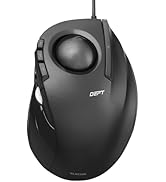


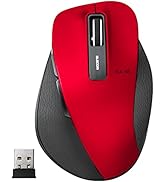


| ASIN | B016QCPRBM |
| Best Sellers Rank | 9,867 in Computers & Accessories ( See Top 100 in Computers & Accessories ) 278 in Mice |
| Guaranteed software updates until | unknown |
| Item model number | M-XT4DRBK |
| Manufacturer | ELECOM |
| Product Dimensions | 9.4 x 4.57 x 12.45 cm; 127.01 g |
P**E
Good mouse
Good trackball mouse, like the 3rd button and the software allowing custom setup, really helps with my engineering work. The buttons are a little on the louder side when clicking compared to other devices. Good value, comfortable to use and surprisingly quick to adjust to using it
M**Y
Superb But Alittle Over Priced
The packaging is superb. No fancy printed, oversized glossy boxes. A simple protective box. There is no 200 page multi-lingustic manual. Only the need to use the website to download the manual and software. The materials could be a little better. It feels flimsy. The ball isn't quite as smooth as I would like. This is my first tracker. There are minute areas that feel hesitant. This could just be my inexperience. The downloadable software, manual and controllers, is easily found. As is the configuration of profiles and the assignment of buttons. I will update this review further after a few months usage.
S**L
Great quality mouse.
Brilliant mouse. Nice adjustable sensitivity. Works great. Feels sturdy.
A**R
Works on Chrome OS!
This is a great product! Works very well on Chrome 134. Only the very left hand button doesn't do anything.
D**H
Updated views after exteded use
I'm more or less ambidextrous. I have carpel tunnel syndrome in my favoured, my right, hand. I use a trackball, a Perixx, for my right hand but have been trying, and failing, to use it in my left for a while. The Elecom XT40R is one of the very few trackballs, with a wheel, suitable for left-handed use. I so wanted to like it. The instructions are in Japanese. The diagrams are poor and, in any case, do not cover the programmable keys. The website is also in Japanese and Google translate doesn’t help when trying to find the particular device. The name on the trackball, Ex-G does not produce any search result and one has to use the number on the bottom of the device, together with a magnifying glass to read it. I eventually found the pdf, and the brief English bit tells one to go to a URL on the Japanese site. So I put the Bluetooth USB device in, put the supplied battery in the trackball. No response. After a few minutes, I put in a new AA battery. Success. Then it's a case of downloading the driver and restarting. The device is comfortable to use, although I have large hands and the device is a bit small – the norm for me. Otherwise it’s promising, although it feels about as robust for the price as I’d expect. Default is right-click for left-click, if you see what I mean, which is a bit odd. On the good side: lots of programmable keys, three main buttons, a wheel that you can use to scroll horizontally and, superior to my Perixx, a smooth ball action. Kudos to Elecom for providing a left-handed device. I said I'd update my review after more use. I've got used to it, find it comfortable, which was the main thing I was looking for, but the ball is not as smooth as I'd hoped, and inferior to my Perixx. Allround, I'm reasonably satsified, and the price was keen.
G**N
Excellent left handed trackball
I need a left handed trackball due to an injury to my right wrist. I am normally right handed. One of the few left handed trackballs available, this became almost a default choice. One initial problem was a slight "stickiness" when you first try to scroll with the ball. That made accuracy difficult. A few hours of use has smoothed that out and the unit now functions very well, with a similar degree of accuracy to the Logitech trackballs I normally use. I am using the trackball with Linux (Debian 12) which is not noted as being supported but the OS had no trouble recognising and enabling the device.
Y**N
Wonderful trackball for lefties
This trackball has changed how I use my computer. it is excellent - comfortable, accurate, a joy to use. I'm not a left-hander but use a trackpad with my right in a dual-monitor set up. Wish I'd discovered this years before. The ball works smoothly; super-comfortable in the hand. So good, I immediately bought another.
P**S
Smooth left-handed trackball
I already use a Logitech M570 but found after years of use my thumb was getting sore if I used it a lot in the evening. I'd have got a left-handed M570 if they did one but this trackball was the only option I could see. If you're happy using a thumb trackball then this is great. Nice smooth action and the only slight complaint I have about it is that my middle finger (resting on the right-click button) sometimes fires it accidentally if I tilt my hand forward at all as the pressure to click it is light. Otherwise it's all straight forward. The function button (ring finger) has to be setup with the Elecom utility. Yes, the instructions packaged with it are in Japanese, but there's a QR code and web address supplied to get the multilingual manual (which you'll need for all of about 2 minutes). Ideal if you already like using a right-thumbed trackball and want something to switch around with. Update: After 3 days of use I have to say that the sensitivity of the buttons is infuriating. Just the weight of my middle finger causes me to unintentionally right click all the time. The third (function) button is also very sensitive. Such as shame, it's fine in every other way but I'm going to have to return it because of this functional issue.
N**T
Sidewise scrolling is not good. Which is main function we are buying this mouse for.
G**I
Ottimo, lo consiglio
T**E
I got this because I can't use my right arm for awhile and I wanted a mouse I could hold in my left hand standing up. It's not really designed for that but it works. I hands are medium/large. I've been using this mouse for a few days and the design is great. It fits my hand nicely and all of the buttons are easy to reach from adjacent fingers. Today I installed the software to program the buttons and the only issue I had was that it was all in Japanese despite the installer saying that it's for English. But weirdly enough, I just uninstalled it, restarted my computer, and then reinstalled it without doing anything differently and now it's in English. Whatever I guess. You can program the buttons for preselected functions or "arbitrary" ones. Arbitrary ones allow you to add custom key combinations, like Ctrl+W, which closes Chrome tabs. The only thing you can't change is the scrolling of the mouse wheel is only for scrolling - I thought to change it to up and down the volume, but I don't think that's possible. One cool thing about this mouse is that you have right-click, left-click, and then further-left-click, or I guess the left-click is actually middle, but that's confusing. The track ball works well enough, but it's not exactly "oiled" as one other reviewer said. It doesn't get stuck or anything, but if you try to move it slowly while the mouse is a certain angles, it won't go smoothly. This is mostly a non-issue - you just get used to it and forget about it once you do. I actually enjoy using the ball with my left thumb. It's very accurate to flicking the mouse cursor across the screen, or maybe my left thumb is just better than I expected it to be, considering I'm right-handed. Not sure about that, but in any case, I enjoy how the ball tracks. It has a nice weighty feel to it and it's a pretty red color like a Honey Buzzard's eye. Pros: I'm a computer guy and I like everything about it even though the track ball is not perfect, it's good enough and accurate and I enjoy using it, so I forgive. Cons: Not sure why the settings software decided to be Japanese the first time, but I just reinstalled it, literally did the exact same steps, and then it was English.. so whatever I guess Overall: I'm happy with this mouse. It's a sharp looking design, works as expected with an extra-left-click I didn't know I needed, and at $35 dollars it's money well spent.
A**Z
tardé un poco e acostumbrarme al uso pero una vez que te acomodas, es una gran herramienta
B**A
Va perfecto. Lástima que es un poco caro.
Trustpilot
1 week geleden
2 maanden geleden