We remain fully operational. Our teams are working around the clock to ensure your deliveries continue safely.

DOWNLOAD DE APP


Klantenservice
Copyright © 2025 Desertcart Holdings Limited
DOWNLOAD DE APP
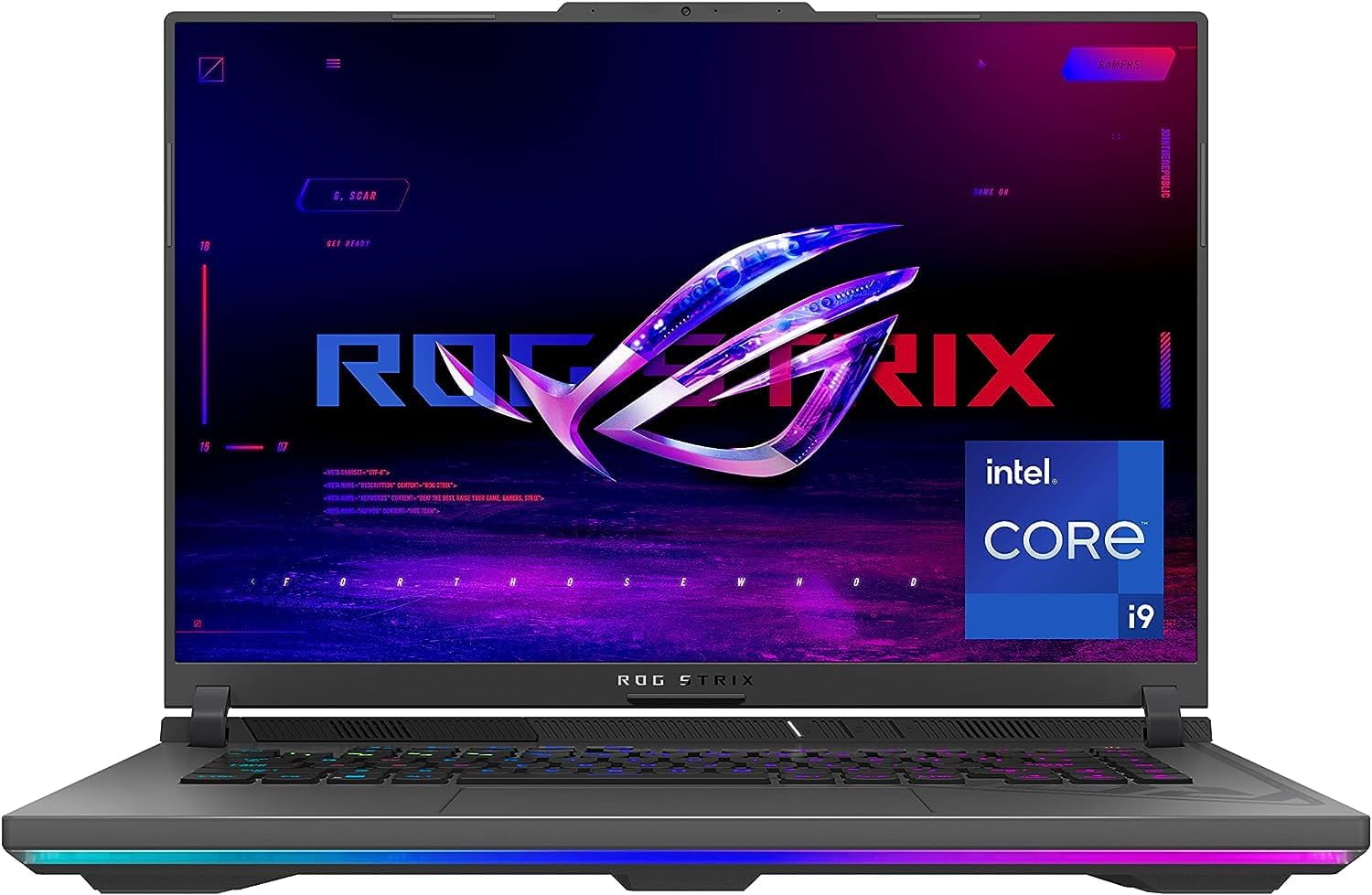
🔥 Power, speed, and style — own the game with ASUS ROG Strix G16!
The ASUS ROG Strix G16 (2023) is a premium 16-inch gaming laptop featuring a 13th Gen Intel Core i9-13980HX CPU, NVIDIA GeForce RTX 4070 GPU at 140W Max TGP, 16GB DDR5-4800MHz RAM, and a 1TB PCIe 4x4 SSD. Its 165Hz FHD anti-glare display covers 100% sRGB with Dolby Vision and Adaptive-Sync, delivering crisp, fluid visuals. Equipped with ROG Intelligent Cooling using liquid metal and tri-fan design, it sustains high performance during extended gaming. The MUX Switch with Advanced Optimus enhances gaming FPS and battery efficiency. Designed for gamers and power users alike, it offers upgrade paths for RAM and storage, wrapped in a sleek Eclipse Gray chassis with cyberpunk-inspired aesthetics.


| ASIN | B0BV7XQ9V9 |
| Average Battery Life (in hours) | 6 Hours |
| Batteries | 1 Lithium Ion batteries required. (included) |
| Best Sellers Rank | #48,325 in Computers & Accessories ( See Top 100 in Computers & Accessories ) #7,640 in Traditional Laptop Computers |
| Brand | ASUS |
| Card Description | Dedicated |
| Chipset Brand | NVIDIA |
| Color | Eclipse Gray |
| Computer Memory Type | DDR5 RAM |
| Customer Reviews | 4.0 4.0 out of 5 stars (524) |
| Date First Available | February 14, 2023 |
| Flash Memory Size | 1 TB |
| Graphics Card Ram Size | 6 GB |
| Graphics Coprocessor | NVIDIA GeForce RTX 4070 |
| Hard Drive | 1 TB SSD |
| Hard Drive Interface | PCIE x 8 |
| Hard Drive Rotational Speed | 7200 RPM |
| Hardware Platform | PC |
| Item Dimensions LxWxH | 13.94 x 0.89 x 10.39 inches |
| Item Weight | 5.51 pounds |
| Item model number | G614JI-AS94 |
| Max Screen Resolution | 1920x1200 Pixels |
| Memory Speed | 4800 MHz |
| Number of Processors | 24 |
| Number of USB 3.0 Ports | 2 |
| Operating System | Windows 11 Home |
| Optical Drive Type | No Drive |
| Power Source | Battery Powered |
| Processor | 5.6 GHz intel_core_i9 |
| Processor Brand | Intel |
| Product Dimensions | 13.94 x 0.89 x 10.39 inches |
| RAM | 16 GB DDR5 |
| Screen Resolution | 1920 x 1200 pixels |
| Series | ROG Strix G16 |
| Standing screen display size | 16 Inches |
| Voltage | 20 Volts (DC) |
| Wireless Type | 802.11ax, Bluetooth |
R**N
Good value and performance
Product ID: G614JI-AS94. Price: $1649. Pros: - Value. The I9-13980HX + GeForce RTX 4070 are a step above mid-tier hardware and are offered here at a reasonable price compared to other "gaming laptops." - Performance. I've been able to play the newest and biggest games all on high / very high settings. I've had no issues, and I feel as if the games look and play great. - Upgradability. I've NOT upgraded my machine as I don't wish to void the warranty. However, and as there was confusion in other reviews, I have personally spoken directly with ASUS support ,as well as Crucial support, and I've confirmed that YES this machine can be upgraded to 64GB of Ram (2x 32GB sticks) and YES there is an available open SSD slot. As such, and considering current prices of Ram and SSDs, you can scale this up to 64GB Ram and add second SSD for a D-drive for a minimal additional investment to really finish out this machine. - Wifi. I get SIGNIFICANTLY better wireless Internet speeds on this device than the older gaming laptop I replaced. Did not expect that, but was pleasantly surprised. - Sounds. Speakers sound good enough. Music through Spotify is crisp and bass gets picked up okay too. Cons: - Battery life. When playing a video game on battery power, I get about only 45-minutes of game time, which is disappointing. However, performance seems to remain higher than expected. When general web browsing or doing home office tasks, I get about 3 hours. When streaming content, such as Netflix, I about about 2 hours, which is frustrating as you can't really watch a movie on a single charge. - Number pad. I was expecting a digital number pad or display as part of the track pad per the advertisement. This model number, G614JI-AS94, does not have that feature and that was very disappointing and seemed misleading. - Touchpad. Doesn't feel as responsive as the touchpad on the older gaming laptop I replaced. Additionally, oftentimes after exiting a video game the touchpad will outright not work and require a device restart. - Lights. As an adult, the multicolored lights are annoying and not something I'm interested in. It was not immediately intuitive on how to turn them off, but I found out that you can do so through the included software. - Startup sound. It's awful and ear piercing! I can't figure out how to turn it off. - Camera. Would have liked a better resolution here as it's not great. Indifferent: - Screen. I'm not a "gamer" so I don't really care or know anything about refresh rate. For me, it seems bright, clear, and things look good! However, I personally wish it was a 15.6 inch machine and not the 16 inch, as I'd prefer a slightly smaller and wider screen than this square. - Ports. Good enough for me and has everything I needed. However, some people might wish for more options. Conclusion: If you're not a real gamer, but want to play games, this is a great option that offers value and performance along with upgradability.
S**S
Exactly what I wanted (so far)
Exactly what I wanted so far. Wanted something sturdy, reliable, and fast to replace my old dell G15. A lot of people have issues right out of the box and early on or with dead pixels. I haven’t had any of those issues. I’ve owned for almost a week and so far everything has been great, zero issues. Display looks great, sound is so so, performance is amazing. One thing is that the cpu temps are high because the i9 runs so hot, however you will not feel a thing because even when I was running 80C playing games, I couldn’t even feel it. Port selection is also awesome, I have everything I need. I do not use it on battery, so I cannot comment on that, however I have heard it’s not the best unless you specifically set it up for that. This thing should be able to handle basically any game you throw at it, you just might want to upgrade the ram so it’s on par with the other specs. I’m not sure if I’ll have issues in the near future, but so far the laptops been pretty perfect. NEED TO KNOWS FOR NEW BUYERS: 1: Manually select gpu only in nvidia control panel instead of integrated graphics which is on by default for whatever reason (haven’t had that happen for other laptops) 2: uninstall armory crate and install g-helper. Not only does this free up resources and battery life, g-helper is a much more lightweight and easy to use version of armory crate that has the same functionality (armory crate sucks) 3: You are buying a 13th gen i9 that runs very hot, UNDERVOLT! Download throttlestop (both this and g-helper are very safe and vetted don’t worry). Throttlestop and g helper are defaulted to not start on startup, so if you mess something up, just reboot and you should be fine. Search up what others did for their i9-13980HX and see what works for you. My undervolt did pretty amazing, going from constant 80C while playing an fps game, to only 60-65C mostly hovering between 61-63 while only taking a small performance hit(350-550 frames to 300-400). Not only will this help the longevity of the cpu, but your fans won’t be nearly as loud. And so far the high temps I’ve seen my gpu go up to undervolt or not, is 60C.
P**E
fast powerful very very happy
C**S
***Actualización del 20 de Julio del 2023: En el canal icr4w de YouTube se explica como puedes configurar hasta 8TB de almacenamiento (Comprobado) y unos tips de los 64GB que tiene en memoria Ram, el método de configuración optimiza el PCIe como si fuera un Gen5 es decir velocidades increíbles de lectura y escritura en disco duro para lo que gusten, por cierto la batería dura en promedio solo 2 horas y se acaba :( ------------------------------------------------------ Compré el equipo y dejo mi reseña clasificada en varios puntos que para mí considero importantes: Almacenamiento: El equipo viene con 1TB de espacio en NVME M.2 Gen 4 de Stock y trae un Slot extra para aumentar el espacio, la velocidad del disco de stock llega a los 5,000 MB de lectura y 4,500 de escritura, al equipo le puse un disco de 2TB WD_Black y le cargué nuevamente el sistema operativo aunque me costo trabajo encontrar el drives de Intel Rapid Storage Technology para procesadores de 13va Generación, al final lo encontré y le cargue Windows 11, en el Slot adicional le instale otro WD_Black de 2TB, en total quedo el equipo con 4TB y funcionan los dos discos a 7,000MB de lectura y 6,800 de escritura, según la página de Crucial con el número de serie del equipo se le pueden asignar hasta 4TB por Slot para tener en total 8TB (no comprobado por mi) ya que son muy caros los discos de ese tamaño pero con 4TB el equipo funciona perfectamente. Memoria RAM: El equipo viene con dos módulos de 8GB de fábrica a 4800 MHz marca Samsung, yo al querer instalar más memoria en todas partes encontré que solo aceptaba 32GB como máximo, caso que me resultaba extraño al tener un muy buen procesador y prestaciones en generales altas, continué investigando y decidí investigar particularmente las características del procesador, en la Página de Intel ingresando el modelo del procesador que es el Core i9 13980hx indica que tolera 128GB en RAM en DDR5 a 5600 MT/s y lo mismo pero a DDR4 a 3200 MT/s y en la página de Crucial con el número de serie indicaba que toleraba 64GB con módulos de 32GB cada uno, así que me arriesgue y solicite en Amazon un paquete de 64GB que trae dos módulos de 32GB cada uno con las mismas especificaciones, DDR5 a 5,600 MT/s y los reconoció perfectamente, probé también dos módulos de 16GB para tener 32GB en total y también funcionó muy bien, al final me quede con los 64GB para tareas exigentes que la mayoría del tiempo quedan sobrados pero si tu duda en específico es si llega a 64GB de memoria RAM, si, si funcionan. Procesador: El equipo viene con un Core i9 Raptor Lake específicamente el modelo 13980hx uno de los mejores del año 2023 de 13va generación, el procesador cuenta con 24 Núcleos, 8 de Rendimiento y 16 de Eficiencia, los proceso que e ejecutado en paralelo han sido creación de contenido, virtualizacion, ciencia de datos, videojuegos y realmente en nada me a fallado el único detalle fue que al reinstalarle Windows 11 en el disco de 2TB no aparecían las particiones para seleccionar el disco, hacia falta un controlador pero es para procesadores de 13va generación, encontré el de 11va y 12va generación pero solamente, si me tarde un poco al final lo encontré pero alguien que lo había publicado para una tarjeta madre de Asus para el procesador de dicha generación de esa forma lo descargue, lo cargue y detecto los discos, existe otra opción de desactivar el controlador VMD desde la BIOS pero no deseaba realizar esto ya que leí reseñas que tenerlo activo si le otorgaba un mejor performance al equipo, aunque si no encontraba el controlador era mi última opción, también leo que se podrían recuperar los controladores con Driver Magician del disco original y ahí debería de estar para poder buscar de carpeta en carpeta el controlador que solicitaba y poder instalar Windows esa era otra opción pero tenía que abrir el equipo nuevamente instalar el original, copiar todos los controladores, cargarlos en una USB y a intentar, sinceramente me daba flojera pero al final encontré el controlador y no hubo mayor falla con ello. Pantalla: No es la mejor pantalla pero si es buena, en la página del producto existe una que es Nebula la cual tiene mayor frecuencia de actualización y mejores características, pero este equipo trae una pantalla con mejores prestación que la Nebula Display, aunque como digo es buena pantalla, tiene muy buen brillo y lo suficiente para jugar. Tarjeta de Video: Incluye 8GB de memoria de video dedicada, la tarjeta de video que incluye es una RTX 4070 pero es la versión mobile, y no tiene el performance que una de escritorio, sin embargo lo primero que jugué fue Age of Empires II y luego probé algunos juegos como CyberPunk, Fortnite, Resident Evil, God of War y cabe decir que todo lo configura en calidad ultra o épica, y con el procesador de apoyo y sus 64GB en RAM pues en realidad ningún problema. Teclado: Cuenta con Teclado RGB por tecla, el cual es configurable al color que gustes, no es algo que me llamara tanto la atención y nunca lo había usado, pero ya que lo use es un plus interesante y agradable. Cámara Web: Cuenta con 720p en su cámara no es lo mejor pero para lo básico es suficiente, de menos ya cuenta con ella, el modelo anterior no la incluía. Energía y Batería: Incluye un poderoso cargador de 280w el cual le da el poder energético que necesita sin embargo el punto en el que más falla es en su batería, se drena en exceso y con mucha velocidad, no dura demasiado más que dls horas o tal vez menos pero por las prestaciones yo creo se podría entender un poco. Precio: Costo 45k en pesos mexicanos y solo había promoción a 6 MSI. Ventilación: Es silenciosa pero con muchas tareas el ventilador se escucha y en ocasiones fuerte y por algo de tiempo. Peso: Es un equipo grande y pesado pero sigue siendo Laptop, si deseas portabilidad y algo ligero este equipo no lo es. Envío: En total tardo 9 días desde que la pedí hasta que llego viene desde Hebron Kentucky EE. UU. y fue hacia la CDMX. En general es un buen equipo, existe una versión con pantalla de 18 Pulgadas y 12 GB en la RTX así como pantalla Nebula, pero su precio a de ser mucho mayor más que no la encontré en Mexico, con un contacto la podía conseguir pero mencionó que su costo estaba entre los 60k y 70k. Espero mi reseña les sea de utilidad, agregaré fotos para respaldar lo que comento y me extendí porque cuando quería saber más del equipo busque en YouTube y no encontré mucho, y tenía varias dudas al respecto. Saludos.
N**A
Good customer service, arrived early and in good condition. I am satisfied
A**A
A good laptop and the lowest price in the market with these specifications. Thank you.
P**0
Very good, Thank you
Trustpilot
1 dag geleden
2 weken geleden