We remain fully operational. Our teams are working around the clock to ensure your deliveries continue safely.

DOWNLOAD DE APP


Klantenservice
Copyright © 2025 Desertcart Holdings Limited
DOWNLOAD DE APP

🚀 Unlock lightning-fast storage with zero fuss!
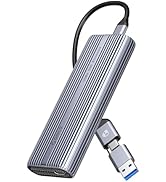
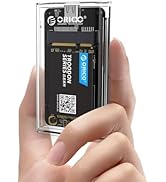
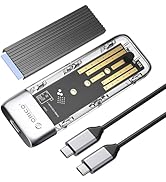
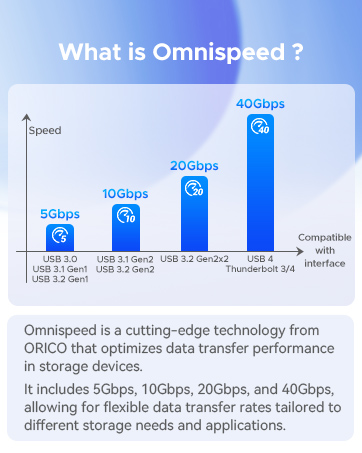
The ORICO PWDM2-BK is a sleek, tool-free M.2 NVMe/SATA SSD enclosure featuring USB-C 3.2 Gen 2 for blazing 10Gbps transfer speeds, an aluminum heatsink for superior cooling, and broad compatibility with M.2 SSD sizes up to 2280 and capacities up to 4TB. Designed for professionals who demand speed, portability, and effortless installation across multiple OS platforms.










| ASIN | B0BJ24GHC7 |
| Best Sellers Rank | #66 in Enclosures |
| Compatible Devices | Laptop |
| Customer Reviews | 4.4 4.4 out of 5 stars (2,471) |
| Data Transfer Rate | 10 Gigabits Per Second |
| Date First Available | October 13, 2022 |
| Item Weight | 0.352 ounces |
| Item model number | Black-C to C cable |
| Manufacturer | ORICO |
| Material | Silicone |
| Max Number of Supported Devices | 1 |
| Memory Storage Capacity | 4 TB |
| Product Dimensions | 4.88 x 1.38 x 0.55 inches |
R**S
works wonderfully
encloser is easy to put in a drive be it a nvme or sata. Comes with a pad and heatsink but unless you don't plan on changing it out that's kind of useless. has some kind of rubber screws to fit in that made putting a drive in and taking out toolless. speed transfers seem to be on par for the drive installed this is a good buy the one thing I didn't like was it only came with a usb c to usb c i think a usb c to usb would have also been helpful I just happened to have one on another enclosure. over all I am happy with this enclosure and would recommend it to anyone.
E**G
Great price and high performance
This is a repeat purchase for me. I had an extra M.2 drive. It takes less than 10 minutes to assemble, and all is done. There is no comparison between the speed of the M.2 and a flash drive. I have had no problem with the product.
D**S
GREAT for occasional use.
PROS: Low Price Easy to install - Tool free Easy to follow instructions Plug -n - Play. No drivers required. CONS: Included USB-C cable is low quality Heat management/Dissipation is poor. Loses connection periodically I bought this enclosure to help me close another drive. The instructions on how to open the case were easy to follow, and (without tools) I had my NVMe M2 (M-Key only, 2280) drive installed and ready to go. At first, I used the included USB-C cable to connect it to my computer. My PC recognized the drive immediately, and I was easily able to format it. Using my cloning software, I started the process, but then it failed - TWICE. The culprit was the included USB cable. It is a low quality cable that is not good for that level of data transfer operation. It was an easy fix: just used another USB C cable I had on hand, and it was good to go. The other issue that I encountered is that the drive will get VERY, VERY warm with any moderate use, and sporadically become unrecognized by Windows 11. You'll notice that the Drive shows up, but it's content summary is blank (no capacity reported next to the drive letter). I know, in this case, that i is not the NVMe drive, as this was used as my OS drive previously with no such issues in another system, and it was recently tested to be in perfect condition. CONCLUSION: This is a fine enclosure for a drive you will use occasionally, as long as you bring your own USB-C cable. If you want a solution for a long term external enclosure, this is not that. Look for something like the SABRENT EC-SSD2, which has a built in cooling fan.
N**A
Perfect USE! Nice look, and assisted in SSD imaging.
The product works really well. My husband used it to clone a drive, and then install it in the same chip set on another machine. . It overcame an OS install from a CD ROM. Simply clone from a machine to a new SSD and then install the hard drive into the receiving machine, and pow the OS fired up. This is a perfect work around. A must have for any IT professional or home lab.
C**T
Will definitely buy again
Worked perfectly. I used an NVME M.2 type A+B SATA drive from a Windows 10 PC, formatted it and it works great. It's important to note that the enclosure must support SATA drives if you're scavenging bootable NVME's from old PC's. A great number of these type of enclosures do not support SATA drives.
M**X
Solid NVMe to USB-C enclosure. Use a USB 3.2 Gen 2x2 port for maximum results!
I stuck a 2TB 980 Pro inside this, and plugged it into a USB 3.2 2x2 port and it is amazingly fast! As in, a nearly 2 gigabyte video file barely takes a second to copy over to the NVMe drive in this enclosure. Installing the NVMe drive inside it was pretty straightforward. The metal shell helped dissipate hate during longer video file transfers to and from the drive itself.
D**N
Reliable SSD Enclosure.
This is a nice ssd enclosure. I installed a portable bootable Windows 10 Pro 22H2 using my HP Notebook running Windows 11. Now I have the option to use either Win 10 or 11 on one notebook. I modified the enclosure and added two heat sinks, one on top and one on bottom to help keep the ssd at a decent temperature. The ssd in the enclosure is working perfectly fine running Win10 OS, no issues at all. The enclosure and usb connector that came with it seems of bad quality. I did not use the usb connector as I purchased a better quality of the same brand as the enclosure, a usb c . Overall, I recommend this enclosure if you want something reliable at a decent price.
B**7
Do not waste your money or time. Junk
One thing is for certain in this universe. this external drive enclosure is complete and utter junk. It is true you get what you pay for. If there was a way to give it negative stars i would. 1 star is not enough. The only redeeming quality of this thing is the pretty bright blue activity light. yay. (sarcasm) I have a TEAMGROUP T-FORCE A440 Aluminum Heatsink 2TB DRAM SLC Cache 3D NAND TLC NVMe PCIe Gen4x4 M.2 2280 Internal SSD R/W 7000/6900 MB/s in the enclosure. I have a USB-C 10GB/s 100W PD high quality cable plugged in. i don't like the fact they give you a usb 3.0 A short cable. I have this plugged directly into my motherboard. not going through any hubs or any case hubs etc. My board is a GIGABYTE X670E AORUS Master AM5 with 64gb DDR5 and my chip is a AMD Ryzen 9 9950x so my desktop is no slouch. All of the other NVME drives i have on the desktop run at 7gb/s. i have another TEAM 2TB NVME in another enclosure (different brand) and on the same usb-c port with the same cable, i get full transfer speeds. about 7gb/s. with this enclosure i'm reviewing right now the one that is junk .. with crystal disk mark, i am seeing transfer rates at 440MB/s read 450MB/s Write. not even close to what is advertised. just for grins, i moved this garbage enclosure to my laptop which is no slouch either. it is a Asus STRIX G18 with 64GB DDR5 and a Intel Core 14th gen I9. it too reports 440-450MB/s transfer speeds. My background is in heavy IT. Yes, i thought it was my machine at first causing a bottleneck but nope. so avoid this thing like the plague.
A**I
Although it is nice and well finishing it can’t be used with 2 tb and 4TB enclosures especially if u have MacBook . So don’t buy it if u want it to be used as external enclosure or SSD it need external power supply . It works with 1 tb only don’t believe them. But you can use it through external hub that have power supply or you connect you power supply to the hub . In other word large capacity SSD 2tb and 4 tb need more power to work perfectly
M**Y
Essentially bought this for cloning and upgrading from 256 GB WD M2 NVMe to 1tB Crucial 2280 P3 one on Asus Vivobook. Could finally clone data of about 230 GB in about 10 min. Of course, upgraded the RAM from 8 (4 on board + 4 DIMM slot) to 20 GB after adding a 16 GB unit. Do remove the plastic mask tapes on the thermal pad provided to properly stick on the SSD and the aluminium heat sink. Though I did not experience any temperature raise, it may occur on intense read, write use for prolonged times. Initially committed some mistakes, such as, cloning with 8GB RAM, using a Type C to A charging cable, whence the estimated cloning time shown was 5h+. From the start to every aborted step, I had to recreate a GPT partition. I could easily do it on an Ubuntu machine using GParted, everytime. Of course, one can use 'diskpart' on command line on Windows as Administrator. There are bare USB type A adapter card for cloning, which could be cheaper, but this enclosure can be used to make a portable on-the-go external storage device for mobile phones, laptops, desktops, pads etcetera, using the old, 'not-so-useful' ME SSD's and extend the utility.
N**H
product quality is nice and durable
D**.
Acheté il y a 2 semaines. Fonctionne bien. Bon débit pour ce que j'en fais et comme c'est un boîtier, le facteur vitesse dépend aussi du SSD NVMe que l'on utilise à l'intérieur. Point intéressant, il ne chauffe pas lors de l'utilisation. Bon système de dissipation de chaleur, si je compare à une autre marque que j'ai. Maintenant, reste à voir si le produit passera le test du temps. Je reviendrai faire une mise à jour, si un problème survient d'ici quelques mois. Pour l'instant, j'en suis très satisfaite.
J**K
I love this item. It works perfectly. Thanks
Trustpilot
1 maand geleden
1 dag geleden