We remain fully operational. Our teams are working around the clock to ensure your deliveries continue safely.

DOWNLOAD DE APP


Klantenservice
Copyright © 2025 Desertcart Holdings Limited
DOWNLOAD DE APP


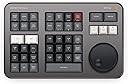
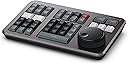

🎬 Edit like a pro, anywhere you go—speed, precision, and power in your hands.
The Blackmagic Design DaVinci Resolve Speed Editor Bundle combines a compact, rechargeable editing keyboard with a precision search dial and dedicated shortcut buttons, designed to dramatically speed up video editing workflows. Compatible with macOS and Windows, it offers both Bluetooth wireless and USB-C wired connectivity. Bundled with the DaVinci Resolve Studio activation key, it unlocks advanced editing, color grading, and audio tools, making it an essential upgrade for professional editors seeking mobility and efficiency.
| ASIN | B08NBZN5NZ |
| Best Sellers Rank | 226,241 in Computers & Accessories ( See Top 100 in Computers & Accessories ) 174,364 in Accessories (Computers & Accessories) |
| Guaranteed software updates until | unknown |
| Item model number | DV/RESSTUD/SE/BUN |
| Manufacturer | Blackmagic Design |
| Product Dimensions | 30.99 x 25.65 x 17.02 cm; 1.16 kg |
F**E
idk what to title this review
Very overpriced Very high quality Good functionality Hard to learn but easy to use
B**S
Came free with the software so it was good.
R**R
Lo compré principalmente por la licencia para poder hacer corrección de color, pero me terminé enamorando del speed editor, agiliza mucho la revisión de clips y puedes hacer los cortes con gran precisión, toda la vida había editado en Final Cut Pro, pero realmente no me costó trabajo la transición y la curva de aprendizaje fue muy rápida, pero algo que si tengo que comentarles es que After effects tiene un nivel mucho más alto en rotoscopias (rotobrush3.0) que davinci, yo lo compré también pensando en cancelar mi suscripción de Adobe, pero decidí no hacerlo por las rotoscopias y la variedad de efectos y fuentes que tienes en adobe, al final de todo recordemos que todas las herramientas disponibles en el mercado nos ayudarán a conseguir mejores resultados y a mejorar nuestro flujo de trabajo. Los que no estén acostumbrados a trabajar con árboles de nodos podrían experimentar alguna dificultad en la corrección de color, pero si ya haz trabajado con nodos antes, realmente va a ser muy sencillo adaptarte. 100% recomendado.
E**C
Oh man.. what a blessing this Speed Editor is!!! Retired Senior S/W engineer with 35 yrs of dev experience.. lots of computers, keyboards and mice.. all works fine for Windows based software with Borland and Microsoft compilers and IDEs, etc. Never really an issue with keyboard and mouse access to apps etc.. all normal BUT.. trying to use a sophisticated Video Editor tool (like DaVinci Resolve Studio) means your mouse clicks BETTER BE PRECISE!! And if your mouse pad has a few bumps and your hand is not as precise as it was 20 yrs ago.. then this is a serious productivity problem... 10X increase in frustration and time. Now, with the Speed Editor, plugged into a powerful enough GPU based workstation, the video jog wheel is a JOY!!!! Being a newbie to DaVinci Resolve Studio has limitations but having the Speed Editor and learning how to use it is by far a great choice to pick up tricks and productivity enhancements. One thing right out of the box is the Speed Editor's jog wheel's choice for advancing video back and forth. This makes it SUPER EASY to find video content -15X anybody :-) - and .25 and .5 speeds too? I got my undergrad degree in Radio TV 40 yrs ago and worked Sony broadcast video cassette machines with their jog wheels and now having this Speed Editor at my fingertips, brings those early college days back :-) If you're a pro editor, then this is a no brainer. If you're a newbie and can afford it (and get the Studio license included) go for it! It should make your video content creating better!
P**R
Pleasantly surprised by the quality of the unit and more than thrilled with its functionality and ease of use with Da Vinci Resolve. Black Magic Design provides a great offer to include Da Vince Resolve Studio free (normally $295) when you order the speed editor. Worth taking the risk for only $105 more. For me, it turned out to be a great deal!
J**Z
Llevaba varios años trabajando con Adobe Premiere y su flujo de trabajo se me hacía bastante bueno, lo que no me llegaba a convencer era el precio del Creative Cloud porque se me hacía excesivo así que decidí cambiarme a Davinci Resolve. Una vez en Davinci la curva de aprendizaje fue muy rápida y estuve trabajando varios años con el puro programa en la computadora, afortunadamente la cantidad de trabajo cada vez fue mayor pero sentía que necesitaba hacer el trabajo más rápido así que decidí ciomprar el Speed Editor. Ya con el Speed Editor en mis manos el flujo de trabajo fue cada vez más rápido y la curva de aprendizaje es muy rápida e intuitiva, incluso debo decir que con el tiempo uno empieza a adquirir memoria muscular así que sin duda lo recomiendo. Otra de las ventajas es que venía con la Licencia Permamente de Resolve, cuando lo compré estaba la versión 18 y ahora que cambió a la versión 19 no tuve problemas en actualizarlo. Sin duda lo recomiendo ampliamente
Trustpilot
2 maanden geleden
1 maand geleden