We remain fully operational. Our teams are working around the clock to ensure your deliveries continue safely.

DOWNLOAD DE APP


Klantenservice
Copyright © 2025 Desertcart Holdings Limited
DOWNLOAD DE APP



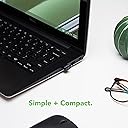

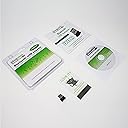
🔗 Connect Effortlessly, Live Freely!
The Plugable USB-BT4LE is a compact Bluetooth 4.0 Low Energy Micro Adapter designed for seamless connectivity with a variety of devices. Compatible with multiple operating systems including Windows and Linux, it offers automatic installation and energy efficiency, making it an ideal choice for professionals who value convenience and performance.


| ASIN | B009ZIILLI |
| Best Sellers Rank | 123,446 in Computers & Accessories ( See Top 100 in Computers & Accessories ) 504 in Bluetooth Network Adapters |
| Box Contents | Network adapter |
| Brand Name | Plugable |
| Color | Black |
| Compatible Devices | Speaker, Headphone, Keyboard, Mouse, Tablet |
| Customer Reviews | 4.3 4.3 out of 5 stars (11,201) |
| Data Link Protocol | Bluetooth |
| Data Transfer Rate | 3 Megabits Per Second |
| Global Trade Identification Number | 00649241921943 |
| Hardware Interface | USB 2.0 Type A |
| Item Type Name | Plugable - Network Adapter - USB 2.0 |
| Item Weight | 0.1 Ounces |
| Manufacturer | Plugable |
| Manufacturer Part Number | USB-BT4LE |
| Model Number | USB-BT4LE |
| UPC | 649241921943 |
| Unit Count | 1.0 count |
J**K
Tips for Windows XP installation
I have two of these - one in use with a Sony Vaio running Windows 7 and the other with a Samsung Netbook running Windows XP. The first one - in use with the Vaio - installed easily first time and performed exactly as expected; the second one - in use with the Samsung - was a lot more difficult to get working! My Samsung Netbook does not have an optical drive so I had hoped to get the dongle working with some Windows drivers and the custom software downloaded from the net - no chance! I am fairly computer-literate but after an hour or so of trying to get the wretched thing working I was about to send it back to Amazon as a failure. However - I persevered and eventually got it up and running so here are my tips for XP users. Firstly, don't bother with the Installation Wizard that pops up when the dongle is inserted - close it and forget it. Then forget the custom software download from the web - it just doesn't recognise its own dongle and Windows may try to block the download anyway. Don't hunt for Bluetooth drivers in Windows Update - there aren't any that work. The only way I could get this dongle working with XP was by installing the software from the provided CD - so if you are planning on installing it on a Netbook you will need to own or be able to borrow a USB optical drive. Then try this: insert the dongle into a USB socket and close the Installation Wizard when it pops up - ignore any error messages. Insert the CD into the optical drive and run it - follow the onscreen instructions until the software has loaded then reboot your computer. A final option box should then appear - choose your options and the Bluetooth should then be working OK - mine did! Once its working this is a good device so I will give it five stars for that, and running under Windows 7 is a doddle. It has also given my old Netbook a new lease of life - eventually! Good luck!
A**N
This little gadget seemed like the ideal solution but I was apprehensive about buying ...
As my desktop PC is quite old now, it did not come with Bluetooth as standard. However, I do have an up-to-date android phone and tablet that are Bluetooth enabled as well as a laptop and wanted to be able to transfer files between them all without the hassle of having to plug them in. This little gadget seemed like the ideal solution but I was apprehensive about buying it due to not having a Windows OS (I hate Windows/Microsoft!) on my desktop PC. I have been using a variety of Linux-based OS distros for some years now, having given up on Microsoft/Windows and its predilection for crashing, and while this did say it was Linux compatible I am always wary about possible compatibility issues and having to hunt down and download additional software to make things work. Having taken the plunge and bought it, I need not have worried. It worked like a charm with my Debian OS: no downloading of additional drivers, etc., it just worked from the get-go: literally Plug 'n' Play! Unfortunately, my laptop came with Windows 8 pre-installed - which I made the mistake of upgrading to 8.1 - and it's supposed Bluetooth capability has vanished into the ether along with the upgrade! Yet another black mark against Microsoft/Windows in my book! So I may have to buy another one of these for my laptop if I cannot salvage it's Bluetooth capability under Windows 8.1.
M**W
Great company! Good product!
What I like about Plugable is that this is first company, I have come accross, that has been proactive about helping with a product. Their email sent on dispatch of my order was very helpful. I like this concept - long may it continue! I already have ideas about what to purchase next from them. In regard of the product itself, I recommend downloading the latest drivers and telling Windows 7 not to bother searching the Internet, when you plug the dongle in, as this results in a number of irrelevant failed searches. The only remaining problem is that occasionally my headset (EP650) connects but the sound services are not re-established, whatever I do. The fix is to remove the headset device and re-detect it. I have yet to figure out why this occurs. However once done, sound reproduction and recording are way better than via the older Bluetooth devices I had. On Ubuntu (Trusty LTS) the advice to download the appropriate firmware needs to be followed to the letter. Only when the dongle is plugged in while the system reboots, does the required firmware get installed. Once this is done, the dongle works fine with my headset - sound reproduction and recording are fine. All in all - after correct setup - the dongle works as advertised. There are a few software glitches but they can be worked around. I hope Windows 10 does not mess things up!
Y**3
Mein Computer hat von Haus aus kein Bluetooth, dennnoch wollte ich sowohl Bluetooth-Kopfhörer als auch eine -Soundbar nutzen können. Dieser Adapter eignet sich dafür hervorragend! Günstig, äußerst klein und macht seinen Job hervorragend. Installation war Plug n Play (unter Windows 10). Seit über einem Jahr verrichtet der Adapter nun seinen Dienst (beinahe täglich) absolut zuverlässig. Entgegen einiger Rezensionen kann ich die Reichweite nur ausdrücklich loben. Selbst in der Küche (zwei Räume weiter) kann ich problemlos Musik hören - ohne Einschränkungen. Und da sind ein paar Wände dazwischen! Ähnlich wie bei W-LAN-Adaptern kann es natürlich Probleme bereiten, wenn man den USB-Stick direkt ins Gehäuse hinten einsteckt. Je nachdem wie viel Störquellen in unmittelbarer Nähe sind, kann es zu deutlichen Einschränkungen kommen. Wer den Adapter in einen USB-Hub, Tastatur / Bildschirm etc. einsteckt sollte deutlich weniger Probleme haben. Ich hatte nie Verbindungsabbrüche oder ähnliche Störungen und würde den Adapter jederzeit wieder kaufen. Uneingeschränkge Empfehlung von mir.
I**N
Risparmiatevi un mal di testa. Se cercate un dongle bluetooth senza dover essere "forzati" ad un pcie che comprende anche wifi, optate per questa marca. Davvero. Penso di aver provato qualcosa come 5 dongle diversi. Va bene tutto, interferenze, quello che volete. Ma io non ho avuto NESSUN problema con questo dongle. Gli altri non appena connettevo piu di un dispositivo (e alcuni erano anche protocollo 5.0), dopo qualche oretta cominciavano a dare problemi. E allora li comincia il: stacca-riattacca-riavvia-reinstalla i drivers-eccetera. Seriamente, è una di quelle sciocchezze che a furia di perderci tempo, ti rovina le giornate e di conseguenza la produttività a l'umore. Ottimo il servizio clienti e anche le accortezze sull'usare porte usb 2.0 invece che 3.0 per evitare interferenze. Si percepisce quanto sia importante ricevere un feedback positivo per plugable sull'utilizzo piuttosto che vendere il prodotto e basta come altri competitor. Assolutamente consigliato.
B**N
Good product. Plug and play for Linux devices
E**O
This adapter works perfectly no ubuntu 22.04. Simply plug-in and doesn't require the extra driver installation on my local machine. Sooooo convenient, very nice product. Recommend to anyone that using ubuntu ~22.04 version
B**T
Me he alegrado de encontrar a un fabricante que da soporte a GNU/Linux. El dispositivo está soportado de serie por lo que no hay que instalar controladores pero en algunas distribuciones será necesario instalar un fichero de firmware para que funcione mejor. Está explicado en su blog (https://plugable.com/2014/06/23/plugable-usb-bluetooth-adapter-solving-hfphsp-profile-issues-on-linux/), y aunque en inglés, los pasos son muy sencillos. Resumiendo por si a alguien le cuesta de entender: En una terminal con permisos de root usamos el comando dmesg para ver si al conectar el dispositivo aparece un error avisando de que falta un fichero de firmware. El fichero lo descargamos del enlace indicado en el blog y lo movemos a la ubicación que nos señala el comando dmesg. Reiniciamos y ya debería funcionar al 100%. Lo estoy usando para conectar el móvil a un PC y funciona perfectamente. La música se escucha con mucha claridad y sin cortes, a no ser que me lleve el móvil lejos o haya varios obstáculos por enmedio. No voy a opinar del alcance porque interviene en igual medida la calidad del móvil. Destacar también el detalle del blister, que no es de esos que te arriesgas a perder un dedo abriéndolos. Va cerrado a presión, se puede abrir y volver a cerrar con facilidad así que lo podemos usar para proteger las instrucciones y el CD que lo acompañan y para guardar el dispositivo cuando no lo usemos. Hasta en eso han tenido un detalle de calidad.
Trustpilot
1 week geleden
5 dagen geleden