
DOWNLOAD DE APP


Klantenservice
Copyright © 2025 Desertcart Holdings Limited
DOWNLOAD DE APP

🚀 Elevate your workspace with WiFi that works as hard as you do!
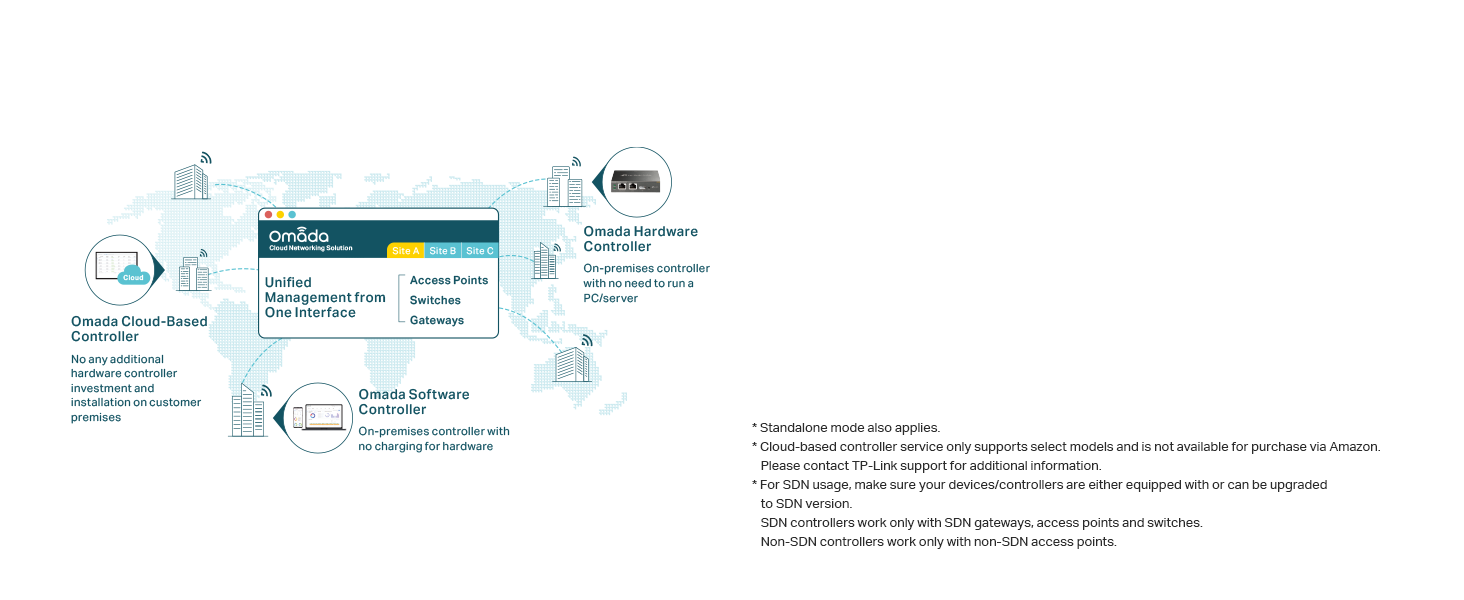
The TP-Link EAP610 Omada is a high-performance AX1800 WiFi 6 access point designed for professional-grade wireless networking. Featuring advanced 1024-QAM modulation, seamless mesh capabilities, and cloud-based management via the Omada app, it delivers robust, gigabit-class speeds and reliable coverage. Powered by PoE+ for easy installation, its compact design fits perfectly in modern office or home setups, making it the go-to choice for millennial managers demanding fast, flexible, and scalable connectivity.


| ASIN | B09XM74VQL |
| Best Sellers Rank | #1 in Computer Networking Wireless Access Points |
| Brand | TP-Link |
| Color | white |
| Customer Reviews | 4.6 4.6 out of 5 stars (1,122) |
| Date First Available | April 13, 2022 |
| Item Dimensions LxWxH | 6.3 x 6.3 x 1.32 inches |
| Item Weight | 13.7 ounces |
| Item model number | EAP610 |
| Manufacturer | TP-Link |
| Operating System | Open Wrt OS |
| Product Dimensions | 6.3 x 6.3 x 1.32 inches |
| Series | EAP610 V2 |
| Voltage | 12 Volts |
| Wireless Type | 802.11ax |
M**O
I should've bought sooner.
So i've purchased 3 of these for the house and i continue to be impressed. Easy setup with the APP. Basically you can set one up and plug in the others and they set themselves up. They are nice and simple, so to me they look fantastic. They can be powered via the adapter or POE. They work great POE so far. I purchased some Renewed or used or returned so i paid way less than you would new. There only one rj-45 on the back for internet. The WIFI coverage is impressive even around lots of old plaster, lath and concrete. One on the 2nd floor, one in the basement and one in the garage. Signal is strong but worth the extra money for me to set it up the way i did.
A**R
Fantastic mesh AP - Unifi competitor
I was in the market for new APs and had a few criteria: Centralized Management Gigabit+ Speed WiFi 6 or higher Wireless Mesh I was heavily considering Unifi U6 Pros, but the lack of wireless mesh functionality and the $159 price tag kept me searching for a better solution. When I came across these for half the price I had to take a chance, and I am glad I did. I installed the controller in a linux VM on my current ESXi host with no difficulty at all. If you have any linux and virtualization experience at all following the instructions is a piece of cake. To top it off, the software is free. I already have an extensive networking infrastructure built out, or I would be very tempted to pick up some of their SDN routers. Configuring the APs to work with PFSense vlans through a Cisco switch was not the easiest thing in the world, but within a couple of hours I was up and running. The control plane for the APs utilizes untagged traffic, so you will need to account for this when building your switch configs. After you figure that out adding VLANs and tying them to SSIDs could not be easier. My SDN controller has no internet access and still maintains full functionality. I get 100% coverage of my 1,800 sqft single story house and pretty good coverage in the driveway with just two access points. I get near gigabit speeds locally and my full 500mbps to the internet (depending on proximity to the APs, but more than satisfactory). For $80 each I could not be happier. Will be recommending these to friends as a good alternative to unifi. If you don't have much networking experience you may get frustrated as the SDN controller is required for wireless mesh to work.
C**S
Transforming My Wi-Fi Experience
This Access Point has been a lifesaver, solving my persistent Wi-Fi woes and delivering a seamless internet experience like never before. One standout feature of this access point is its ultra-slim design, which not only looks sleek but also allows for easy installation in any location. The inclusion of the DC adapter makes setup a breeze, eliminating the need for additional purchases. With its True Wi-Fi 6 AX1800 technology, the EAP610 provides lightning-fast speeds and improved network capacity. I no longer experience frustrating lags or buffering while streaming or gaming. The support for WPA3 encryption ensures enhanced security, giving me peace of mind that my network is well-protected. The mesh and seamless roaming capabilities of this access point are great for large spaces or multi-story buildings. I can move around without experiencing any drops in connectivity, making it ideal for my home setup. While the EAP610 offers remote and app control options for convenient management, it's worth noting that some people have reported occasional connectivity issues with the app, though I haven't encountered any such problems and find the remote control option reliable and user-friendly. In conclusion, the TP-Link EAP610 Access Point has revolutionized my Wi-Fi experience. Its slim design, Wi-Fi 6 technology, and comprehensive features like mesh and seamless roaming have transformed my network stability and speed. If you're looking for a reliable and efficient upgrade to your Wi-Fi system, the EAP610 is definitely worth considering
D**M
Fantastic system, very happy with this AP setup
I was tired of fiddling with mesh networks so I finally decided to go with an actual AP system on my next home. During construction I wired the entire house with ethernet and ordered 3 of these units along with the hardware controller. I can honestly say it's been one of my best technology purchases. The Omada system was easy to set up (it's worth noting I am an IT professional by trade so I have a respectable familiarity with networking) and I have literally had zero problems with this system over the last year. It just runs flawlessly and silently in the background to the point that I sometimes forget the name of Omada app because I so rarely use it, literally log in every few months to see if the APs have a firmware update and that's about the extent of having to mess with it. Every time I've had a WiFi issue (which has been rare) the root cause was my starlink router, the APs just chug along doing their job without issue. The speeds are always within 1-5% of hardwire speed on my desktop so no major loss of throughput by virtue of being wireless. I plan on buying a 4th unit for my basement soon and potentially an outdoor on to expand my coverage outside. The mounting for the APs is kind of annoying. All my units are ceiling mounted, however the ethernet plug on the unit faces horizontal rather than vertical making the wire through the drop into the plug a bit of a pain. I ended up buying right angle Ethernet adaptors which helps some but it definitely takes a little bit of fiddling, however once they're up you shouldn't need to bother with them for a long time.
K**M
Slim wired into ceiling see photos. Connection is great. Install was easy. Definitely recommend.
A**Y
Gerência diversos cenários, inclusive para rede de convidados, restringindo e o acesso à rede do cliente.
J**O
han funcionado muy bien para una casa
R**S
Compre anteriomente otro modelo de acces point, el cual tuve que regresar, por problemas de configuracion, este sin ningun problema, lo recomiendo ampliamente.
M**O
Eu comprei este produto para aumentar o sinal WIFI em uma casa grande. É anunciado como Power Over Ethernet, mas esse não é o caso.
Trustpilot
1 maand geleden
2 maanden geleden