We remain fully operational. Our teams are working around the clock to ensure your deliveries continue safely.

DOWNLOAD DE APP


Klantenservice
Copyright © 2025 Desertcart Holdings Limited
DOWNLOAD DE APP
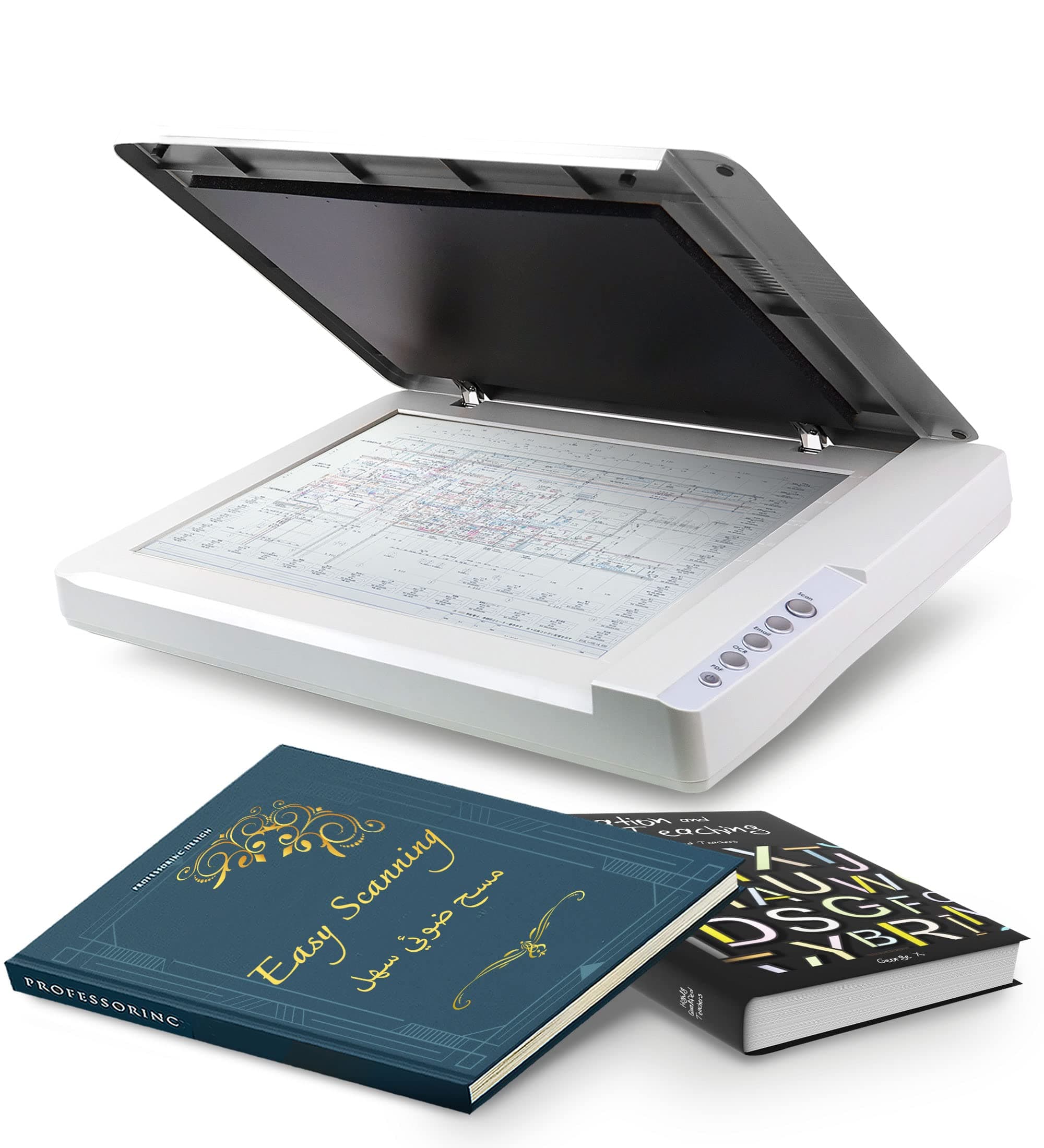
📄 Scan Big, Scan Fast, Stay Ahead!
The Plustek OS1180 is a professional flatbed scanner designed for libraries, schools, and small offices, capable of scanning large A3 documents up to 11.7"x17" in just 9 seconds. Featuring energy-efficient LED lighting, one-touch preset controls, and advanced ABBYY OCR software, it delivers high-resolution 48-bit color scans at 1200 dpi, making it ideal for digitizing large-format documents quickly and with exceptional clarity.


| ASIN | B01MZXE0OV |
| Additional Printer Functions | Scan |
| B&W Pages per Minute | 6.67 ppm |
| Best Sellers Rank | #94,626 in Office Products ( See Top 100 in Office Products ) #9 in Flatbed Scanners #103 in Document Scanners |
| Brand | plustek |
| Built-In Media | PDF Converter, Thumbnail Viewer Application, OCR Software |
| Color | Grey |
| Color Depth | 48 bits |
| Compatible Devices | PC |
| Connectivity Technology | USB |
| Control Method | Touch |
| Controller Type | Push Button |
| Customer Reviews | 4.0 out of 5 stars 554 Reviews |
| Display Type | LED |
| Dual-sided printing | Yes |
| Duplex | Automatic |
| Hardware Interface | USB 2.0 |
| Ink Color | Grey |
| Item Dimensions D x W x H | 16.02"D x 23.18"W x 2.67"H |
| Item Weight | 9.52 Pounds |
| Manufacturer | Plustek |
| Maximum Copy Resolution Black and White | 1200 dpi |
| Maximum Copy Resolution Color | 1200 dpi |
| Maximum Copy Speed Black and White | 0.15 ppm |
| Maximum Media Size | A3 |
| Maximum Print Resolution Black and White | 1200 |
| Maximum Sheet Capacity | 1 |
| Maximum print Resolution Color | 1200 |
| Model Name | OS 1180 |
| Model Number | 7.83064E+11 |
| Model Series | OS 1180 |
| Number of Drivers | 1 |
| Number of Trays | 1 |
| Other Special Features of the Product | A3 size, bright LED, shortcut buttons, ABBYY FineReader 12, PageManager and Docation software |
| Output sheet capacity | 1 |
| Paper Size | A3 |
| Print media | Glossy photo paper |
| Printer Connectivity Type | USB |
| Printer Output Type | Color |
| Printer Type | [NI] |
| Printing Technology | [NI] |
| Processor Count | 1 |
| Resolution | 1200 |
| Scanner Type | Photography |
| Series Number | 783064282635 |
| Special Feature | A3 size, bright LED, shortcut buttons, ABBYY FineReader 12, PageManager and Docation software |
| Specific Uses For Product | Specific uses such as scanning charts, large format documents and potential in professional or educational environments |
| Total USB 2.0 Ports | 1 |
| Total Usb Ports | 1 |
| UPC | 783064282635 |
| Unit Count | 1.0 Count |
| Warranty Type | limited warranty |
L**S
Great for large-size scanning, super value, and the BEST tech support ever
I absolutely love this scanner. I have been working to diminish my stuffed file drawers by throwing away what I don't need and scanning what I want to keep. Some of the keepers were newspaper clippings and other larger items that my other scanner couldn't accommodate--other than scanning them in pieces. Thus began my search for a large-format scanner. Is this the best large-format scanner on the market? That depends on your criteria and how much you're willing to spend. Here's why it is the best for me. 1) If you compare the prices of large-format scanners, this is an unbelievable bargain. If you're trying to scan fine art, it may not be what you need. For my purposes of having high-def, clear copies of precious but mundane items, it was a screamin' deal. 2) This has a great user interface and is fairly intuitive and easy to use. It took me a little while (maybe 20-30 minutes) to figure out exactly how everything worked, which I consider not bad at all. It also has excellent instructions. 3) It offers a lot of fine tuning, with options of color/BW, level of definition/dpi, JPG/PDF, etc. 4) I initially couldn't get it to work and was ready to send it back. I called tech support, and I got a human. Not a human after a recorded menu. A real human answered the phone. The kind and knowledgeable tech support rep who answered the phone walked me through troubleshooting, and I discovered a huge, embarrassing, total rookie error. I hadn't fully plugged in the USB cable. The rep was totally kind about it. 5) Most importantly, this scanner creates clear, high-quality scans. Yay! Mission accomplished. (If you found this review helpful, I'd really appreciate if you would click the "Helpful" button. Thanks so much for reading! Liz)
R**A
This Large Size Scanner Opens Up a Whole New World for Artists
This scanner is fantastic, especially at this price range. Stop stitching together 8 1/2 X 11 scans ! The high resolution settings are great. Scans are fast. Controls are comprehensive. You can fudge your way through it by just pressing buttons and clicking here and there. The quick guide is effective too. Super value for the money. A must for comic book artists drawing at 10 X 15. I cut off 1/2 inch from m by 11 X 17 boards to allow the full page to sit flat. After three months of use, I’m quite satisfied.
W**L
Great value in tabloid-size scanner
UPDATE 12/2020: After 2½ years of reliable service I have just replaced this with the more advanced/expensive Plustek OpticPro A320L. The reason is that the CCD scanning of the A320L can give better results than the CIS scanning for this model on certain kinds of materials, including some that I find myself needing to scan now. The Amazon listing for the A320L provides a brief explanation. To lean more just google for "CIS vs CCD scanning". I want to emphasize that for a very wide range of scanning needs this OpticSlim 1180 has been entirely satisfactory. The criticisms that the scans are "too dark" are a mystery to me. You have complete control over how dark or light the scans are in the software that comes with it and if you want lighter scans it's a very simple adjustment. ORIGINAL REVIEW 7/2017: In terms of function this is a pretty basic scanner. You can get one for one-fifth the price that is comparable in every respect -- EXCEPT that its scan area is only half as big. This seems to be the least expensive large-area flatbed scanner out there by a considerable margin, and it will serve very well for most purposes. In general I'm a bit wary about color fidelity on LED scanners, but it doesn't seem to be much of a problem with this one. I'm uploading two scans of a standard IT-8.7/IS-12641 color calibration target. One was made with basic scanning s/w and the other with VueScan. (No prizes for guessing which is which.) What this tells me is that the OS1180 is entirely adequate for any but the very most demanding of reflective-media scanning tasks. But if you want high-quality scans you have to have high-quality software. And you won't find it growing on trees or lying in the street. That to say that you need to figure the price of VueScan or some comparable package (if there is any) into the total cost if you want quality scans of high-quality materials. The scanner comes with a CD containing the manual in PDF form, the driver, a copy of ABBYY FineReader 12 Sprint, and miscellaneous scanner utility s/w. There is a new driver (actually two, one for Mac and one for PC) on the Plustek Web site, which is supposed to provide improved color scans. (The scans I'm posting are made with it.) Installation from the CD went pretty smoothly on my Win 10 PC. But with the new driver it took me a lot of tries to get it to install without stirring up Norton Security. Neither the old driver nor the new has been entirely stable. At random times the scanner stops working properly in any of a variety of ways. It's necessary to close the driver and re-start the scanner, which usually does the trick. It's not a major problem but it happens often enough to be pretty annoying. One of the big uses for a large scanner is to scan books, two pages at a time. The ABBYY FineReader 12 Sprint that ships with the scanner is probably the best of the "lite" OCR apps and works well for double-page scanning. Although bundled with the OS1180 it will work with other scanners as well, if you have any. In theory the scanner has four "built-in" scanning functions, actuated by buttons: scan, e-mail, OCR and PDF. I've had no luck with them; they produce some scanner activity followed by a "generic error" pop-up message. It's probably possible to get them to function if you work hard enough with the software, but I haven't bothered.
A**R
Holy Amazing Scanner, Batman!
First off, this thing is a bit big - well, it has a big footprint - but it is very thin & light, so it's easy to stash out of the way when not in use. Works great on a Mac (M1-2 & Intel). Reasonably fast, good colour accuracy, does 1200dpi. A magnitude less expensive than anything else comparable. Need to scan larger documents? Get this scanner and you're all set.
R**K
Dead in less than two years
I scan lots of sheet music as an orchestra librarian, and lots of those parts are printed on oversize paper. This scanner was a good add on to my office in many regards. The good: Scan quality of printed materials was very good. I can understand that for graphic artists/ photographers, the quality of scans may not be precise enough, but it certainly met my needs. Scanning was quick, and fairly quiet. The scanner itself was pretty much a plug and play item. Since the time I bought this device, (July 2022) I have scanned several thousand pages of sheet music. But now the scanner is not recognized by any of my computers and/ or scanning software apps. I had not needed to contact Plustek tech support before this, but I can say they responded quickly and worked to diagnose the issue in short order. The bad: The scanner is just over a year and a half old, and is dead. I am faced with the decision whether to spend $170 for a flat rate repair, plus one way shipping, or buy a new one for not that much more (even their tech support admits the cost difference may make the cost of repair not a good idea). I knew at the time I purchased this unit that I was buying in the bargain basement price range of scanning equipment, and that this outcome (failure not that long after the warranty is done) was a possibility. So if you happen to own one of these, and it's lasted longer, I'm happy for you. For myself, I'll be looking into a different (translation: more $) scanner. Not the worst experience, just wish it had worked successfully for a longer time. As always, caveat emptor.
J**S
After 5 months I'm ready to break it
Having used many scanners over the past 20 years, I can break the reviewable experience into 3 categories: - Interface/Ease of Use - Quality of scan - Support Across the board this scanner not only scores low, but it actually makes my blood pressure boil. Today, my smart watch must've read my heart rate as being too high because I got an alert to breath. It's not like this is my first scanner. Not sure why this one is so awful. First, the interface is terrible. Think of how well designed and how easy to use an Apple product is. Now, picture the exact opposite of that. That's what this experience is. The software looks like it was designed using 1990's technology. And you don't use one application, you actually have to use two. The base application wasn't working so I had to delete it and re download it. Once you figure out how to scan (there's not a button in the application, it's only on the scanner) then the photo is opened another application called ePhoto which is the most stripped down vanilla interface imaginable. It looks like the screen you see when you sit down to create a new app. If you hit the disk icon it saves your photo somewhere on your computer and the photo disappears. It's up to you to remember if you set up a destination for saved files, or if was put somewhere else. It actually ends up in a random folder created by the app. The quality is abysmal. See my attached photo. I'm trying to scan a school photo. After an hour of trying to scan it successfully I've given up. I was *this* close to taking a hammer to the scanner. Seriously. Not only can I not get the scan to look like the photo, but now the scans are coming in crooked. I've even taped the #@$%ing photo down so it won't move. And it's still coming in crooked! I can feel my blood pressure elevating right now. Might get another notification from my watch to breathe. If you can see the photo I've uploaded, this is as close as I got after an hour. Notice the reddish hair, now notice the blackish hair in the scan on the right. I cannot, for the life of me, get the photo to come in at high quality no matter how much I try to change the brightness, contrast, gamma and other the other features. Keep in mind, I've been using Photoshop since 1992. I know how to color correct a photo, but this 1990s interface and lousy scanner are driving me up a wall. Not even sure how to get support for this product. I think this is a company in Europe with no U.S. office. Maybe once I calm down I'll try to figure that out, but who has this kind of time. I just want to put the photo on the scanner and have it scan easily. Does is need to be this hard??
B**N
Best bang for buck. Lightweight too!
I needed a scanner to transfer my comic pages and art pieces. 11x17 was the minimum i needed. This was the cheapest scanner i found. Received brand new, plugged in and drivers installed. Does everything i need it to and with barely a fuss. Scanning options for JPG, PDF and TIFF? Perfect. DPI resolution options from 100 to 1200dpi? Incredible (See image for example) It's day one and i can imagine this being a part of my work space for the long term (as long as the tech gods smile upon me). The user interface is a little intimidating, but on top of being able to customize scan quality, format, location, and naming convention, i love that i can make my scan automatically open on any program I want (in my case, Photoshop). Two things to keep in mind: 1. If after a few minutes of non use. Your computer might say "scanner not detected". Technically true. By default, the scanner goes to sleep after a few minutes. you can turn this off by checking the scanner utility section and turning off the auto sleep. 2. If your colors look too light or dark, check the gamma. I thought my color art pieces were scanning weird and the gamma was the culprit. I also love that the program has a preview button which has saved me a lot of time by testing the look before i take a real scan.
R**E
Excellent Quality PDF's Fit For Publication
I needed a new scanner since I'd written a book called Marketing Mayhem! Selling Dean Martin & Jerry Lewis To Post-War America, available right here on Amazon. However, I'd hit a snag. Much of the book relied upon excellent reproductions of vintage 1950's press book advertising of classic comedies starring Dean and Jerry. The first go-round, using jpeg scans, produced muddy looking ads that were fuzzy and gray. I was horrified and needed a solution. I researched scanners on the internet and THIS one came highly recommended. I bought one here on Amazon and rescanned hundreds of original newspaper ads for publication. I'm thrilled to report that my book is now published and the advertising art scanned with this excellent scanner look VIVID and SHARP with sold blacks... probably BETTER than they looked when originally printed in American newspapers of the 50's. This scanner did the job for me!
Trustpilot
2 weken geleden
2 maanden geleden