
DOWNLOAD DE APP


Klantenservice
Copyright © 2025 Desertcart Holdings Limited
DOWNLOAD DE APP

🔥 Elevate your desk game with the Horus TKL — where pro performance meets sleek style!
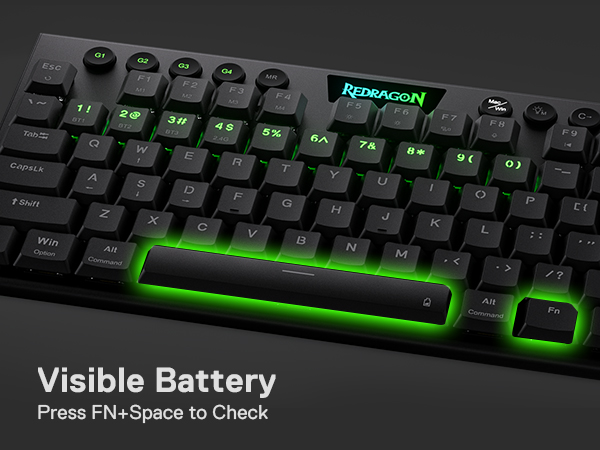
The Redragon K621 Horus TKL is a versatile ultra-thin mechanical keyboard featuring 3-mode connectivity (USB-C wired, Bluetooth 5.0, and 2.4GHz wireless), hot-swappable Outemu Red linear switches with a short 1.2mm actuation distance, and a compact 80% tenkeyless layout. Designed for professionals and gamers alike, it offers dedicated media controls, 4 on-the-fly macro keys, and fully customizable RGB lighting with onboard memory. Its lightweight aluminum chassis and multi-device support make it ideal for seamless productivity and immersive gaming across Windows and macOS platforms.



| ASIN | B09BVSFT7X |
| Additional Features | Lightweight |
| Antenna Location | Everyday Use |
| Best Sellers Rank | #12,110 in Video Games ( See Top 100 in Video Games ) #827 in PC Gaming Keyboards |
| Brand | Redragon |
| Built-In Media | USB Cable |
| Button Quantity | 10 |
| Color | Black (Red Switch) |
| Compatible Devices | PC, Laptop, Tablet |
| Connectivity Technology | BT, 2.4Ghz , USB-C |
| Customer Reviews | 4.1 out of 5 stars 1,167 Reviews |
| Enclosure Material | Synthetic, waterproof material |
| Generation | 1 |
| Hand Orientation | Ambidextrous |
| Item Dimensions L x W x H | 15.35"L x 7.48"W x 1.93"H |
| Item Height | 49 millimeters |
| Keyboard Backlighting Color Support | RGB |
| Keyboard Description | Gaming |
| Keyboard Layout | QWERTY |
| Manufacturer | Redragon |
| Mechanical Keyboard Switch Model | outemu_red |
| Model Name | Horus TKL |
| Model Number | K621 |
| Number of Keys | 87 |
| Number of Sections | 3 |
| Power Source | Corded Electric |
| Recommended Uses For Product | Everyday Use |
| Series Number | 26191618277569 |
| Special Feature | Lightweight |
| Style Name | Modern |
| Switch Type | Linear |
| Theme | gaming |
| Warranty Description | 1 year |
| Water Resistance Level | Water Resistant |
B**T
The BEST Starter TKL Gaming Board !!!
This board is a super star you never knew you HAD to have! For it's price point alone I can't believe how amazing this gaming board has already won me over and i just got mine earlier today. The hardware setup was straight forward for all 3 modes and even though I had a small issue getting the downloadable software to register it turned out is was my fault so I can't blame Redragon on that one. Lol ** Need to make sure software is fully updated -manual update patch located in download file, just click and 'boom', fixed- Also, you need to make sure you are using the USB cable in wired-mode (fn + 5) and the software will register ** You get TONS of RGB pattern styles to play and tweak with (21 to be exact). The product description says 20, but with the software you get an extra "Self-Define" style and WOW that one is fun to play with. Imagine as a kid playing with a Light Bright and now imagine having the imaginative customization for color coding your own board for particular games.. define your movement keys from your special action buttons, your scope or swapping grenades, etc.. it's really fun to create and you get to create multiple self-define profiles to toggle from for up to 5 slots! This is an upgraded version of the TKL K621! I have to say I'm very impressed with the build quality of the casing. Firm, solid aluminum is nicely weighted and the low-profile key caps feel great and time will tell about their longevity but I'm not worried they feel great to me. They also allow for a lot of RGB color/light emission so no worries there about the visual eye candy factor,. "A+, Redragon! Bravo!" The battery seems to be good. It'll quickly go from 100% to 90% which had me worried at first but I've been using it a few hours now and it's still showing 90 so if I need to I'll update this factor later if it tanks soon but given the quality so far I have faith it'll hold true. Only thing I wish it gave us is an easier way to track the battery level. The keyboard itself only has a light that'll flash red when low battery. Otherwise the only way I've found to check otherwise is to connect via Bluetooth to another device and you'll get a percentage to go by. I used my laptop to do this. That one was a swing and a miss opportunity. Not even the software gives you a status bar when you're charging up your keyboard via USB cable. Lame, but so far that's really my only gripe. What an amazing budget mechanical hot swappable keyboard! I can't say enough good things, you just have to get one if you're like me and wanting to take your game to the next level of customizable enjoyment. Keep up the GREAT stuff Redragon, you got me won over, now go and get yourself in the game today!!! Kali A.K.
C**.
A Board with Great Promise
In our office we’ve been using K70 MK.2 Low Profile Rapidfire mechanical, and K83 membrane keyboards from Corsair; as well as Lenovo laptops as our standard for key feel, actuation distance, response, and quietness. Now we’re looking for new ‘boards closely mimicking the typing experience of Lenovo’s upper echelon laptops (the ones we have anyway) with enhanced features varying in significance depending on overall execution. We gleaned a lot of input especially through YouTube and omitted the Logitech Craft “Advanced” Keyboard for among other things - paint wearing-off the keys. Corsair K100 Air, and Razer DeathStalker series were excluded chiefly for the ridiculously high prices with a possible dent in the cost-to-longevity lottery vs. customer service reliability. So we ordered a JLab Epic keyboard but the keys were wobbly, and when using a finger on the volume knob there was too much resistance often causing the board to slide as a result. Two or more fingers on the unfortunately short knob usually brushed against the BT2 key which took a further hit on design confidence. Though the keys were reasonably quiet with short travel, there were no standalone keys for media control, Home, End and Windows functions; we don’t require a number pad, ROI was cost prohibitive and no one really gravitated to it so the ‘board was returned. Attention soon focused on Logitech’s highly functional and beautiful G915 TKL in both color schemes but we quickly learned of the infamously wobbly keys, high price, and lack of hot-swappable switches. But the very appealing form factor and aesthetics became the benchmark so as luck would have it, Youtubes by The Provoked Prawn, Refreshingly CoZChristopher, randomfrankp, ECPU, Caleb Thornton and others brought the K621 to light. Understanding it’s “inspired” by the G915 TKL while possibly recalling the Egyptian falcon deity Horus, along with unique pluses, minuses; hopes of recent updates, and shockingly low price for what’s on the check list, we purchased two: • White keys/silver deck • Black keys/black deck In the Box • Keyboard with a 2.4GHz dongle in a magnetized cubby tucked in the chassis’ underside. • 5’ 2” USB A-to-C (90° angle for the Type C) cable matches the ‘board’s key color • Keycap puller • Switch puller • Four extra switches • A few stickers General Use The power switch on the ‘board’s left side needs to be switched ON for wireless and Bluetooth communication, and OFF for USB. In either case it’s slightly difficult to engage/disengage. Pros 1. Very thin profile allowing hands to be in a more comfortable position compared to non-low profile ‘boards, resulting in wrist rests that aren’t needed, for us at least. 2. Slightly smaller footprint than the G915 TKL. 3. The 2.4GHz dongle storage is a thoughtful touch especially when toting from place to place. 4. Legs on the underside deploy solidly in either position. When ‘open’ they raise the deck about a half inch in back. Rubberized non-slip pads on back and bottom of the legs aid the two non-slip pads under the chassis’ front. They do a good job of keeping the board in place while in use on smooth wooden surfaces or desk mats. 5. System BIOS/UEFI is accessible through the USB cable; some ‘boards can’t do it. 6. Connecting up to five devices and switching between them on the fly, the M Status LED shows a different color for: • Bluetooth 3.0/5.0 (both appear as selectable devices in my phone) BT1-blue, BT2-cyan, BT3-magenta • 2.4GHz - green • USB cable - white when the battery is fully charged, red when it’s charging Ad copy indicates there’s no latency with the upgraded BT and 2.4GHz wireless chips which we confirmed through key presses and media controls at roughly 6 feet. But when using BT1 two inches away from a phone there were missed key presses, and sometimes a normal press/release of the up or down arrow key resulted in the cursor continually moving until the key was pressed again. Something similar happened in 2.4GHz mode with a completely different key. In both cases the keyboard was situated between a phone and PC. There’ve been no problems so far with USB. 7. Switching between connected devices takes about a second, when in close proximity anyway. 8. Hot-swappable Outemu Low Profile Linear Red Switches with Cherry MX-style stems (shaped like a +), require only 40 grams (1.41 ounces) of force with a 1.2 mm (.05 inch) actuation distance. Both are less than the G915 making it easier on the fingers with better overall usability and feel compared to the K70’. 9. If a number pad is needed you can purchase Redragon’s K618 (full size keyboard), or a separate number pad from a different manufacturer. 10. We use the dedicated media controls a lot especially the dual-function knurled roller which moves in stepped increments (two at a time in windows) and makes immediate changes in volume or backlight level corresponding to how quickly you move it. When it’s used as the dimmer, the arrow keys briefly flash letting you know that full brightness or backlight off is reached, a very nice touch. Engaging either mode requires pressing the rubberized round key just left of the status LEDs, and it will stay in that mode until it’s pressed again. The play/pause button is useful when working on a project and needing to pause foreground or background media, YouTube, etc., to handle other activities then continue from there. This is preferable to a mute button as none of the media is skipped, a reassuring design choice. There are situations though when a mute button is warranted, like needing to hear something in your immediate environment without stopping a game for instance. 11. When wirelessly connected - all LED’s timeout at 55 seconds to preserve battery life. Any key press except moving the roller instantly ‘wakes’ and registers that character on the screen depending on the key. 12. Touching the rubberized G and media keys provide pleasant sensory input of the ancillary functions somewhat mitigated by their pivoting movement if pressed near the perimeter. 13. Two product color variants: black keys and deck, and white keys on a silver deck with a brushed finish. 14. The aluminum deck brings a hint of rigidity, and heightens the aesthetic. Subjectively it would be nice if the black version sported a dark gray brushed deck to augment the black keys a la G915. 15. 20 different multicolored backlight presets (some interactive), the ability to choose static colors, white or no backlight means no pressing need to install software, another check in the win column. An app however is available to personalize backlighting for each main key, and help refine macro functions. 16. RGB especially in a dark room on the black version is understated and preferred by some, as comparatively there isn’t nearly as much light reflecting off the deck which enhances the aesthetic. The silver version however easily reflects a diffused wash of light from the deck providing additional ambience preferred by others. I thought it’d be a questionable source of light pollution but when the ‘board is on a work surface in front of you - it’s gorgeous, they both are. 17. Primary and secondary key legends are backlit unlike the G915 and other ‘boards which annoyingly only target the primary. 18. Double-shot removable low profile sculpted key caps with Cherry MX-style insert are replaceable if there’s a suitable option. “Double-shot” refers to an injection molded plastic for the alphanumeric characters, surrounded by an injection molded plastic outer layer forming the key shape. Depending on assorted variables this should last longer than a single-shot for a key shape which receives a painted color and laser etch to create the characters. After a while the paint tends to wear-off through usage and it looks pretty bad often leading to early e-waste. 19. Didn’t think I’d like the logo but it’s growing on me; not quite as “office benign” as Corsair’s but it’s a welcome addition in our workspace nonetheless. 20. The Windows Key can be disabled. 21. W, A, S & D game functions can be transferred to the dedicated arrow keys. 22. Keys don’t wobble or rattle unlike the G915, and stabilizers under longer keys do a nice job. 23. Absolutely no body flex when typing. 24. The USB cable’s 90° bend is handy for a particular station we have where the user’s drawing tablet is in very close proximity to the keyboard, and a USB connection in back of the ‘board wouldn’t easily allow it. 25. Rumor has it when the ‘board is USB’d to a PC and the Redragon’s software is open it will do an automatic firmware check and update. Presumably the firmware in our decks is current as the software gave no indication one way or the other. Still the software should communicate the current firmware version and if an update is ready to download. 26. Onboard memory for personalized lighting profiles and macro key presses with the G keys and M keys is convenient. 27. The keyboard is lite and small enough to travel, so grab a suitable case and go. Midpoints 1. The logo on one ‘board appeared to have a smooth finish while the other had a small wrinkle near an edge. Not knowing if it was a manufacturing defect, curious fingers soon found it was protective film that we since removed. 2. Legends on the lighter key caps are easier to see without RGB in a lit room than their darker counterparts. 3. Waiting to see which key color shows more wear. Will the light colored keys look dirty more quickly over time, and/or will the darker ones show more wear/shine through frequent usage? 4. Waiting to see how long the ‘boards last in our work environment. 5. Customer service: I sent an email to them just after midnight not long ago and in less than two hours received a very cordial and thoughtful response, as well on the following nights to get a better understanding of current issues, adding to owner satisfaction. Unfortunately Redragon haven’t addressed the BT and wireless issues noted by others that have been lingering for some time. Cons 1. Typing with a Bluetooth connection was hit and miss with too many misses; 2.4Ghz had one mishap when there should be none, in either case it doesn’t inspire confidence. 2. Media keys are briefly lit when pressed which needs to be the other way around, seemingly a quick fix for Redragon. 3. Caps Lock and M LEDs are too bright, especially when the deck is plugged-in and the battery fully charged turning “M” into a constant visual irritant. Hopefully this will be changed soon by the manufacturer, in the meantime thin film products or dark ink will hopefully address the issue without looking tacky. 4. No explanation in the manual of the “down arrow” LED between Caps Lock (A) and M LEDs. 5. No way to adjust the backlight time-out. 6. The three ‘status LED’s’ don’t indicate battery level except “M” when it’s time to recharge, and the software doesn’t display the battery at all. 7. The keys don’t approximate the better Lenovo laptops for short travel, and especially quietness. This is very important for people in a wide variety of job titles and use cases where quiet operation of a keyboard is paramount. The K621 and the K618 in this regard is disappointing, but people accustomed to mechanical keyboards may like it. Even though we have K70’s they aren’t great for typing and office productivity so we use them for other functions. 8. Can’t find a truly quiet lower profile switch/key cap set, yet. 9. Connecting the USB cable at both ends doesn’t auto switch to it, it needs to be selected by pressing Fn/5. Changes We’d Like To See: 1. Alter the media key’s lighting scheme as noted and allow them to be RGB customized and dimmable, use the G915 and other noteworthy ‘boards for examples. 2. Lower the status LED’s brightness and make them dimmable with the main keys but not all the way off. 3. Use Fn/B keys to temporarily report battery charge status by lighting applicable F1-F10 keys from orange to green. F1=10%, F10=100% with ten percent increments for keys in-between. When it’s at 5% turn F1 red, when at 2.5% blink red repeatedly on/off indicating the ‘board needs to be charged. 4. A dark gray brushed aluminum deck to augment the black keys. 5. Higher contrast legends in the black key caps. 6. Utilize a better power switch for feel and movement. 7. Going forward ensure all packaging and protective shipping solutions are compostable and/or recyclable materials. There’s no need for the plastic bag, end cap and twist tie for the USB cable. The two pullers (without the current resealable bag), and USB cable can be shipped in accessories boxes within the main package. The protective shipping sleeve covering the keyboard should be a different material, which if suitable would also allow the logo to be protected. 8. Option for near silent (not figurative) switch/key combos. Though pressing/releasing one of the extra switches proves they’re very quiet, for some reason actuating a key cap/ switch mounted in the deck makes it highly audible unfortunately. Most people won’t remove key caps, remove then disassemble switches to apply lube, close the switch housing, affix a small rubber O-ring to each stem then take apart the chassis to apply soundproofing before putting it all back together and voiding the warranty. 9. (Integrated with #8) Option for lower key travel. For gaming enthusiasts the ‘621 and ‘618 have exceptionally low travel, but for the millions of people acclimated to very good laptops, the K621 and K618 need improvement. 10. Provide underbody channels to route the USB cable: left, back, or right on a MKII version. 11. On the MKII version place the nine keys below the volume/dimmer control to just above the up arrow key. To the right of F12 place three buttons shaped like the round G and Media keys (without the wobble) for: • Mic on/off • Mute on/off for speakers/headphones/earbuds • Camera on/off These are advantageous for office productivity, gaming, podcasts, meetings, Helpdesks, etc., additionally the mic. and camera controls offer privacy. Or the three keys could be populated in the unused deck space just above the up arrow key. Summary All things considered the K621 is feature-rich and heading in the right direction at up to ¼ the cost of its Logitech counterpart depending on market variables, while bettering it in notable areas. Unfortunately it’s marred by some issues so we’re still looking for a quieter lower actuating product with features, ergonomics and aesthetics this ‘board offers, but nothing to our knowledge comes close at the price….. yet. Would we purchase another? With their affable approach to customer service and our experience with the board: yes, but only for USB and 2.4GHz; and BT for basic controls, but waiting to see if they effectively address the current issues. Writing the review I used the ‘621 to wirelessly type in my PC’s word processor, while BT’d to my phone listening to tunes, changing tracks and pausing/playing when necessary. Switching between them was quick, effective and a pleasurable experience. In Closing If Redragon take the load off their CS Department by implementing astute changes, and effectively market the results to a much wider demographic without unnecessary price hikes, their brand visibility and bottom line may increase notably for the efforts going forward. Question is: how cohesive and skilled are their management, engineering, marketing, sales, manufacturing, ecology, quality assurance, packaging, and distribution teams to continually get it done while steadily improving compliance and reducing their carbon footprint? From office building dwellers, content creators of all sorts, project members, home theater enthusiasts, to those wishing not to disturb nearby family members; there are vast markets moreover people to reach and enhance the quality of their lives.
H**W
amazing keyboard! (make sure 60% is right for you!)
Low profile, programable, great keys (very black, awesome brightness, height, feel), also love the media buttons and volume control scroll! I legit love how low-profile this keyboard is, both the body and the keys! A lot of other mechanical keyboards with the standard height keys and key profiles are way too high for me (I'm used to laptop height keys, and also the hand doctor I went to for carpal tunnel said it's better to try to keep your wrist flat without resting the full weight on it (on said carpal tunnel) rather than putting a pad or anything under the wrist- I've stuck to laptop keyboards b/c of that b/c they're thinner than other keyboards... until now!). I would honestly call this a perfect wired keyboard, however, I made a bit of my own user error in buying a 60%, when it turns out that I really need the arrow keys for writing/editing/work. Exactly this keyboard just in a wireless 75% (also on me, I also didn't realize how much I'd want wireless, once I was free of the laptop screen lol) would honestly be absolutely perfect for me. TBH I still like this one enough to keep as a backup keyboard. If you're looking for a wired 60%, I highly recommend it!
P**.
good budget wireless keyboard
i like everything about this keyboard. the key click noise is fine, size is good, layout is what i wanted. the only problem ive had is the F4 LED got stuck on white, and i havent been able to get it unstuck. besides that it has been a fantastic keyboard. i wont take a star away for the led malfunction.
M**L
Useful for general purpose - not just for gamers....
I felt the need to add a few comments about this keyboard as I have struggled with the likes of RGB types before in my quest for the perfect illuminated bluetooth keyboard in the past. This one has all the formfactor specifications I am after in terms of compactness and key-type and the battery size appears adequate. I am going to hedge, slightly on this review. I have had the keyboard only a day, or so - ok? But already I can see there are things not communicated to prospective buyers/users. This is the normal stuff that is very difficult making the nerd/cultural transition (China). Folks may not be getting full use of the product they have purchased, or worse, returning without seeing what they had. I am familiar with the awful software one had to spend hours becoming familiar with trying to modify these types of keyboards, so when I saw comments about this (pre-sales) I just nodded in agreement, but also nodded when it was concluded the software wasn't needed. That may be true to a point, but I believe Redragon has revamped the software and made it very simple. More importantly, the software automatically updates the firmware, and this now makes it essential for those struggling with bluetooth problems. Take a look at the blurry picture I included that does not do this keyboard justice in a dark room. That can be done in minutes, and made fixed - no fancy, distracting animations. Macros may also be done with the software, although I haven't tested it yet. Joy has been brought back to simple typing for me - I can do it without my glasses now... There is only one detail I didn't have control of, and I guess I don't blame Redragon - it concerns the illumination of their beautiful logo at the top of the keyboard. I find it distracting. I can tell it is independently lit. This is one of those areas where user-need should prevail. Fortunately my IT experience is rather deep and I know how to deal with such technical problems - I covered it w/tape... The problem is I will be thinking about that lit logo when on battery.... The multi-connection capability capacity of this keyboard is awesome on paper. I have been using it mostly on direct USB so far, and did some simple testing with its wireless dongle. I bought it primarily for its 5.1 bluetooth capability and will follow-up with reports on how that is going. Somehow don't expect issues knowing Redragon is following up with a proper firmware update facility. I get the feeling they care about this product. [added the following day...] I'll just say it - I had to return this gem, despite my glowing report. It almost feels like Murphy's Law in reporting too soon, or something like that. I don't want to remove this review because the product will eventually smooth out - I just decided to go another way, a safer way as I need my keyboard to be something I can forget about. What happened started with bluetooth. I found it paired fine w/ Windows both 10 and 11 and bluetooths 5.0, 5.1 and 4.0 It paired once, but if I removed the pairing and tried to restore the pairing it would fail = on all of the Windows platforms. This is on the upgraded firmware, btw. Android (versions 9 and 12) failed to see the keyboard at all. While fiddling around with bluetooth one of the F keys, I think F4 turned pure white while the rest of my F keys were programed orange. I soon realized it wasn't working anymore. I used the software to reset everything to no avail. I hope you understand what happened. The theme of this message was using the keyboard as a general purpose keyboard, not gaming. This sort of thing is not acceptable considering that purpose. But, I don't want to discourage what I consider a good product that I expect to eventually get all the bugs out. [added 4-20] It is worth mentioning I was right about Redragon caring about this keyboard. There was sincere follow-up when it became clear I was returning - attempting to fix/address the problem. I had already replaced the keyboard at this point, and I wasn't in a position to work out the issues I was dealing with anyway (at this point in time). But for those of you that are sticking with it, I figure you are supported. I will probably try this board again in six months.
K**N
Looks and feels amazing, but connectivity and unresponsiveness kills this
Please see my update at the end, made January 2, 2023. I bought this unit because I am a long time redragon fan, and also needed a wireless keyboard for couch gaming. The look and feel are great, but sadly if you are more than a few feet from the usb receiver and have literally anything between them, it can't communicate at all. Trying to play a game or type, I have to hit any of the keys multiple times before it registers. So, if you keep your phone near the keyboard or a coffee table w metal/etc in between you and the usb receiver, sadly this will not work for your needs. Wired on my desktop is flawless though, and wireless on desktop is 99% flawless as long as you keep your phone away from the keyboard Edit: I am updating my review after Redragon reached out to me. They offered me a significant partial refund for my unit having the USB dongle connectivity issues. I am happy with this resolution because I still have wired and Bluetooth modes that work well. If you don't mind using as Bluetooth or wired when at your Desktop, this is a good keyboard and I can recommend if you are on the fence. Update: 12/02/23 For the life of me I cannot recommend this keyboard. The longer I use this the more problems arise. This keyboard has had connection issues since day one and the frequency is now to the point that this is unusable. It does not matter if I am in Bluetooth, 2.4hz dongle, or literally plugged in to the PC via the USB cord... I can be playing Doom or World of Warcraft, and out of nowhere the keys literally become unresponsive. The WASD keys refuse to register character movement, or when in online games I can't type messages (like in the wow chat). I love the Redragon name brand and wish them the best. But this keyboard is a dud in the mud. I look forward to seeing more of what Redragon does, for I have multiple keyboards and mice from them other than this one that have all been great.
K**R
Great keyboard if you dont want high name brand
Really nice budget keyboard. Rbg lighting. Yoh can download app to change the light pattern or do it from the keyboard directly. Good value gor the money. Been using for 2 years now. A key or two got stuck here and there but they give 5 extra so i replaced and all good. Cleaned it out and worked like new. Feel is great and clickiness is nice. Quick and responsive. The black matched my pc.
J**H
Very nice. Much like an old IBM laptop
It's a very smooth and quiet typing experience reminiscent of my old IBM before Lenovo went to chicklet keys. However, what does stand out is that it doesn't have any means of trackpoint, arrows keys, touchpad, etc. The face is aluminum, the roller is a nice knurled aluminum, the rest is plastic. The whole keyboard is flat...similar to a T60 laptop, with very little dish to the keys. (red switches.) What they could improve instantly at the factory is that all of the keys have the same switches. I'm sure you have all had the same problem before, the caps lock key should have a click and a much stronger spring. And some manufactures have a light that comes on...which should be excessively bright. Of course, that wouldn't be as easy for the company to do, add a brighter LED to that one key on the circuit board. Not why it only gets four stars though. I haven't had it or used it long enough to say much about the battery life other than my computer says it is still fully charged two days after the first time I charged it. Mine didn't come with any extra switches. It only get for stars because the software/driver give it a hard time plugged in, it isn't actually 2.4ghz/bluetooth/corded. It's good at bluetooth and charges plugged in. Offsetting that, it seems to switch itself off when you are not using it. The usb4 connector on mine seems to have a problem.
Trustpilot
4 dagen geleden
1 week geleden