
DOWNLOAD DE APP


Klantenservice
Copyright © 2025 Desertcart Holdings Limited
DOWNLOAD DE APP




🎬 Elevate your edits, own the spotlight.
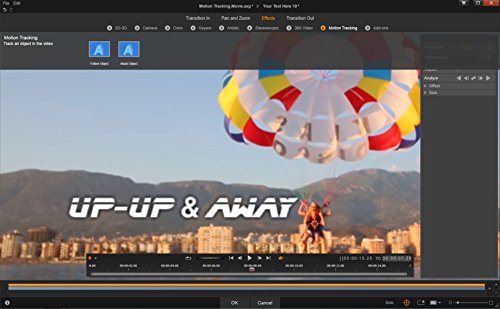
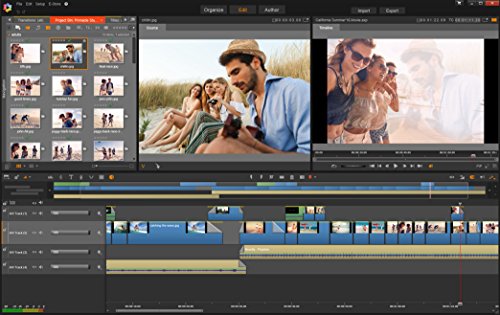
Pinnacle Studio 20 Plus is a professional-grade video editing software featuring advanced multi-camera editing, over 1,800 2D/3D effects, and new motion tracking and stop motion animation tools. Optimized for the latest hardware, it offers enhanced audio controls and direct social media export, empowering creators to produce polished, dynamic videos with ease.


| ASIN | B01HAP3NUG |
| Customer Reviews | 3.3 3.3 out of 5 stars (58) |
| Date First Available | June 19, 2016 |
| Is Discontinued By Manufacturer | No |
| Item model number | PNST20PLEFAM |
| Manufacturer | Pinnacle Systems |
| Product Dimensions | 5.25 x 1.25 x 7.5 inches; 1.6 ounces |
W**.
Video Editing for the Newbie...
This looks like a really good editor. It does a lot. And that's the rub. It really needs tutorials to teach the user how to use all the features. You do get access to a training site for two weeks but what about after that? I also wish I had purchased the Ultimate version. I would like to have the motion tracking "blur" feature that I thought was in the Plus version I purchased. Don't get me wrong. I feel this product will help me learn video/audio editing. The skills of video editing are new to me and I have a large learning curve to overcome. I'm encouraged to start purchasing a decent video camera and microphone and start a new video hobby for myself and family. I have no experience with other video editors so I can't make a comparison. However, I think I'll be very happy with this one, at least for a long time to come.
A**R
Five Stars
AS EXPECTED
D**A
Yeah, I did it; why do you as?
For an amateur video editor, this product fills the bill. I have no idea what I'm doing, but my videos are winning praise from all corners.
A**R
The user interface on this version is horrible. I know what directories and files are
I have had older versions. They were easier to use, but crashed frequently. The user interface on this version is horrible. I know what directories and files are. Why add another layer with project bins? I have spent the last 3 hours trying to make a simple title. The manual is has no examples. I am currently trying to watch a tutorial. The title screen did not match the tutorial so I restarted pinnacle. It asked for a review so here it is. I would not recommend this product.
M**W
Not user friendly, and lacks some key features you should be aware of.
I've noticed some of the reviews here seem to tout the features of this software, but the authors do not necessarily indicate that they have actually tried to use it, which makes me a little skeptical of their 5-star ratings. Let me say up front that I have actually used it. Also note that I have used quite a few different types previously, my favorite being Adobe Premiere Elements. This version from Pinnacle is not by any means user friendly. If you are a novice, you won't find that the process has a "easily walks me through it" design to it by any means. It is, in fact, fairly difficult to do even basic things...like add titles or captions to the timeline. You will see a tab toward the bottom called "SmartMovie," that does make things a little bit simpler....but even with this option it's still not all that easy to navigate your way through the process. Two main things about this software that I found fairly annoying: 1) If you want to view the online training videos from Pinnacle, you can only do so if you subscribe to their site for $7 per month....otherwise the video stops about a fourth of the way through and a pop-up pushes you to make this purchase. Until you do, you're blocked from viewing the videos. 2) It does not burn to Blue-ray discs unless you download a plug-in that will allow this feature, which also costs $7 to download. Really Pinnacle? I mean....really? Even the MyDVD software that comes with it has a burn to Blue-ray option on it, which is greyed out because you have not yet purchased the plug-in. Horrible business model, IMO. What I did manage to do was to burn a short 4GB AVCHD movie on a DVD DL disc, and I was able to include a title for it. Oddly, the transition from one clip to another had special effects built in for switching from one clip to another...swiping from left to right, loading the next clip from the middle out, etc. At first it was pretty cool to look at, but eventually it got annoying. I was able to finally figure out from the manual how to go in and take the transitions out of the timeline. It was strange to me that these special transition effects were set up by default. When I tried to burn a larger, 10GB movie (as a side note, all of these are HD family vacation footage), of course I couldn't load it on a DVD DL disc due to its size, so I decided to save the file and then I would burn it from my Adobe software. Halfway through to exporting it to the folder, however, the Studio 20 software froze up and stopped exporting....so I had to close it. BTW, I have a fairly robust PC....Core i7 CPU, 12GB RAM, etc. Basically, unless you want software to make AVCHD movies less than 8.5GB in total size that will not burn to Blue-ray unless you download a plug-in at an additional cost, I would look elsewhere. My suggestion is Adobe Premier Elements....that's the one I have had the most success with. I can't recommend this one.
V**P
So So
My old Pinnacle was easier to use.
R**.
An Evolution of Studio Software with Some Frustrating Lingering Issues
I'm a long time, though novice user, of Pinnacle Studio and have been using version 17 for several years. All of my movie edits are pretty basic stuff: cutting video from my Sony or Canon camcorders, my Sony Action Cam (like a GoPro), or video from my smartphones. I dump all of the edited movies on my home NAS when my edits are done. For my uses, Pinnacle does a pretty good job but there are some frustrating elements with Studio 20 that can't be overlooked. First, Studio 20 seemingly cannot handle .AVI files despite it being a supported format (on Pinnacle's website). It seems to import them, display the file in the Library, but then cannot actually play the file. This was a problem in Studio 17 and apparently still an issue in version 20. In order to work with .AVI files you'll need to convert the file to another file format first. Second, this is a resource intensive application and unless you have a moderately powerful PC I wouldn't attempt to install the application. My PC is a moderate PC, i5-6600K, GTX 970, with my OS (Win-10) on an OCZ NVMe SSD (also where I'm editing). Even on my machine, Studio 20 seems to frequently get bogged down on basic operations. The initial scan/library indexing was a massive chore and crashed the application multiple times. I finally just gave up on indexing and instead just work in a small directory with only a few videos I'm intent on editing. I strongly, strongly advise anyone intent on using this software to head over to Pinnacle's website and watching some of the tutorials. There is some advanced pay content that's provided by an outside party but a lot of really in-depth free videos too; look for the "video tutorials link" for the free tutorials. Aside from the technical issues and initial burn-in time to get accustomed to the software you can create some pretty good videos with Studio 20. My latest project has been splicing together several years worth of family videos that will eventually end up on DVD and be given out as Christmas favors. It's probably my most ambitious project in Studio to date and coming along pretty well. Special note: If you're working with large datasets that will end up on optical media (Blu-Ray) you'll need to for over a few bucks to Corel to unlock the ability to burn to BD media. Not a huge deal but worth noting. I'm not sure how Pinnacle Studio stands up against its closest competitor, Adobe Premiere Elements, however, if I do get a chance to use that product I'll update this review. For now, I do recommend this software for amateur content creators.
A**R
After 20 versions, still not user friendly. KISS pinnacle or your days r done
B**E
good
Trustpilot
2 weken geleden
3 dagen geleden