We remain fully operational. Our teams are working around the clock to ensure your deliveries continue safely.

DOWNLOAD DE APP


Klantenservice
Copyright © 2025 Desertcart Holdings Limited
DOWNLOAD DE APP
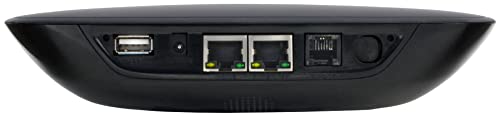
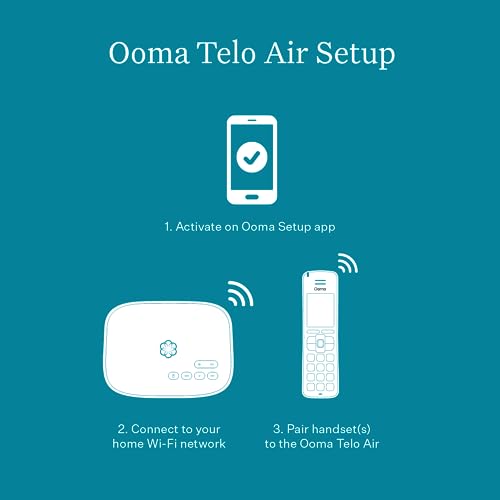


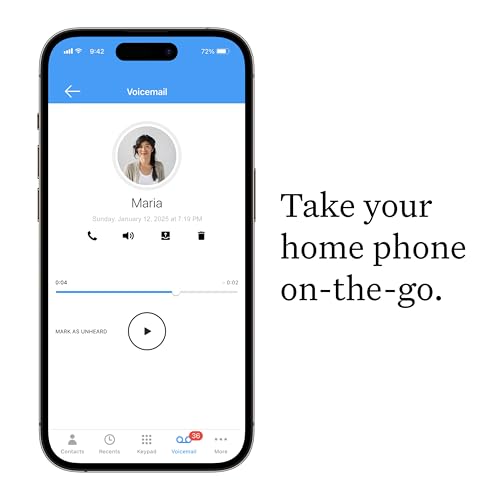


The Smartest home phone is the one that gives you exactly what you want with the greatest savings. That's ooma Telo. Wireless connect ooma Telo air to your high-speed Internet and regular home phone and get crystal-clear nationwide calling. All you pay are applicable taxes and fees. This works only for phones in the US. Review: When I received this Ooma device I went to work setting it up- turns out the one I had was set up for a US system. I attempted to set it up with my Lap Top- advice- Don't. Once I used a cell phone- scanned the code and waiting about 45 minutes - it was up and running. It has great sound quality. My problems setting up the system was more Shaw related than Ooma. I'm not who Shaw is hiring for Tech Support but the one lady I spoke with didn't even know what an Ethernet Cable was. Review: This product works great! I am using it to replace my landline service that I have had forever but was getting increasingly expensive. This was a good solution as I was able to port my landline number to Ooma and save the monthly expense. It's easy to set up by connecting to wifi, and works with my old phone. I estimate that the initial cost will be paid out in 4 months based on the landline savings. And since it connects with wifi you can move your phone anywhere you want it to be, not only where the jack happens to be. Ooma also offers voicemail and other optional features.


| ASIN | B078Z4HBFG |
| Batteries Included | No |
| Batteries Required | No |
| Brand | OOMA |
| Compatible Devices | Telephone, iOS Devices, Android Devices |
| Customer Reviews | 4.2 4.2 out of 5 stars (2,065) |
| Date First Available | 27 February 2018 |
| Display Type | LCD |
| GSM frequencies | 1.9 GHz |
| Item Dimensions LxWxH | 15 x 19.8 x 4.3 Centimeters |
| Item Weight | 544 g |
| Item model number | 811008021450 |
| Manufacturer | ooma |
| Material | Plastic |
| Model | 811008021450 |
| Net Quantity | 1.0 Count |
| Power Source | Corded Electric |
| Product Dimensions | 14.99 x 19.81 x 4.32 cm; 544.31 g |
| Recording Capacity | 22 Minutes |
| Wireless Type | 802.11ac |
B**D
When I received this Ooma device I went to work setting it up- turns out the one I had was set up for a US system. I attempted to set it up with my Lap Top- advice- Don't. Once I used a cell phone- scanned the code and waiting about 45 minutes - it was up and running. It has great sound quality. My problems setting up the system was more Shaw related than Ooma. I'm not who Shaw is hiring for Tech Support but the one lady I spoke with didn't even know what an Ethernet Cable was.
G**H
This product works great! I am using it to replace my landline service that I have had forever but was getting increasingly expensive. This was a good solution as I was able to port my landline number to Ooma and save the monthly expense. It's easy to set up by connecting to wifi, and works with my old phone. I estimate that the initial cost will be paid out in 4 months based on the landline savings. And since it connects with wifi you can move your phone anywhere you want it to be, not only where the jack happens to be. Ooma also offers voicemail and other optional features.
M**G
Highly recommended if you're looking for a low-cost landline replacement with advanced calling features. I've been using a wired Ooma at my house since 2016 and just purchased this wireless one for my Mom. We're using cordless Panasonic DECT phones with the Ooma at both locations ... the setup works great. Service cost is ~$5/month without Ooma Premier service and ~$15/month with Premier. Get the Premier, which gives you a second line, caller ID, spam blocking, call forwarding, conference calling, free calling to Canada and Mexico, etc., etc. Previously, I was paying ATT ~$35/mo for basic local service and another $10/month to a budget long-distance service. With Ooma, I'm paying about 1/3 of that for a service with many more features. Pros: - Simple installation - With Ooma Premier, all the features mentioned above and more. Spam blocking is particularly great and almost completely eliminates nuisance calls - Fax compatible, prepend *99 to outgoing fax numbers - You can keep your existing landline number. Ooma will "port" it for you and give you a temporary number in the meantime. Porting takes 1-4 weeks. I've done trouble-free ports of Pacific Bell (CA) and CenturyLink (CO) numbers - Sends standard voicemail waiting signals to connected phones -- just like phone company voicemail -- so that you can be notified of, and pick up, Ooma voicemails on connected phones that support this signaling - Reverse powers wired jacks in your house if you want multiple phones or fax machines connected (disconnect your house from the phone company's lines to do this safely and *don't* try this if you have DSL Internet ... it'll likely disable your Internet connection) - Smartphone app allows you to send/receive calls from your Ooma number, pick up Ooma voicemail and monitor incoming/outgoing calls from anywhere; the app isn't amazing, but it works. - Informative browser/web interface for monitoring and configuration of the service. - Sends address information to public safety when calling 911. Be sure to configure your address correctly during setup Cons and things to be aware of: - Requires a reliable Internet connection with a few 100 kbps of bandwidth for the Ooma. You can set up Ooma to automatically forward calls to another number if your home Internet goes out. Otherwise, your Ooma voicemail will record incoming calls, which can be retrieved after your Internet comes back (or from the app or the browser interface). - Sound quality of voicemails recorded by the Ooma is muddy. If your home phone has a built-in answering machine, try using that instead (just set the phone answering machine to pick up after a smaller number of rings than the Ooma). - If you wire the Telo in your house, rather than connecting via WiFi, note that you have the options of (a) installing it between your Internet modem and router or (b) behind your router on your home network. While Ooma recommends (a) for wired Telos, note that the Telo will limit throughput to your home network to 100 Mbps in this configuration, slower than many of today's Internet plans. My $0.02: connect a wired Telo behind your home router. - The "flower" light on top of the Telo is very bright by default. It's brightness can be adjusted by logging in to the Telo (not your Ooma dashboard) or with the Telo rewind button (see https://support.ooma.com/home/ooma-telo-basic-functions-and-faq/)
F**S
Fonctionne parfaitement en autant que l internet est stable la moindre variation de l internet et le téléphone coupe
J**A
Overall, a great device and once you get it working, things go smoothly. It's just that little thing about getting the device to setup that isn't clear. Ooma clearly has a long way to go with smoothing out their documentation and setup process. First off, the advertised setup app on Android does NOT connect to the Ooma and it is not at all clear what version of Bluetooth they are running. Technical specifications could NOT be located for this device which is very surprising. Ooma should make this a high priority in addition to their setup process needing overhaul. Overall, here are the issues I encountered in setting up the device: 1. The Bluetooth setup process via the mobile app did not work for me because my recent vintage Bluetooth phone was incompatible which is very surprising. 2. The alternate procedure using the https://setup.ooma.com ALSO did not work with the laptop connected via ethernet port due to the fact that they insist on using a self-signed certificate which most browers trap and refuse to connect with these days. Shame on you Ooma! You should KNOW this! 3. The instructions are disjointed and written by a marketing team and not real world people who are more likely than not to run into real-world issues. I consider the instructional guide for the Ooma to be practically worthless. 4. The only REALLY useful documentation is the shortcuts guide which is very well done. Two copies are provided and I plan to make copies just to keep with all my phones. 5. There are no technical specifications which is utterly mystifying to me. This should be standard with all devices, especially a VOIP device. Continuing on with my setup experience: What DID work as to access the default http://172.27.35.1/ address. The reason the SSL connection via the https://setup.ooma.com doesn't work is because most browsers intercept and deny connection to self-signed SSL certificates. It is a catch-22 I've seen on a lot of wireless devices. Ooma NEEDS to change these confusing aspects of it's setup process to something more streamlined and easy for people to understand. I'm an experienced (now retired) professional webmaster and it took me 45 minutes to sort through getting this thing hooked up. Wireless does work. The setup menu in the built in webserver does work and extremely basic. I have a Google Voice device which is MUCH more comprehensive, but this gets the job done for the bare basics with the Telos. What isn't clear is the order of precedence and prioritization for multiple wireless connections. Again, a mystery sauce and I have yet to understand their system for handling this. Once again, the Ooma documentation isn't much help, but I will keep working to find out how it works and will update when I learn more. It is also not clear as to the Telos boot process and how long it takes. This isn't covered at all in the guide and needs attention. It took a couple of minutes for the Ooma Telos to reach a ready state. This should be clearly discussed in the manual. The Bluetooth issues were also notable. The system absolutely refused to speak with a Samsung cell phone that is only a few years old and Ooma should state the Bluetooth version minimums clearly on their device and literature. As it sits now, I cannot direction access the Ooma setup without their included ethernet cable. At least I had a way to press forward but if the Bluetooth is this picky, why not carry a line of Bluetooth adapters that plug into the USB port and give you options for multiple specifications of Bluetooth other than this paltry and non-working version bundled into the system? My take is that the Ooma is a really nice piece of gear. It's main issue seems to be the poor documentation and a Bluetooth issue that seems to be a deep dark secret for those of us wanting to know more. I have yet to work with the Ooma team to port my old landline number, but will update here about the experience when I get that all done. I did like the security features to block spam callers with "unknown" and a wide variety of other settings on the web app for the application. Time will tell how well this works. The other great feature is the addition of a forwarding number you can use when the Internet is down which can be to a wireless device for continued coverage. On to the positive: I'm glad I got this. Price is right for the basic service and I'm considering the premier plan. It is FAR FAR cheaper than what we are getting from a certain ancient carrier whose prices are completely out of line with reality. Goodbye Landline, Hello VOIP and Ooma.
Trustpilot
3 weken geleden
2 weken geleden