We remain fully operational. Our teams are working around the clock to ensure your deliveries continue safely.

DOWNLOAD DE APP


Klantenservice
Copyright © 2025 Desertcart Holdings Limited
DOWNLOAD DE APP
Buy anything from 5,000+ international stores. One checkout price. No surprise fees. Join 2M+ shoppers on Desertcart.
Desertcart purchases this item on your behalf and handles shipping, customs, and support to Netherlands.
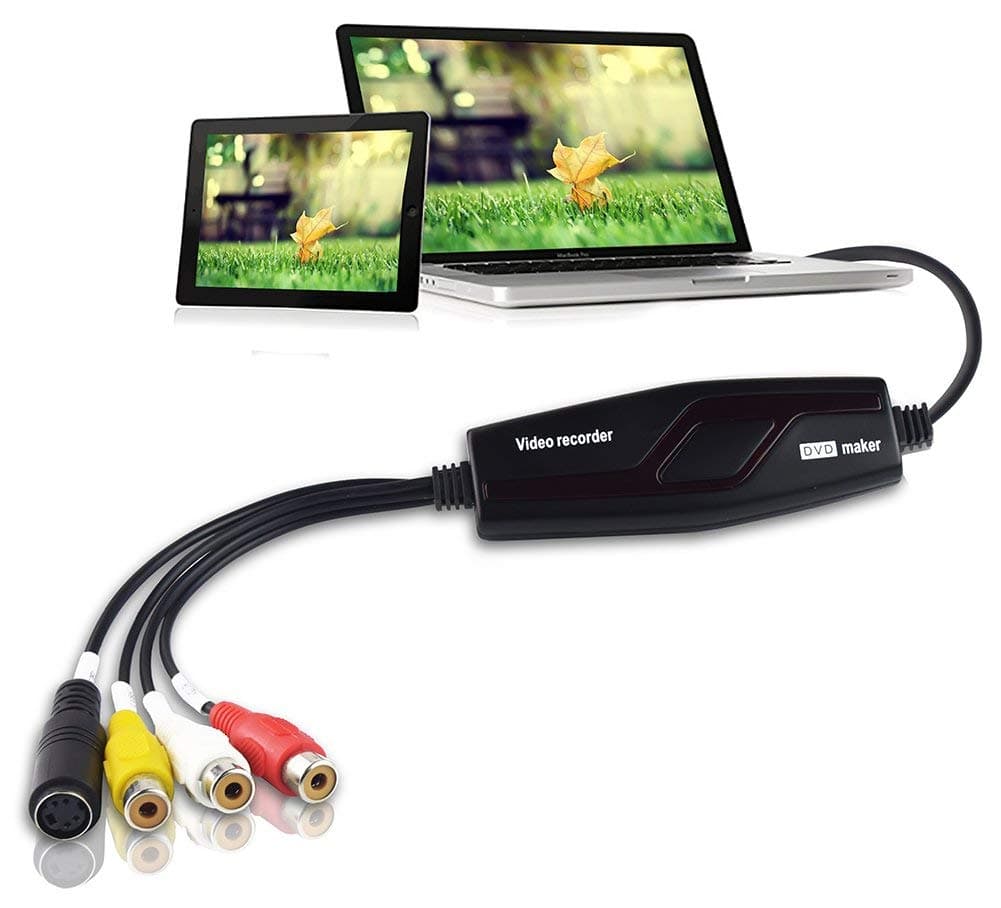
🎞️ Turn your retro reels into digital gold—don’t let your memories fade away!
The DIGITNOW Video Capture Converter is a lightweight, USB 2.0 device that transforms analog video sources like VHS, V8, and Hi8 tapes into high-quality digital MPEG files. Compatible with most Windows and Mac systems (excluding Mac OS Mojave), it includes software for easy video capture and DVD burning, making it the perfect tool for professionals and nostalgia lovers to preserve and share their vintage footage.


| ASIN | B07H287NRC |
| Best Sellers Rank | #11,802 in Computers ( See Top 100 in Computers ) #12 in Internal TV Tuner & Video Capture Cards |
| Brand | DIGITNOW |
| Color | Black |
| Compatible Devices | Gaming Console |
| Connector Type | RCA, usb 2.0 |
| Customer Reviews | 4.0 4.0 out of 5 stars (101) |
| Finish | Matte |
| Item Dimensions | 19.8 x 14 x 3.8 centimeters |
| Item Weight | 68 g |
| Manufacturer | Rybozen |
| Model Number | BR117 |
| Number of Ports | 1 |
| Package Quantity | 10 |
| Power Plug Type | No Plug |
| Specific Uses For Product | Video and Audio Transfer from Analog Sources |
| UPC | 738598749604 190835554653 791319927347 190835512974 190835513056 |
| Unit Count | 1 Count |
M**D
Good product
Works as expected, just follow the instructions given in the product description.
R**.
Perfect
Just receive mine and use it right away. Great product and easy to use. It work on my old canon camcorder (mini DV).
D**N
Video recording
Good product working very good
S**F
Didn't work
The picture came out fade, no colors
M**R
Did not last
Worked fine initially, then stopped capturing the sound.
S**M
Good
Good
Y**N
Freezes on some tapes; I don't know why.
This product is easy to use and I like it. So far I used only the Capture facility. It has 4 quality options: Best, Good, Normal and Average. It's splitting the tape at 4.38 GB. I have used only the Normal option and I checked the Average option. The quality of the average was not satisfactory for me, so I deleted it and repeated the capture using Normal. The quality of the Normal is okay with me. I guess the Best and the Good would split the 2 hr tape into several chunks of 4.38 GBs. I also converted a 3 hr tape and it became to files, one of which was smaller than the other one. Finally I wish it had a FireWire option for capturing, instead of USB only. I had one tape which was freezing in some places. I deleted the file, but I think it is the speed of the USB 2.0 that was not sufficient. Yousef
A**R
Great product for the price
My Sony Digital8 camera does have usb but it is supported only by Windows 7 and i needed a way to backup old videos. Considering i had also a bunch of VHS tapes to backup i bought this product which worked quite well and i managed to backup everything via Svideo input, which gives out better color and brightness compared to plain composite. To record i used OBS studio and to get best quality: - define video capture device, go to its properties - under Resolution/FPS Type select custom - set resolution 720x576 or 720x480 - set FPS to highest possible - close properties and open OBS settings - select output and under recording quality select indistinguishable, encoder Software x264 - under audio tab 44.1 and stereo i selected - under video resolution and scaled resolution i placed the same 720x576, FPS 60 Note that file will be quite big, ie. 90min of video was 9.7GB for me, however this is where you use software called Handbrake to encode it to h265 format that will reduce size quite well. You can start by selecting a video encoding preset like H.265 MKV 480p30 and then modifying it: - skip summary, dimensions and filters go to video tab - you need H.265(x265) encoder, not NVEnc or AMD, software encoder only, because hardware is used for streaming content and is of lower quality - set it to average bitrate 5000 and 2 pass encoding On a AMD Ryzen 7 4800H it took around 2-3 hours but the file was reduced to 3.3GB approximately. In case you are backing up VHS you can change the FPS to 24-25 because that is the maximum it can output, as for resolution there is a lot of debate what is best for PAL/NTSC standards, but i recorded on higher resolution and then used handbrake to change it to whatever i felt comfortable with.
Trustpilot
3 weken geleden
1 week geleden