We remain fully operational. Our teams are working around the clock to ensure your deliveries continue safely.

DOWNLOAD DE APP


Klantenservice
Copyright © 2025 Desertcart Holdings Limited
DOWNLOAD DE APP
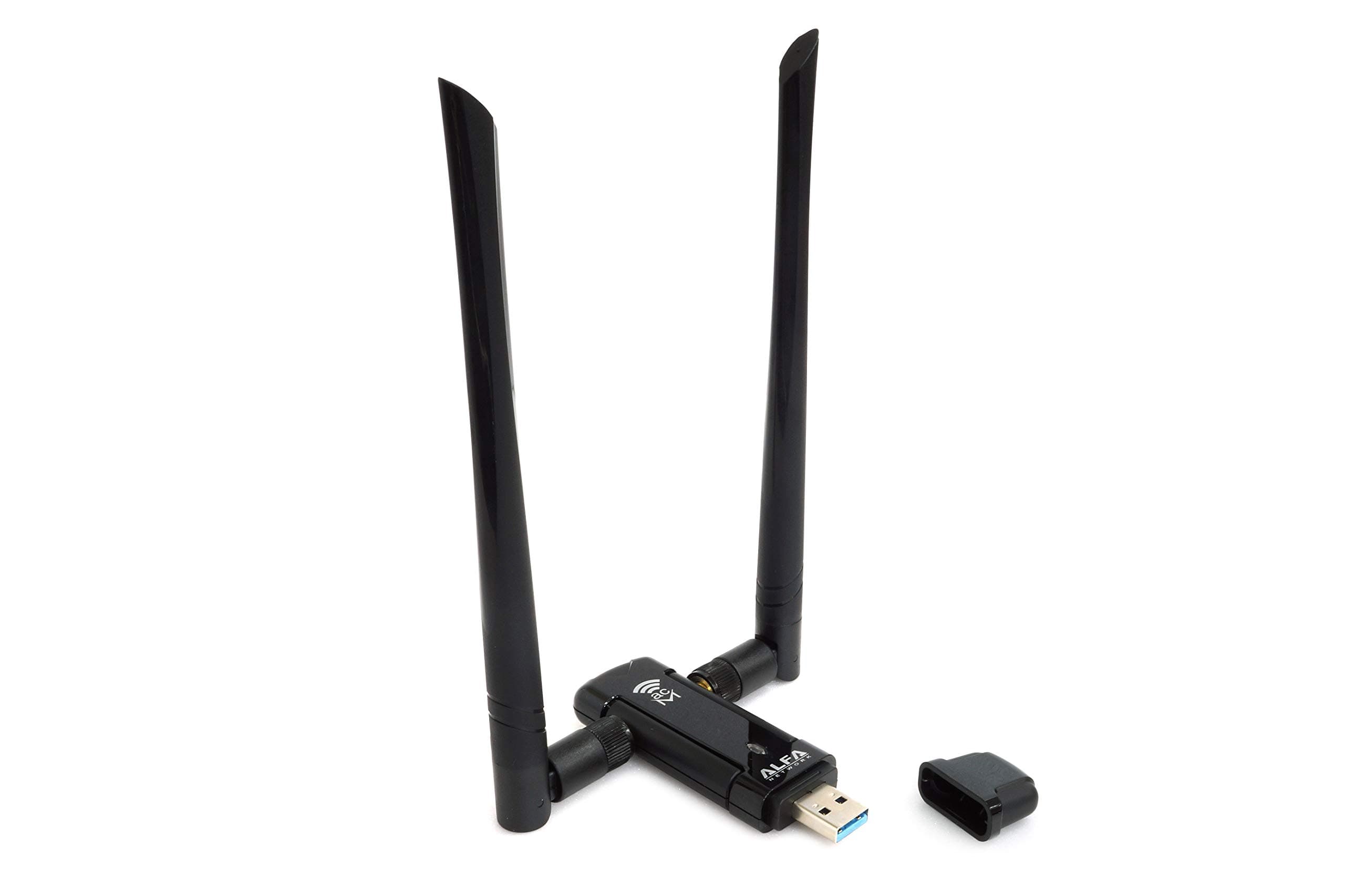
📡 Stay connected, stay unstoppable — the ultimate Wi-Fi weapon for pros!
The ALFA Network AWUS036ACM is a high-performance dual-band AC1200 USB Wi-Fi adapter featuring a high-sensitivity external antenna and USB 3.0 interface. It delivers up to 867Mbps on 5GHz and 300Mbps on 2.4GHz bands, ensuring stable, lag-free connections. Designed for professionals and pentesters, it offers seamless plug-and-play support on Kali Linux and Raspberry Pi 5, plus broad compatibility with Windows and macOS (up to 10.13). Its included USB cradle allows flexible positioning for optimal signal strength, making it a top choice for long-range wireless networking and security auditing.


| ASIN | B08BJS8FXD |
| Best Sellers Rank | #94 in USB Computer Network Adapters |
| Brand | ALFA Network |
| Color | Black |
| Compatible Devices | Laptop |
| Compatible Operating System Family | Linux, MacOS, Windows |
| Customer Reviews | 4.6 4.6 out of 5 stars (968) |
| Data Link Protocol | USB |
| Data Transfer Rate | 300 Megabits Per Second |
| Hardware Interface | USB 3.0 |
| Item Dimensions L x W x H | 2.44"L x 0.94"W x 3.36"H |
| Item Weight | 2.07 Ounces |
| Manufacturer | ALFA Network |
| Mfr Part Number | AWUS036ACM |
| Minimum Required Operating System Version | Windows 10 |
| Model Number | AWUS036ACM |
| Unit Count | 1 Count |
M**S
The Pentester's Dream for Raspberry Pi 5 - Works Flawlessly Out Of The Box!
Let's face it, getting hardware peripherals, especially capable wireless adapters, running smoothly on brand new platforms like the Raspberry Pi 5 can be a real headache. Driver support is often lagging. That's where the ALFA Network AWUS036ACM absolutely shines, particularly for anyone running Kali Linux for wireless security auditing and penetration testing. This adapter is a lifesaver! I plugged it into my Raspberry Pi 5 running the latest Kali Linux ARM image, and it was recognized instantly – truly out-of-the-box. No hunting for obscure drivers, no compiling, no dkms nightmares. This is HUGE, especially on the Pi 5 where compatibility can still be hit-or-miss for many adapters. The underlying MT7612U chipset has solid in-kernel support, which makes all the difference. From a pentesting perspective, this adapter is exactly what you need. It fully supports monitor mode and packet injection, performing reliably with standard tools like the Aircrack-ng suite, Wireshark, and Kismet. Capturing handshakes and injecting packets worked without a hitch. The adapter's long-range capabilities and strong AC1200 dual-band performance mean you can reliably capture traffic from further away and on less congested 5GHz channels, which is critical for effective wireless assessments. If you're setting up a Raspberry Pi 5 for wireless penetration testing or security research and want an adapter that is powerful, reliable, and guaranteed to work without wasting hours on driver issues, the ALFA AWUS036ACM is the undisputed champion. It saves you the setup pain and lets you get straight to work. An essential tool for any Pi 5-based pentesting toolkit. Solid 5 stars
H**.
Good USB wifi adapter for Linux
Works plug and play in Linux Fedora 42 stock (Gnome). It connects to 2.4GHz and 5GHz networks. The adapter comes with a very good USB extension cable. It shows 650 Mbps when connected to wifi network (it depends on the router and number of devices connected).
J**Y
Works on HP ProDesk 600 But Careful Where You Plug It In!
TL/DR: I HIGHLY RECOMMEND THIS ANTENNA, just be aware that plugging it into a USB port on your box might cause electrical interference resulting in a buggy system. This is easily resolved by plugging it into a USB hub that's connected to your box but a little distance away. I drive an old HP ProDesk 600 G1 running an old version of Linux. This computer does not come equipped with wifi capability. My new apartment doesn't have a coax cable outlet, only a wifi modem in the closet so my computer was unusable for the internet. This ALFA Network USB dongle is fast and works great! Once plugged into a USB port, the network tools that came with my distro found the network and acquired signal with no trouble at all. All I had to do was select my network and type in a few particulars about my modem. But there's one problem with USB wifi dongles that you might or might not experience. Plugging a wifi antenna into a USB port on your box can cause electrical interference that makes things get weirdly buggy. What do I mean by "buggy"? After a while my wifi signal began dropping out and my network tool struggled to find signal again. Then my mouse and keyboard simultaneously became non-responsive and I had to do a hard shutdown. I decided to reinstall my O/S. While I had my box shut down I moved the ALFA dongle from the front to the back of the box so my cats wouldn't rub against it. After the reinstall my network was stable but my keyboard and mouse began going dead more and more often, requiring hard shutdowns every time. I read on a forum that these problems can be caused by a USB wifi antenna dongle causing electrical interference with USB devices. *CLICK* I unplugged the ALFA Network dongle from the USB port on my machine on the floor and plugged it into a multiport USB hub on my desk that's connected to my computer via USB cable. Removing the ALFA from a direct connection to my box completely solved the problem. I hope that someone finds this helpful.
J**N
Excellent Choice.
This is an excellent brand and works as advertised. I have another version that is also excellent.
J**K
Works, not 100% on Kali (might be separate issue)
It works and fast shipping but not working on Kali for me, definitely speeds up my internet though
Λ**Ɵ
Top WiFi Adapter for Kali Linux (MediaTek)
This is what I consider to be the second best USB WiFi adapter for use with Kali Linux. What matters for use with Linux is the chipset, and these Alfa adapters with the "M" suffix feature a MedaTek chipset, which seems to be much less problematic than those with RealTek chips. They tend to have fewer issues and are just straight up plug-and-play. Obviously this adapter supports monitor mode and packet injection. The reason I call this the second best adapter is because the AWUS036ACHM has better range and it is more conducive to the use of the Alfa panel antennas for even more range. The downside of that adapter is that it is large and cumbersome, requiring some modification to clamp to a laptop screen securely. Which one you choose probably depends solely on how discrete you need the adapter to be. The ACM listed here is a great choice either way.
R**B
Love ALFA wireless products always work
Alfa AWUS036ACM works great, not much else to say, works on both Windows and Kali Linux right out of the box.
O**S
Easy Setup!
This adapter was truly plug and play and worked exactly as described. Setup was quick, performance is solid, and connectivity is reliable. No complaints at all.
M**Y
المفروض المنتج دا كان يوصلي، الي وصلي كان موديل اخر مش الي اخترته بس نفس الماركه، جيت اجربه على الجهاز، لقيت ان اسمه Realtick Semiconductor Co. RTL8812AU,يعني تم ارسال منتج غلط، والمنتج الغلط كمان كان غطا لجهاز من ماركه تانيه اصلا مقلداه، دا غير انه لا يصلح للlinux اطلاقا، حاجه غير مقبوله بالمره
E**S
Bought for dual boot (win11, Linux) PC. Worked plug & play in both OSes, speed now is as good as the speed of the ethernet connected directly on the router (98Mbps) as I am in a rural area of an island and the maximum theoretical speed is 100Mbps
M**A
HR
F**S
Fa il suo lavoro egregiamente. Perfetta.
B**N
Mooie stabiele adapter die op Kali Linux wordt ondersteund. De gevoeligheid voor ontvangst had wel wat beter gekund. Wel geef ik 5 sterren vanwege de ondersteuning en kwaliteit. Zoek je iets om een gebouw of buurt in kaart te brengen overweeg dan andere antennes of een adapter die nog wat gevoeliger is.
Trustpilot
3 weken geleden
3 weken geleden