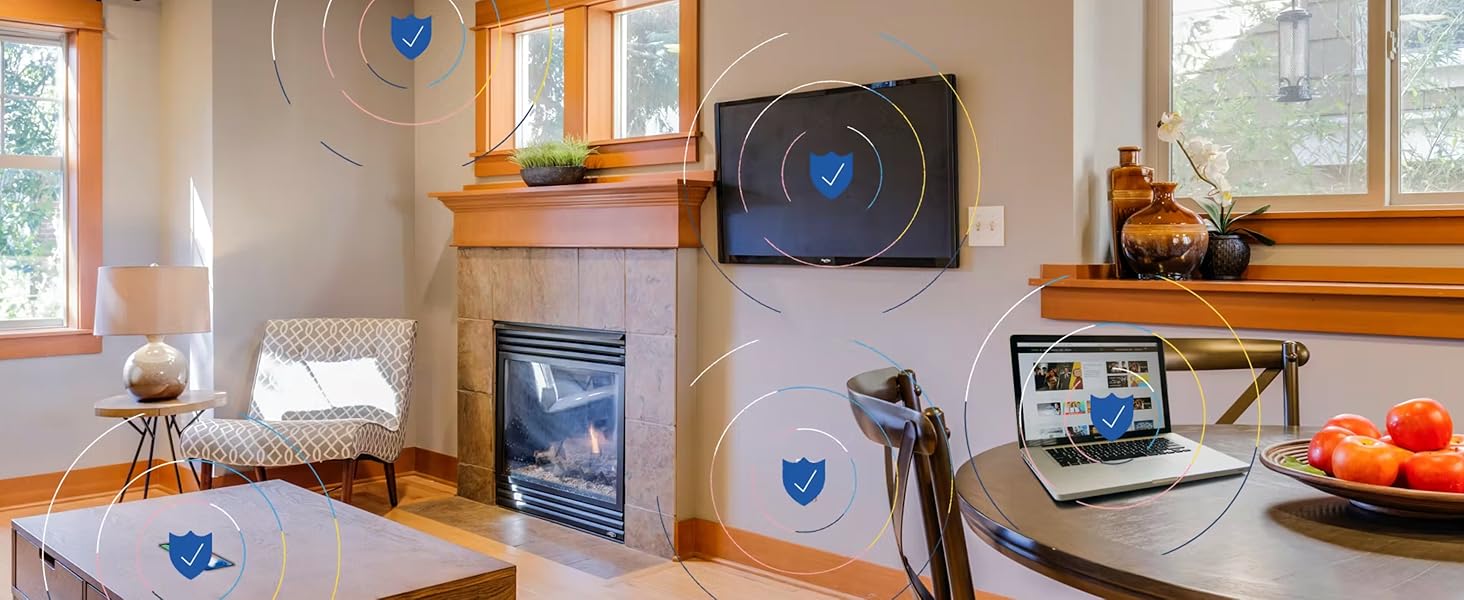
🕸️ Guard your digital kingdom with Gryphon Guardian — where security meets smart family control!
The Gryphon Guardian Mesh WiFi Router combines robust AC1200 dual-band speeds with advanced parental controls and next-generation cybersecurity. Covering up to 1,800 sq. ft. per unit, it offers flexible mesh expansion and centralized management via a smartphone app. Designed for modern families, it enforces screen time limits, content filters, and device monitoring while protecting your home network from malware, ransomware, and phishing threats—all in an easy-to-setup, scalable system.


| ASIN | B082YGNKJH |
| Antenna Location | Security |
| Antenna Type | Internal |
| Best Sellers Rank | #25,929 in Electronics ( See Top 100 in Electronics ) #119 in Whole Home & Mesh Wi-Fi Systems #181 in Computer Routers |
| Brand | Gryphon |
| Built-In Media | Gryphon Guardian router, 90 days of Premium Protection, 1-Year Hardware Warranty with Tech Support, 90-Day Money Back Satisfaction Guarantee |
| Color | white |
| Compatible Devices | Smartphone |
| Connectivity Technology | Wi-Fi |
| Control Method | App |
| Controller Type | Android |
| Coverage | Up to 1,800 sq. ft. |
| Customer Reviews | 3.6 out of 5 stars 4,370 Reviews |
| Data Transfer Rate | 1300 Megabits Per Second |
| Frequency | 5 GHz |
| Frequency Band Class | Dual-Band |
| Has Internet Connectivity | Yes |
| Has Security Updates | Yes |
| Is Modem Compatible | Yes |
| Item Dimensions L x W x H | 4"L x 4"W x 1"H |
| Item Height | 2.54 centimeters |
| LAN Port Bandwidth | 1Gbps |
| Manufacturer | Gryphon Online Safety, Inc. |
| Maximum Upstream Data Transfer Rate | 900 Megabits Per Second |
| Model Name | GRYG1-UK |
| Model Number | GRYG1-UK |
| Number of Antennas | 2 |
| Number of Ports | 2 |
| Operating System | Android |
| Other Special Features of the Product | WPS |
| RAM Memory Installed | 64 MB |
| Router Firewall Security Level | basic |
| Router Network Type | mesh |
| Security Protocol | WPA-PSK |
| Special Feature | WPS |
| UPC | 868739000452 |
| Unit Count | 1 Count |
| Voltage | 12 Volts |
| Wireless Communication Standard | 802.11ac |
| Wireless Compability | 802.11ac |
L**E
Very happy, parental controls are the best so far
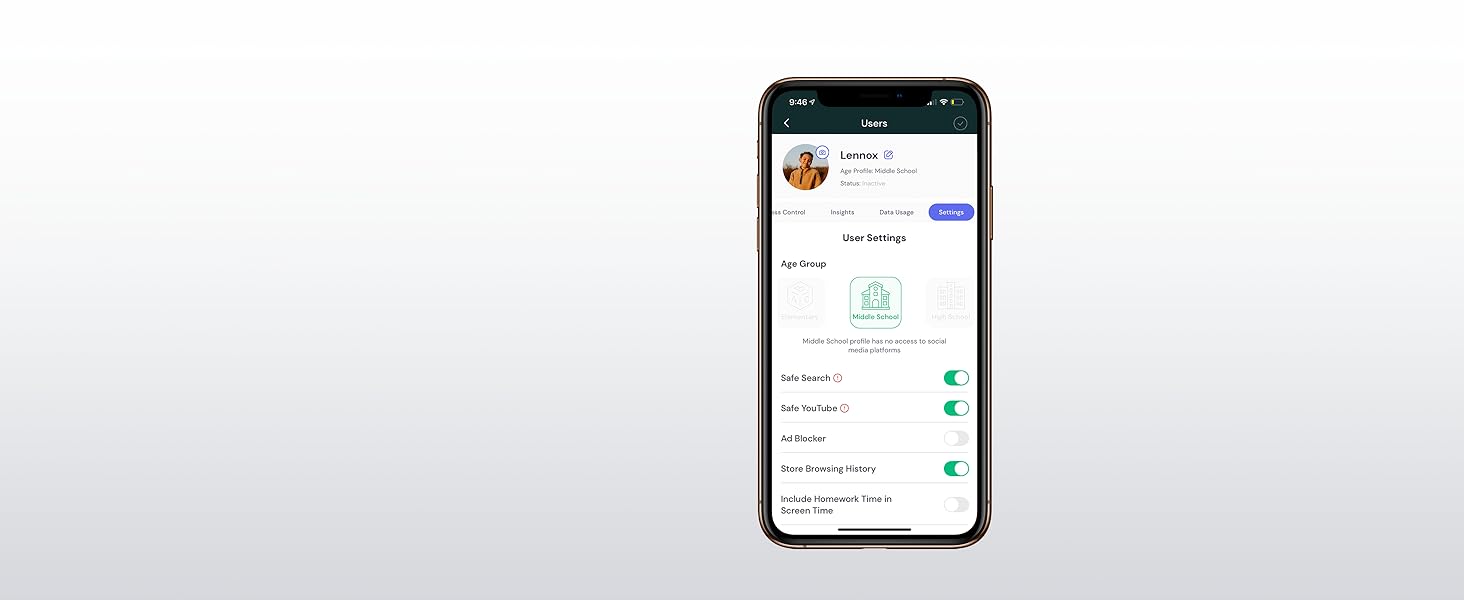
Purchased this and 3 Guardians to replace a Verizon Fies G3100 and Apple Airport-based wireless network. (Yes, I could have kept the Airport Express setup as non-mesh access points but was worried about compatibility problems, and was time to move on). Provider is Verizon Fios Gigabit. Look, I was of the "just teach your kids/let them teach themselves screen limits, it's part of being a parent". LOL. With COVID, kids home with no one and/or a sitter instead of a parent, and having a kid who considers 24 hours to be a reasonable upper limit of screen time perday" mindset, this was NOT working. Just need some basic structural rules in place besides haranguing, pleading, and threatening. Most of this review is going to be about the parental controls/app, but some basics on the setup: Some people report setup issues. I had no problem, but it took a long time by the clock (as each unit had to connect, update its firmware, etc). I saw no reason to rush this. Best way to do setup, as though there *are* videos on the web they are sometimes out of date: start with the Gryphon app. It will ask you to scan the QR code on the base unit, will then tell you what to plug in or power up and not, then proceed. Once that is up, in the app: network/add mesh repeater, and continue for each Guardian. They have switched to wired pairing--you use a cable--for the initial setup, which I think is wise, then you move the mesh repeater to its final position afterwards. Second step: identify the items (name them) and assign to a user. Sometimes you can tell the manufacturer, but often it's just a MAC address so you may spend some time staring at the labels on devices (MAC addresses almost always on a label or on an internal menu). to narrow it, you can tell how the item is connected to the network though (which repeater, or if hard-wired). Took a while to map out our 30 devices (computers, then thermostats, sprinkler, a scale (!)....) Overall network performance is quite good, nearly as good as Fios' native G3100. [Full disclaimer: my mesh repeaters are hardwired, aka "wired backhaul", which frees up some of the radio issues]. I get 250-500 MBps by Ookla speedtest when a device is connected by 5GHz, about 80-120 Mbps when connected on 2.5GHz, and 850/300 wired just now. Varies somewhat. Haven't load-tested very much, or tweaked, could probably be better. No connectivity issues *except* when I tinker with certain settings in the app--I suspect that the router interrupts service briefly when it saves settings--various cries from around the house when I do so. In terms of the app: I ditched the Verizon G3100 because of the unpleasant discovery that it only allowed one rule per device: that is, one on/off time per day. No afternoon + bedtime. Compared to that, Gryphon is absolutely wonderful. I have not seen most of the issues described by others, so I assume they have been fixed in firmware or app updates. I would praise the following: --Devices are assigned to a user, and you control user access as a group. So, if I suspend access, it ends access for all the devices at once. (More on devices that use cellular later). --Thermostats, printers, etc. have no user, so don't get accidentally suspended (though as some have noted you can give them a user group if you want extra control). --There are pre-assigned categories of filtering based on the age group that you assign to the user. For example, assigning toddler I think blocks everything, but you can approve individual websites (done by attempting them, finding them in the "blocked" list and saying "allow"). Assigning Middle School allows website monitoring but does not autoblock everything, but allows screen time restrictions (see below), app-use restrictions, and enforces google safesearch/youtube comment block, and does not allow VPNs. "Adult" lets you do everything and does not track websites. You have some control within each re. turning things on and off relative to those defaults. --Screen time: Very, very good. Not perfect, but by far the best. For each user, you can set 3 sections of time: BEDTIME (which is suspended internet), SUSPEND (which seems to be the same), and HOMEWORK which allows internet use but blocks certain categories/apps (we don't have Facebook, but could block it then; or Youtube; etc). You can set this for multiple days of the week at once, but also can vary it by day of week. So I can set BEDTIME for Sat/Sun in one step, and BEDTIME for Mon-Fri in a second step. Done. (No copy from user to user I think though). --Screen time 2: there is also a total screen time per day limit, also changeable/fixable by day. I don't know how this works, but there seems to be some sort of "rescue request" that can be sent and/or approved if the user runs out of screen time and wants to ask for more. --Simple internal safeguards: Devices are "known" by their MAC address. Savvy users will know how to spoof the MAC address and pretend to be a new device, but there is a setting to block internet access for new devices until you approve, preventing this. [You get pinged that someone has tried, so you can for example let the babysitter have access if you gave her the password but forgot to do this before you left]. Other safeguards: VPNs can get around the website filters, but there is a setting to block VPN use for a given user. --Using cellular: Another quick workaround is to use cellular to escape the router. However, there is a HomeBound app which institutes a VPN on the mobile device, which enforces the same restrictions as if you are the home network. I have tried this (iPhones only) and it works (though we will see if my kids can defeat it). Unlike what some wrote, it is *not* (at least on iOS) dependent on having the app running on the target phone, closing the app makes no difference. You need to block "deleting apps" in ScreenTime as deleting the app will reportedly defeat it. Important: texts and phone calls still work, even if the service is in the "suspended" state at home/through HomeBound. This is good--don't want to deactivate the phone. I don't know about Google Maps (maybe would function as if offline). Need to deactivate for a few days while your kid is visiting Grandma? You can turn this entire Homebound control on and off from the Gryphon app at the user level, no need to uninstall/reinstall. Nice additional options: --There is a "suspend" quick option for all users or individual users, and you can set it to suspend immediately or in 5 or 15 minutes. Dinner in 5 minute kids! I mean it! -You can turn off the screen time limits above for a given user for a day, then they will restart again normally the next day. I imagine this is: kid home sick, or it's a holiday, no need to dismantle your entire elaborate screen time program and rebuild it. No need to remember to turn it back on. --Works with OpenDNS. One thing I didn't see: Some report that users are able to ask for website such-and-such to be allowed, or to send a list of websites to be allowed, or getting some kind of splash screen saying how to ask for access. Got none of this yet--just the internet works, or it doesn't, for a given site. I'll look for this. Overall--love it. Not perfect. Much better than anything else I've tried.
R**N
Very good router with great security features
Let me first state that we've had this router for about 8 months now, and it's certainly one of the better routers that I've had. Some of its best features are its range, its security features, its user profiles, and its parental controls. I keep it in the basement laundry room, which is about the center of our split-level house, both horizontally and vertically. I've had no problem getting connections anywhere inside the house, and I do pretty well with most of the yard outside of the house. I do very much appreciate that the developers of this router have made security a first-class citizen, and it frees me from being overly concerned about such things. Few of us really have the time or the knowledge (even those of us that do IT-type work) to tackle such chores, and who wants to put up with that drudgery anyway? ok! maybe some of us! But it does give me some sense of safety, especially when I know that not everyone using the internet is super-savvy about such things. It's very convenient to be able to control the router from the phone (or tablet), but the inability to do the same from a web interface can sometimes feel limiting; especially, when you're first setting things up, and you have to spend time with virtual keyboards. The app previously allowed only one person to administer the router. Logging into the app on another mobile device would cause the initial admin device to logout. Fortunately, this has been changed so that a secondary admin can be defined. This allows my wife to take care of stuff if I'm away or busy with other things. With the hardware seeming quite capable, there are some things with the software where I'd like to see improvements. I know some of these have been recognized by the company, and some changes have been promised. I'm still waiting for many of them. Here are my gripes: * Clearing many notifications in the mobile app can be a pain. Sometimes, it would be nice to be able to see the content of the notification without having to go into the app, drill into it, and click a button to clear it. Most of these are "Malware Detected" warnings. These almost always seem to be triggered by a fetch of a blacklisted URL when my kids are playing games and visiting game sites. Most are mysterious in the sense that we don't usually find them in the list of sites (in the app) visited by the user (children only). The notification also doesn't display the URL, so it's hard to analyze anything about them -- I suspect they are probably advertising/tracking links or images that are not necessarily from the sites being directly visited. It would be nice if the notifications were handled in a smarter way (machine learning FTW!) or maybe just better categorized as incidental and either ignored or grouped for easier dismissal. * As mentioned above, the app saves a list of the sites visited by child users. Only the hostname is saved with an image of the home web page and a timestamp. That's ok, but it would be nice to be able to review all and entire URLs visited. Maybe too much info? Dunno. Some sites have a lot more places to explore, and having the option of viewing it gives power to the user. * The option to save browsing history is present for child user profiles, but for some reason the same option is not permitted to adult or guest users. I can only guess that this was done for privacy reasons, but my personal opinion is that I should be allowed to see internet usage within my household. I guess you can control this by selecting the appropriate age-group profile to use. * I *wish* that parental controls had finer-grained day/time control, and maybe even the ability to create custom-named schedules and one-off changes to them. As it is, there are two schedules: one for bedtime and one for homework. Schedules can be turned off or on for each day have have only one start time and one end time to apply to all of them. The coarse handling of scheduling makes it inconvenient when you want to use different times for the weekend or if you want to permit multiple periods during the day. My older TP-Link router had its granularity at the hour-level, and it allowed me to freely schedule many usage periods throughout the week (it's weakness was that it couldn't create independent schedules for different users like the Gryphon can). The perfect scheduler would be similar to the one that I get in modern calendaring apps where I can click on a calendar grid cell, drag it around, lengthen or shorten it to adjust the permissible "online" period and even click on the online block to customize it further. * Being able to add to the "Apps Control" list for user profiles would be a bonus. I'm not sure what it would take. The current list is ok and affords some control within the bedtime and homework schedules. There are probably other nice-to-haves that I've thought of while owning the Gryphon router. Overall, I think I'd still pick this router over many of the others, but with its age and its price still in the premium range, I'd expect less expensive similar functionality from competitors growing more common.
T**S
Great router with the best security. Lacking 24/7 support
This router is a breeze to set up. The security is probably the best I have ever seen. The issue I have is I get poor coverage just outside of my home. I live in a small brick home of 1200 sq ft. The coverage is good inside and the speed is acceptable, 260 to 441 mbps wireless. Just outside I get 18mbps on the front porch and 60mbps on the back porch. So the 3000sq ft coverage doesn't mean much to me. So when I was thinking about adding a second repeater I had trouble with the thought that you have to pay full price but get no second year subscription to the services as the security services are done through the main router. On another note, I have gone online and started chat two times and was told I was first in line. After hours of waiting I never chatted with support either time. My other request for support were answered a day later or longer. I have been called back one time be a very nice gentleman in Canada but that was at 1:00am in the morning. Fortunately I work at night. All in all I think this is as powerful as the orbi(I have owned a rbk50with major issues) with a security package that can't be matched.The app is probably the best I have ever seen and VPN is non existent even though I saw it in some of the advertising. 24/7 support is something that I have not been able to access. And it is by email only until they decide to call you. For the new kids on the block $400 is far to high for two units since you only get one year subscription to services weather you buy one or two. I will keep my Gryphon only because my Orbi had issues with devices dropping on a regular bases.While connected the Orbi gave me 225-250mbps in the same location this router delivers 18-60mbps. I feel there are better choices for people that live in older built homes that are brick wuth cast drain lines and copper piping.As of writing this review I have had a question submitted to Gryphon support through an email reply and have been waiting since 5:36pm on 02/21 with one reply that didn't answer,it was a reply from them on why my Gryphon was offline. That off subject reply was 02/25 at 8:07pm so I re submitted my question on 02/28 at 8:03am and it has been 9 hours without a response. If you want a great powerful router with questionable support then go right ahead, but if you feel like you will ne fast support then I would veer in a different direction. I am keeping mine because of the firmware issues with the Orbi. When that is resolved I will be switching back. Update as of 03\01/19 At a 25 ft distance I am now getting 11mbps upload. This thing crashes and then recovers when it wants to. Thinkin about going back to router/access point system. Update as of 06/19/19 The router is now dropping the connection to my wireless adapters every few minutes. When this happens everything in the house looses wireless internet connection. All of my devices see other ssid but not the two I have set up on the gryphon. This router has turned out to be a total waste of $200.
B**M
Use to replace/supplement your current router/wifi; be wary of refurb units
I've been using a TP-Link Deco M5 system for a couple years. Currently I have four Deco pucks throughout my home, all hardwired together (so not having to rely on wireless mesh). The Deco includes some decent parental controls and malware protection but it does not offer any enforcement of search engine SafeSearch or allow prevention of VPN connections. Wanting to add SafeSearch protection, I decided to purchase the Gryphon Guardian and experiment with it as a supplement to my existing Deco network. This allows me to continue to use the investment I already have in the four Deco pucks. I decided to save a few dollars by purchasing the certified refurbished Gryphon Guardian. It arrived quickly and looked physically fine. However, the power supply that was included was defective (output 1.9V instead of 12) so the unit refused to power on. Luckily I have a box of spare power bricks and was able to find a compatible one (12V, 1A). As I mentioned, I wanted to use Gryphon to supplement my Deco environment so I had envisioned two possible implementation scenarios. Both involved cabling the Gryphon between my master Deco and cable modem. From there I had to decide whether to keep the Deco in router mode or put it in access point mode. For ease of install, I decided to keep the Deco in router mode and see how that went. Sometimes having double routers and double NAT can cause issues with speed and some network functionality; but so far it's been fine. So, I am currently implemented by having both the Gryphon and Deco in a NAT/Router mode. From the Gryphon standpoint it only sees one client which is my master Deco. I have older kids and don't really need the ability to set parental controls on a device by device level. In my case, I'm fine with everyone getting the same parental controls and SafeSearch settings. If I needed granular ability then I would control it in the Deco or turn the Deco into AP mode so that Gryphon saw all the individual devices rather than just the master Deco. Anyhow, now on to my experience with the Gryphon itself. In general, setup was easy. All app drive like you'd come to expect with most modern home tech devices. Other than the bad power supply they sent me, I was able to get the system up and running in about 15 minutes. As mentioned, I'm using my Deco system, in router/NAT mode, behind the Gryphon. So, the Gryphon app saw one client (the Deco), and it was easy to set up parental controls and assign the client to that policy. In my testing, the Gryphon was able to block access to the sites I tested in each category. The Gryphon was also successful in enforcing SafeSearch usage on Google, Bing, and DuckDuckGo. Other search engine sites that I tried (Yahoo.com, Ask.com, Dogpile.com) were totally blocked because they couldn't enforce SafeSearch. I'm OK with that behavior in my case. As far as Wifi goes, I'm not using the Gryphon Wifi in my setup (continuing to use the Deco). But, over time, I may consider migrating to the Gryphon Wifi and buying more units for around the house. Many vendors have primary and guest wireless network options which isolate traffic for improved security. The Gryphon introduces a third which they label as an IoT network. This allows you to create a dedicated network for IoT devices (thermostats, cameras, sensors, etc). This is helpful because it keeps these IoT devices isolated from your home and guest networks which is great from a security standpoint. Also, many IoT devices require compromises on your network like disabling of fast roaming or band steering. Isolating IoT devices allows you to dumb down the network for them without affecting the rest of your devices. This alone may be enough for me to make the switch to Gryphon WiFi in my house sooner rather than later (and replace the Deco altogether). I did experiment with the HomeBound app on my iPhone a little and it seemed to work well. This app will keep a constant VPN connection back through your home network so that all policies and logging are enforced as if they were on the local home network. This is an interesting approach to this problem and a different way to tackle than I think most vendors tackle this need. At a high level, this VPN based approach, may significantly impact Internet speed performance of your mobile devices because they have to route back through your home network no matter where you are in the world. However, I can think of a number of positives to this approach as well especially if you are using tools/apps that are better served coming from the IP address of your home network or want some added security in public hotspot settings. I'm not sure if I'll continue to use the HomeBound app for my use case; especially at the additional annual expense. Pros: Easy to set up Can be used in a variety of ways to supplement or replace your existing setup. My Internet speeds do not seem to be have impacted; even in a double NAT setup. I'm getting my published internet speeds of about 350Mb down and 12Mb up. Seems to do a good job with Parental Control and SafeSearch enforcement. Hard to really tell if the security features are working well unless you go looking for trouble :) Cons: No ability to shut off wifi permanently (seems to be schedule based with 23 hours, 45 minutes seeming to be the maximum disable period.) No ability to fine turn parental control policies/categories of sites. You have to pick from 5 predefined "age groups" or select "unfiltered". You can however explicitly allow or deny certain sites within a policy. Be wary of the refurbished units on Amazon; mine came with a bad power supply. Extra fees involved with ongoing use of the enhance security feature and HomeBound apps are a downside.
J**E
What I've learned...
So I've got teenagers. The teenagers drove me to this router. Prior to I had a Linksys with no complaints, followed by a Netgear Nighthawk, which was an outstanding peice of hardware, and the Netgear certainly had some parental controls, but it was a little clunky. As a level set I'm more than willing to fiddle with any electronic to get it to work. I have loads of patience and am the IT support for the house. In truth I like it that way and nerding out with the router is not a chore to me. So I buy the Gryphon and am pretty happy with the router. This also coincided with moving to a new home. Said new home is good sized and has 2 floors. The house is roughly 4300 Sq ft. My office ends up being right next to the router and I really did not have any performance complaints. My family though... Ugh. Complaints galore, and I had written some of it off as a new internet provider when we moved. As I said I continue to fiddle and change things hoping to get a better experience for all. What was frustrating is that the router seemed to put out the signal I needed at the edges of the house and while the speeds were not as fast as next to the router they were acceptable when not being heavily taxed. I finally came to the conclusion that I should add a mesh repeater as the system worked especially up where I did most of my work, but the complaints did not subside so my work was not done. I added one repeater which was quite easy. There wasnt a lot of fussing just scan a qr code on the bottom of the repeater in the app and you're off and running. After I added one it was a bit better....but Still getting complaints. So what's a guy gonna do? I decide to just go deeper down the rabbit hole. Adding a second and... Still complaints... Then eventually a third as I had grown tired of the complaining. I also came to the conclusion after speed checking every corner of the house and swapping around positions of the routers for several days in my spare time. Let me offer this peice of info also.... Sony PS4s have TERRIBLE WIFI ANTENNAS. I could not figure out why I couldn't get their machines to pull the speeds I could when testing on my phone.... Standing right next to the dang thing and I'm getting 200mbps more download speed. After some research I figured out that the PS4 unless sitting almost on top of the router is going to struggle to pull reasonable speeds. Do yourself a favor and just run an ethernet cable if you're in that position, or reserve yourself that you're going to have to add repeaters close to the PS4. That's free advice and it took me a long time to figure that one out. So besides all that I finally came to the conclusion is that this setup does not have great wifi signal out of the box, and you have supplement with the mesh system to unlock true performance. So after all my fussing what kind of speed am I getting? Cloat to the main unit I can pull 500mbps down and 450mbps up. Those aren't typos either. The hardware is legit after it's weak antennas are overcome. In the far corners of the house and yard I can pull roughly 100 mbps down and 125 mbps up. That compares to what it was before of 20ish mbps down and 30 mbps up. It's made a big difference. Lots of whining has gone away and now everyone can do anything they want and not worry about everyone else. Everyone can Zoom at the same time, while playing video games, streaming 4k videos, and uploading selfies to social media. So all that withstanding, what about the real reason I bought it? The parental controls are slick and simple! Want the kids to do their homework? Great just kill all the wifi to only their devices all at the push of a button. Want the wifi shutoff at midnight so they don't watch TV all night? Cool. Just set it up that way for that child. Kids going to "questionable" sites. No problem BLOCKED at the push of a button. When I was having complaints about the internet I had rounded up anything extra I could think of that would suck up bandwidth (Wyze Cams, Amazon Echoes, smart switches, light bulbs etc) nd assigned them all to a group in the app as a user. So when complaints started I could add bandwidth quickly with the push of a button by just suspending internet to those items. Assign static IPs with ease. We have a printer that loves to not marry up with the computers. Set that bad boy as static and never worry about it again. Assign whatever name you like to devices. In my house we have close to 100 wifi items to be assigned. Being able to identify by name (and it makes sense to me) is a God send. I was able to catch one of the kids in a lie because someone came over and hooked into our wifi and you can set it to ask permission to join. Mine is not set that way, but when all your devices are hooked up and suddenly a new one shows up... It's pretty obvious. Want 2.4ghz and 5ghz as a choice? Sure no problem. Want to not have to think about it and let the routers do the work. No problem you can do that too. The system really provides a lot of flexibility and performance once I finally got it all dialed in. It did end up being more expensive than what I could have done with a different setup, but I would not have had such a slick interface to deal with the kids. I am now very happy. The kids have been unhappy since it came in the front door....and I don't care! Lol. I hope you can make your teens unhappy soon too.
R**S
Update after 1.5 YEARS of Gryphon ownership
We finally decided to purchase 2 Gryphons after exhausting search for a suitable solution for our home. We struggled to get WiFi throughout our 2 story home (barn style, but not an open floor). Our home was built in 1975. It was built with solid beams and walls/lumber. It is 3,000 sq. feet (1/2 downstairs and 1/2 upstairs). For years now we struggled to update/upgrade our routers to deliver our ISP's (Comcast) 150 MB/S throughout the home (and hopefully outside coverage as well). All the major brands have been tested (we have serious stack of "old" routers) and none of them could deliver what these Gryphons have accomplished so far! This is NOT a technical review, but a review from someone who understands how technology operates. What we were seeking in our next router (in the order of importance to us): 1. Customer support 2. Reasonable pricing 3. Excellent functionality 4. Decent firewall/malware protection/detection 5. Parental controls 6. Usable app without crashes/glitches 7. Intelligent bandwidth allocation between units using internet and base/repeater when moving around the house. We are able to stream movies in our home theater (Amazon Video and Netflix), while all the smart devices are connected (Nest thermostat, water/intrusion sensors, Blink video cameras (5 with base station)), utilize smart phones and personal/work laptops all at once! No drops, no latency!!! We purchased these Gryphons (2 of them) and upon receiving from Amazon, we tried to follow the directions on firmware updates for the units. The first unit updated FAST. The second one - we struggled to update it and clicked on a "button" in the app to have the support call us. Less than 5 minutes later - a call came through from California. The engineer walked us through all the steps. Would NOT get off the phone until everything was accomplished. Connecting via wire, adding repeater, updating firmware, etc... They spent about 45 minutes to complete the process. Even though it seems the action item was completed, they still shipped us another unit with firmware already updated. Upon receipt of the unit, we replaced it with Technical Support being on a phone with us. Who does that, we thought?.. Placement of the units. Due to our home being somewhat unique - we tried to place one router at one side of our second floor (where Comcast cable outlet is) and another unit downstairs in opposite corner of the house. The signal between the routers was not strong enough (confirmed while speaking to Tech Support). So, we moved the second unit back to upstairs floor, but in opposite corner of the house (and the base station). That in itself produced fast and reliable connection between the base station (gryphon #1) and repeater (gryphon #2). Now, our first floor and second floor receives FAST, RELIABLE internet connection. Including OUTSIDE of our home! We tested Skype outside of our home and it was receiving a signal about 100' away from the house. We were streaming our video feed to our family showing off our garden :) Downstairs floor - consistent 175 MB/S! That is from one corner of the house to the next! Absolutely 100% coverage. Additional important details to consider: 1. The unit(s) come with 1 year support for AI-based protection of the network including malware detection/prevention. As well as 1-year warranty. However, we had an additional option to consider to extend our "firewall" option as well as warranty by another 3 years. We added both! 2. Solid app with ability to ping tech/customer support and the call back in prompt (according to your preferences indicated on how and when you would like to be contacted). Our first attempt to contact the support was on the day of installation of the units. We indicated "now" and the phone number. The call came in less than 5 minutes with someone who was not distracted by other "cases" and was fully dedicated to resolve our issues!!! 3. Gryphon's quality of build is obvious! The packaging, stations, documentation - all at A+ rating! 4. Not sure how, but these Gryphons are able to provide 175 MB/S on our "150 MB/S plan" via Comcast. Tested and retested - consistent 175 MB/S... Very pleased that these units "juice out" all the speed they can get out of our ISP. 5. What we appreciate the most - when requesting an actual support - you deal with REAL people who actually CARE!!! 6. Parental controls are super easy to use - per device that logs into the network - settings per your preference including certain sites blocking with one click. We look forward to trouble-free experience with Gryphons in our home for years to come! The quality of the product and support warrants us to say safely - we are in good hands with Gryphon! At par (if not better) than Eero (Amazon)! If someone is looking for similar set-up to ours (very unique building with heavy lumber and thick walls) - two units should work perfectly to provide the adequate coverage. HIGHLY RECOMMEND!!! A+
M**N
Still Not There Yet For What Parents Are Needing to 100% Protect Their Children.
Here’s what it is excellent for and what it isn’t excellent for. It is: 1. Excellent as a Router. 2. Excellent in it’s signal coverage (mesh feature). 3. Excellent for ease of physically setting up the router. 4. A great security concept (stopping risks at the router level) 5. Excellent with the ease of the Parental Controls *set-up*. 6. Excellent features for giving we, as parents, the ability to control our children’s screen time, while at the same time, simplifying those controls (2 clicks on my iPhone and I can pause/turnoff my kid’s device(s) at will. Not to mention a scheduler for the days/times you will permit them to be on the devices. It is NOT excellent with its: 1. Apps blocker. 2. or its filter based upon their designed categories of (1) Toddler, (2) Elementary, (3) Middle School, (4) High School, (5) 18+ Adult, and (6) Unrestricted - Unfiltered. • On Gryphon’s smartphone app, it gives you a small, but good list of some harmful apps targeting your children that you can select to be blocked at the router level, but there are so many more out there that it doesn’t list. • But the worst thing I discovered was…that I added my son’s XBOX One X as a device in his profile, selected in his profile to “Block” access to YouTube, and it failed 100%. In the XBOX it has an option to access YouTube, and it permits it while connected thru the Gryphon Router. • Even worse, I toggled between the filter categories of (1) Toddler, (2) Elementary, (3) Middle School, (4) High School, on the Gryphon smart phone app, and then used the XBOX’s Internet Explorer browser to search for sexual terms, porn, etc. and there seemed no difference in the results in Toddler vs. Middle School vs. High School. To be fair, it did filter out explicit nudity just as well, if not better that anything else out there, but parents are looking for complete visual blocking. I will tell you, that the company that comes up with a way, to completely shield the eyes of children—a way to stop even one inappropriate picture from being seen by a child…that company will make a TON of money. I suggest that the only way to accomplish that, would be to look…not at identifying *known* bad actors thru key words and other identifying factors, but some software that knows the difference between a fully clothed person and one who is not (maybe AI will give us that (??).
M**.
Seamless, quick installation. Intelligent functionality for the whole family.
I ordered this product after reading mostly positive reviews on Amazon as well as other consumer review sites like CNET and PC Mag. Received it the next day at my doorstep and so far have been using it for only 3 days. My previous dual-band router had a bad habit of dropping phone calls and dropping the printer from the network. Plus it had only okay to poor coverage in my garage. I will update as I see fit. Unpacking was a breeze, and minimal; it was much like unpacking an Apple product--devoid of any fuss and certainly without any of those annoying tiny little styrofoam beads that stick to everything with even the most remote static charge. The instructions were minimal and straight forward, all on a single folded page. From unpacking to complete set-up was less than 5 minutes, as advertised. Just download the Gryphon App (I used Android), scan the QR code on the bottom of the unit and follow the very simple instructions. I like how Gryphon eliminated uncertainty in their app instructions. For those who appreciate asthetics, the Gryphon unit also looks elegant. Certainly more so than my existing router, which appears comparatively like some sort of broken satellite space junk that fell back to earth. Many routers being sold today do tend to look gaudy and with all sorts of alien-like antennae protruding in every direction. On functionality: From the administrator's smartphone (that is the one who set it up), every conceivable web-connected device in your home can be managed for time and content safety as to (I presume) reasonably ensure younger users have a safe and time-appropriate web experience. The handy feature here is that each device can be tailored for a specific age group as for grade school kids or high school queens; or it may be left completely unfiltered all at the touch of a button in the Gryphon app. One can also "pause the internet" for any specific device or for all devices at once for any given length of time or indefinitely (think of the annoying internet gamer in your family who refuses to be non-digitally social). On speed and signal: it seems to run smoothly in our household. I can't tell if it is faster than my previous router, though we are not a content-heavy family....3 phones, 1 TV (with Firestick), 2 computers and a wireless printer. No apparent slowdowns even at peak usage hours. Gryphon states Triband wireless signaling is superior to dual band--and it probably is--I just don't think we've crossed that threshold. Compared to my previous router, I now have strong to very strong signal throughout my entire home, even in my garage, part of which is made of concrete. My house is 2200sf; Gryphon claims coverage up to 3000sf, and my guess is that it would cover that much space rather consistently for the typical house of that size. If you're rich like most of us aren't and live in a 8500+sf home built from some trendy "renewable", but not really renewable material, you might need 3 (or 4) of these Gryphons. But I'm sure someone else would be setting them up for you as well as doing your shopping. So far with my one unit, I've no dropped calls and the printer is still connected. On customer support: So far I have had no issues that have needed consultation; however other reviewers have stated that customer support has been excellent, which have mostly led to resolution of the problem. Overall, I'm super satisfied thus far. Easy, seamless, intelligent with practical functionality for the whole family. I would say the only improvement they could have made is to have the ability to have more than one administrator, say like myself and my spouse so we could manage content and accessibility for our family together. I'm also not sure how you would switch to a new smartphone and maintain administrator status without having to reset the whole thing up again (thought it wouldn't be much of a hassle).
Trustpilot
2 maanden geleden
3 weken geleden