
DOWNLOAD DE APP


Klantenservice
Copyright © 2025 Desertcart Holdings Limited
DOWNLOAD DE APP

🚀 Double the drives, double the speed — your ultimate storage sidekick!
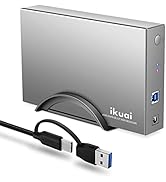
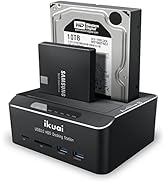
The ikuai SATA to USB 3.0 Dual Bay Hard Drive Dock is a versatile external docking station supporting two 2.5"/3.5" SATA HDDs or SSDs up to 20TB each. Featuring USB 3.0 with UASP for blazing 6Gbps transfer speeds, it includes an offline clone function for direct drive-to-drive copying without a PC. Additional perks include dual USB 3.0 ports, a Micro SD card reader, broad OS and console compatibility, and smart power-saving auto-sleep mode, making it a powerhouse for professionals needing fast, flexible, and reliable storage management.




| ASIN | B083W6YBPW |
| Best Sellers Rank | #26 in Hard Drive Docking Stations |
| Compatible Devices | Computer, Laptop, PC, Desktop, Television, Gaming Console, PS4 , PS4 Pro, PS5, Xbox 360, Xbox one, etc. |
| Customer Reviews | 4.2 4.2 out of 5 stars (830) |
| Data Transfer Rate | 6000 Megabytes Per Second |
| Date First Available | January 15, 2020 |
| Hard Disk Form Factor | 3.5 Inches |
| Item Weight | 1.41 pounds |
| Item model number | RSH-DS02 |
| Manufacturer | ikuai |
| Material | Acrylonitrile Butadiene Styrene (ABS), Aluminum |
| Max Number of Supported Devices | 2 |
| Memory Storage Capacity | 20 TB |
| Product Dimensions | 5.2 x 4.3 x 2 inches |
C**E
UASP USB 3.0 Multifunction 2x HDD with 16TB support. 2x USB 3 slots and TF SD slots
I'm NOT getting paid for this review and am referring to the model UASP DS02 Sata 3, 16TB HD support with TF/SD slots, 2x USB 3 slots and 2x 2.5inch/3.5 inch slots. Ordered on 10/2020. DO NOT BUY refurbished or used older models. Get the latest new version to BE on the SAFE side! I have several older clone/sata external drive enclosures that have served me well for years. I needed something to do more, be muich faster and after thorough research, I took a chance on this one. NO REGRETS!!! This unit does everything I need to do. YES - You can use two hard drives at the same time and they will each have their own drive assigned letter. You can transfer ANY files from the computer to any of the two drives with ease. The 2.5 inch drive slips right into the slot easily and it has a spring loaded cover for the larger 3.5 inch drives. It makes the unit look really nice and helps keep the dust out. The POWER supply is 3 Amps and I'm using it to handle 1 USB 3 memory stick with 2 Sata 3.5 inch drives and a TF card at the same time!!! You can also easily transfer ANY files from the two hard drives to the USB stick and vice versa with one click. However, YOU CAN'T transfer a file to the TF\SD card unless you take out the USB stick. Once the USB stick is removed, you then have full access to the TF\SD card. This puppy is very fast, however, a few times a file seems to transfer slow. Hard drive to hard drive all files are super fast, but on very few rare occasions a hard drive to USB 3 transfer seems to slow down. I copy most movies which are 2 GB a piece and its super fast, just know that making multiple copies onto ANY USB drive will be severely slow down big time due to its design. Any multiple copies on a USB stick whatever the version will all come to a crawl. If you simply copy one file at a time, it will be like warp speed. I am using this to backup my movies and games onto a 4TB 3.5 inch drive and to USB 3 memory stick and again, its lightning fast. The TF/SD card slots are just a bonus and like icing on the cake makes this an ultimate unit. The power supply has 3 amps and more than enough juice to run everything. I have not tested "OLDER" drives that may require more power but in that case, use a heavier amperage power supply. It also comes with a beefy thick USB 3.0 cord that seems to be 3 foot long that attaches to your computer. It comes with a nice manual, small footprint but still readable and very informative with colored diagrams and troubleshooting. 1 Year warranty. I had two 4TB hard drives and a USB stick powered up for many hours and the hard drives are lightly warm. They never get hot and this unit has enough clearance to keep those drives cool. It says that everything is "HOT SWAPPABLE." Thats true and it is but honestly that is a FOOLS way of working with this. BE SMART - DO IT RIGHT - ALWAYS use the dismount the drives FIRST, then shut the unit off with the easy click on/off button on the back TO SAVE PROPERLY and not have ANY chances of corrupting your files or DAMAGINGING
B**E
Easy set up
No complaints at all. Works as intended and the transfer rate seems good.
I**A
SUPER VERSITILE! GREAT FOR COMPUTER REPAIR, VIDEO EDITING & MORE!
I needed a docking station to utilize my spare hard drives and came across this device. I tested to see if I could edit 4k footage, and to my surprise, I could without lag! I installed games on the docked drives and could play them without issue. I had to repair a drive as well and could without needing to install the drive directly into my main system (used laptop). The device made repairing computers with my laptop a breeze! Since I also create content, it has improved my workflow significantly, recovering footage from SD Cards quickly and transferring them to my bulk storage drives to edit off. Pros: - Dock standard desktop 2.5”/3.5” drives - Can clone drives with a push of a button. No computer is required! - File transfer up to 6 GBs - Support for up to 20TB drives - Sleep Feature to reduce drive wear & save power! Cons: - Requires external power - Can’t use USB ports and SD Card/TF Card simultaneously - LED Indicator is a little dim Overall, the device is worth the price and is very versatile! It saves me time & effort, making repair jobs & video editing a much more enjoyable experience!
T**D
Failed after two months....UPDATE: Replacement Has Worked Fine
The dock worked ok at first, but after a month or so I started getting a "There is a problem with this drive" message on windows 10, along with a suggestion to scan the drive for errors. This got more frequent as time went by, and I finally did a chk dsk on both drives. After completion, the drives were not even showing up in device manager or disk management > I had to use a 3rd party program to reformat them & lost all the data. About 500 GB worth of stuff. I thought that maybe it might have been a glitch in windows, or possibly 2 bad drives, but I just had it happen again with this same dock, with 2 almost new drives. I have 2 other dual-bay docks, and I've never had any problems with either of them. I tried all 4 of the failed drives in them, and all 4 worked fine and I copied multiple GB of data to them with no problems or errors. I would recommend staying away from this dock. I'm probably going to go back to Thermaltake. I've never had a problem with their external docks. Guess it's what I get for trying something different lol EDIT 7/30/22 - I received a replacement dock a few days after this review, and it has worked flawlessly so far. Seller was very helpful. Changed the review to 4 stars and will make it 5 if the dock continues to function properly for a few more months or so.
E**.
Frequently disconnects from Mac Studio
I wanted to love it. Small size, can connect two 2.5 SSDs or 3.5 HDs, plus a USB hub and SD card reader. Unfortunately, it has disconnected on its own from my Mac Studio M4 Max several times, both when actively transfering files and while idle. It immediately reconnects but I get the message disk not ejected properly and the file transfer fails. Strangely, another separate external SSD on another one of my Mac's ports disconnects too when this occurs, and one time that storage volume got corrupted and had to be reformatted. I don't know what the problem is, but I didn't have any such issues until I connected this product, so I'll have to return and try another product.
D**A
Data storage device
Shipped fast and operates as it is supposed to. Great addition to my setup, saved me a lot of time while transferring large files. Great product, even though it was used it's still in new condition.
F**N
funciona muito bem . atendeu as expectativas com equipamentos Mac OS 2024
A**N
Drives, once connected, are responsive and stable. The only issue is when you either remove or reseat a drive while a second drive is already seated. It is almost impossible to not nudge the second drive and disconnect it. I plan to buy a second one if I cannot find a reliable 4-or-5 drive bay, at a fair price.
O**G
Fast, compact, does what it should. I've had it for years and am completely satisfied. I use it with Linux, btw, so it plays well with that.
I**G
Quality was good.
K**Y
ممتازة وسهلة الإستخدام
Trustpilot
1 maand geleden
2 maanden geleden