Some deliveries may take a little longer than usual due to regional shipping conditions.

DOWNLOAD DE APP


Klantenservice
Copyright © 2025 Desertcart Holdings Limited
DOWNLOAD DE APP

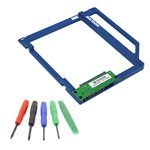

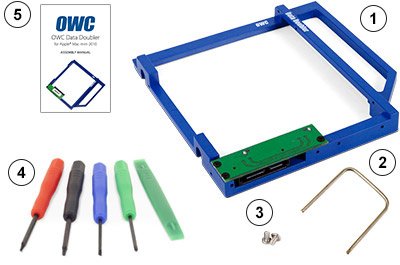
💡 Upgrade your Mac Mini’s storage game—because one drive is never enough!
The OWC Data Doubler Kit for 2010 Mac Mini is a precision-engineered adapter and toolset that enables users to add a second hard drive or SSD, significantly expanding storage capacity and boosting performance. Lightweight and compact, this kit is designed specifically for Mac Mini 2010 models, providing a seamless, DIY upgrade solution.


| Hard Drive | Solid State Drive |
| Brand | OWC |
| Series | FBA_OWCDDMM10CL0GB |
| Item model number | FBA_OWCDDMM10CL0GB |
| Hardware Platform | Mac |
| Item Weight | 2.22 ounces |
| Product Dimensions | 5 x 4.06 x 0.47 inches |
| Item Dimensions LxWxH | 5 x 4.06 x 0.47 inches |
| Manufacturer | OWC |
| ASIN | B00IEKMXDU |
| Is Discontinued By Manufacturer | No |
| Date First Available | February 12, 2014 |
W**L
This worked well to install the SSD in my iMac. Note that you will lose the use of your CDRom Drive, but fantastic speed boost.
This worked just as it should in my 2010 27" iMac. I've taken my iMac apart to clean out dust and replace one of the fans that started to fail. If you aren't good with working with your hands in tight areas you will want some help. The included screwdrivers would have been helpful if I didn't already have a set.
D**E
Great complete kit, BEST. INSTRUCTIONS. EVER!
This DIY kit included all the tools and gadgets needed to install it. If that didn't set it apart, the instructions do.The 22 page full size instructions included color photos, well written English, and was easy to follow. I was absolutely amazed given most DIY kits today have a microscopic piece if paper that's unreadable and unintelligible.Thanks OWC - it's 2017 and my 2010 mini is going strong. Please continue to find niches like this despite Apple's attempts to close the door.
S**N
It works!
It does what is advertised. Not much to say. The hard part is the install in the Mac Mini if you don’t have experience taking those apart. Other than that this is exactly what you need if you want to put another SSD or hard drive in your optical drive bay.I generally dislike OWC stuff because it tends to be poorly made and over promises and under delivers. However, this great.
E**E
For Mac mini 2010
This product is designed perfectly with the clearest instructions imaginable. It comes with all the tools you'll need and then some and the manual has clear pictures. There's no installing this wrong lol. I used this to install a Samsung SSD as a boot drive.
D**S
Everything was great just be careful when removing the sensor connectors on ...
Everything was great just be careful when removing the sensor connectors on the motherboard. I broke one and subsequently the fan ran at a fast and noisy rate. Luckily some kind person created Mac Fan Control . After installing the App I was able to control that noisy fan. No harm no foul!!
I**A
It works fine without problems and it does its job
I had one of those for a 2009 Macbook Pro and I bought for my 2010 Mac Mini. It works fine without problems and it does its job. It comes with all the tools you need, thats great.
A**R
250 GB/s read. 215 GB/s write.
It works fine. I only get 250 GB/s read and 215 GB/s write The optical drive sata connector only allows 1.5 Gbps. The other HDD slot allows 3.0 Gbps, so you might want to just put an ssd there and boot Mac OS X from a thumb drive. I put an 850 EVO in 250 GB. So it works half as good as I thought it would. Here is a good video on YouTube from OWC on how to install https://www.youtube.com/watch?v=UfGO8nl84Ok . It takes about 2 hours plus another hour to transfer and boot and stuff.Another thing is the optical drive sata connector hardly reaches its connector spot with the data doubler installed so don't tape the sata cable down on the ssd and data doubler.
A**R
Five Stars
Excellent step by step instructions. And everything you need is in the box.
Trustpilot
3 weken geleden
4 dagen geleden