We remain fully operational. Our teams are working around the clock to ensure your deliveries continue safely.

DOWNLOAD DE APP


Klantenservice
Copyright © 2025 Desertcart Holdings Limited
DOWNLOAD DE APP


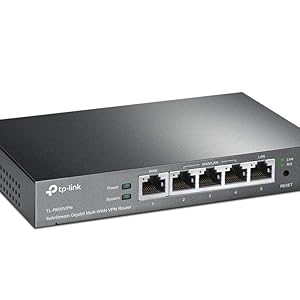
🔐 Secure your network fortress with lightning-fast, multi-WAN power!
The TP-Link Safestream TL-R600VPN is a high-performance multi-WAN VPN router featuring 5 Gigabit Ethernet ports (1 fixed WAN, 1 fixed LAN, 3 configurable WAN/LAN), supporting up to 20 IPsec VPN tunnels simultaneously. It integrates advanced security protocols including SPI firewall, DoS defense, and IP/MAC filtering, alongside professional-grade 4KV lightning protection. Designed for small offices and SOHO environments, it delivers reliable, high-speed wired connectivity with easy setup and robust VPN capabilities, ensuring secure remote access and uninterrupted internet performance.
| ASIN | B007B60SCG |
| Batteries | 1 Lithium Ion batteries required. |
| Best Sellers Rank | #37,154 in Computers & Accessories ( See Top 100 in Computers & Accessories ) #1,026 in Computer Routers |
| Computer Memory Type | DDR3 SDRAM |
| Customer Reviews | 4.3 4.3 out of 5 stars (1,785) |
| Data Transfer Rate | 1000 Megabits Per Second |
| Date First Available | February 20, 2012 |
| Flash Memory Size | 16 |
| Global Trade Identification Number | 00112039993281, 00803983008281, 06935364041250 |
| Interface Type | 1 Fixed Gigabit WAN Port1 Fixed Gigabit LAN Port3 Changeable Gigabit WAN/LAN Ports |
| Is Discontinued By Manufacturer | No |
| Item Dimensions LxWxH | 4 x 6.2 x 1 inches |
| Item Weight | 1.21 pounds |
| Item model number | TL-R600VPN |
| Manufacturer | TP-Link |
| Number of Processors | 1 |
| Operating System | Microsoft Windows 8, 7,Vista, XP or MAC OS, NetWare, UNIX or Linux |
| Product Dimensions | 6.2"L x 4"W x 1"H |
| RAM | 64 GB |
| Series | TL-R600VPN |
| Standing screen display size | 8.2 Inches |
| UPC | 778890698408 809186281292 112039993281 803983008281 845973041175 |
| Voltage | 9 Kilovolts |
| Wireless Type | 802.11n |
A**N
Best router for multi-wan SOHO and home use!
Ok the journey to replace my old tp-link 470+ router took almost a month of research and testing. Here is what I found out and I really hope this helps someone save a bit of time. I was a network administrator over 20 years ago. I do not consider myself an expert by a long shot. I have two 4 Mbps DSL lines entering the house (I am not close to any city). I have an email server, file server and our house is extremely automated. There are only 2 of us in the home but myself and my wife are avid gamers. We stream most of our tv/movie content. Our workout room is all connected with video instructors. I have both mac laptops and tablets, windows gaming laptops, VOIP, Xbox and Linux boxes all running off this network. Daily I am downloading 20-100gig games in the background. I also have a mesh wifi covering the 3 floors of the house and the grounds outside of the home. This gives you and idea of what my challenges are. I want to get use of the full 8 Mbps bandwidth for downloads then scale back so we can watch a movie or play a game or listen to music throughout the home all while the game keeps downloading but at a slower speed. When we are not using the network I would like it to speed back up and use the full 8 Mbps again. I tested an Ubiquiti edgerouter 4, TP-Link TL-R600VPN V4, pfsense on an old water-cooled 3ghz gaming computer and on a protectli vault 4 port quad core. Here is what I experienced. First test was the tp-link. It was running in about 20 minutes from when I took it out of the box with the email server port forwarded. I was able to access my email server outside the house and inside even with pointing our phones to the no-ip dynamic DNS address (kind of like a loopback or NAT reflection). It simply worked. But monitoring is near non-existent so I would need a secondary network monitor and SMS connect which it supports but I figured I would test some other routers. It was so simple to setup including QOS that I kept coming back to use this router as the gold standard setup. Second, I spent a little over a week with the edgerouter 4. It gets great reviews, and the network monitoring was the best of the bunch for me with PfSense a close second and tp-link at near non-existent monitoring/graphing traffic. I always knew what was going on and what the edgerouter was doing with its excellent dashboard. After a few days and many hundreds of pages of reading on forums and chatting with folks as the edgerouter has a very helpful community I got it up and running with both wans and the email server. But gaming was not great. Buffer lag and bloat and constant disconnects were simply just unacceptable and after a week I threw in the towel. Interesting the first-person shooters were not the only issue but Guildwars 2 would just drop either myself or my wife mid adventure 3-4 times in an hour and at other times we could go a complete hour before one of use was dropped. This never happened with the tp-link 470T+ in 4 years, the PfSense or the TP-Link TL-R600VPN. It was only the edgerouter. I had to box up the edgerouter and stop all further work with it. The last router(s) I tested was pfSense with both an old 3ghz gaming box and a protectli 4 port fanless box. I will say the PfSense was the my favorite of all interface and the things that the software can do is incredible. It look less than an hour to download and get the box up and running on my old pc. I purchased a dual port intel nic from amazon and with the nic already on the motherboard I was able to connect 2 dls lines and the local ethernet line. PfSense was completely free! Just the cost of the hardware you will need to run it. After tweaking it for a week I got the load balancing working and the QOS dialed in, performing better than the TP-link TL-R600VPN. I was able to get the most bandwidth with pfSense but I never was able to get my mail server working quite right. I thought the issue was my old gaming computer and I purchased a protectli fanless box – the quality is top notch and installing PfSense took just a few minutes. I can’t say enough about the little box and its capabilities. I think it only used 20W total, so it was not a huge power consumer as the gaming rig/router was. But without getting PfSense working I had to abandon the box. As I recall I spent $350 on the box so it became the most expensive router of the 4 tested. Conclusion – I ended up going back to the TP-Link TL-R600VPN. Why? Well it was the lowest power used, it had 5 lan ports, QOS and load balancing. Its port forwarding and virtual servers work great but most of all everything work right out of the box. I mean everything. Dynamic DNS was a breeze to setup. I am serious when I say it was less than 20 min to get the whole router up and running. I realize I could have spent another couple of days or weeks getting the other routers to work but I finally decided why? This is a home network, I have learned all I wanted to at this point and I had a router that simply worked out of the box for a multi WAN install. Is it perfect – no. Can I monitor the network from its own interface – no! I don’t work for any of these folks and I am not in the tech industry. I am a purchasing manager so trust me there will be many who can do better at setting these up but this is my experience and like many others with a reasonable non-professional understanding of networking this review is intended for you.
B**4
Great Site to Site VPN Router with easy setup!
I just received this router, and I have to say I am quite impressed. In the past, I've been using two Cisco/Linksys WRVS4400N Routers to connect two sites together via VPN secure tunnel. The old Cisco Routers always give me issues, and always require a power cycle to work. Most times, the status would show the tunnel connected, but I've been unable to ping a LAN IP address from site 1 to site 2. I was pretty confident that my Cisco at Site 1 was the culprit, but I decided two order two of these just to be safe. When these items arrived, I was impressed with the build quality. Nothing fancy, just a nice solid piece of equipment. They don't have wifi, but since I am covering a large area, I had already installed a separate Wireless Access Point, a Ubiquiti Networks UniFi UAP-PRO Enterprise WiFi System (which is awesome by the way). I set up the first router at site #1. Initial setup was incredibly easy to get me online. I have Comcast 50MPS and my speedtest clocked at 62MBPS. Wish I had higher speed to test the capability, but Comcast is due to double the speed in my area, so I'll update once that happens. Since site #2 is a 30 minute drive away, I knew I wouldn't be able to get the new TP-Link TL-R600VPN installed at site #2 just yet. That said, just for fun I decided to attempt a IPSEC (site to site) VPN connection between the new TP-Link and my older, less reliable Cisco WRVS4400N at site #2. To my delight, first try, the two connected without any issues. They are working great! Indeed, my suspicion that the Site #1 Cisco router was faulty was accurate, but what surprised me is that TP-Link and Cisco routers are communicating and interacting without any issues. I can ping local IP addresses across both networks at site #1 and Site #2. This may be common knowledge to many advanced network folks, but was it was a pleasant surprise to me. I still plan to update the router at site #2 to the new TP-Link so all my hardware is current, but at least I am back up and running. As a side note, I placed my order on 11/29/2014 for quantity of 2. Both Items were Hardware Version 2, and both came with the most recent firmware (August 2014). In addition, the serial numbers were within a couple digits of each other which leads me to believe they were manufactured at the same time, post August 2014. Not a big deal to some, but I like knowing I have the most recent hardware possible and saved me having to update to the most recent firmware. There are not a lot of other bells and whistles, but if you are looking for a simple solution to securely connect multiple sites at a reasonable price and you already have another wireless solution in place, this seems like a great choice.
E**N
Everything as described. Thank you.
Y**B
BuffaloのBHR-4GRV2からの置き換えで、もう少し上の性能のものが必要だけれど、YAMAHAのような高価なものは避けたいという状況で購入しました(以前ならNetGenesisあたりを選んでいたかも知れません)。 特に問題もなく、特にVPN開始時の動作がスムースなのが気に入りました。PPTPを使用する場合でも、Windows10側の追加設定は不要でした。 NetFlixサイトでの簡易テストになりますが、通常接続で90Mbps程度の回線で、PPTPでは40Mbps程度、L2TPでは10Mbps程度の速度でした。 ほとんど発熱しないのも優秀だと思います(ACアダプタの出力が9V0.6Aなので、5W程度しか使用しない製品ということになります)。 なお、同じ「TL-R600VPN」という型番でもバージョンの違いがあり、初期のV1は背面にWAN/LAN端子があったのが、最新のV4は前面に来ていて(つまり外観写真も全く違う)、設定画面の内容や機能なども大きく異なります。 今回2019年5月にamazonから購入し、レビューした製品はV4のほうになります。
O**A
O produto atende bem ao seu propósito. VPN em pequenas empresas
B**Y
Initial delivery Pack came with missing Router but charger,Ethernet cable and manuals inside the box. Box looks very old / used one and torn.There is no seal on the Box. Got replacement which is Brand New with seal and all accessories and router inside box. Installed router as per initial instructions, provided user name and password as per initial Login instructions. This Router TPLink TL-R600VPN having 1 default 1000Mbps WAN & 1 default LAN port with 1000Mbps and 3 WAN/LAN ports which are 100mbps not 1000mbps as they mentioned. Pros:- Brought this router only to use as LINK BACKUP and LOAD BALANCING not for Firewall or VPN. This router having some default firewalls set which are working satisfactorily. I have 3 BB connections AIRTEL, BSNL and ACT. Converted 2 of WAN/LAN Ports as WAN ports and created Link Backup policy working perfectly Primary to Backup and then Backup to Primary without issues. Note:- Before connecting your BB modem cables to this router read review of user "Nightfury2050" in amazon to set different IP address to BB Modems. "Many Many thanks to user "Nightfury2050" for this update". ******Review after using more than 2 months*** All ports are 1000mbps and product Working flawlessly. Link backup or Load balance working without issues. to get 1000mbps on ports , check your your PON or the ISP provided device supports 1000mbps. in my setup BSNL PON "Alphion AONT-100c" supports only and 100mbps. checked with other ISP PON with cat 6/cat5e I am able to get 1000mbps on all ports. Thanks to TP-link Support and the competitive price for this genius.
L**A
Installato da un paio di mesi nella mia rete con una ventina di dispositivi collegati, mai un ravvio o rallentamento, completa configurazione della rete. Testata anche funzionalità di VPN senza nessun problema.
Trustpilot
1 maand geleden
1 dag geleden