We remain fully operational. Our teams are working around the clock to ensure your deliveries continue safely.

DOWNLOAD DE APP


Klantenservice
Copyright © 2025 Desertcart Holdings Limited
DOWNLOAD DE APP
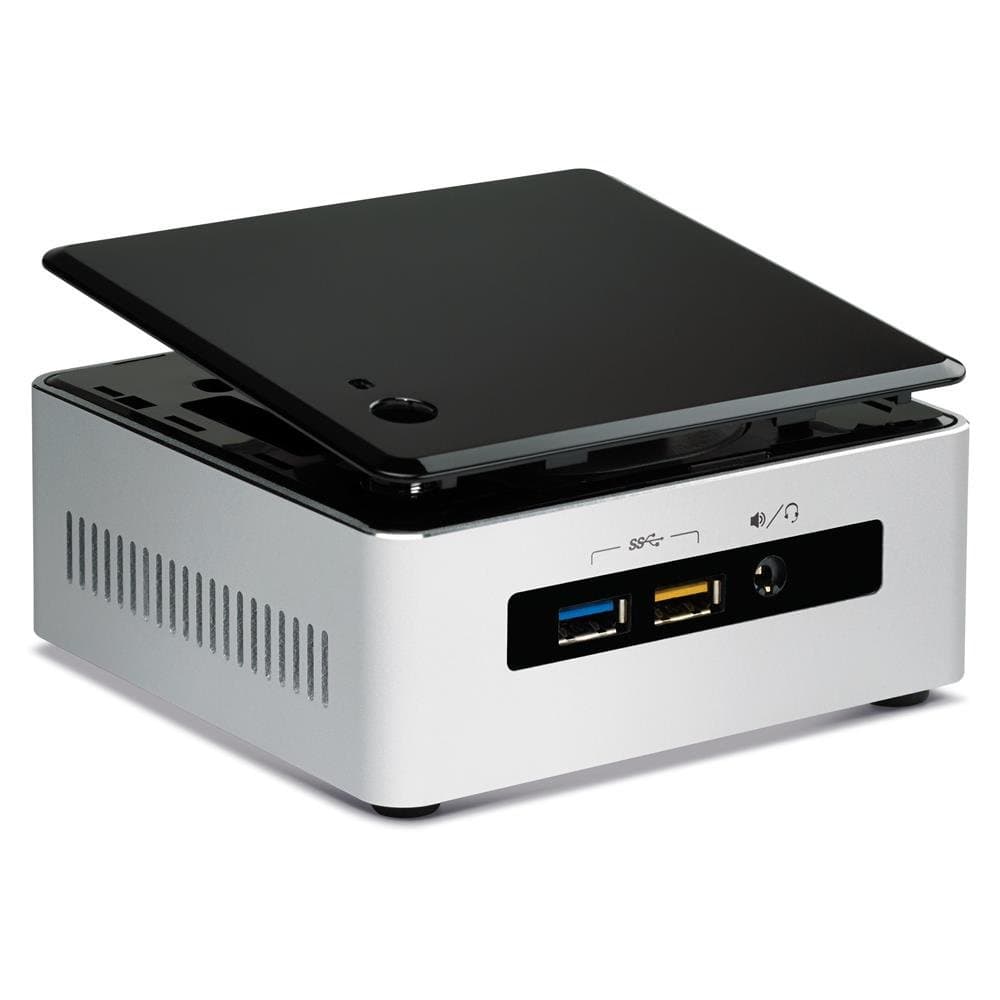
🚀 Tiny Titan: Power, style, and 4K brilliance in the palm of your hand!
The Intel NUC5i5RYH mini PC combines a 5th gen Intel Core i5 processor with integrated Intel HD Graphics 6000 to deliver smooth 4K UHD video playback and efficient multitasking. Its compact 4-inch form factor includes a 2.5-inch drive bay for SSD or HDD expansion, supports up to 16GB DDR3 RAM, and offers versatile connectivity with six USB 3.0 ports and Wi-Fi. Designed for professionals craving desktop-grade power in a sleek, customizable package, it’s ideal for home theaters, office setups, and on-the-go productivity.
| ASIN | B00SD9IS1S |
| Aspect Ratio | Unknown |
| Best Sellers Rank | #169 in Desktop Barebones |
| Brand | Intel |
| Built-In Media | computer, laptops, minis |
| CPU Model Number | Core i5-5250U |
| Cache Memory Installed Size | 16 GB |
| Color | Black |
| Connectivity Technology | Wireless |
| Customer Reviews | 4.3 4.3 out of 5 stars (272) |
| Display Resolution Maximum | 3840x2160 |
| Display Type | LCD |
| Global Trade Identification Number | 05032037066266, 06953041344265 |
| Graphics Card Interface | Integrated |
| Graphics Coprocessor | Intel HD Graphics 6000 |
| Graphics Description | Integrated |
| Hard Disk Description | SSD |
| Hard Disk Interface | Serial ATA |
| Hardware Interface | USB 3.0 |
| Human-Interface Input | Microphone |
| Item Dimensions | 5.4 x 3.94 x 4.92 inches |
| Item Type Name | Intel Corp BOXNUC5I5RYH NUC Kit NUC5i5RYH |
| Item Weight | 14.4 ounces |
| Keyboard Layout | QWERTY |
| Manufacturer | Intel |
| Memory Speed | 1600 MHz |
| Model Name | BOXNUC5I5RYH |
| Model Number | BOXNUC5i5RYH |
| Model Year | 2015 |
| Native Resolution | 3840 x 2160 |
| Number of Component Outputs | 1 |
| Operating System | Windows 8.1 Pro |
| Personal Computer Design Type | Mini PC |
| Processor Brand | Intel |
| Processor Count | 2 |
| Processor Series | Core i5 |
| Processor Speed | 2.5 GHz |
| RAM Memory Installed | 2 GB |
| RAM Memory Technology | DDR3 1600 |
| RAM Type | DDR3 SDRAM |
| Ram Memory Maximum Size | 16 GB |
| Resolution | 3840 x 2160 |
| Screen Size | 2.5 Inches |
| Specific Uses For Product | Everyday Use |
| Specification Met | Energy Star Certified |
| Style Name | Tall (Space for 2.5” SATA HDD or SSD) |
| Total Number of HDMI Ports | 1 |
| Total Usb Ports | 6 |
| UPC | 712641415500 640265333552 809395430726 675901295680 735858286275 |
| Video Output | HDMI |
| Video Output Interface | HDMI |
| Video Processor | Intel |
| Wireless Compability | 802.11g/n |
| Wireless Network Technology | Wi-Fi |
| Wireless Technology | Wi-Fi |
T**Y
Great HTPC with Windows Media Center
First off: I recommend buying a 7th-gen (Kaby Lake) or later NUC unless you want to run Windows 8.1 or earlier (most likely for Media Center DVR). Kaby Lake NUCs (e.g. NUC7i5BNK or BNK) have better graphics, can output 4K at 60 Hz, and (in the case of the 7i5 but not the 7i3) come with Thunderbolt ports, which can be used for a variety of peripherals (from high-res monitors to external GPUs). Second: If you buy a tall model (which usually ends in H) to add a HDD for data, make sure the HDD is 7mm tall or less. Some 2.5" HDDs (such as the 3TB or 4TB models) are 15mm tall and therefore won't fit in this machine. Now: I decided to buy a NUC for my home theater PC (HTPC) and settled on this unit due to its price (on sale at the time) and its compatibility with Windows 7, 8 and 8.1, which still run Media Center. (I previously bought a Kaby Lake model, but only Windows 10 is supported on it.) I've had it running 24x7 for several weeks with 8 GB of RAM, a 250 GB SSD, a 2 TB HDD (2.5", 7mm height), and a USB-attached tuner box installed, and its performance has been excellent. The IR feature is particularly cool; it works with RC6 remotes without any configuration whatsoever (although I've read that you can install programs that will let you remap keys). The biggest downsides of this unit are: - Mini-HDMI port is only HDMI 1.4 -- that means 4K at 30 Hz, not 60 Hz, which is fine for video but kind of unbearable for navigating Windows or an Internet browser. (You can purchase an adapter for less than $30 to convert the DisplayPort to HDMI 2.0, but see my second bullet.) - While the mini DisplayPort can supply 4K/60 and (active) adapters are available to convert that to an HDMI 2.0 port, it doesn't appear to work with the DRM that Windows Media Center employs (PlayReady), preventing CableCard-based tuners from working. I'm not sure whether this is a limitation of DisplayPort or the adapter. (My TV doesn't have a DisplayPort, so I can't test that.) - Occasionally the display will turn to snow -- like a bad analog channel, except more digital -- while we're watching a recorded show. I don't know whether this is an issue with my TV or the NUC (possibly a video driver issue), but I never saw this with my previous HTPC and this TV. I haven't tried a different mini-HDMI to HDMI cable or tried different display drivers, but those would be the next things to check. It's very infrequent (less than once per day) and I fix it by changing the HDMI input on the TV to a different one and changing it back, so I live with it. That's it, though. Everything else about the box is great. If you want to do more than what a TV stick or set-top box provides (like run a DVR or Plex server or play games with relatively low graphics intensity), then I highly recommend this NUC.
T**Y
Amazing tiny powerful computer, install whatever operating system you want, quiet, compact
This little computer is amazing! I installed 16 gb 1600 RAM and installed a 250 gb PCIe M.2 card to use as the hard drive. With ubuntu, the computer boots in 1 sec and is much faster than even the big memory boxes that I use at the office. Fantastic performance. But my wife wanted Windows 7, so now it still boots reasonably quickly but is burdened by the overhead and other BS that plagues all Windows computers. Using a SSD instead of a spinning HD for the operating system is a good choice, and you still have room to install a 2.5-inch drive for data storage. Maybe the best thing about a bare bones computer like this is you install whatever operating system you want and are not burdened with the useless bloatware that comes on HPs or the trashy computers you buy at a big box store. Anyway, 2 months of use and all is well. Note: some people have commented on the fan. On our unit, it is barely audible. The audio output is very good quality. Highly recommended. This is an efficient way to replace the standard refrigerator-size floor-standing computer with its big power supply, cooling propellers, and wasted interior space. Change rooms or go on a trip: unplug your NUC and take it with you.
D**N
Great long life product
Adding a review after 7 years of usage. I bought it to run some servers on Ubuntu, and it delivered over the years! Even today, it still runs smooth and nice. Only problem that I had was the charger after about 3 years, which somehow, was replaced under the warranty. A very stable machine, that runs 24/7 in the last 7 years, with almost no issues. Noise wise, you hear it a bit, so I recommend that you don't install it in the room where you need complete silence, like your bedroom. In my case, it is installed in a cabinet in the kitchen, and it never bothers me. Highly recommend!
H**G
The future is here
This is probably the best mini PC on the market right now. * What's good: - Price is competitive. - i5 5th generation computer that can rest on your palm. Running 24/7 with minimal of heat issue, low power usage, great performance. - Good display adapter with HDMI video AND audio out; Displayport output is also supported. - 802.11ac Wifi built-in, gigabit Ethernet port. - 4 USB 3.0 ports. - Room for 2 DDR3L memory up to 16Gb. If you buy one bar 8Gb, install it in the lower slot. Room for 2.5" hard drive. I put Samsung SSD EVO 850 and it is perfectly fit in. - Latest drivers are up to date on Intel's web site, supporting latest Windows 10. * What I don't like: - Mini HDMI instead of regular HDMI. I have to buy an adapter just to convert it back to regular (standard) HDMI. Most people are having existing standard HDMI cable at home. - DDR3L memory only. It would be great if it also supports DDR3 which will save laptop-convert buyers some $, but this is acceptable for the benefits of its size and performance. - This is what I hate: Product description should be clearer: (maybe just Amazon.com) + Model ended with RYK and RYH. Most people will overlook the differences. If RYH clearly states supporting 2.5" HDD, RYK should be states ONLY mSATA is supported to avoid wrong order. Most people who need 2.5" HDD support may just look at the price and slimmer profile of RYK and placing a wrong order because of that. + Product title should clearly state the generation of its processor so buyers won't place a wrong order of previous generation by just looking at the price and processor type (i3, i5, i7...) + Intel (or Amazon.com) delicates a whole big section of "From the manufacturer" to introduce stuffs that I think most potential buyers of NUC will just not interested at all. Where is the detail technical specification section? The spec will save buyers from unnecessary hassles. Take my case, I ordered the NUC and later on found that it only supports DDR3L, Amazon Prime Now was helpful and saved my day to put DDR3L memory order in. All items were arrived as plan within hours and I thought it should be all set. When I opened the box at night, I found that it's a mini HDMI, not standard HDMI port. Stores are all closed at the time. It sucks throwing the toy back to the box and have to wait for a darn HDMI adapter purchase tomorrow, it just ruins all the fun.
J**R
Desde que lo compré hasta que le puse los componentes y lo hice funcionar ha pasado mucho tiempo y vamos, el "ordenador" (lo pongo entre comillas porque ya no parece un ordenador) va como un tiro. Digo que no parece un ordenador porque es ínfimo, Si organizas bien los cables no ocupa espacio apenas y encima no hace prácticamente nada de ruido. Me compré dos SSDs (uno para el de 2,5'' y otro para el hueco m.2) y un blister de 8Gb de RAM y me sobra para jugar, editar/ver documentos (Word,Excel,PDF,PPT... que por cierto los abre a una velocidad de vértigo) y como HTPC (Home Theater Personal Computer). Que más decir... le he puesto Windows 10 y va de lujo. Eso y un teclado/ratón (véase el Logitech K400) inhalámbrico y ya tienes un ordenador perfectamente funcional para casi todo (menos para renderizar vídeo, maquetar y diseñar gráficos 3D que ya pide mucha caña).
K**D
Great Value. No clutter. Responsive and quiet.
C**R
Windows7 + SHDD + メモリ8G にて使用中、主な用途はウェブ閲覧。(一ヶ月使用) それまで、ほぼ同じ環境で、DN2820FYKH を使っていて、主に作動が遅い(ブラウザでの縦スクロール時の表示や地図の表示が遅い / USB経由でメモリやプリンタ接続したときにすごく待たされる場合がある)などが不満で、こちらにアップグレードしました。NUCはケースが小さいこと、HDMI/電源のケーブルがスマートなことが気に入っていたので、迷わずまたNUCを購入。 # DN2820FYKHと比較して利点 1)作動が速い(CPUの差やその値段の高さを考えれば当然ですが)すべてがキビキビしていてストレスがほぼなくなった 2)DN2820FYKH ではうまく機能しなかった 内蔵のBluetooth が機能するようになった 3)USBの差し込み口が 3個から4個に増えた(DN2820FYKHでは USB一個は後付けのBluetoothが占めていたため、自分にとっては 2個増えたことになる→これは影響大) 4)ACアダプタもさらにスマートになった # 欠点 1)作動音(ファンの音)が大きくなった(自分の感覚では、深夜以外では気になるほどではない) 2)2.5インチHDDの設置が少し難しくなった(取り出すとき大変そう) 3)すべてが USB3.0 のため USB2.0しか対応していない Windows7 の移行時にかなりはまった DN2820FYKHに比べてかなり値段が高い、表面上の機能だけで言えば同じものに、3倍以上の値段を払うことにかなり躊躇しましたが、それだけの価値があると思います。( Core i3 版でもよかったのかなーというのはありますが... )
ケ**ル
CドライブにM.2 SSDを入れたこともあってか、ともかく速い。 起動なんか10秒程度。 LenovoのCore i5のデスクトップを使っていたが、比べ物にならない。 心配した発熱も、普通に使っている分にはほとんど気にならない程度。熱くなってもノーパソ程度。 それにとても静か。キーボード前においているが、ほとんど音がしない。 性能的には予想以上で満足している。 この機種からは無線LANとBluetoothは最初から入っているので、キーボード、マウスをワイヤレスにすれば、ケーブルはHDMIと電源のみ、すっきりしている。 また付属のプレートとねじを使うと、モニターの後ろにあるアーム取り付け部分に、設置することができる。こうすると、モニターとの一体型パソコンになる。ただ、この機種はHDD搭載型なので、HDDまでつけるとそこそこ重量もあるし、形もその分少し大きくなっている。だが、NUC5i5RYKのシリーズだと、HDDがつかない代わりにもっと薄型になるので、モニター裏につけるなら、そちらの方がおすすめだろう。ただ、HDDがつけられないためM.2 SSDにある程度の要領が必要になる。 私としてはモニターの後ろに手を伸ばすのがかえって面倒なので、すぐ手の届く、机の上に置いている。それでも小さくて場所をとらず、静音設計だから、音も気にならない。 今までのパソコンの概念を一変させてくれる商品と言っても過言ではないだろう。 もちろんこれは、半完成品であるから、この他にモニター、ミニHDMI→HDMIケーブル、マウス、キーボード、メモリー、ストレージ、OSは、別途購入しなければならない。これを全部買いそろえたら、少なくとも8万円台にはなるので、おそらく普通のノートパソコンが買える値段になるだろう。 従って、初めてパソコンを買う人や、ノーパソのメモリーを増設するのに、お店の人にやってもらわないとできな人などは、おすすめできない。 しかし、メモリー交換くらいの経験はあり、実は部品とかをいじってみたい気持ちがあり、わからないことはネット検索で自力で調べようという意欲のある人なら、十分に手の届く範囲にある。自作PC初心者にもお勧めできると思う。 実際、私は初めての自作で、十分構築できた。インテルのサポートは意外と親切だったし、マイクロソフトはOSのインストールくらいなら無償でサポートしてくれるので利用したらいいと思う。部品の選び方なども、丹念にネットを検索すれば結構情報がある。動画配信などを探すと、組み上げ課程を映したものがあるので、参考にできると思う。 デスクトップの性能と、ノーパソ以上のすっきりした机周りを目指すなら是非おすすめの一品。 追記 持ち歩きの必要が出たので試してみたところ、本体、電源、キーボード、マウスで、A4ノーパソより全然軽い。後はモニターだが、行き先にデジタルテレビが使えればそれで代用可能。もし持って行くなら、小型モニターがいる。ただ最近物色してみたところ、7インチ辺りならかなり簡素なものがあり、重量も軽いので、結局ノーパソもって歩くより軽いかも知れない。(Raspberry Pi関連で探すと液晶と基板だけと言うのまで売っている。そこまで行かなくても、非常に簡素な作りのものがあるので、それだと軽いと思う。工作が得意な人なら、本体と上手く組み合わせて作れるかも知れない。確かNUCのHPにNUCの天板を外して、小型モニターと組み合わせ実例があった気がする) 追記 2016年になって、内部のBluetooth端子に異常がでて、使えなくなる。インテルのサポートに電話したところ、丁寧に指示が出て、指示通りに本体のみを梱包し送る。付属の電源やACアダプターなどは送らないように支持され、本体のみを送る。後日代替品を送ってくれる。サポートは迅速で丁寧で良かった。現品交換なので、修理より早い。
A**T
parfait
Trustpilot
5 dagen geleden
2 dagen geleden