We remain fully operational. Our teams are working around the clock to ensure your deliveries continue safely.

DOWNLOAD DE APP


Klantenservice
Copyright © 2025 Desertcart Holdings Limited
DOWNLOAD DE APP
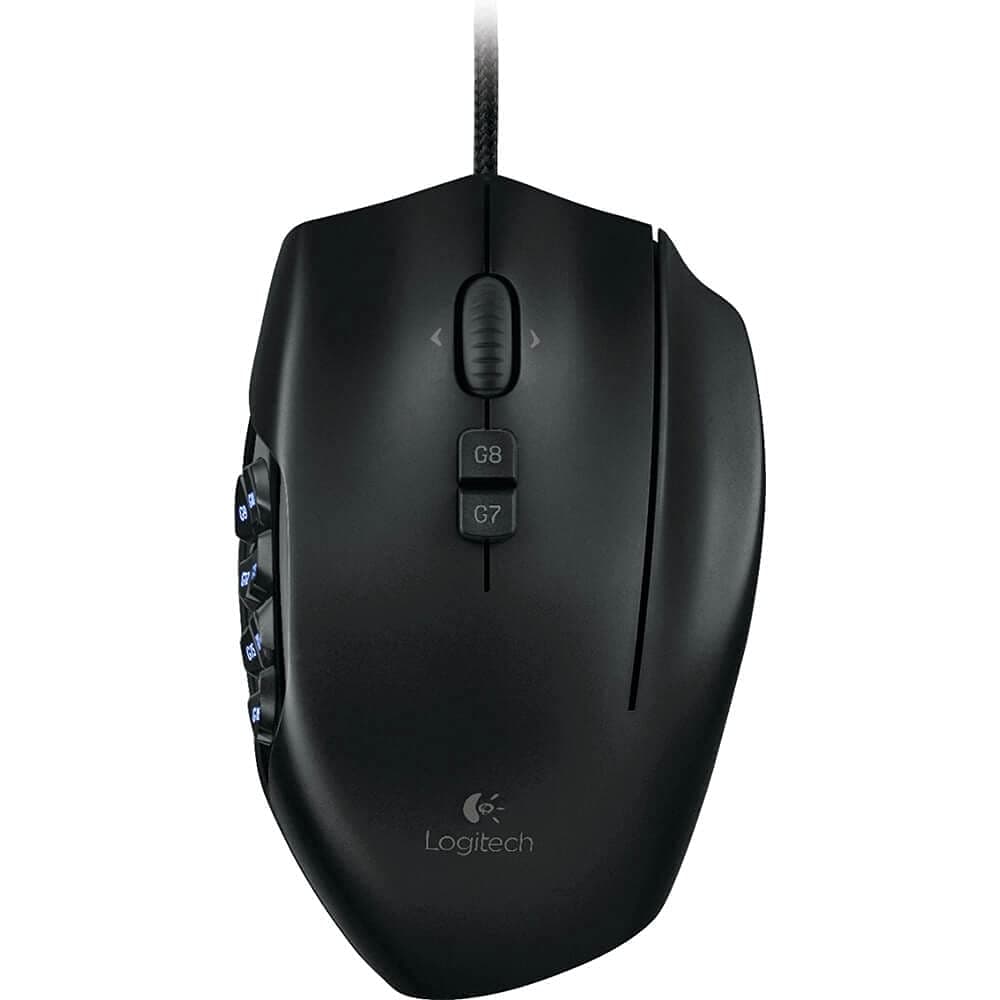
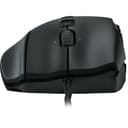
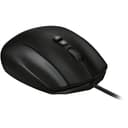
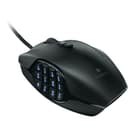
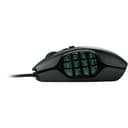
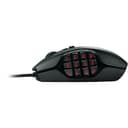
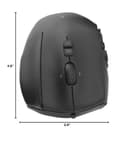
🎯 Dominate your game with precision and style — the ultimate MMO mouse for pros!
The Logitech G600 MMO Gaming Mouse is engineered for serious gamers with 20 programmable buttons including a unique 12-button thumb panel and a G-Shift function that doubles your command options. Featuring customizable RGB lighting, low-friction PTFE feet for smooth tracking, and an ergonomic design to reduce fatigue, it offers unparalleled control and comfort. Onboard memory lets you save profiles for seamless gaming across sessions, making it the go-to mouse for MMO mastery and beyond.


| ASIN | B0086UK7IQ |
| Additional Features | Ergonomic Design |
| Antenna Location | Gaming |
| Are Batteries Included | No |
| Are Batteries Required | No |
| Best Sellers Rank | #37,046 in Video Games ( See Top 100 in Video Games ) #1,200 in PC Gaming Mice #2,309 in PlayStation 5 Accessories |
| Brand | Logitech |
| Built-In Media | Mouse, User documentation |
| Button Quantity | 20 |
| Color | Black |
| Compatible Devices | Personal Computer |
| Connectivity Technology | USB |
| Customer Reviews | 4.5 4.5 out of 5 stars (17,221) |
| Enclosure Material | Ptfe |
| Global Trade Identification Number | 00097855088055, 10097855088052 |
| Hand Orientation | Right |
| Hardware Platform | PC |
| Item Dimensions L x W | 4.6"L x 2.9"W |
| Item Type Name | Logitech 910-002864 G600 MMO Gaming Mouse |
| Item Weight | 229 Grams |
| Manufacturer | Logitech |
| Model Name | LOGITECH INC. |
| Model Number | 910-002864 |
| Movement Detection | Optical |
| Number of Batteries | C batteries required. |
| Operating System | Windows 7 |
| Power Source | Battery Powered |
| Range | feet |
| Style Name | G600 Mouse |
| Theme | Gaming |
| UPC | 097855088055 887603489834 631058208409 809394265411 734911345881 041114167432 801940714220 803246000472 080850209754 072090541701 801940459794 801940115560 767333082294 088020692221 012300306881 069060112191 097855089182 667649023885 804067189353 163120434367 978550880550 151903565704 803982776570 736983817051 |
| Warranty Description | Manufacturer's Warranty |
J**N
Great functionality and customizability
UPDATE: Dropped to 4 stars because after 2 and a half years of use, the middle mouse button has crapped out. I'm in the warranty process to see if I can get it replaced (if it's within warranty), and will update. UPDATE 2: Brought back to 5 stars! The moment I contacted support, they sent out a new one, no questions asked! I'd give Logitech 6 stars if I could (although I hope the refurb one they sent doesn't crap out in 2.5 years as well). I previously had a UtechSmart Venus, which I replaced with a wired Razer Naga 2014, which I then replaced with this guy. The Venus was fine, but the Naga had cooler buttons... but it had tracking issues, which is how I ended up with the Logitech G600. Although its buttons aren't mechanical, they're large, textured, angled, and very easy and comfortable to use. The up and down buttons are at very different heights so it's easy to know which is which, and the entire mouse fits so comfortably in my palm. The one wonky thing is just the right side button (note that this is obviously a right-handed mouse), which rests under your ring finger - I pressed this a few times when using it and ended up disabling it in the Logitech Gaming Software, since 12 side buttons + 2 up/down buttons + 2 left/right scrolls are plenty enough for me now, thank you very much. However if I ever decide to automate my entire computer with my mouse, maybe I'll re-enable the G-shift function, which allows for additional side button binds. That being said, the scroll wheel is very satisfying to use and is very stiff compared to the Razer Naga's. While this isn't too great for scrolling down hundreds of pages of documents, it's very good for controlled scrolling while gaming. The software for this is probably a bit better than Razer Synapse's, which gave me tracking issues. Logitech Gaming Software is well-designed and really easy to use, and its game-detection works well as well. I also enjoy having more than just green light to choose from, as that pairs well with my Corsair K70 RGB. However, one oddity is that there is a "mode" wheel with three choices - I originally thought that that only entailed lighting switches but guess what? It's actually three button binding modes... per profile. With their own individual lighting settings. Which is excessive. Especially since there's G-shift. But you know, if you wanted 2x12x3=72 different side binds per game so you can almost type the entire alphabet out three times, more power to you, right? Admittedly, LGS isn't perfect. When I alt-tab out of games it has a habit of not switching back to the game binds until I alt-tab out and back in again. While this isn't an issue with most games, it does bug me in fast-paced multiplayer games like League of Legends or CS:GO, where I have a lot of important functions bound to side buttons. I've died or made hilariously terrible plays many times while mashing my side buttons, only to realize that they weren't bound correctly because I alt-tabbed to change my music. I think there's a way to get around this though, using Logitech's persistent profile settings or whatever. Either way it's not a huge deal. If you move around a lot but also like to take your profiles with you, you can save I think three profiles to the mouse's hardware, but don't quote me on that. Anyways, if you're looking for a mouse with extra buttons and you've got $40 to spare, get this. It's pretty great, and the Logitech software is highly customizable. It might look like a mechanical alien hiding in a shell, but you can bind the entire alphabet onto the mouse. Which is pretty cool. -Reviewed from my Logitech G600 Gaming Mouse
E**N
The Best Mouse for Games, Not Just MMOs.
One of the best gaming mice I've ever used. The mouse is wired. I originally got the mouse for Final Fantasy XIV, but now use it for almost every game in my library. The mouse moves smoothly, as there are different options that allow gamers to select the speed (DPI) at which the mouse registers (or however it's articulated...I just know it works well). I have a normal-sized hand, I suppose, so the size of the mouse is just fine for me. Clicks feel great, I've never had issues with it in the years since I've bought the product. The 12 extra keys can be mapped for almost anything. Some game examples: Baldur's Gate 3, Divinity Original Sin, Rogue Trader...--I've used the extra keys for dialogue options; in Arc Raiders, I've used the extra keys for everything from selecting weapons, opening my map, to even in-game communication options (as I don't use voice communications when I'm playing most of the time).
E**N
Compare G600 to Naga Epic
March 2014 Update - After about 1.5 years I'm having the double click issue. I did a manual repair (bending the spring back) that worked for a few months; but now it is back. - I've enjoyed this mouse enough, and there is nothing new in the space, so I'll be picking up a second to replace it. So I have the Razer Naga Epic Gaming Mouse and now this Logitech G600 MMO Gaming Mouse, Black (910-002864) . How do they compare? Short version, they are equal mice. - Pick the Naga if you use the 7-12 keys often in fast high pitched game play. - - You can reach them faster as you have the muscle memory to hit the right and there is nothing in your way. - Pick the G600 if you don't use them that often. - - You can reach them faster as you don't have the muscle memory and the 2nd set of grooves makes it so you don't hesitate before clicking them. Size: - They are both the same size with one slight exception, the Naga you place your ring finger next to the mouse and use it as part of your 'grip'. - The place your finger is on is extended on the G600 to be an actual button your finger rests on. - THIS is the major 'comfort' difference between the two mice and where I see a lot of complaints. - For the first hour, I was constantly hitting this key as on my Naga I was use to using this finger as part of my grip. - After retraining the muscles a little, this is no longer an issue for me and I now have an extra key to actually use. Thumbpad: - The G600 is 133% the size of the Naga in Length (or width depending on how you look at it). - The Width (or length...) is the exact same. - How does this feel? The Naga is FASTER. The rows are not as far apart and they are flat so its really easy to glide your thumb down and hit the right key. - The G600 is CONFIDENT... It is much easier to tell where your thumb is, and the way the keys are grooved you have 2 locations for your thumb, one hits 1-6, the other hits 7-12. Due to the spacing, Naga users you can compare this by moving your thumb to the last row (10-12), this is where your thumb will be to hit 7-12 on the G600. - Verdict? Depends on how many keys you actually use. I use 1-6 A LOT and don't use 7-12 that often. This actually makes the G600 shine as you have less memory of keys you don't use, when I swap to the 7-12 position I don't have to hesitate to hit a key because I KNOW my thumb is on the right one. - Counter Verdict? The Naga is simply faster. You don't have to get over the grooves and the rows are closer so you can get to 7-12 just as fast as 1-6. It does take more memory though. If you use all 12 keys all the time, the Naga may be the better mouse. Extra Keys: - G600 has the ring finger key, the 2 tilts of the mouse wheel as an advantage. All the other keys are located in the exact same spots for the two mice. Weight: - The Naga is slightly heavier, maybe the reason I got use to using that ring finger as part of the grip. - The G600 is lighter, but not having that extra finger to move it with actually makes the 'resistance' of each mouse the same. Software: - They both look great and function without issue for me. (Synapse 2.0 and Gaming 8.35) - They both have great macro / key press / toggles and such that cover most needs perfectly. - The Logitech does have more options for advanced users such as scripts and such though. Lighting / Looks: - Both have about equal brightness in lights and similar lighting options. - The Naga has an extra light on the wheel, but the sides of this wheel are actually a sticker that does come off after about a year of use. Skin: - The Naga has a rubberized skin (like the back of the kindle fire) where the G600 is more a textured plastic. They both feel nice but the Naga feels higher tech. Wireless: - The Naga can be unplugged and used as a wireless mouse (and includes a base station). - If you want a gaming mouse that can also go wireless, the Naga is a great option. Price: - At the time of this review the Naga commands a 50% price premium over the G600. If I was to go off Value, the G600 gets the nod. However, I don't as the mouse is a very important part of the computer and something I don't mind spending money on. - The wireless is really where the price comes from. Note: - I'm an MMO gammer (Rift/GW2) and I casually play RPG Shooters (Borderlands).
J**É
O melhor
C**M
Scroll slutat fungera efter 4 månader
N**.
This mouse is amazing, but you have to keep in mind its not for everyone. First off there is a third button on the right side, which if you aren't used to can lead to misclicks. If you are someone coming from a more "standard" mouse background the grip needed to hold this will need some time adjusting to. However, the mouse is fantastic. highly customizable keybind options with 3 profiles (you'll need to download an app ofcourse) gives you good flexibility for different games. Although it is marketed as MMO, I've used it for FPS and Space Sim as well without any problems. Durability - the previous one I had lasted about 5 years with nearly daily use, I have no complaints. Now using this one for a while as well without issues. As a bonus, if you are someone using 3D software like "Maya" it is handy to have keybinds you can use thanks to the 12 buttons on the side of this mouse to speed up your work flow. Pleasant in the hand even when sweaty, great build quality and good freedom of customization. Can't recommend enough.
K**O
Tengo la primera edicion, sigue vivo (es verdad que he cambiado las teclas una vez, valen 20 centimos de aliexpress, y se pueden soldar facil), pero por desgaste, he decidido cambiarlo, es verdad que este viene con el cable normal (el antiguo tiene funda de nylon el cable) pero lo demas excelente.
A**I
This MMO mouse has the best build quality out there and the sloped side buttons help you get used to it quickly and track your movements.
Trustpilot
2 dagen geleden
2 weken geleden