
DOWNLOAD DE APP


Klantenservice
Copyright © 2025 Desertcart Holdings Limited
DOWNLOAD DE APP

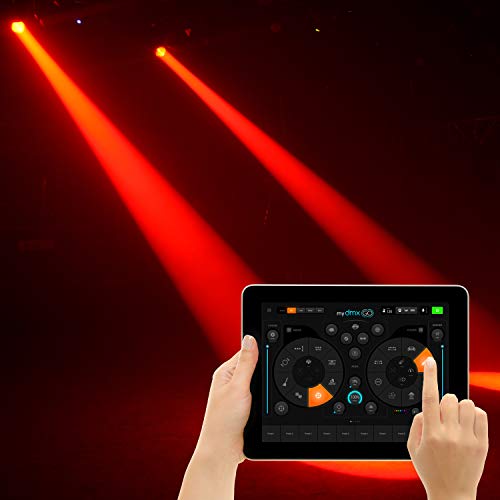

🎉 Light up your show with the ultimate wireless DMX freedom!
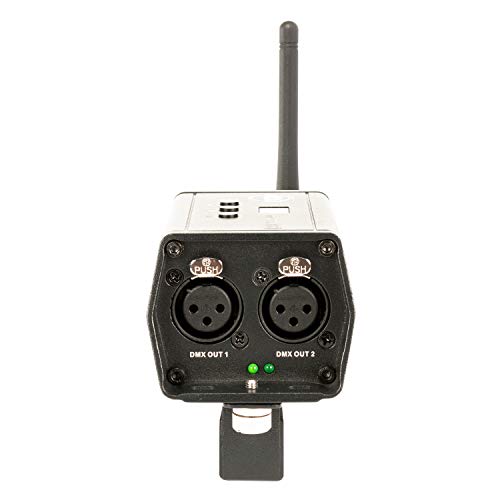
The ADJ MyDMX Go is a cutting-edge wireless DMX lighting controller app that empowers professionals and beginners alike to control up to 256 DMX channels from any iPad or Android tablet. Featuring a vast fixture library, multiple operation modes, and easy USB/XLR connectivity, it delivers powerful, plug-and-play lighting control with no programming needed. Compact and mountable, it’s the perfect tool to elevate your lighting setup with seamless wireless precision.


| ASIN | B07M7LGV6J |
| Best Sellers Rank | #9,578 in Musical Instruments ( See Top 100 in Musical Instruments ) #81 in Stage Lighting Accessories |
| Brand | adj |
| Brand Name | adj |
| Color | Multicolor |
| Customer Reviews | 3.8 out of 5 stars 409 Reviews |
| Display Type | LCD or LED |
| Global Trade Identification Number | 00818651026054 |
| Item Dimensions L x W x H | 11"L x 8"W x 5"H |
| Item Type Name | DMX Lighting controller |
| Item Weight | 1 Pounds |
| Manufacturer | ADJ |
| Material | Plastic |
| Material Type | Plastic |
| Product Dimensions | 11"L x 8"W x 5"H |
| UPC | 818651026054 |
| Unit Count | 1.0 Count |
| Voltage | 12 Volts (DC) |
| Warranty Description | 2 year |
D**N
Simple controller for anyone.
This is a great product for anyone that wants to use DMX with their lights but doesn't know a lot about DMX. The program for this is easy enough for anyone that is just getting started with DMX. The video shows 3 moving lights that are running off of the controller. You can also set up a light bar to have full control of both types of lights. For the money you can't beat this controller. It can be set up and working in just minutes. This will make your light show 100 times better than just turning on the lights and let them run on auto.
D**S
as close to plug and play dmx as you can get
as close to plug and play dmx as you can get. love it!
D**E
Don't Do It
This product is fairly expensive for it's functionality to begin with... however, coupled with the wireless transmitters HORRIBLE range (less than 10ft if completely unobstructed) and how often the software miscommunicates with the equipment in my universe... unbelievable. Customer care is non-existent from my experience. There are open source alternatives that you can use with a laptop or tablet. Choose those over this. I really tried for years to love this thing, but it's failed me so many times I gave up and it's been collecting dust. I tried both variations of the apps compatible with the device, still experienced signal issues within my DMX universe that would cause my gobos, spider lights, and signal lasers to go NUTS. I'm the type of person who goes into the system directory and knows how to set up each address for a given device. What I discovered was there was a random voltage drop across the line randomly and that's what would cause the signals to go nuts. I tried different cables, using the end caps, etc. Don't waste your time or money on this. It's not the convenience you think it's going to be.
R**G
Disconnects easily.
Bought it new. Part time DJ here. After looking it up on YouTube and reading many reviews decided to go ahead and buy one. Looks so easy on the big screen. BUT....once you get it it's not all what they say it is. Don't want to mess with a DMX board so got the adj dmx go. Not cheap. Plus didn't want to carry another laptop. Bought a android tablet also. You need some name brand lights if you want it to work properly. Have some Chinese lights and man I'm so disappointed. They do not work. Plus it disconnects easily. Need to always be on the ball and keep checking it. Now need to get some new Name brand lights and I'll give it another go. So I'm spending another grand maybe less. Keeping fingers crossed. But don't take my word for it. You want to buy it go ahead. Don't let me rain on your parade 😄
S**T
Much better with Android – iPad loses connection constantly
Works, but poor connection with iPad. Constantly loses signal, making it unreliable for events. With Android, the connection seems much more stable — maybe a rare drop, but nothing like the issues with Apple devices. Definitely recommend using it with Android for best results.
J**S
Had high hopes for it....,but nope
So go the mydmx go today and had set it up, downloaded the manual from adj.com did what it said. I was able to get some no need brand cheap crappy par light to work, but my mini moving lights, nope. Tried using many different fixture downloads. They even had my brand of moving head light but it still wouldn't do what it was supposed to. This thing must only work with top name brands of moving head lights. The instructions don't help much. I think it has to deal with dmx address and having them correctly dialed in. But you would need better instructions for that. UPDATE 10-22-2019. So I would like to take everything I say back lol. This thing really does what its supposed to. I didn't know much bout the hooking this thing up and having my lights ran through this. My lights that I am running are ADJ hex mega par, Lixada moving head lights and MFL led moving head lights. 4 lights for each brand all dmx'd and connected to a dmx splitter which then runs to mydmx go. When you add the light fixtures to your mydmx go, from the library you assign it a mode which is the dmx channel you have to choose on the light fixture as well as in the mydmx go. Once you add the light look just to the right of the name of the brand you chose and there will be a number, that number is the number you have to assign on your light fixture as the address number. My MFL lights had to be added to the light fixture brand list by adj. If you look at option near the bottom of the page of where you add light fixtures there will be a globe sphere looking thing and then a person shape icon, they added my MFL light program in the person shape icon, and added and lights were up working. I will try and add pictures to help anyone, believe I was frustrated for a long time lol. But all is well now.
Y**G
Great concept. Implementation needs work.
First - my credentials... I am a computer programmer who is also a musician, and I own my own band, A/V company and lighting company. I don't sleep much... I already owned the Chauvet ShowExpress, and was looking for a "plug and play" type of product for events that did not need custom programming or a lighting engineer. I saw the MyDMX GO by ADJ and jumped at the opportunity... I set it up in my house and had no trouble connecting with my iPad. I was excited to try using my Android phone, but the app said that my Samsung S9+ was not compatible. A little research showed that the software only works with tablets. Bummer. I showed up at the first gig - set up two moving heads and a few washes, ran my DMX cables, plugged in the MyDMX Go and started getting error messages on the iPad about bad passwords. I immediately went online, and found the Facebook groups and saw a ton of posts about the Wifi being in the 2.4 range and being unstable. I knew about the issues with 2.4 from owning a Behringer xAir (which I no longer use). However, unlike with the xAir, there is no option to plug in an external router. Even if I use one, I still need to connect to the router from the MyDMX GO via a 2.4 WiFi connection. I was not happy. I have since discovered that Android tablets will let you plug in directly and bypass the Wifi, however it takes some configuration, and I have yet to see an Android tablet that has a separate power input and USB socket. So while it is plugged in to the Android tablet, and drawing power from it, you can't also charge the tablet. On the next gig, I was prepared with the Hardware Manager running on my laptop. Thanks Martin Long! I scanned the WiFi in the area, chose the least congested channel, and set the device to it. It still did not work. After a frustrating 30 minutes, I gave up, and went to play the outdoor ceremony. When I came back to the reception, I tried one more time, and it worked! It ran for 3 hours flawlessly and did a pretty good job. It does not know anything about how to use the gobos, though. That is a shame. Also, while the washes switched colors fairly frequently, the moving heads appeared to only switch when it changed motions - and only used one color per motion. I suspect using mover's built in sound activation and master slave between the two moving heads - without the MyDMX Go, would have gotten me better results. So... I have ordered an ADJ brand moving head to see if it knows how to use that more intelligently. However, unless I find an Android device with separate power and USB ports, I will probably not use this until it is improved. I need to have 100% confidence that my tools will work. And I will use an weaker product that works 100% of the time, over a stronger product that only works 75% of the time. The purpose of this purchase was to reduce stress on my gigs. Not to add any. That being said - I am not returning it, as the idea is really good. I hope the development team spends some time improving this product as it can be a very useful tool for the average DJ/musician out there.
T**O
Great DJ light controller without any programming required.
The MYDMX GO is a great device/app for both small and large DJ lighting systems. Easy to configure and lots of advanced instructions by the software creators (LightRider). Most hardware based controllers are generic control units for stage lighting. This is DJ focused with auto support for all the typical sequences and effects you will want to use. Was pleased that they support Amazon Fire Tablets. I had one lying around to made it a dedicated controller for my home light rig The software is well thought out with a lot of flexibility without a lot of complexity.
Trustpilot
5 dagen geleden
2 weken geleden